Introduction
Picture Monday morning at a sanitation company running five trucks. Two drivers call the office asking for job addresses. One crew heads to the wrong side of town. A service window gets missed because the route list printed Friday didn't account for a new add-on. By 2 PM, the dispatcher is fielding customer complaint calls instead of managing the schedule.
That's not a bad week. For many sanitation businesses still relying on printed sheets, phone calls, and tribal knowledge, that's just Tuesday.
Inefficient route scheduling doesn't only cost time: it burns fuel, delays invoicing, frustrates customers, and puts a hard ceiling on how many jobs a crew can complete. According to Salesforce, 47% of field service appointments fail to go as planned due to scheduling conflicts — a number that hits harder when your margins are tight and your trucks are expensive to run.
This guide breaks down what route scheduling software actually does, where manual planning falls apart for sanitation operations, the real-world benefits, and what to look for when comparing platforms.
Key Takeaways
- Route scheduling software replaces printed sheets with automated, map-driven stop sequencing that cuts fuel costs and adds job capacity
- Sanitation businesses can complete more stops per day without adding trucks or hiring drivers
- Real-time dispatch and GPS tracking keep office and field teams aligned, reducing missed jobs and complaint calls
- When routing connects to work orders and invoicing, completed jobs turn into faster payments
- Small operations with two or three trucks see the same gains as large fleets — often faster, with less setup friction
Why Manual Route Scheduling Breaks Down for Sanitation Businesses
The Limits of Memory and Printed Sheets
Routes built from memory, spreadsheets, or basic mapping apps have one thing in common: they don't optimize. They don't account for traffic patterns, service time windows, or the most efficient stop sequence across a full day. The result is drivers backtracking across town, arriving at stops in the wrong order, and burning fuel on miles that a smarter sequence would eliminate.
This matters more for sanitation than most service industries. Trucks are heavy, fuel-hungry, and expensive to maintain. Every unnecessary mile compounds.
The Tribal Knowledge Problem
Many sanitation operations run on route knowledge that lives entirely in a driver's head. That driver knows which gate code changed, which customer prefers morning service, which street floods on Tuesdays. When that driver leaves, that operational intelligence walks out with them — leading to missed stops, service disruptions, and rising costs while the replacement driver figures things out.
Replacing a waste industry driver isn't cheap either. Waste Today reported the average cost to onboard a new driver exceeds $10,000 — not counting the service quality issues that happen in between.
Communication Gaps Between Office and Field
Without a connected system, schedule changes create a chain of small failures:
- Dispatchers relay updates verbally, with no written record
- Drivers jot addresses on paper or rely on memory while behind the wheel
- Instructions get misheard, details get dropped, service windows get missed
The Scaling Wall
Manual scheduling that works with two trucks tends to fall apart at four or five. Job conflicts emerge. Service areas overlap. Crew workloads become uneven — one driver is overloaded while another has slack in the afternoon. What looked manageable becomes daily firefighting.
At that point, the scheduling problem becomes a revenue problem — and the only fix is a system that scales with the operation instead of against it.
What Is Route Scheduling Software for Sanitation Services?
Route scheduling software is a digital platform that helps sanitation businesses plan, assign, and optimize the order of stops for each driver or crew — factoring in job location, service type, time constraints, and available resources.
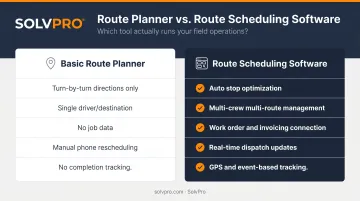
That's a different category from what most people reach for first: Google Maps. A basic route planner gives you directions. Route scheduling software manages the entire workflow behind those directions.
The distinction in practice:
| Basic Route Planner | Route Scheduling Software |
|---|---|
| Provides turn-by-turn directions | Sequences and optimizes stops automatically |
| One driver, one destination | Manages multiple crews across multiple routes |
| No job data | Connects to work orders and invoicing |
| Manual rescheduling via phone | Real-time dispatch updates pushed to field crews |
| No completion tracking | GPS and event-based tracking at every stop |
Platforms built for field service connect dispatch, work orders, crew tracking, and billing in one system — so office staff and drivers are working from the same information, not separate tools.
One misconception worth addressing: this software isn't just for large municipal fleets. Small sanitation businesses running two or three trucks often see proportionally larger gains — because time and fuel savings represent a bigger share of a smaller operation's overhead.
Key Benefits of Route Scheduling Software for Sanitation Services
Fewer Miles, Lower Fuel Bills
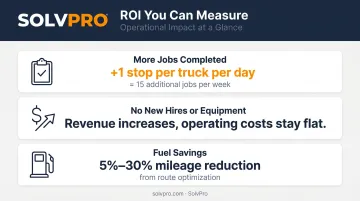
Optimized routes cluster nearby jobs and eliminate backtracking. The difference can be substantial. A 2024 academic study of Budapest's municipal waste collection found route optimization produced a 5.2% distance reduction — equal to roughly 4,835 km less travel per month and €7,823 in monthly cost savings (approximately $8,500 USD). Vendor benchmarks from AMCS suggest waste collection routes can be planned 10% to 20% more efficiently, with mileage reductions ranging from 5% to 30%.
Fewer miles also mean less wear on vehicles — and sanitation trucks are expensive to repair and replace.
More Jobs Completed Per Day
Tighter routes mean drivers spend less time behind the wheel and more time completing billable work. The math adds up fast:
- One extra stop per truck per day across three drivers = 15 additional jobs per week
- No new hires required, no new equipment to purchase
- Revenue increases while operating costs stay flat
That's the core ROI argument: more capacity without proportional cost growth.
Real-Time Visibility and Crew Accountability
Live GPS tracking and event-based geolocation give office staff an accurate, real-time picture of where each crew is and what they've completed. When a customer calls asking whether their service has been done, the dispatcher can answer immediately — no hold music, no guesswork, no call to the driver.
This visibility also creates accountability. Managers can see if a driver has deviated from the planned route or fallen behind schedule, enabling adjustments before a small delay becomes a missed stop.
SolvPro's Smart Activity Tracking geo-stamps time entries, photo uploads, and job status updates — creating a verifiable, timestamped record of when and where work happened at every stop.
That documentation matters. In any service dispute, it protects both the business and the customer with a clear, objective record.
Faster Invoicing and Quicker Payments
When field crews mark jobs complete in real time, that data flows directly into work orders and invoices. The end-of-day paperwork scramble — collecting paper tickets, reconciling job notes, manually entering billing data — disappears.
For small sanitation businesses managing tight operating budgets, shorter invoice cycles matter. The faster a completed job turns into a sent invoice, the faster it turns into cash. Platforms like SolvPro even support on-site invoice creation, so crew leads can send an invoice from the job site the moment the work is done.
Must-Have Features in Route Scheduling Software for Sanitation Businesses
Not every platform sold as "route scheduling software" delivers the same capabilities. These are the features worth requiring:
- Route optimization that builds the most efficient stop sequence automatically — no hand-sorting by the dispatcher
- Real-time dispatch updates that let dispatchers add, remove, or reassign jobs mid-day, with changes pushed instantly to drivers' mobile devices
- Event-based geolocation tracking — arrival, start, and completion events at each stop, not just continuous GPS pings, creating an audit trail for both operations and billing disputes
- Work order and invoicing integration so completed route data flows directly into job records and billing — no manual re-entry
- Bilingual support (English/Spanish) — for businesses with Spanish-speaking drivers or crews, a native bilingual interface keeps everyone on the same plan without translation workarounds
- Fast setup and simple daily use — drivers without strong tech backgrounds need to be productive on day one, not after weeks of onboarding
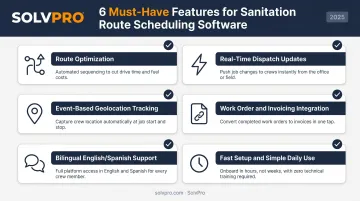
SolvPro covers all six of these requirements out of the box — including a fully bilingual English/Spanish interface across the mobile app, dispatcher view, work orders, and customer communications on every pricing tier. The platform is built to get a sanitation business operational in under 10 minutes, with live onboarding support from a real team, not a self-service knowledge base.
How to Get Started with Route Scheduling Software
The First Steps
Starting is simpler than most business owners expect:
- Import your customer and job location data — most platforms accept a basic spreadsheet
- Define your service areas and assign crews — set up your drivers and the zones or job types they cover
- Run your first route — use real jobs from your actual schedule, not a demo scenario
SolvPro's onboarding follows this same structure, built to get a sanitation or field service business fully operational in under 10 minutes — create an account, add your crew and jobs, then dispatch and track in real time.
Addressing the Transition Concern
Switching from manual scheduling feels risky because the old system, despite its inefficiencies, is familiar. Most modern route scheduling software is built for incremental adoption. Start with one crew or one route type, build confidence, then expand. Businesses typically see measurable time savings — fewer callbacks, less double-booking — within the first few weeks.
Evaluating with Real Data
Test any platform using your actual routes and job volume — not a polished demo with fictional data. Real routes expose whether the platform can actually handle your operation:
- Stop sequencing that fits your geography and service windows
- Dispatch updates that reach drivers without lag
- Invoicing integration that connects to your actual billing process
One more factor to check before committing: live onboarding support. Setup questions will come up, and a real person on the other end matters more than a video library. SolvPro includes live team support across all plans, plus a 1-hour demo and discovery session for businesses that want a hands-on walkthrough first.
Frequently Asked Questions
What is waste management software?
Waste management software is a category of digital tools designed to help waste and sanitation businesses manage operations — including scheduling, routing, dispatch, billing, and customer communication — from one connected platform. It replaces the mix of spreadsheets, phone calls, and paper tickets that most manual operations rely on.
How does route scheduling software reduce fuel costs for sanitation businesses?
The software minimizes total miles driven by grouping nearby jobs and eliminating backtracking, reducing idle time and unnecessary detours. Even modest mileage reductions — 5% to 10% across a small fleet — add up to meaningful annual savings over the course of a year.
Can route scheduling software handle multiple crews and service areas?
Yes. Purpose-built sanitation scheduling software supports multiple drivers, crews, and geographic territories: managers can assign stops by zone, balance workloads across crews, and prevent teams from overlapping on the same streets.
How long does it take to set up route scheduling software?
Setup time varies by platform, but modern field service scheduling tools are designed for fast onboarding. SolvPro is built for setup in under 10 minutes — create an account, add your crew and jobs, and begin dispatching in real time.
Does route scheduling software work for small sanitation businesses?
Small businesses with two or three trucks benefit just as much as large fleets — often more. Time and fuel savings represent a larger percentage of a smaller operation's total overhead, which means the ROI is faster and more obvious.
What's the difference between a route planner and route scheduling software?
A basic route planner like Google Maps provides directions. Route scheduling software manages the full operational workflow: assigning jobs to crews, sequencing stops for efficiency, tracking completion in the field, and connecting route data to work orders and invoicing.