Cloud-based job management software consolidates scheduling, crew dispatch, field documentation, and invoicing into one platform — giving office staff and field crews the same real-time picture of every active job. According to Software Advice's 2026 field service buyer report, 52% of buyers cite inefficiency as their primary pain point, and 35% are still using spreadsheets or pen-and-paper methods.
This article covers the top cloud-based job management platforms for restoration contractors — what each one does well, where each falls short, and how to pick the right fit for your business.
Key Takeaways
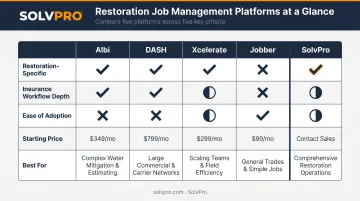
- The top platforms for restoration contractors in 2025 include Albi, DASH by Next Gear, Xcelerate, Jobber, and SolvPro
- Restoration-specific platforms offer deeper insurance workflows but cost more and take longer to learn
- General field service platforms trade specialization for simplicity, affordability, and faster onboarding
- The right choice depends on how heavily you work within the insurance ecosystem, crew size, and budget
- Always factor in total cost: onboarding fees, per-user charges, and add-ons — not just the base subscription
What Is Cloud-Based Job Management Software for Restoration?
C&R Magazine's 2023 software roundtable defines job management as documenting and recording the life of a job through workflows, schedules, and communications. In a restoration context, that definition carries specific weight.
Restoration jobs don't arrive on a predictable schedule. Water damage calls come in overnight. Fire claims require immediate crew mobilization across multiple sites. Documentation must be thorough and defensible. Incomplete records can delay or eliminate insurance compensation entirely.
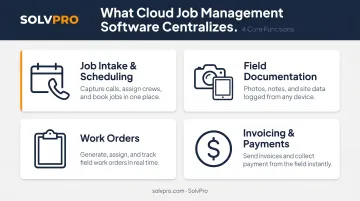
Cloud-based job management software addresses this by centralizing:
- Job intake and scheduling — from first call to crew assignment
- Field documentation — photos, notes, moisture readings, and time logs from any device
- Work orders — accessible by both office and field in real time
- Invoicing and payments — tied directly to completed work orders
Job Management vs. Estimating Software
Job management software handles the operational side: scheduling, dispatch, crew tracking, documentation, and billing. Estimating software like Xactimate handles scope-of-work pricing specifically for insurance claims. They serve different functions, and contractors need to know which gap they're filling.
Many restoration businesses use both. Some platforms overlap, but this guide covers job and operations management only.
Best Cloud-Based Job Management Software for Restoration Contractors
These platforms were evaluated across five criteria:
- Restoration workflow fit
- Ease of adoption
- Integration capabilities
- Pricing transparency
- Scalability
Albi
Albi is a restoration-specific platform built by restorers, covering the full business lifecycle from marketing and CRM through operations and HR. Its most notable field feature is DryBook 2.0 — a documentation tool that captures daily moisture readings, equipment data, floor plans, photos, and e-signatures in a single structured workflow.
Albi uses a "Triple 1 Onboarding Approach" — basic functionality in 1 day, proficiency in 1 week, mastery in 1 month. Worth noting: Albi's own onboarding guide acknowledges that digitizing existing document templates takes longer and is typically not complete on day one. Current help documentation confirms Albi now supports XactAnalysis integration for importing assignments and syncing project updates.
On Capterra, Albi holds a 4.6 rating, with 82% of reviewers from the construction sector.
| Feature | Details |
|---|---|
| Key Features | Job management, CRM, DryBook moisture tracking, Albi Pay, Albi AI analytics, mobile app, automations, XactAnalysis integration |
| Best For | Independent restoration contractors wanting a restoration-native, end-to-end platform |
| Pricing | $6,000 minimum annual subscription; Base seats at $60/month, Pro seats at $100/month; White Glove onboarding at $2,500 one-time; Enterprise onboarding at $4,500 |
DASH by Next Gear Solutions
DASH is one of the most established platforms in the restoration industry. Next Gear was acquired by CoreLogic in 2021, which rebranded as Cotality in March 2025. DASH remains widely used by contractors doing heavy TPA and insurance carrier work, with deep connectivity into the insurance claims ecosystem.
The tradeoff: DASH carries an older technology infrastructure that can make daily use less intuitive than newer platforms. On GetApp, DASH holds an overall rating of 3.2/5 with an ease-of-use score of 3.2/5 across 27 reviews — suggesting the learning curve is real.
A Next Gear press release confirms DASH has agreed to integrate with XactAnalysis and Xactimate workflows, which is a meaningful differentiator for insurance-heavy operations.
| Feature | Details |
|---|---|
| Key Features | Job management, multi-platform tracking, compliance management, offline functionality, built-in messaging, insurance carrier data flow, Xactimate/XactAnalysis integration |
| Best For | Restoration contractors doing significant TPA and vendor/insurance carrier work requiring deep carrier ecosystem connectivity |
| Pricing | No current public pricing listed; contact Next Gear/Cotality for a demo |
Xcelerate Restoration Software
Xcelerate was built specifically for restoration contractors and was acquired by Teamfront in 2024. The platform's workflows are designed to mirror the actual progression of a restoration job — intake, mitigation, documentation, rebuild — rather than forcing restoration work into a generic field service structure.
The Master Job feature enables cross-communication between related projects for the same customer, which is useful when a single property involves water mitigation, mold remediation, and reconstruction under one umbrella. Xcelerate also integrates with Matterport for 3D documentation and Zapier for connecting with 5,000+ apps.
Current official pricing is not publicly listed on Xcelerate's website. Contact them directly for a quote.
| Feature | Details |
|---|---|
| Key Features | Job management, CRM, dashboards and analytics, Master Job cross-project communication, Matterport and Zapier integrations, mobile app |
| Best For | Restoration contractors who want an intuitive, purpose-built platform and are comfortable with pre-structured workflows |
| Pricing | Not publicly listed; contact Xcelerate for current plans |
Jobber
Jobber is a general-purpose field service management platform used across dozens of service industries and by more than 300,000 home service professionals across 60+ countries. It's not restoration-specific, but smaller or newer restoration teams adopt it regularly because of its clean interface and accessible pricing.
QuickBooks Online sync is available on Connect and Grow plans. There are no restoration-specific features — no moisture logging, no insurance documentation workflows. Teams doing significant insurance claims work will need to supplement Jobber with other tools.
Capterra rates Jobber at 4.6 out of 5 across 1,457 reviews.
| Feature | Details |
|---|---|
| Key Features | Job scheduling and dispatch, CRM, online invoicing and payments, client communication hub, mobile app, QuickBooks integration |
| Best For | Smaller or newer restoration businesses that need an affordable, easy-to-use operations platform without heavy insurance workflow requirements |
| Pricing | Core (1 user): $29/month billed annually; Connect (1 user): $99/month; Connect (5 users): $149/month; Grow (1 user): $149/month; Grow (10 users): $299/month; Plus plans up to $529/month |
SolvPro
SolvPro is a field service management platform built by a team with 50+ years of combined experience across construction, field service, estimating, and project management. It's designed for growing service businesses — including restoration contractors — that need a clean, organized operations hub without enterprise-level complexity or cost.
A few capabilities that stand out for restoration teams specifically:
- Event-based geolocation tracking geo-stamps every time entry, photo, and field note automatically — creating a verifiable record for insurance documentation and crew accountability
- Fully bilingual English/Spanish interface across both web and mobile, covering office staff and field crews equally (no other platform in this comparison offers this)
- Phase-based estimating with customer-facing PDF proposals, milestone payment schedules, and digital signatures — built around how restoration jobs actually progress
- Digital work orders consolidate photo documentation, notes, materials tracking, and change orders in one centralized job record
- QuickBooks Online sync and NMI payment processing are core features, not add-ons
Setup takes under 10 minutes, with no credit card required to start a free trial. Live onboarding support is included at no additional cost across all plans. No long-term contracts.
| Feature | Details |
|---|---|
| Key Features | Job scheduling, work orders, crew tracking, phase-based estimating, customer-facing proposals, QuickBooks Online sync, NMI payment processing, bilingual English/Spanish interface, event-based geolocation, real-time job costing |
| Best For | Growing restoration businesses with field crews that need an organized, easy-to-adopt platform with bilingual support, transparent pricing, and no steep learning curve |
| Pricing | Starter (up to 3 users): $179/month; Growth (4 users, +$49/user): $228/month base; Scale: custom pricing. No long-term contracts, cancel anytime |
How to Choose the Right Platform
Evaluation Criteria That Actually Matter
Software Advice's 2026 report found that 49% of current field service software users rate mobile access as the most important feature for field work. For restoration contractors, that lines up — your crews are on-site, not at a desk.
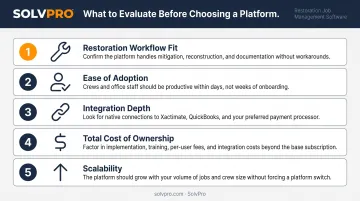
When evaluating platforms, focus on:
- Restoration workflow fit — scheduling, field documentation, work orders, crew tracking, and invoicing in one place, without workarounds
- Ease of adoption — can your office staff and field crews actually use it without weeks of training?
- Integration depth — does it connect with QuickBooks, Xactimate, or your carrier platforms?
- Total cost of ownership — onboarding fees, per-user costs, and any add-ons combined
- Scalability — will it still work when you add more crews?
Common Mistakes to Avoid
- Restoration-specific branding doesn't guarantee a good fit — if the UX is frustrating, adoption will be low regardless
- A slow implementation has a real cost: disrupted operations, lost time, and frustrated crews
- A $99/month subscription with a $2,500 onboarding fee and expensive add-ons may cost more than a higher monthly rate with no extras
- Demos show the best-case experience; daily usability is what actually matters
Matching the Platform to Your Business Model
Once you know what to avoid, narrowing down your options comes down to how your business actually runs:
- For high-volume TPA and insurance carrier work, consider DASH or Albi — both offer deep insurance ecosystem connectivity
- For growing field operations with multi-crew management, SolvPro or Xcelerate provide operational clarity without enterprise-level overhead
- For small or early-stage restoration businesses, Jobber offers affordability and a fast learning curve
Conclusion
The right software depends on what your operation actually looks like. A contractor managing high-volume insurance carrier jobs has different needs than a growing restoration business dispatching multiple crews across active water and fire damage sites.
Prioritize long-term usability over demo appeal. Understand what you're actually paying for — including onboarding, per-user fees, and add-ons. And trial multiple platforms before committing; most offer free trials or demos.
If that evaluation leads you toward a platform built for growing field crews — bilingual, straightforward to set up, and without long-term contracts — SolvPro fits that profile. You can set up your account in under 10 minutes at solvpro.com — no credit card required.
Frequently Asked Questions
What is the best cloud-based job management software for restoration contractors?
It depends on your business model. Restoration-specific platforms like Albi or DASH suit insurance-heavy operations needing carrier ecosystem connectivity, while platforms like SolvPro or Jobber fit growing field service teams that prioritize ease of adoption, transparent pricing, and fast onboarding.
What features should restoration job management software include?
Look for: job scheduling and dispatch, mobile work orders, field-to-office communication, crew tracking, photo documentation, invoicing, and QuickBooks integration. Restoration-specific needs like moisture logging or insurance documentation workflows are worth evaluating if you do heavy insurance work.
How much does restoration job management software cost?
Costs vary widely. Albi starts at a $6,000 annual minimum plus $2,500+ onboarding. Jobber starts at $29/month with no onboarding fee. SolvPro starts at $179/month with no long-term contracts. Always calculate total cost including onboarding fees, per-user rates, and any add-ons before comparing plans.
Can restoration companies use general field service software instead of restoration-specific tools?
Yes — general FSM platforms like Jobber or SolvPro work well for restoration businesses focused on field operations and crew management. Contractors doing heavy insurance claims work may need restoration-specific platforms with TPA integrations to avoid supplementing with additional tools.
How does cloud-based job management software improve field-to-office communication?
Field crews log job updates, photos, and time in real time through the mobile interface, while office staff track job status and schedule follow-ups without waiting for calls or paper reports — eliminating the communication lag that delays invoicing and creates costly misunderstandings.
What is the difference between restoration job management software and estimating software?
Job management software handles the operational side: scheduling, crew dispatch, work orders, and invoicing. Estimating software like Xactimate handles scope-of-work pricing for insurance claims. Most restoration businesses use both — either through integrations or as separate tools.