Introduction
Missed labor on a water heater swap. Your tech quotes 3 hours. The job runs 5. You still bill the quoted price.
At $85 billed labor per hour, those 2 extra hours are $170 you never collect. Do that twice a week and you lose $340. Over 50 work weeks that is about $17,000 gone before fittings, truck time, or overtime.
That is the daily margin problem in most plumbing shops. Service calls, slab leaks, repipes, and drain jobs all move at different speeds. When time and parts live in separate tools, you only see the real cost after the invoice is already out.
Plumber Magazine notes that home service pros using modern tools reclaim over 4 hours a week from admin work. NetSuite reports that roughly 50% of U.S. B2B invoices are overdue. Late invoices hurt. Invisible job cost hurts more. You keep quoting the same bad hours on the next water heater or copper repipe.
This guide compares 7 mobile job management apps for plumbers in 2026. We focus on published pricing, field use, and whether the app shows what a job actually cost while the crew is still on site. The list covers SolvPro, Jobber, Housecall Pro, ServiceTitan, FieldEdge, Field Promax, and Service Fusion.
Key Takeaways
- Plumbing margin dies when labor and materials stay hidden until after you bill.
- Job costing (estimate vs actual while work is open) matters more than a pretty invoice screen.
- Multi-crew shops need time by job, digital proposals, and books that stay in sync.
- Published pricing often starts near $50–$100 per user per month. Full platforms can run higher once you add users and add-ons.
- Top picks for 2026 for plumbing shops: SolvPro, Jobber, Housecall Pro, ServiceTitan, FieldEdge, Field Promax, and Service Fusion.
What Plumbers Actually Need From a Job Management App
A solo handyman booking tool is not built for a plumbing company running service, remodel, and emergency work in the same week. Your day looks different.
Plumbing work usually includes:
- Service calls with unknown scope until you open the wall
- Multi-day jobs like whole-home repipes and commercial TI work
- Material lists that change mid-job (fittings, fixtures, valves, PRVs)
- Crews that need clear work orders without long phone calls
- Quotes that must become jobs without retyping every line
The Features That Actually Matter
Not every field app holds up on a wet crawlspace job. These are the must-haves:
- Mobile-first design — fast on a phone between calls
- Scheduling with real crew and job visibility — who is where, and what is open
- Estimating that converts into a work order — no double entry
- Job costing — estimated vs actual labor and materials while the job is open
- Native photo documentation — before/after shots tied to the job
- On-site payment collection — card or ACH before you leave
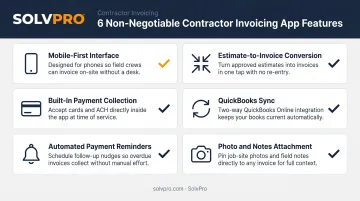
Multi-crew plumbing shops need one more layer: time by job and by tech, connected to the estimate. That is how you see a 16-hour repipe turning into 24 hours before you lock the invoice. Eight extra hours at $85 billed labor is $680 of margin risk on one job. That gap is the difference between a basic booking app and a real job management platform.
Booking Tool vs Job Profit Platform
Simple booking tools help you schedule and send an invoice. Job management platforms connect estimate, schedule, time, materials, and billing so you can see profit while work is still open.
If you run one tech on fixed-price service calls, a lighter tool may be enough. If you run two or more crews on mixed service and project work, you need labor and material visibility on every open job.
Best Mobile Apps for Plumbers: Job Management in 2026
These seven apps were reviewed on mobile use, plumbing-friendly workflows, published pricing, books sync, and whether they help you see job profit. Coverage spans small residential shops through larger multi-crew operations.
SolvPro
SolvPro is built for growing service businesses that manage plumbing crews in the field. The core idea is simple: keep estimate, crew hours, materials, and invoice on one job record while the job is still open. The platform covers scheduling, work orders, time by job, job costing, digital proposals, invoicing, and payments. Office and field both get English and Spanish. QuickBooks Online sync is included in the core plan.
Why it stands out for plumbers: Mechanism first, not a feature dump. When techs log time to a water heater, slab leak, or repipe job, you compare estimated hours and materials to actuals before you close the ticket. Digital proposals with approval tracking cut the lag between quote and schedule. Field techs can add photos, collect signatures, and take card or ACH payment on site.
Constraints are honest. SolvPro is strongest when you want job profit visibility on open work, not when you need enterprise marketing suites or complex franchise rollouts. Pricing is straightforward: $179/mo for up to 3 users, then $49 per additional user. Month-to-month. 14-day trial with no credit card.
| Feature | Details |
|---|---|
| Key Features | Time by job and crew member, job costing (estimate vs actual labor and materials), digital proposals with signatures and approval tracking, QuickBooks Online sync, on-site card and ACH payments, bilingual English/Spanish for office and field, scheduling and work orders |
| Pricing | $179/mo up to 3 users; $49 per additional user/month. Month-to-month. 14-day trial, no credit card required. |
| Best For | Multi-crew plumbing shops that need labor and material visibility and job profit while work is open |
Jobber
Jobber connects quoting, scheduling, dispatching, invoicing, and client messaging for home service and trade businesses. Many plumbing shops use it when they want one workflow from request to payment.
Why it stands out: The quote-to-schedule-to-invoice path is clear, with payment tools and automated follow-ups. It is a solid fit when dispatch and client updates matter as much as billing. Check current tiers for user limits and when QuickBooks Online sync unlocks. Pricing and included users change by plan, so confirm on the vendor site before you buy.
| Feature | Details |
|---|---|
| Key Features | Quote-to-invoice flow, scheduling and dispatch, client messaging, payment tools, mobile iOS and Android apps, QuickBooks Online on higher tiers (confirm current tier rules) |
| Pricing | Published tiers often start near entry home-service pricing and rise with users and features. Additional users are billed separately. See vendor pricing for 2026 rates. |
| Best For | Solo plumbers to small multi-user teams that want scheduling and invoicing in one place |
Housecall Pro
Housecall Pro is widely used by residential service businesses, including plumbing. It focuses on booking, dispatch, customer communication, and getting paid after the call.
Why it stands out: Strong consumer-facing booking and day-to-day service call flow. Good when your shop lives on residential service and needs a polished customer experience. As with most platforms, deeper reporting and some add-ons may sit on higher plans. Verify job costing depth and books sync against how your shop quotes repipes and remodel work.
| Feature | Details |
|---|---|
| Key Features | Online booking, dispatch, invoicing and payments, customer communication, mobile apps for field techs |
| Pricing | Tiered monthly plans; price rises with features and seats. Confirm current packages on the vendor site for 2026. |
| Best For | Residential plumbing shops focused on service calls and customer booking |
ServiceTitan
ServiceTitan is a large platform used by many home service companies. It is often chosen by bigger plumbing operations that want deep dispatch, marketing, and reporting in one system.
Why it stands out: Broad feature set for larger teams. The trade-off is cost and setup effort. It is rarely the lightest option for a small two-truck shop. If you are comparing in 2026, ask for current plumbing-focused pricing and which modules you actually need so you do not pay for unused seats.
| Feature | Details |
|---|---|
| Key Features | Dispatch, job management, reporting, customer management, payments, mobile field tools |
| Pricing | Typically custom or higher-end for multi-crew operations. Request a quote and compare total cost with seats and modules. |
| Best For | Larger plumbing companies that need a wide platform and can invest in setup |
FieldEdge
FieldEdge serves HVAC, plumbing, and related trades with field service and office tools. Many mid-size shops look at it when they want trade-focused workflows.
Why it stands out: Trade-oriented job and office flow. Fit depends on your size and how you handle service agreements vs project work. Confirm mobile speed for techs and how estimate vs actual cost shows up on open jobs.
| Feature | Details |
|---|---|
| Key Features | Scheduling, job management, invoicing, mobile field access, accounting connections (confirm current options) |
| Pricing | Usually quoted by package and company size. Compare seat cost and add-ons for 2026. |
| Best For | Mid-size plumbing and mechanical shops evaluating trade-focused platforms |
Field Promax
Field Promax targets field service teams that want scheduling, work orders, and billing without enterprise weight. Some plumbing shops use it as a mid-market option.
Why it stands out: Practical field workflow at a generally lower complexity than the largest enterprise suites. Review how time and materials attach to each job if margin visibility is your main goal.
| Feature | Details |
|---|---|
| Key Features | Work orders, scheduling, invoicing, mobile apps, reporting |
| Pricing | Published or quoted plans vary by users. Check the vendor site for 2026 rates. |
| Best For | Smaller multi-tech plumbing teams that want core job management without a heavy enterprise stack |
Service Fusion
Service Fusion is another all-in-one option for home service businesses, including plumbing. It combines CRM-style customer records with scheduling and billing.
Why it stands out: Broad home-service feature set. As always, test the mobile job flow with a real drain or water heater call. Confirm how clearly you can see labor and material cost against the original estimate.
| Feature | Details |
|---|---|
| Key Features | Scheduling, dispatch, invoicing, customer records, mobile field tools |
| Pricing | Plan-based pricing; total cost depends on users and features. Verify current published rates for 2026. |
| Best For | Plumbing shops that want one home-service platform for office and field |

How We Chose These Apps
Apps were scored on what plumbing owners feel in the truck and the office, not on long feature lists alone. Industry buyer research keeps pointing to the same themes: mobile access and less wasted admin time. Software Advice field service buyer insights have ranked mobile access near the top of buyer needs, with operational waste as a top pain point.
The Five Selection Criteria
- Mobile usability — Can a tech update a job between calls without fighting the screen?
- Estimate-to-job conversion — Does the approved quote become the work order without retyping?
- Job costing — Can you see estimate vs actual labor and materials while the job is open?
- Books sync — Does it connect cleanly to QuickBooks Online or a dedicated field management tool paired with your books?
- Pricing clarity — Is the price public enough to model seats and growth without surprises?
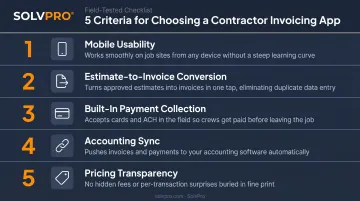
One common mistake: picking software from a feature list without a real field test. Spotty signal in a basement. Finishing a slab leak. Rolling to the next emergency. A desktop-perfect screen can be slow on a phone with wet gloves.
Shop size matters as much as the feature list. A solo plumber on flat-rate service has different needs than a plumbing company running four crews on mixed service and remodel. Run a free trial on a live water heater or drain job before you sign. The app that matches how your crews work will beat the longest feature sheet.
When a Simple Scheduler Is Not Enough
This is the practical question plumbing owners ask when software shopping.
Lighter tools focus on booking, basic invoices, and payment links. They can work for one tech with simple fixed-price calls.
Full job management platforms connect estimate, schedule, time, materials, and billing. They are built for shops where the office and the field lose information between every handoff.
Signs Your Plumbing Shop Has Outgrown Basic Tools
- Crews get job details by text group
- You call techs to learn if a job is done before you can bill
- The schedule lives in a separate spreadsheet
- You cannot tell which open jobs are past the estimate
- Material costs hit the books days after the invoice went out
These are not only billing problems. They are margin problems. A standalone invoice app will not fix them. You need time and materials tied to the job while work is still open.
Simple Math on Admin Time and Margin
Say each of 3 techs loses 1 extra hour a day to callbacks, missing notes, and rework on bad handoffs. At $85 billed labor per hour, that is $255 per day. Five days a week is $1,275. About 50 work weeks is roughly $63,750 a year in labor you already paid for, before overtime or lost slots.
If a better workflow saves even half of that, the gap between a cheap booking app and a $179/mo platform (up to 3 users) gets small fast. The real comparison is not only the subscription line. It is which tool shows job profit soon enough to fix the next quote.
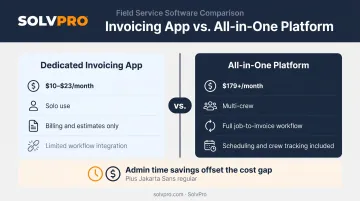
Conclusion
Plumbing profit is won or lost on open jobs, not only on the day you send the invoice. Every hour past the estimate that you cannot see is margin you cannot protect.
The best mobile job management app is the one that fits how your plumbing business runs. Solo techs with simple service calls can start lighter. Multi-crew shops need labor and material visibility, digital proposals, and books that stay in sync while work is open.
Pick your short list and run a real job through each trial. Watch whether the app cuts steps or adds them. If you run multiple plumbing crews and need job profit while the ticket is still open, start a SolvPro trial — $179/mo up to 3 users, $49 per extra user, month-to-month, 14-day trial with no credit card. See time by job, job costing, digital proposals, and QuickBooks Online sync on your own water heater and repipe work. Compare features, pricing, and a live demo before you commit.
Frequently Asked Questions
What are the best mobile job management apps for plumbers in 2026?
Strong options include SolvPro, Jobber, Housecall Pro, ServiceTitan, FieldEdge, Field Promax, and Service Fusion. The right pick depends on crew size and whether you need job costing, not only scheduling and invoices. Multi-crew shops that need labor and material visibility often shortlist SolvPro or another full field service management platform. Smaller residential teams may start with Jobber or Housecall Pro.
Which features should plumbers prioritize?
Focus on mobile speed, estimate-to-job conversion, time by job, job costing (estimate vs actual), photo documentation, on-site payments, and QuickBooks Online or books sync. If you run more than one crew, treat job profit visibility as a must, not a nice-to-have.
How much does plumber job management software cost per month?
Many buyers budget around $50–$100 per user per month, though totals vary by seats and add-ons. SolvPro is $179/mo for up to 3 users, then $49 per additional user. Larger suites may quote custom pricing. Always model seat growth, not only the first month.
Should plumbers use a simple booking app or a full platform?
One tech on fixed-price service can often start with a simpler tool. Once you coordinate multiple techs, remodel work, or frequent change orders, a full platform that connects estimate, time, materials, and billing protects margin better.
How long does setup usually take?
Setup time for a mobile job management app varies by product and how clean your customer and price list data is. Plan for more than a quick login if you import years of customers and flat-rate books. SolvPro offers a 14-day trial with no credit card so you can test real jobs before you commit. Month-to-month billing avoids long lock-in while you learn the workflow.
Are these apps usable for English and Spanish-speaking plumbing teams?
Some platforms support multiple languages better than others. SolvPro offers English and Spanish for both office and field, which helps mixed-language shops cut handoff mistakes. Always test the exact screens your office and techs will use every day.