A recent survey found that 96% of small home and field service businesses and 71% with 2-50 employees are wrestling with these exact operational headaches every week, according to EverCommerce's 2025 Service Small Business Insights Survey. Scheduling tools have moved well past the basic calendar app. Today's platforms connect job assignments to crew tracking, invoicing, and real profitability data.
This guide breaks down the top five tools built for small service businesses, and how to pick the right one for your crews.
KEY TAKEAWAYS
- Booking tools and crew scheduling tools solve different problems—know which one you need
- All-in-one platforms like SolvPro combine scheduling, work orders, and invoicing for field teams
- Five standout options: SolvPro, Jobber, Housecall Pro, Connecteam, and ClockShark
- Pricing ranges from free plans for tiny teams to $150+/month for full-featured platforms
- Mobile usability and payment integration matter more than a long feature checklist
Overview of Scheduling Software for Small Service Businesses
Scheduling software, in this context, goes far beyond a shared calendar. It assigns jobs to specific crew members, tracks where those crews are during the workday, and ties that activity back to invoicing and payments once the job wraps up.
There's an important split worth understanding before you start comparing tools:
| Tool Type | What It Does |
|---|---|
| Client appointment booking (Calendly-style apps) | Lets customers reserve a time slot for a consultation or service call |
| Field service/crew scheduling | Dispatches workers to job sites, tracks progress, and manages the paperwork that follows |
Field service and crew scheduling tools are where adoption is accelerating fastest. 70% of commercial contractors surveyed across North America now use some form of field service management software, according to a ServiceTitan survey. That's a broad industry sample rather than a small-business-only figure, but it signals where the market is headed.
Tools built for growing service businesses with field crews work differently from those built for solo-appointment businesses booking one client at a time.
Top Scheduling Software for Small Businesses
Four criteria separate these platforms: ease of setup, mobile usability for crews in trucks and on job sites, integration with invoicing and payments, and pricing that's actually transparent for SMB budgets.
SolvPro
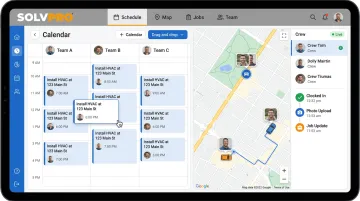
SolvPro is an all-in-one field service management platform built by a team with construction, estimating, and project management backgrounds. That background shows up in details other platforms overlook: a fully bilingual English/Spanish interface, job and crew time tracking, and digital estimates with customer-facing PDF proposals. Setup takes under 10 minutes, start to finish.
| Category | Details |
|---|---|
| Key Features | Drag-and-drop scheduling with day/week/crew views, crew dispatch, recurring job scheduling, work orders, QuickBooks Online sync, and credit-card and ACH payments (credit card and ACH) built into the core platform |
| Best For | Growing multi-crew service businesses (electrical, plumbing, HVAC, landscaping, cleaning, general contracting) that want scheduling tied directly to job profitability |
SolvPro does not offer location tracking. It records work events such as clock-ins, photo uploads and job status changes against the job, all day. That gives office staff accountability without turning the app into a surveillance tool.
Jobber
Jobber has been a fixture in home service software since 2011, built by a pair of developers and a painter who understood the industry firsthand. It's widely used across quoting, scheduling, and invoicing for home service businesses of every size.
The drag-and-drop calendar, client hub for customer communication, and route optimization for multi-stop crews are the features most owners mention first.
| Category | Details |
|---|---|
| Key Features | Drag-and-drop scheduling and online booking, professional quoting, invoicing, and online payment collection |
| Best For | Home service businesses that need a smooth quoting-to-invoice workflow layered on top of scheduling |
GPS crew tracking on Jobber is a paid add-on rather than a built-in feature, and digital estimates with milestone billing isn't part of the platform.
Housecall Pro
Housecall Pro launched in 2013 and has grown into a broader operating platform for home service professionals, bundling scheduling and dispatch with payment processing and business tools.
Its standout features include GPS crew tracking via a technician's phone, with no extra hardware needed, and an online booking widget customers can use directly from Google or your website. Automated text and email updates keep clients in the loop throughout the job.
| Category | Details |
|---|---|
| Key Features | Scheduling and dispatch, employee GPS via mobile phone, online booking widget, automated booking confirmations and "on my way" texts |
| Best For | Solo operators and small crews that want strong customer-facing booking and communication tools |
Connecteam
Connecteam takes a different angle, an all-in-one app built for deskless teams rather than exclusively for home service trades. It handles scheduling, time tracking, and internal communication in one place.
The free plan makes it an easy entry point for very small teams, and the drag-and-drop scheduler pairs with built-in chat and task management so office staff aren't juggling three separate apps.
| Category | Details |
|---|---|
| Key Features | Drag-and-drop scheduling, GPS time clock with geofencing, availability management, team chat |
| Best For | Businesses that want scheduling bundled with broader team communication and lightweight HR tools |
ClockShark
ClockShark grew out of a family-run trade business in Chico, California, and it's built specifically for construction and field service crews rather than general office teams.
GPS breadcrumb tracking logs a worker's location every 10 to 15 minutes while clocked in, and geofencing prompts automatic clock-ins and clock-outs at job sites. Job costing ties labor hours directly to scheduled shifts.
| Category | Details |
|---|---|
| Key Features | Drag-and-drop crew scheduling, geofenced GPS time tracking, job costing by task or job |
| Best For | Construction and field service businesses that need labor cost tracking built into their scheduling |
Key Features to Look for in Scheduling Software for Field Service Businesses
Before picking a tool, weigh these five factors. They matter more than a long list of bells and whistles.
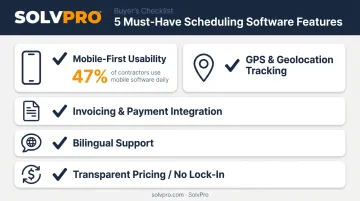
- Mobile-first usability: Crews work from trucks and job sites, not desks, so clunky phone apps get abandoned fast. Per Software Advice's analysis of nearly 5,000 buyer conversations, 47% of users rated mobile access critical, and 44% said the same about scheduling and dispatch.
- GPS and job-level time tracking: Location data builds trust between the office and the field without becoming micromanagement, especially when it's tied to actual work events like a clock-in or photo upload rather than constant background tracking.
- Invoicing and payment integration: A schedule is only half the job. Integration with accounting software, like QuickBooks Online sync, turns a completed job into a faster invoice and quicker payment.
- Bilingual support: Crews with Spanish-speaking field workers are common, yet most platforms are English-only, a gap that gets overlooked during buying and becomes a real problem at onboarding.
- Transparent pricing, no long-term lock-in: Watch for enterprise tiers you don't need or hidden add-on fees buried in fine print, and confirm month-to-month flexibility before signing.
What to Look for in Scheduling Software
The stronger tools work equally well for office staff planning the week and crews executing it in the field. A platform that's polished for desk-based dispatchers but frustrating on a phone doesn't make the cut here.
Two mistakes come up again and again among small service business owners:
- Choosing feature-heavy enterprise platforms that require weeks of onboarding and training nobody has time for
- Picking an appointment-only tool when the business actually needs crew dispatch, job tracking, and cost reporting
Avoiding these missteps meant looking past booking features alone. Pricing transparency, mobile usability, and genuine integration with payments and invoicing matter as much as core scheduling capability.
Conclusion
There's no single "best" scheduling software for every service business. It comes down to whether you need simple client appointment booking or full crew and job scheduling with invoicing wired in.
Before committing to a plan, put it through a real test:
- Time how long setup takes from signup to your first scheduled job
- Try the mobile app on an actual job site, not just at a desk
- Confirm it connects to the payment and accounting tools you already use
If you're running multiple crews and want scheduling, work orders, and invoicing under one roof, SolvPro handles exactly that. Setup takes under 10 minutes, there's no long-term contract, and you don't need a credit card to try it.
Field service software helps you manage the work. SolvPro helps you make sure the work makes money.
The right tool depends on your trade, crew size, job mix and the systems you already run. Test it on real jobs before you commit, and check that crews will actually enter what the office needs. When you want to see it on your kind of work, Book a Demo.
Run the Job. Protect the Profit.
Frequently Asked Questions
What Is the Best Scheduling Software for a Small Service Business with Field Crews?
All-in-one platforms like SolvPro that combine scheduling with crew tracking and invoicing work best for multi-crew field businesses. Simpler appointment tools are better suited for solo-operator, client-booking-only setups.
How Much Does Scheduling Software Cost for a Small Business?
Pricing ranges from free basic plans (Connecteam offers free for up to 10 users) to $50-$300+/month depending on team size and features. SolvPro's plans with no surprise add-on fees.
Does Scheduling Software Integrate with QuickBooks?
Many platforms, including SolvPro, offer built-in QuickBooks Online sync so labor hours, job costs, and invoicing stay aligned once a job is scheduled and completed.
What's the Difference Between Appointment Scheduling and Crew/Job Scheduling Software?
Appointment tools manage client bookings for a specific time slot. Crew scheduling software dispatches workers to job sites and tracks job progress, location, and costs along the way.
Is There Free Scheduling Software for Small Businesses?
Yes, tools like Connecteam offer free tiers, though they're typically capped by user count or feature access. Paid plans usually unlock crew tracking, job costing, and invoicing integrations.
How Long Does It Take to Set up Scheduling Software for a Small Business?
Modern platforms are built for fast onboarding. SolvPro, for example, offers full setup, from account creation to your first dispatched job, in under 10 minutes, with live onboarding support included.