Introduction
When field crews are on job sites and the office has no idea what's happening, the gaps show up quickly. Jobs get missed. Customers don't get called back. Invoices sit unsent for days or weeks. For growing service businesses in HVAC, plumbing, landscaping, and general contracting, that gap between the field and the office isn't just frustrating. It's expensive.
According to a 2025 QuickBooks report on small business payments, 56% of U.S. small businesses were owed money from unpaid invoices, with an average outstanding balance of $17,500 — and businesses carrying high overdue volumes were 1.4x more likely to report cash flow problems.
The right platform doesn't just show you where your trucks are. It connects scheduling, dispatching, work orders, crew accountability, and invoicing into one live workflow — so every job moves from assignment to payment without slipping through the cracks.
This guide breaks down five platforms built specifically for service businesses that need real-time visibility, tighter crew coordination, and faster invoicing — all in one place.
Key Takeaways
- Real-time field team management software tracks the full job lifecycle — not just GPS location or hours logged.
- 35% of field service businesses still rely on spreadsheets or pen-and-paper for scheduling and dispatch, according to Software Advice.
- The best platforms combine scheduling, dispatching, work orders, and invoicing in one system — reducing missed jobs and accelerating payment.
- Before committing, prioritize mobile-first design, offline capability, QuickBooks integration, and crew adoption ease.
- SolvPro, Jobber, ServiceTitan, Housecall Pro, and FieldEdge serve different business sizes and trade types — this guide breaks down the differences.
What Is Real-Time Field Team Management Software?
Real-time field team management software is a distinct category from general time tracking or GPS apps. It coordinates the full job lifecycle — scheduling, dispatching, crew tracking, work order completion, documentation, and invoicing — rather than just logging hours or vehicle locations.
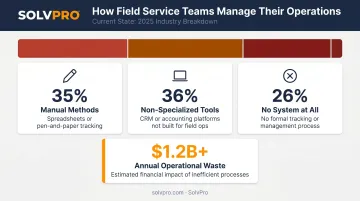
The gap between what businesses use and what they actually need is significant. According to Software Advice's 2026 Field Service Software Buyer Insights Report, most service businesses are still managing field teams with tools that were never built for the job:
- 35% rely on manual methods like spreadsheets or pen-and-paper
- 36% use non-specialized tools like CRM or accounting platforms
- 26% have no system at all
The financial cost compounds quickly. Disconnected tools mean delayed invoices, unbilled parts, missed follow-ups, and no real visibility into job profitability. For a business running five crews across multiple job sites, that adds up to a serious revenue problem.
The platforms below were evaluated on five criteria:
- Real-time tracking accuracy
- Field-first mobile usability
- Job management depth
- Integration capability
- Fit for growing U.S. service businesses
Best Platforms for Real-Time Field Team Management
These platforms were evaluated on how well they support live crew visibility, streamlined job workflows, and the ability to scale without adding administrative overhead.
SolvPro
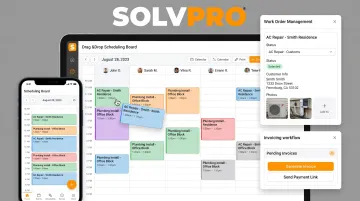
SolvPro is an all-in-one field service management platform built for growing service businesses — HVAC, plumbing, landscaping, general contracting, janitorial — that need to manage the full job lifecycle without enterprise-level complexity.
What makes it stand out is the combination of capabilities that rarely appear together at SMB price points:
- Location records are created when crew members take documented actions — time entries, photo uploads, job status updates — tying each entry to a verified location rather than a passive GPS ping.
- The entire platform runs in English and Spanish, including the mobile app, scheduling, work orders, invoicing, and customer communications. No added cost. Included in every tier.
- Estimates are built by project phase with milestone payment schedules, and convert directly to active jobs once a client approves the PDF proposal.
- QuickBooks Online sync and NMI payment processing are core features, not add-ons — so the workflow from dispatched job to collected payment stays in one place.
Setup takes under 10 minutes. There are no long-term contracts and no credit card required to start a free trial.
| Feature | Details |
|---|---|
| Key Features | Event-based geolocation, drag-and-drop scheduling, digital work orders with photo/geo-stamping, phase-based estimating, bilingual EN/ES interface, QuickBooks Online sync, NMI payment processing (credit card, ACH, digital), on-site invoicing and payment collection |
| Pricing | Starter: $179/mo (up to 3 users); Growth: $228/mo base (4 users, +$49/user); Scale: custom pricing. No long-term contracts, cancel anytime. Free trial available. |
| Best For | Growing service businesses (HVAC, plumbing, landscaping, general contracting, janitorial) with field crews that need full job lifecycle management and bilingual support |
Jobber
Jobber is a widely adopted field service platform serving home and commercial service businesses — lawn care, cleaning, pest control, HVAC — with an integrated system for quoting, scheduling, dispatching, and client communication.
Its client-facing experience is a strength. Automated "On My Way" notifications, online booking, and a client hub portal reduce back-and-forth communication and give customers visibility into appointment status. On G2, Jobber holds a 4.6/5 rating from 509 reviews, with users consistently praising its scheduling dashboard and ease of reassigning technicians.
One important distinction: Jobber uses GPS Waypoint Tracking, not continuous live GPS. Location is captured when team members take actions in the app — clocking in, starting timers, or marking visits complete — which is a similar concept to event-based tracking but more limited in scope. Exact location accuracy depends on device GPS signal, and the app documents potential data inaccuracy. For multi-crew dispatching, Capterra reviewers note that scheduling is individual-based, with no ability to group crews for easier assignment.
| Feature | Details |
|---|---|
| Key Features | Scheduling and dispatch, GPS waypoint tracking, quoting, invoicing, automated client reminders, "On My Way" notifications, client hub portal, online booking |
| Pricing | Core: $29/mo (annual); Connect: $149/mo; Grow: $299/mo; Plus: $529/mo. Additional users at $29/mo each. Free trial available, no credit card required. |
| Best For | Home service businesses prioritizing a polished client communication experience alongside solid scheduling and job management |
ServiceTitan
ServiceTitan is an enterprise-grade platform built for larger trade service companies in HVAC, plumbing, electrical, and related industries. It offers deep operational control across technician scheduling, dispatching, call booking, and revenue reporting.
The platform handles high job volumes well. Its dispatch board uses drag-and-drop functionality, displays a live activity feed of real-time job status, and includes GPS technician tracking. Call booking tools identify existing customers and surface service history, including past estimates and invoices — which cuts call time and reduces missed upsell opportunities in high-volume residential shops.
The tradeoff is complexity and cost. G2 reviewers describe implementation timelines of up to 3 months, a steep learning curve, and experiences with 2-year contract requirements. Multiple reviewers note the platform is oriented toward large commercial and enterprise businesses and is not designed for startups or smaller operations. ServiceTitan doesn't publish pricing — you'll need to request a demo for a quote.
| Feature | Details |
|---|---|
| Key Features | Drag-and-drop dispatch board, GPS technician tracking, real-time job status feed, call booking with customer history, technician performance metrics, revenue reporting |
| Pricing | Enterprise-priced; requires demo for quote. No public pricing listed. |
| Best For | Established or scaling trade service companies with high job volumes and dedicated operations staff who can absorb a complex platform rollout |
Housecall Pro
For small service businesses — plumbing, HVAC, cleaning, electrical — Housecall Pro is built around fast setup and a mobile-first experience. Teams are typically operational the same day.
GPS tracking locates technicians on a map via mobile phone — no extra hardware required. In-app payment processing supports card rates as low as 2.59%, bank payments at 1%, and mobile check deposits with no fee. Booking confirmations, review requests, and "On my way" notifications all run automatically, cutting down on manual follow-up. G2 reviewers (4.3/5 from 204 reviews) consistently describe setup as simple and the interface as easy to adopt quickly.
Limitations surface at the reporting and customization layer. G2 reviews cite an inability to track commissions on specific services and limited reporting depth — which can become friction points as businesses grow and need more granular job profitability data.
| Feature | Details |
|---|---|
| Key Features | Real-time technician GPS, in-app payments, automated follow-up messages, scheduling, dispatching, estimates, online booking |
| Pricing | Basic: $59/mo (annual); Essentials: $149/mo; MAX: $299/mo. 14-day free trial, no credit card required, no long-term contracts. |
| Best For | Small service businesses that need a fast-to-launch platform with solid scheduling and payment features and minimal configuration overhead |

FieldEdge
FieldEdge has deep roots in the HVAC and plumbing industries, with a centralized dispatch board designed for coordinating multiple trucks and assigning technicians based on skills, availability, and location. Technicians access complete customer information and service history from the field — which matters for trade contractors managing recurring equipment checks and multi-visit maintenance agreements.
Its QuickBooks integration is positioned as a native real-time sync with no double entry. On G2 (4.0/5 from 87 reviews), user feedback on the QuickBooks connection is mixed: some describe it as simple and fast, while others report difficulty — so test the QuickBooks integration directly before committing if accounting sync is critical to your workflow.
FieldEdge is most effective for HVAC and plumbing contractors. Capterra reviews flag limited project management features and reduced fit for broader or non-trade service use cases. FieldEdge doesn't list pricing publicly; request a demo to get a quote.
| Feature | Details |
|---|---|
| Key Features | Live dispatch board, real-time technician tracking, equipment and service history, maintenance agreement management, QuickBooks sync |
| Pricing | Requires demo for pricing; no public pricing listed. |
| Best For | HVAC and plumbing contractors that need deep service history tracking, real-time dispatch visibility, and QuickBooks integration |
How We Chose These Platforms
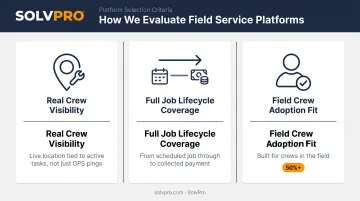
The evaluation prioritized three things that matter more than feature counts.
1. Real crew visibility, not just GPS pings Platforms that only show a truck's location every few minutes don't tell you whether work is actually happening. The platforms here capture location data tied to meaningful crew actions — job starts, completions, photo uploads — so accountability connects to real work, not just movement.
2. Full job lifecycle coverage Tools focused exclusively on GPS tracking, time logging, or payroll were excluded. The platforms in this guide manage the path from scheduled job to collected payment, which is what actually affects revenue and cash flow.
3. Fit for how field crews actually work Research from WBR/Field Service covering 136 service industry executives found that over 50% of organizations face challenges with technician adoption and training on new platforms. A platform your crew won't use is worse than no platform. Every platform here was assessed for ease of adoption, mobile usability, and realistic fit for field workers with limited tech familiarity.
Each platform below is rated on all three criteria — so you can see exactly where it fits and where it falls short.
Conclusion
The right real-time field team management platform gives you live operational control from the moment a job is scheduled to the moment it's paid — without the complexity that bogs down crews or demands a dedicated admin just to keep things running.
Prioritize platforms built for the field first, not adapted from office productivity tools. Evaluate ease of crew adoption, scalability, and integration with your existing accounting or payroll workflows before committing. Most platforms offer a free trial — use it. Switching platforms mid-season is far more disruptive than taking a week to evaluate the right one upfront.
If you're running a field service business and need a system your crew can actually use, SolvPro was built by people who've worked in the trades. The team brings 50+ years of combined experience in field service, construction, and project management — built from job sites and late nights, not boardrooms. Setup takes under 10 minutes, there are no long-term contracts, and every feature is available from day one.
Explore SolvPro or book a demo to see how it fits your operation.
Frequently Asked Questions
What is the best team management software?
It depends on your business type and team structure. For field service businesses with crews on job sites, platforms like SolvPro, Jobber, or Housecall Pro are stronger fits than general tools, since they're built around job dispatching, real-time crew tracking, and field-to-office workflows rather than project boards or task lists.
What is the best system for employee time tracking?
For field teams, time tracking tied to specific job sites and work orders is more useful than general clock-in/out apps. Systems that geo-stamp time entries to a job location give you more accurate payroll data and better job costing, since you can see exactly how much labor each job consumed.
What features should real-time field team management software have?
Look for live GPS or event-based location tracking, scheduling and dispatching, mobile work order management, photo or checklist documentation from the field, and invoicing or payment capabilities. Offline mode is also worth confirming for crews working in areas with poor connectivity.
Can field team management software work without an internet connection?
The best platforms let field crews access job details, complete work orders, and log activity without a live connection, syncing data automatically once connectivity returns. Confirm offline capability directly with any vendor before committing, as support varies significantly across platforms.
How much does field service management software cost for small businesses?
Entry-level plans typically start around $29–$59 per month, with mid-tier plans ranging from $149–$299 per month. Enterprise platforms like ServiceTitan and FieldEdge require custom quotes. Watch for per-user fees, feature-gating, and long-term contract requirements, which can significantly increase what you actually pay.
Is there field service management software that supports Spanish-speaking crews?
Bilingual support is rare, but it matters for many U.S. service businesses. SolvPro offers a fully bilingual English/Spanish interface across the entire platform, including scheduling, work orders, invoicing, and the mobile app, at no additional cost on any tier. Housecall Pro supports Spanish on its mobile app only when the device language is set to Spanish, with some elements remaining in English.