A landscaping company with two crews runs like clockwork: the owner knows every job, every client, every truck. Then business grows: three crews become five, five become eight. Suddenly, jobs get double-booked, invoices sit unsent for weeks, and nobody's quite sure which crew is where.
The root cause is a systems problem: your tools haven't scaled with your crew count.
Spreadsheets, group texts, and paper tickets work fine when you can hold the whole operation in your head. Once you can't, those same tools become the bottleneck that stalls growth entirely.
This guide flags the warning signs that your systems are breaking down. It also covers the software features that solve scaling problems, plus a step-by-step framework for growing your crew count without losing control of your business.
KEY TAKEAWAYS
- Manual systems break down once crew size outgrows what one owner can track mentally
- The right software fixes four problems: scheduling, crew accountability, invoicing speed, and job profitability
- Rolling out software in stages beats implementing every feature simultaneously
- Transparent pricing and no long-term contracts let your tools flex with headcount
- Seasonal headcount swings make per-user pricing and contract length a practical concern for landscaping businesses
Why Scaling Breaks Down Without the Right Systems
Landscaping owners tend to hit the same wall. At two or three crews, you can track jobs on a whiteboard or in your head. Add a fourth or fifth crew, and that mental math stops working.
The result is double-bookings, missed appointments, and crews showing up to the wrong address. Your systems haven't kept pace with your growing crew count.
Communication Gaps Widen with Every Crew You Add
Texts and phone calls work between an owner and one foreman. They fall apart across five or six crew leads simultaneously.
- Office staff waste time repeating job instructions over the phone
- Crews make wasted trips because details got lost in a text thread
- Nobody has a single source of truth for job scope, so mistakes multiply
Slow Invoicing Turns into a Cash Flow Crisis
A few late invoices among two crews is annoying. Dozens of late invoices among fifteen crews can sink a growing business.
The numbers back this up. A 2025 Intuit QuickBooks Small Business Late Payments Report surveyed nearly 2,500 US small businesses and found:
- 47% had invoices overdue by at least 30 days
- The average business was owed $17,500 at any given time
- Businesses hit hardest by late payments were 1.4 times more likely to face cash-flow problems
- 22% couldn't invest in new equipment because of unpaid invoices
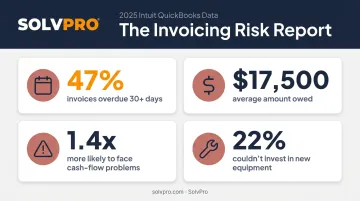
Growing your crew count without fixing invoicing multiplies that cash-flow risk.
Must-Have Software Features for Scaling Landscaping Operations
Not all landscaping software solves the same problems. As you add crews, five capabilities matter more than any flashy extra feature.
Centralized Scheduling and Dispatch
A shared digital calendar replaces the whiteboard entirely. Instead of one person holding every job in their head, the whole office can see, assign, and adjust work in real time.
Look for a system that offers:
- Drag-and-drop job assignment across day, week, or crew views
- The ability to see which crews are active, delayed, or finished
- Built-in conflict prevention, so two crews never get booked for the same slot
SolvPro's scheduling tool, for example, lets office staff reassign jobs in seconds when a crew runs long or a client reschedules, without a single phone call.
Crew Tracking and Field Accountability
Once you can't personally check on every job site, you need a way to verify work happened, on time, at the right location, without micromanaging.
GPS and job-level time tracking give owners that visibility. Employers commonly use GPS data to verify that time sheets match actual work locations and travel routes, supporting accurate payroll and reducing disputes over hours worked, according to SHRM's guidance on employee monitoring.
SolvPro builds this directly into the workflow through job and crew time tracking, recording time entries and photo uploads so every clock-in, job start, and completion carries a timestamp against the job and the crew memberion record. Office teams get crew-level accountability without needing to call the field for updates.
Job Costing and Knowing What Each Job Made
Revenue can grow while margins shrink, and you won't notice until it's too late, unless you're tracking true job costs.
The stakes are real, according to NALP's job costing research:
- 24% of landscape firms believe one bad estimate could put them out of business
- 33% cite underestimated labor as the top cause of project losses
- 65% of landscapers using job-costing technology reported increased profitability
Software should track labor and material costs per job, then surface profitability at a glance, not buried in a spreadsheet formula nobody updates.
Fast Invoicing and Payment Collection
The gap between finishing a job and getting paid is where cash flow problems start. Field-generated invoicing closes that gap.
SolvPro allows crews to build invoices on-site, capture a digital signature, and collect payment immediately through integrated credit-card and ACH payments, supporting credit cards, ACH, and online portals. That means jobs can close and get paid the same day instead of waiting for someone back at the office to catch up on paperwork.
Team Communication and Bilingual Support
Landscaping crews are diverse, and language gaps cause real operational problems. BLS data shows 47.5% of landscaping and groundskeeping workers identify as Hispanic or Latino, per the Bureau of Labor Statistics' 2025 occupation data.
Software with a fully bilingual interface, like SolvPro's English and Spanish platform covering both office and field-facing screens, reduces miscommunication and cuts training time as headcount grows. It's one less reason for a new hire to fall back on texting the foreman instead of using the system.
How to Use Software to Scale Your Operations: A Step-by-Step Framework
Buying every feature at once overwhelms your team. Roll out software in this order instead.
Standardize scheduling first. Disorganized scheduling is usually the first thing that breaks once you're running three or more crews, so get every job into one shared calendar before touching anything else.
Digitize work orders. Attach addresses, instructions, and photos to every job so new crew members have consistent information without relying on the owner's memory.
Turn on crew time tracking. Use live timers or manual time entries against each job to record arrivals and job durations across multiple sites without constant check-in calls.
Connect job costing data. Link labor and material costs to each project so you catch underpriced services before they scale into bigger losses.
Automate invoicing and sync accounting. Platforms like SolvPro sync invoicing directly with QuickBooks Online, so payments post automatically and your books stay current without double data entry.
Use reporting to guide expansion. Let job profitability and crew performance data, not gut instinct, tell you when to hire the next crew or invest in equipment.
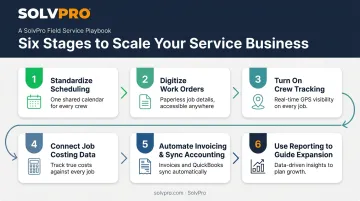
Each step builds on the last. Skip ahead, and you're automating chaos instead of fixing it.
Choosing Software That Grows with Your Business
The right software matches your current size, not the size you hope to reach in five years.
- Match complexity to crew size. Enterprise-level platforms built for hundred-crew operations often slow down a five-crew team with features nobody uses.
- Prioritize transparent, SMB-friendly pricing. SolvPro's month-to-month plans, with no long-term contracts locking you in early.
- Test the learning curve before committing. New hires should run basic scheduling or time tracking within a day. Longer ramp-up times become a liability as you add staff.
That same quick learning curve should extend to setup, too. Platforms that get a new account running in minutes rather than weeks let you start capturing value immediately instead of losing another month to implementation.
Common Mistakes That Stall Growth When Adopting Software
Even good software fails when the rollout goes wrong. Watch for these three traps:
- Implementing everything at once. Turning on scheduling, tracking, invoicing, and reporting simultaneously overwhelms crews and something gets ignored. Stage rollout using the framework above.
- Choosing based on price alone. Skipping job costing or crew accountability to save on subscription costs you more in lost margin.
- Skipping proper onboarding. Crews who don't trust new software revert to texts and paper, losing every benefit you paid for. Live support—not a help article—makes the difference.
Conclusion
Field service software helps you manage the work. SolvPro helps you make sure the work makes money.
The right tool depends on your trade, crew size, job mix and the systems you already run. Test it on real jobs before you commit, and check that crews will actually enter what the office needs. When you want to see it on your kind of work, Book a Demo.
Run the Job. Protect the Profit.
Frequently Asked Questions
How Do I Automate a Landscaping Business?
Start with scheduling and recurring job templates, then expand into automated invoicing, payment reminders, and crew notifications. This reduces manual admin work as your job volume grows.
What Is Project Management Software for Landscapers?
It typically combines job scheduling, digital work orders, crew assignments, and progress tracking in one platform, giving managers visibility into multiple active jobs at once.
What Apps Do Landscapers Use?
Most rely on scheduling and dispatch apps, GPS time tracking apps, invoicing and payment apps, and team communication tools. All-in-one platforms like SolvPro combine these into a single app instead of juggling four.
What Is the Best Bookkeeping Software for a Lawn Care Business?
Many landscaping businesses pair QuickBooks Online for accounting with field service software that syncs job and payment data directly into it, avoiding duplicate data entry between systems.
How Much Does Landscaping Software Cost as My Business Grows?
Pricing usually scales with user or crew count. Look for predictable, transparent tiers rather than surprise add-on fees. SolvPro's plans, for example, add a flat per-user rate as you hire.
When Should I Start Using Software to Scale?
The right time is once you start experiencing missed jobs, late invoices, or communication breakdowns, typically past 2-3 crews. Waiting longer only makes the transition harder.