A framing crew shows up to find the electrical rough-in isn't done. A foreman texts the office asking where the materials are, and nobody answers for three hours.
Multiply that across dozens of jobs, and you get the reality for most contractors: schedules built on spreadsheets, whiteboards, and group texts that fall apart the moment a job gets complicated.
Construction scheduling software exists to close that gap between the office and the field. What started as paper timelines and static spreadsheets has become cloud-based platforms with real-time updates, GPS-tracked crews, and mobile access from any job site.
Construction scheduling software splits between CPM-depth tools for enterprise general contractors and faster, simpler platforms for growing contractors. You'll find options ranging from enterprise CPM tools for massive multi-year projects to residential builder platforms. The focus stays on simpler, crew-focused solutions built for growing service contractors who need speed over complexity.
KEY TAKEAWAYS
- Centralizes scheduling, crew assignments, progress tracking, and job costing in one platform.
- Enterprise GCs need CPM depth like Primavera P6; growing contractors need simplicity and speed.
- This list ranks 6 platforms by ease of use, features, pricing, and contractor fit.
- Mobile access, QuickBooks sync, and bilingual support are now baseline, not extras.
- A schedule that crews can see on a phone is more likely to stay current than one that lives only in the office.
Overview of Construction Scheduling Software in the Construction Industry
Construction scheduling software is a digital system that plans tasks, assigns crews, and tracks progress against a timeline — replacing the guesswork of manual coordination with a single source of truth everyone can see.
The market for these tools keeps expanding alongside the industry itself. U.S. construction employment hit 8.3 million jobs in early 2024, according to the Bureau of Labor Statistics, and that workforce needs coordination tools that scale with it.
Here's the catch: a large share of that workforce still runs on spreadsheets, sticky notes, or whiteboards in a job trailer.
That gap is exactly why the scheduling software market keeps growing. Small and mid-sized contractors are finally moving toward accessible, cloud-based tools instead of enterprise systems built for someone else's problems.
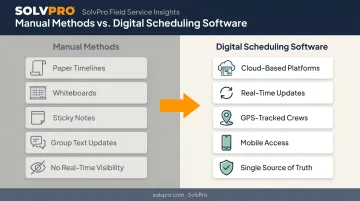
The strongest options span enterprise, mid-market, and small contractor needs, and matching the tool to the actual operation matters more than the length of the feature list.
Key Features That Make the Best Construction Scheduling Software
Not every "scheduling" tool does the same job. Some visualize timelines. Others calculate the exact sequence of tasks that controls your completion date. Knowing the difference matters before you buy.
Gantt Charts, Dependency Mapping, and Critical Path Detection
Gantt charts remain the foundation of scheduling software. The Project Management Institute describes them as bar charts that display a project's start and finish dates, along with milestones and task overlap, giving teams a visual map of the entire job at a glance.
Task dependencies build on that visual map by connecting predecessor and successor activities, so a delay in one trade automatically flags downstream impact. The Critical Path Method (CPM), as defined by PMI, identifies the specific chain of activities that controls your minimum project duration. Not every platform on this list calculates true CPM: some only offer Gantt views and basic dependencies, which matters if you're managing complex, multi-trade sequencing.
Resource Scheduling, Mobile Access, and Integrations
Good scheduling tools show crew availability before you assign work, preventing double-booking and over-allocated equipment. Look for:
- Drag-and-drop assignment calendars
- Day, week, and crew-level views
- Instant conflict flags when a crew is already committed
Crews also need to view schedules, log hours, and update job status from the field instead of calling the office for information that should already be there. Real-time mobile access turns a static plan into a living one.
QuickBooks Online sync and built-in payment processing are quickly becoming baseline requirements for SMB contractors managing tight cash flow. Add bilingual English/Spanish accessibility to that list too: as crews become more diverse, an English-only interface locks out a growing share of the field workforce.
Top Construction Scheduling Software for 2026
These six platforms were compared on scheduling depth, field usability, and pricing transparency, not just brand recognition. Some are built for enterprise CPM scheduling; others are built for growing service contractors who need something simpler and faster to deploy.
SolvPro
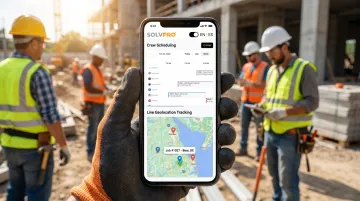
SolvPro is an all-in-one field service management platform built by a team with over 50 years of combined experience in construction, estimating, and project management. Rather than bolting scheduling onto a generic project tool, SolvPro combines crew scheduling, work orders, job-level time tracking, and payments into a single system designed around how field crews actually work.
What sets it apart:
- Fully bilingual English/Spanish interface across office dashboard and mobile app (a feature competitors like Jobber don't offer)
- Job and crew time tracking on time entries, uploads, and photos for verifiable crew accountability
- Digital estimates with customer-facing PDF proposals, useful for multi-stage jobs like excavation or general contracting
- Setup in under 10 minutes, with live onboarding support and no long-term contract
| Category | Details |
|---|---|
| Key Features | Crew scheduling, work orders, QuickBooks Online sync, credit-card and ACH payments, bilingual interface, job-level time tracking |
| Best For | Growing service-based contractors — GCs, electrical, plumbing, landscaping, excavation, and multi-crew field teams needing simplicity without enterprise complexity |
Procore
Procore is among the most widely used construction management platforms, deployed by large general contractors managing the full project lifecycle from pre-bid through closeout. It centralizes scheduling, budgets, RFIs, and documentation in one system.
For advanced CPM scheduling, Procore's documented workflow imports schedule files from Microsoft Project or Primavera P6, meaning deep schedule edits still happen in the source application before re-upload. Its native schedule view handles Gantt charts and dependencies well but isn't a standalone CPM engine.
| Category | Details |
|---|---|
| Key Features | Gantt charts, document management, budgeting, quality/safety modules, unlimited users |
| Best For | Large general contractors managing complex, multi-stakeholder projects |
Buildertrend
Buildertrend is a cloud-based platform built for home builders, remodelers, and specialty contractors. It combines scheduling with financials and client communication, which makes it a strong fit for residential-scale work where homeowners expect visibility into progress.
Its mobile schedule supports linked tasks and dependency sequencing across Month, List, and Gantt views. It lacks deep CPM analytics, though, so it's better suited to single-project residential timelines than large, multi-project portfolios.
| Category | Details |
|---|---|
| Key Features | Gantt/calendar scheduling, CRM, client portal, daily logs, job costing |
| Best For | Home builders and remodelers needing client communication built into scheduling |
Jobber
Jobber is a field service management platform used across trade and service businesses for quoting, invoicing, and scheduling. Its calendar is appointment-driven rather than Gantt-based, which makes it strong for dispatching recurring jobs but limited for multi-week project sequencing.
| Category | Details |
|---|---|
| Key Features | Calendar scheduling, quoting, invoicing, payment processing, client hub |
| Best For | Small field service and trade contractors with simpler, recurring job scheduling needs |
Contractor Foreman
Contractor Foreman is an affordable all-in-one platform combining scheduling, estimating, and job costing at a flat monthly fee. Its Gantt scheduler supports dependencies and milestones, making it a solid everyday tool, though it lacks advanced float analysis or portfolio-level scheduling across multiple large projects.
| Category | Details |
|---|---|
| Key Features | Gantt charts, daily logs, job costing, unlimited users on higher tiers |
| Best For | Small contractors needing everyday scheduling without enterprise pricing |
Monday.Com
monday.com is a flexible work management platform with construction-specific templates, popular with teams that prioritize collaboration and customization. It offers Gantt-style timelines and dependencies (available from the Standard tier upward), but it isn't a documented CPM engine and lacks dedicated construction cost-loading.
| Category | Details |
|---|---|
| Key Features | Customizable boards, Gantt timelines, automation, dashboards |
| Best For | Teams that want flexible collaboration tools alongside basic scheduling |
What to Look for in Construction Scheduling Software
Each platform was evaluated on:
- Scheduling depth
- Mobile field usability
- Integration options
- Pricing transparency
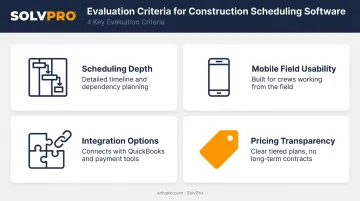
Brand recognition alone didn't factor into the rankings.
A common mistake contractors make: choosing an enterprise CPM tool that's overbuilt (and overpriced) for their actual project complexity, or picking a generic work management tool that lacks construction-specific workflows entirely. Both mistakes cost time and money.
User feedback shaped this list too. Procore's G2 profile shows a 4.6/5 rating across more than 4,200 reviews, with users praising centralized information but flagging a real learning curve.
That gap between power and usability is worth weighing against your team's technical comfort level. We factored review volume and sentiment into the feature comparisons for every platform on this list.
Conclusion
There's no single "best" construction scheduling software — only the best fit for your company's size and project complexity. Enterprise GCs running multi-year, multi-stakeholder jobs need CPM depth. Growing service contractors juggling crews across job sites need speed, simplicity, and mobile tools their crews will actually use.
Whichever category fits your business, weigh scalability and integration needs against total cost of ownership before committing, not just the sticker price on a pricing page.
If you're running crews in the field and tired of double-booked jobs and lost paperwork, SolvPro's scheduling and crew management tools are worth a look. Setup takes under 10 minutes, there's no long-term contract, and support is built around how service businesses actually operate.
Field service software helps you manage the work. SolvPro helps you make sure the work makes money.
The right tool depends on your trade, crew size, job mix and the systems you already run. Test it on real jobs before you commit, and check that crews will actually enter what the office needs. When you want to see it on your kind of work, Book a Demo.
Run the Job. Protect the Profit.
Frequently Asked Questions
What Is the Best Construction Scheduling Software?
It depends on project size and complexity. For growing service contractors needing simple, bilingual scheduling with crew tracking, SolvPro is a strong fit; large GCs typically need Procore or Primavera P6.
How Much Does Construction Scheduling Software Cost?
Pricing ranges from free/entry-level tiers to $9–$30 per user/month for mid-range platforms. Enterprise-grade tools like Primavera P6 typically require a custom quote from sales.
What Features Should I Look for in Construction Scheduling Software?
Prioritize Gantt charts, task dependencies, mobile field access, and integrations with accounting tools like QuickBooks.
Is There Free Construction Scheduling Software Available?
Some platforms, like monday.com, offer limited free tiers or trials. Most full-featured construction scheduling tools require a paid plan for real project use.
Can Construction Scheduling Software Integrate with Accounting Tools Like QuickBooks?
Yes. Many modern platforms, including SolvPro, offer built-in QuickBooks Online sync covering job costing, labor tracking, and one-click reporting.
How Long Does It Take to Set up Construction Scheduling Software?
Setup time varies widely by platform. SMB tools like SolvPro can be running in under 10 minutes, while enterprise systems like Primavera P6 or Procore often take weeks to fully implement.