for 2026](https://file-host.link/website/solvpro-xf4m4x/assets/blog-images/72b9f53a-33b3-4d5d-819a-f1185c18d80b/1785348293707821_139094c6d89b4c02af1f3c9c18473a42/360.webp)
Field service management software isn't optional anymore. As job volume grows, spreadsheets and group texts stop working, and dispatch chaos starts costing real money in missed jobs and delayed payments.
This guide breaks down what work order dispatch software actually does, the top platforms worth considering for 2026, and how to pick the right one for a growing crew-based business.
KEY TAKEAWAYS
- Dispatch software replaces spreadsheets and phone tag with real-time job and crew tracking
- Choose platforms that combine scheduling, dispatch, invoicing, and payments in one system
- Top platforms include SolvPro, Jobber, Housecall Pro, ServiceTitan, and Workiz for different business sizes
- Prioritize onboarding speed and mobile usability over flashy enterprise feature lists
- SolvPro fits growing SMB teams needing bilingual support and same-day setup without contracts
Overview of Work Order Dispatch and Management Software
Work order dispatch and management software is the system that creates, assigns, tracks, and closes out field jobs, while keeping the office and the crew in sync in real time. Instead of a whiteboard and a stack of paper tickets, everything lives in one place both sides can see.
These two terms often get used interchangeably, but they aren't the same:
- Scheduling is the advance planning: deciding who does which job, and when
- Dispatching is the real-time execution: sending the job, adjusting it when a crew runs late, and confirming it's done
General contractors, electrical and plumbing companies, landscaping crews, and commercial cleaning operations are adopting these platforms faster than ever as crew counts and job volume climb.
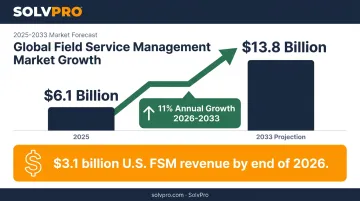
The category has real momentum behind it: the global field service management market hit $6.1 billion in 2025 and is projected to reach $13.8 billion by 2033, growing at an 11% annual rate from 2026 through 2033.
In the U.S. alone, the FSM software industry is on track for $3.1 billion in revenue by the end of 2026.
That growth isn't abstract — it reflects thousands of service businesses moving off spreadsheets. Many companies have already decided to adopt one of these platforms; the real question is which one fits how your crews actually work. Here's how the top five stack up.
Top 5 Work Order Dispatch and Management Software for 2026
These platforms are best judged through a specific lens: ease of use for crews in the field, depth of dispatch and scheduling tools, payment and accounting integrations, pricing transparency, and how well each supports a growing business rather than only enterprise operations.
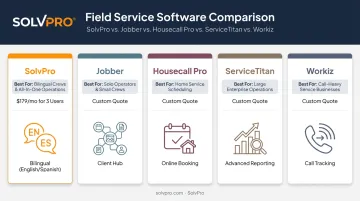
SolvPro
SolvPro is an all-in-one field service platform built by a team with 50+ years of combined experience in construction, estimating, and service operations. It covers scheduling, work orders, crew tracking, and payments in a single system, with no bouncing between apps.
What sets it apart:
- Fully bilingual English/Spanish interface for office staff and field crews (a rarity in this category)
- Built-in QuickBooks Online sync and credit-card and ACH payments as core features, not paid add-ons
- Same-day go-live: create an account in under 2 minutes, import your crew and jobs, and dispatch your first work order the same day
- No long-term contracts: cancel anytime, with free onboarding support included
The bilingual interface deserves a closer look. Field crews can run the mobile app entirely in Spanish, viewing job assignments, updating status, and capturing customer sign-offs. Office staff manage scheduling and invoicing in English at the same time, with no workflow disruption.
| Best For | Growing multi-crew service businesses (GCs, electrical, plumbing, landscaping, cleaning) needing simplicity without enterprise complexity |
| Key Features | Work order dispatch, digital proposals/estimates, crew accountability tracking (time entries and photos recorded against the job), QuickBooks Online sync, credit-card and ACH payments, bilingual interface |
Jobber
Jobber is a widely used field service platform, particularly popular among residential and light commercial contractors. It bundles scheduling, a client hub, quoting, and invoicing into one system that's fairly easy to pick up.
It works well for smaller teams that want an all-in-one tool without a steep learning curve. However, as commercial complexity grows (more crews, more admins, more workflow nuance), some businesses find themselves working around limitations rather than through them.
| Best For | Small to mid-sized residential/light commercial service teams |
| Key Features | Scheduling, client hub, quoting, invoicing, basic CRM |
Housecall Pro
Housecall Pro is a residential-focused dispatch and scheduling tool built around online booking, customer texting, and simple payment collection. It's a strong fit for small teams that prioritize speed of setup over depth of features.
Where it starts to feel limited is larger commercial workflows: multi-crew coordination and more complex job costing tend to push past what the platform was designed for.
| Best For | Small residential service businesses |
| Key Features | Online booking, dispatch, customer communication, payments |
ServiceTitan
ServiceTitan is an enterprise-grade platform built for larger, established residential service companies (think HVAC, plumbing, and electrical operations with dedicated admin staff and call-center needs).
Its strength is scale: deep reporting, marketing tools, and call-booking integration that larger operations rely on. That same depth is also its barrier for smaller, growing teams. Both the complexity and the cost can be tough to justify before a business reaches a certain size.
| Best For | Larger, established residential service companies with dedicated admin staff |
| Key Features | Dispatch, call booking, marketing, advanced reporting/analytics |
Workiz
Workiz combines dispatch and scheduling with built-in call tracking, making it a natural fit for call-driven service businesses like locksmiths, appliance repair, and HVAC companies that live and die by inbound phone leads.
Outside of calling features, the platform's breadth is narrower than some competitors, so businesses whose growth depends more on job complexity than call volume may find it less flexible.
| Best For | Call-driven service businesses (locksmiths, appliance repair, HVAC) |
| Key Features | Dispatch, call tracking, scheduling, invoicing |
What to Look for in Work Order Dispatch and Management Software
The most common mistake businesses make when choosing software? Picking based on brand recognition or a long feature checklist — rather than fit for their actual crew size and workflow.
Software Advice's analysis of over 6,000 buyer interactions backs this up: 52% of businesses switch to dedicated FSM software because of inefficiency, not because they want more bells and whistles. Only 23% cite limited functionality as the driver.
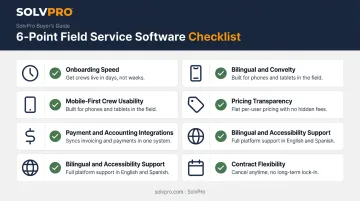
Five specific factors matter here, each tied to a real business outcome:
- Onboarding speed: faster go-live means fewer missed jobs during the transition
- Mobile-first crew usability (if field techs won't use it, the office won't get accurate data)
- Payment and accounting integrations, which directly impact how fast invoices go out and money comes in
- Pricing transparency to avoid budget surprises that derail adoption
- Bilingual and accessibility support, critical for teams with mixed-language crews
One more factor deserves attention: contract flexibility. Growing companies need room to scale or pivot without being locked into a 12- or 24-month agreement that no longer fits. Month-to-month terms matter more than a lot of buyers realize until they're stuck.
Conclusion
The right work order dispatch software matches how your crew actually works in the field, not the one with the most features listed on a sales page. A platform that requires three weeks of setup and a dedicated IT resource doesn't help a 12-person landscaping crew that needs to dispatch jobs tomorrow morning.
Before committing to a platform for 2026, evaluate:
- Scalability: will it still work when you double your crew size?
- Ease of onboarding: can your office and field staff actually get up and running fast?
- Total cost of ownership: not just the sticker price, but add-ons, extra users, and payment processing fees
If you're managing a growing crew and tired of chasing paperwork, SolvPro's same-day onboarding and bilingual, all-in-one platform were built specifically for businesses like yours. There's no long-term contract required to find out if it fits.
You shouldn't have to wait until the job is over to find out whether you made money.
Keeping the estimate, work order, time entries and invoice on one record reduces how much the office has to reconstruct before it can bill. That is the difference between finding out now and finding out at closeout. When you want to see it on your kind of work, Book a Demo.
Run the Job. Protect the Profit.
Frequently Asked Questions
What Is the Difference Between Scheduling and Dispatching?
Scheduling is the advance planning of who does which job and when. Dispatching is the real-time execution and adjustment of that plan as field conditions change throughout the day.
What Is Work Order Dispatch?
Work order dispatch is the real-time process of assigning and communicating an authorized work order to a technician or crew (including job details, location, and instructions) so they can act on it immediately.
What Features Should I Look for in Work Order Dispatch Software?
Essential features include mobile access, drag-and-drop scheduling, automated notifications, payment and accounting integrations, and real-time job status tracking. Bilingual support matters too if you manage a mixed-language crew.
How Much Does Work Order Dispatch Software Typically Cost?
Pricing varies by business size and feature depth, but Capterra data shows 75% of entry-level FSM plans start under $50/month, though premium plans can run $450 or more. Look for transparent pricing without hidden add-on fees.
Is Work Order Dispatch Software Worth It for a Small Service Business?
Yes. Even small crews benefit from fewer missed jobs, faster invoicing, and clearer accountability. It's worth adopting as soon as manual scheduling starts creating bottlenecks. Waiting until you're overwhelmed just makes the transition harder.