Field crews in 2026 are still juggling four tools to do one job: a whiteboard for scheduling, a text thread for dispatch, a separate app for invoicing, and a spreadsheet for job costing that nobody updates until month-end. That patchwork breaks fast once you add a second or third crew.
The right field service management (FSM) platform separates businesses that scale predictably from those where office staff chase crew locations and unpaid invoices all morning. When office-to-field communication fails, jobs get double-booked, materials go untracked, and profit disappears.
Established enterprise names and simpler SMB-first platforms such as SolvPro solve different problems, and the gap matters most when a growing crew is paying for features they'll never touch.
KEY TAKEAWAYS
- FSM software centralizes scheduling, work orders, invoicing, and crew tracking, which removes the spreadsheet-and-phone-tag routine.
- Crew size, trade complexity, and total cost of ownership matter more than the length of a feature list.
- Options range from SMB tools such as SolvPro and Jobber to enterprise platforms such as ServiceTitan.
- Bilingual support, transparent pricing, and fast onboarding now shape purchasing decisions for multi-crew teams.
- Pricing models differ between per-user and flat-rate plans, so the cheaper headline price is not always cheaper at your crew size.
Overview of Field Service Management Software in 2026
FSM software connects office scheduling, field dispatch, and billing into one system, so general contractors, electricians, plumbers, landscapers, and cleaning crews stop relying on separate tools that don't talk to each other.
The category has real momentum behind it. IBISWorld sizes the U.S. Field Service Management Software industry at $3.1 billion in 2026, projecting 7.5% growth this year alone. That growth reflects a simple reality: manual scheduling and paper work orders don't scale past a handful of crews.
That growth has drawn a crowded field of competitors, but not every platform on this list serves the same buyer. Each option below suits a different kind of operation:
- Solo operators running one or two trucks
- Growing multi-crew teams managing 3-50 field staff
- Large enterprises with 50+ technicians and dedicated IT support
Matching your business to the right tier matters more than chasing the platform with the most checkboxes on its features page.
Top Field Service Management Software Picks for 2026
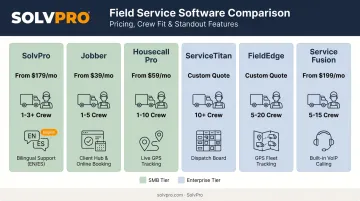
Five factors separate these platforms: pricing transparency, mobile/field usability, onboarding speed, integration depth, and support quality. Here's how the field stacks up.
SolvPro
SolvPro is an all-in-one FSM platform built by a team with over 50 years of combined experience in construction, estimating, sales, and project management. It covers scheduling, work orders, crew tracking, estimating, and payments in a single system, designed specifically for growing multi-crew businesses rather than enterprise IT departments.
What sets it apart:
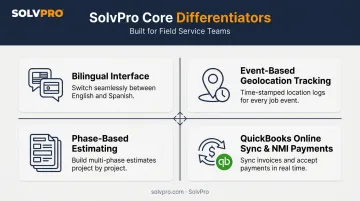
- Fully bilingual English/Spanish interface across office and field mobile apps
- Job and crew time tracking that records time entries and photo uploads against the work order for a documented account of the work
- Digital estimates with customer-facing PDF proposals for professional, multi-stage quotes
- Built-in QuickBooks Online sync and credit-card and ACH payments, included at no extra cost on every plan
| Key Features | Scheduling, work orders, crew and job time tracking, digital estimates, invoicing, and credit-card and ACH payments in one platform |
| Best For | Growing multi-crew service businesses in construction, electrical, plumbing, HVAC, landscaping, cleaning, and excavation |
Jobber
Jobber earned its reputation as an SMB-focused platform known for fast onboarding and clean, straightforward invoicing for owner-operators. Its official positioning centers on one workflow: quoting, scheduling, invoicing, and collecting payment.
It is positioned for smaller shops that want simple job management without a steep learning curve.
| Key Features | Client manager, scheduling, invoicing, and mobile app with GPS waypoint tracking |
| Best For | Solo operators and small residential crews |
Housecall Pro
Housecall Pro made its name through mobile-first UX and marketing automation, including online booking and automated review requests. Its dispatch product supports real-time GPS tracking and lets managers reassign jobs from a single schedule view.
It positions itself for operations that want marketing tools built into scheduling software.
| Key Features | Scheduling, real-time GPS dispatching, online booking, and review automation |
| Best For | Residential trades scaling their technician count |
ServiceTitan
ServiceTitan is the deepest enterprise-grade FSM platform on this list, with an advanced dispatch board and business intelligence reporting that few competitors match. Its Dispatch Pro tool automatically assigns jobs based on technician skill, location, and sales performance.
That depth comes at a cost. ServiceTitan doesn't publish numeric pricing on its site; every package requires a custom quote, and implementation typically involves a longer setup process than SMB-tier tools.
| Key Features | Advanced dispatch board, revenue and technician performance reporting, customer financing integrations |
| Best For | Large residential and commercial operations ready for enterprise software investment |
FieldEdge
FieldEdge is a QuickBooks-integrated platform built specifically around residential HVAC-style workflows, with automated syncing between field activity and office accounting. Its standout strength is equipment history tracking, giving techs full visibility into a unit's service record before they arrive.
Like ServiceTitan, FieldEdge doesn't list numeric pricing publicly; you'll need to request a demo for plan costs.
| Key Features | Real-time QuickBooks sync, equipment hierarchy tracking, and maintenance contract billing |
| Best For | Residential HVAC shops that don't need enterprise-level compliance depth |
Service Fusion
Service Fusion distinguishes itself with flat-rate pricing with unlimited users on every plan, which helps growing shops avoid the per-user fees that inflate costs as headcount grows. Its strengths include drag-and-drop dispatching, GPS tracking, and inventory management.
| Key Features | Drag-and-drop dispatching, mobile tech access, and inventory management |
| Best For | Growing service companies wanting predictable flat-rate costs |
What to Look for in FSM Software
The most common buyer mistake in this category is prioritizing feature count over onboarding speed and total cost at scale. A platform with 200 features you'll never use isn't better than one with 20 features your crew actually needs.
We weighted four factors that tie directly to business outcomes:
- Pricing transparency: Does the vendor publish real numbers, or does every plan require a sales call?
- Mobile usability: A technician needs to update job status from a driveway with spotty signal — the software has to work there too.
- Integration depth: QuickBooks sync should happen automatically, not require someone to re-key data every week.
- Support responsiveness: Onboarding help should be live and immediate, not buried in a ticket queue.
Capterra's research backs up why this matters. 51% of FSM buyers budget $50-$100 per user, per month, so cost predictability is already a top concern before a single feature gets evaluated. Faster invoicing and fewer missed jobs come from software that fits your actual operation, not the one with the flashiest demo.
Why Growing Service Businesses Are Choosing SolvPro
SolvPro was built from job sites, truck beds, and job trailers by a team that lived the exact chaos this article describes. Crews called for information that should've already been there, jobs got double-booked, and invoices went out weeks too late.
The founding team brings over 50 years of combined experience across construction, estimating, sales, and project management. Kai Stanton, SolvPro's Technical Sales Specialist, spent 17 years working as a project manager, estimator, and installer before joining the team, giving him firsthand insight into what actually breaks down in the field.
A Genuinely Bilingual Platform
Unlike most competitors, SolvPro offers a fully bilingual English/Spanish interface across both the office dashboard and the field mobile app. Rather than a machine-translated menu, this runs through a dedicated in-house translator, ensuring accuracy for mixed-language office and field teams.
For businesses running crews where English and Spanish are spoken interchangeably on-site, this removes a real communication barrier that most FSM platforms simply ignore.
Built-In Accountability and Estimating Tools
Two features stand out for crews trying to win more bids and reduce disputes. Time entries and photo uploads are recorded against the job, creating a documented, timestamped record of the work.
Digital estimates breaks complex jobs into organized project phases, then generates a customer-facing PDF proposal that looks as professional as a bid from a much larger firm.
Faster Payments, Less Admin Work
SolvPro includes QuickBooks Online sync and credit-card and ACH payments as core features on every plan, with no paid add-ons required. Field crews can generate an invoice on-site, collect payment via credit card or ACH, and have labor hours sync automatically to QuickBooks for payroll, closing the gap between finishing a job and getting paid.
Onboarding Without the Risk
Perhaps the biggest practical advantage: SolvPro sets up in under 10 minutes, with a live team walking new customers through setup rather than a chatbot or knowledge base. Combined with transparent pricing and no long-term contracts, this removes the switching risk that keeps a lot of SMBs stuck on spreadsheets far longer than they should be.
Conclusion
The best FSM platform matches your crew size, trade complexity, staffing plans, and where your business is headed over the next two to three years, not the one with the flashiest demo.
Before signing anything, weigh onboarding speed, ongoing support quality, contract flexibility, and total cost of ownership, not just the sticker price on month one. A cheap plan that takes six weeks to implement, or an enterprise system that requires a dedicated admin, can cost you more than the subscription itself.
If you're managing multiple crews and tired of stitching together five different tools, try SolvPro's free setup. See how quickly it organizes scheduling, crew tracking, invoicing, and payments, no credit card required.
Field service software helps you manage the work. SolvPro helps you make sure the work makes money.
The right tool depends on your trade, crew size, job mix and the systems you already run. Test it on real jobs before you commit, and check that crews will actually enter what the office needs. When you want to see it on your kind of work, Book a Demo.
Run the Job. Protect the Profit.
Frequently Asked Questions
Frequently Asked Questions
What Is Field Service Management Software?
FSM software centralizes scheduling, work orders, invoicing, and mobile field tools for service businesses in one platform. It replaces the spreadsheets, whiteboards, and text threads that break down once a company grows past a single crew.
What's the Difference Between CRM and FSM?
CRM manages customer relationships and sales pipelines, while FSM manages operational execution — scheduling, dispatching, work orders, and field crew activity. Many businesses run both together, with CRM feeding leads into FSM once a job is booked.
How Much Does FSM Software Cost in 2026?
Capterra reports that 51% of buyers budget $50-$100 per user, per month, with entry-level plans around $100/month and premium subscriptions at $450 or more. Enterprise platforms like ServiceTitan and FieldEdge don't publish rates; expect a custom quote plus onboarding costs.
Do I Need FSM Software with a Small Crew?
Absolutely. Even small crews recover the subscription cost through faster invoicing and fewer scheduling conflicts. Most businesses see the payoff within the first month, especially once they stop losing billable hours to miscommunication.
Which FSM Software Has the Best Mobile App for Field Crews?
Mobile apps from SolvPro, Housecall Pro and Jobber let crews pick up assignments and record job updates from the field. Confirm which location features each vendor offers, since they differ. Full offline editing support varies by platform, so confirm this if your crews work in low-connectivity areas.
Is There a Bilingual FSM Option for English/Spanish Crews?
Yes. SolvPro offers a fully bilingual English/Spanish interface across both the office dashboard and field mobile app, a rare option built specifically for mixed-language teams. Most competing platforms, including Jobber, remain English-only.