This is what growing a service business looks like without the right systems. As crews multiply and job sites spread out, spreadsheets and sticky notes stop working.
Field workforce management software is the connective layer between the office and the field. It's a single system for scheduling, dispatch, tracking, and job data that updates in real time, so everyone works from the same information instead of guessing.
This guide covers what the software actually does, the four pillars behind it, the features worth paying for, the real benefits, how to pick a platform, and where SolvPro fits into the picture for growing service businesses.
KEY TAKEAWAYS
- Centralizes scheduling, dispatch, and communication so office and field teams share real-time data
- Built on four pillars: forecasting/scheduling, time tracking, task management, and analytics
- Cuts missed jobs, speeds up invoicing, and reveals which jobs are actually profitable
- SMBs rarely need enterprise complexity; purpose-built platforms with fast setup usually win
- Hours that arrive already linked to a job remove the reconciliation step before payroll and invoicing
What Is Field Workforce Management Software?
Field workforce management (FWM) software is a digital system that helps service businesses plan, assign, track, and support employees who work outside a central office. It syncs what's happening on job sites with what the office needs to know, in real time.
That's different from generic workforce management software, which is built for office-based HR and scheduling. FWM platforms are built around three things generic tools don't handle well:
- Mobile-first access — crews need the app to work from a phone in a truck, not just a desktop browser
- Location awareness — knowing where a crew is matters for dispatch, routing, and accountability
- Job-site data capture — photos, signatures, and status updates happen where the work happens, not back at a desk
Few businesses jump straight from paper to a platform. They stack tools: a shared spreadsheet for scheduling, a group text for updates, paper work orders that get photographed and emailed, and QuickBooks running separately from all of it.
A Software Advice analysis of field-service software buyers found 36% were still relying on manual methods like spreadsheets, pen-and-paper logs, and phone calls before they started shopping for something better.
FWM software replaces that patchwork with one connected system.
The 4 Pillars of Workforce Management
Whether you're managing office staff or field crews, workforce management tends to break down into four core functions:
- Forecasting and scheduling: Predict labor needs and build schedules that match job demand with crew availability
- Time and attendance tracking: Capture when and where employees clock in, including field-specific methods like geolocation-based check-ins
- Task and productivity management: Assign, track, and close out jobs with visibility into progress from start to finish
- Analytics and optimization: Use real-time data to spot bottlenecks, cut costs, and make smarter staffing and dispatch decisions
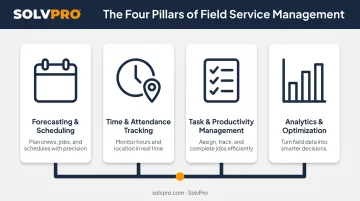
Field workforce platforms take these same four pillars and adapt them for people who aren't sitting at a desk.
Key Features to Look for in Field Workforce Management Software
Not every platform is built the same. A five-person landscaping crew and a 40-technician commercial cleaning operation don't need the same feature set. The right list depends on your crew size, how complex your jobs are, and how mobile your team needs to be.
Scheduling, Dispatch, and Job Assignment
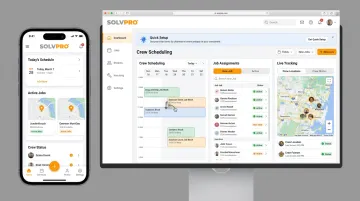
The best scheduling tools use a visual, drag-and-drop calendar rather than forcing office staff to learn a rigid automated system. Look for:
- Instant assignment: drag a job onto a crew member's slot and it's done
- Multiple views: day, week, and crew-level views so dispatchers see everything at once
- Live availability: knowing who's free before you try to book them
- Double-booking flags: the system catches conflicts before they become no-shows
Mobile Access and Field Communication
A mobile app should let a crew member run their whole day without calling the office. That means:
- Viewing job details and notes before arriving on-site
- Updating job status the moment work starts or finishes
- Uploading job-site photos and capturing customer sign-off
- Logging change orders on the spot
If crews are still calling in for addresses, the app isn't doing its job.
Real-Time Location Tracking and Accountability
Job and crew time tracking tracking captures location when something happens, such as a clock-in, a time entry, or a photo upload, rather than tracking someone continuously throughout the day. This gives owners a verifiable record of when and where work happened, creating accountability in the field without turning the app into a surveillance tool.
Work Order, Estimating, and Job Management
Digital work orders keep crews and office staff aligned on scope. Digital estimates takes this further by breaking a quote into project stages instead of one flat list, which mirrors how contractors actually plan jobs. Customer-facing PDF proposals with milestone payment schedules give clients a clear picture of what they're paying for and when.
Invoicing, Payments, and Accounting Integration
Built-in payment processing lets a crew close out a job and collect payment before they leave the driveway, accepting cards, ACH, and digital payments on the spot. Pair that with QuickBooks Online sync and job costs, labor hours, and payment data flow into accounting automatically, no duplicate entry required.
Benefits of Field Workforce Management Software for Growing Service Businesses
The core value here isn't flashy. It's turning scattered texts, paper, and spreadsheets into one accountable system everyone can trust.
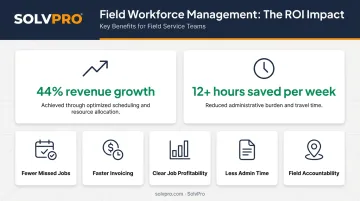
Jobber reports that businesses using its platform see an average of 44% revenue growth in the first year, along with more than 12 hours saved per week. That's a vendor-reported figure, but it's still a useful signal of what's possible once field data stops living in five different places.
Here's what that looks like in practice:
- Fewer missed or delayed jobs: automated scheduling and real-time updates prevent the double-bookings and communication gaps that cause no-shows
- Faster invoicing, quicker payments: closing a job and generating an invoice on the spot shortens the gap between finishing work and getting paid, instead of billing three days later
- Clear job profitability: tracking labor hours, materials, and costs in real time shows owners which jobs and crews are actually making money
- Less admin time: automating scheduling, invoicing, and reporting frees office staff from repetitive data entry that eats hours every week
- More field accountability: geolocation-based check-ins and digital job records cut down on disputes over hours worked or whether a job was actually completed
Owners often expect the biggest win to be scheduling. In reality, it's usually the invoicing speed and cost reporting that change how the business runs day to day.
How to Choose the Right Field Workforce Management Software
Picking a platform comes down to matching it to how your business actually operates, not chasing every feature on a vendor's checklist.
- Match complexity to crew size. A five-person landscaping crew doesn't need the same tools as a multi-site commercial cleaning company. Paying for enterprise features you'll never touch just adds cost and confusion.
- Prioritize fast setup. Platforms that take weeks and a consultant to implement are a poor fit for an owner-operator without dedicated IT staff. Look for something configurable in minutes.
- Check pricing transparency. According to Capterra's buyer research, 51% of field-service software buyers budget between $50 and $100 per user per month. Favor vendors with clear, published pricing over ones that require a sales call just to get a quote, and avoid long-term contract lock-in.
- Confirm your integrations. If you already run QuickBooks for accounting or a payment processor for on-site deposits, make sure the platform connects natively instead of requiring manual re-entry.
Why Growing Service Businesses Choose SolvPro
SolvPro was built for exactly this kind of business: general contractors, electrical and plumbing companies, landscaping crews, and commercial cleaning teams juggling multiple crews across job sites, not enterprise buyers with dedicated IT departments.
The platform reflects real job-site experience because that's who built it. The team behind SolvPro brings decades of combined experience in construction, estimating, sales, and project management, so features come from actual field problems rather than a boardroom guess about what contractors need.
A few things set it apart:
- Fully bilingual English/Spanish interface across the mobile app, web dashboard, and crew scheduling — not just a translated menu
- Job and crew time tracking for accountability without constant surveillance
- Digital estimates with customer-facing PDF proposals and digital signatures
- Built-in QuickBooks Online sync and credit-card and ACH payments, included in the core plan with no add-on fees
For SMB owners, the practical advantages matter as much as the feature list. SolvPro can be set up in under 10 minutes through a three-step process: create your account, add your crew and jobs, then dispatch and track in real time.
Onboarding support comes from a live team, and there are no long-term contracts, so you can cancel anytime. Plans, making it a low-risk way to move off spreadsheets and texting instead of committing to an enterprise field service suite.
Conclusion
Field service software helps you manage the work. SolvPro helps you make sure the work makes money.
The right tool depends on your trade, crew size, job mix and the systems you already run. Test it on real jobs before you commit, and check that crews will actually enter what the office needs. When you want to see it on your kind of work, Book a Demo.
Run the Job. Protect the Profit.
Frequently Asked Questions
What Are the 4 Pillars of WFM?
The four pillars are forecasting and scheduling, time and attendance tracking, task and productivity management, and analytics and optimization. These apply to office-based teams and field crews alike, just with different tools for capturing the data.
What Is the Difference Between Field Service Management and Field Workforce Management Software?
Field service management emphasizes customer-facing delivery, like dispatch, work orders, and billing. Field workforce management focuses on the people themselves, including scheduling, attendance, and productivity. Many modern platforms, SolvPro included, combine both.
How Much Does Field Workforce Management Software Typically Cost?
Pricing varies widely, from simple per-user monthly plans for small crews to custom enterprise quotes. SolvPro runs a single core plan with no long-term contracts, and does not publish pricing; confirm the current figure directly.
Can Field Workforce Management Software Integrate with Accounting Tools Like QuickBooks?
Yes. Many platforms offer built-in QuickBooks Online sync, including SolvPro, which includes it at no extra cost on the core plan. Job and payment data flows directly into accounting without manual re-entry.
Is Field Workforce Management Software Hard to Set up for a Small Business?
Some enterprise platforms require lengthy implementation and consultants. Many SMB-focused tools, including SolvPro, can be configured in minutes with guided onboarding, no dedicated IT support needed.
What Industries Commonly Use Field Workforce Management Software?
General contractors, electrical and plumbing companies, HVAC contractors, landscaping and lawn care businesses, excavation companies, and commercial cleaning or janitorial teams all rely on these platforms to manage crews across multiple job sites.