This guide covers what crew management software is, the warning signs your operation needs it, which features actually matter for landscaping, and how to choose and roll out a platform without disrupting your crews.
Key Takeaways
- Crew management software replaces paper schedules, group texts, and spreadsheets with one system for scheduling, time tracking, job costing, and invoicing.
- Labor is your largest cost — job-level time tracking is the only way to know which accounts are actually profitable.
- Must-have features for landscaping: GPS-based clock-ins, mobile-first crew app, job-level time tracking, and scheduling with real-time updates.
- A bilingual English/Spanish interface is a meaningful differentiator when a large portion of your field crew prefers Spanish.
- Setup doesn't have to be painful — the right platform can be operational in under 10 minutes with no long-term contract required.
What Is Landscaping Crew Management Software?
Crew management software is a digital platform that gives landscaping business owners visibility and control over their crews in the field. Instead of managing scheduling in one place, time tracking in another, job notes on paper, and invoicing in a spreadsheet, everything runs from one system.
That means every piece of the operation — connected and visible in real time:
- Scheduling and job assignment
- GPS-based crew tracking
- Work orders and job notes
- Time tracking and payroll export
- Invoicing and payment collection
Why Generic Software Doesn't Cut It
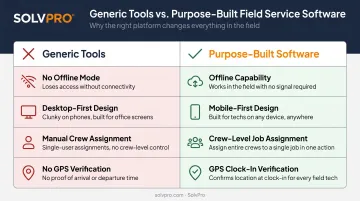
A spreadsheet or calendar app can hold job information, but it wasn't built for the reality of field operations. Landscaping crews move between multiple properties in a single day, work in areas with spotty cell service, and need tools simple enough to operate with dirty hands on a phone screen.
Field service software is built for exactly that environment. Where generic tools fall short, purpose-built platforms handle:
- Offline capability for dead-zone job sites
- Mobile-first design crews can navigate quickly
- Crew-level job assignment from the office
- GPS verification of clock-ins at each property
Signs Your Landscaping Business Needs Crew Management Software
The Paper Timesheet Problem
When crews self-report hours at the end of the day, accuracy depends entirely on memory and honesty. Drive time gets rounded up, "forgot to clock out" quietly defaults to the full shift, and breaks rarely get logged at all.
The bigger issue is that paper timesheets are almost impossible to dispute after the fact. Without a GPS-verified record of when a crew was actually on-site, you're reconciling guesses — and those guesses tend to favor the crew, not your payroll budget.
The Scheduling Chaos Signal
Jobs get double-booked. A crew shows up to a property without the gate code, the correct scope of work, or any knowledge that the appointment was rescheduled this morning. The office finds out via an angry customer call, not from the crew.
Last-minute changes relayed by phone or text get missed — especially when a crew lead is already mid-job. The fallout is predictable:
- Missed appointments that never get rescheduled
- Frustrated clients who call the office instead of waiting
- Callbacks that eat up your afternoon and your crew's next job
The Job Profitability Blindspot
Most landscaping owners know their total monthly revenue and their total payroll number. What they don't know is which specific accounts are profitable and which are quietly bleeding money on every visit.
NALP's 2025 Financial Benchmark Report identifies maintaining profit levels as the second-highest business concern among landscape owners, cited by 44% of respondents. That's not surprising when you consider that direct labor is the single largest cost in the business — and most operations track it as a daily lump sum rather than by individual job.
Without job-level cost data, repricing decisions are guesswork — and underpriced accounts stay underpriced until they quietly sink the quarter.
Core Features to Look For in Landscaping Crew Management Software
Scheduling and Dispatch
Good scheduling for a landscaping operation means more than a calendar. Look for:
- Drag-and-drop job assignment — assign jobs to crews in seconds without phone calls
- Multiple calendar views — day, week, and crew-level visibility to spot gaps and avoid double-booking
- Real-time job updates: when weather forces a reschedule or a same-day job gets added, the change reaches the crew immediately through the app rather than a chain of phone calls
SolvPro's scheduling includes day, week, and crew views — letting office teams manage multiple jobs simultaneously from one screen.
GPS-Based Crew Tracking
Event-based geolocation captures the crew's location at the moment they clock in and clock out — not continuously throughout the day. The system records a GPS coordinate and timestamp at each job event, tying that data directly to the work order.
This supports accountability without feeling like surveillance. The crew lead knows their time is verified, the office can confirm on-site presence, and disputes about whether a job was completed become easy to resolve.
Mobile-First Crew App
The crew app has one job: work for everyone on day one. That means:
- No training manual required — new hires can figure it out on day one
- Offline capability for rural properties and large commercial sites with poor signal; data syncs when connectivity returns
- Bilingual English/Spanish interface: BLS data shows 47.5% of landscaping and groundskeeping workers are Hispanic or Latino, and a Spanish-language app is a real operational advantage when that reflects your field team
SolvPro offers a fully bilingual English/Spanish interface across both the office platform and the mobile crew app — included at no additional cost in every pricing tier.
Time Tracking Tied to Jobs
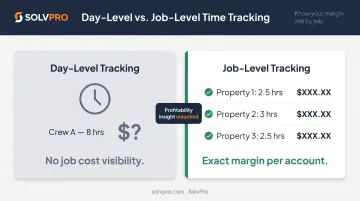
Day-level time tracking tells you how many hours a crew worked. Job-level time tracking tells you how many hours they spent at each property.
That distinction is what makes job costing possible. Without it, hours are a lump sum that tells you nothing about where your margin went. With it, you can see exactly how much labor went into a specific account — and compare that against what you estimated and what you billed.
Work Orders and Job Documentation
Digital work orders eliminate the "the crew says they did it, the customer says they didn't" dispute. Crews see exactly what needs to be done at each property, can document completion with notes and photos, and that record is automatically attached to the job — geo-stamped and timestamped.
Notes, photos, materials used, and change orders all live in one place in SolvPro — visible to the office in real time the moment the crew submits them.
How Crew Management Software Solves Your Biggest Operational Problems
Fixing Labor Cost Leakage
Three patterns show up consistently in landscaping operations running on paper timesheets:
- Drive-time padding — hours logged that GPS would show differently
- Overstated breaks — breaks that aren't consistently recorded, or get reconstructed at week-end in the crew's favor
- Forgotten clock-outs — the shift extends until someone notices or a default kicks in
GPS-verified clock-ins don't eliminate every payroll dispute, but they give you a factual record to work from. When time entries are geo-stamped and tied to specific job locations, discrepancies become visible rather than invisible.
Turning Job Hours Into Profit Visibility
When a 4-hour job estimate becomes a 6-hour reality, the software surfaces that gap. That gives you three options you didn't have before:
- Reprice the account at renewal based on actual hours
- Adjust the crew assignment if the issue is a specific team's efficiency on that job type
- Improve estimating for similar jobs going forward
Without job-level data, that 6-hour job just shows up as payroll. You never know the specific account was underwater.
SolvPro's Job Costing & Analytics module makes this visible automatically — tracking labor costs by job in real time and syncing directly with QuickBooks Online so you're not manually reconciling at month-end.
Eliminating the Office-to-Field Communication Gap
The fragmented loop of phone calls, texts, and paper route sheets has a predictable failure mode: something gets missed. A crew lead doesn't see the text. A schedule change happens after the route sheet was printed. An instruction doesn't make it from the office to the right person.
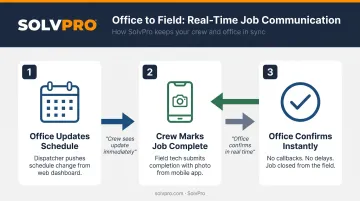
Crew management software replaces that loop with one shared system everyone works from. Here's how that plays out in practice:
- The office updates the schedule — the crew sees it on their phone immediately
- The crew marks a job complete with a photo — the office sees it instantly
- No callbacks, no "I didn't know," no end-of-day catch-up calls
Speeding Up Invoicing and Getting Paid Faster
When job completion is confirmed through a digital work order — with timestamp, crew notes, and photos — invoicing can happen the same day rather than waiting for paperwork to come back to the office.
This matters because delayed billing has a measurable cost. QuickBooks' 2025 Small Business Late Payments Report found that 56% of small businesses were owed money from unpaid invoices, with an average outstanding balance of $17,500 per business — and 47% reported invoices more than 30 days overdue.
Getting invoices out the same day a job closes is one of the most direct ways to compress that cycle.
Building Crew Accountability Without Micromanaging
GPS clock-ins and job-level tracking create accountability through data, not surveillance. Over time, patterns emerge that would otherwise be invisible:
- Which crews consistently run long on certain job types
- Which accounts are consuming more hours than similar accounts
- Where training or process changes would have the most impact
That turns a vague performance concern — "I feel like this crew is slow" — into something you can actually act on: "this crew averaged 2.3 hours over estimate on residential mowing accounts last month." Specific data changes what's possible in those conversations.
How to Choose and Implement the Right Software for Your Landscape Crew
Three Questions to Answer First
Before comparing platforms, answer these:
- Does it fit your operation size? A platform built for enterprise construction won't work for a 3-crew landscaping business, and a basic time clock app won't grow with you.
- Does it connect your existing tools? QuickBooks integration isn't optional if your bookkeeper lives in QuickBooks.
- Will your crew actually use it? Simple mobile interface, available in the languages your team speaks, low friction on day one.
Where SolvPro Fits
SolvPro was built for growing landscaping and field service businesses that need scheduling, GPS-based crew tracking, work orders, job costing, and QuickBooks Online sync. There's no enterprise-level complexity here, and no long-term contract required.
The platform is fully bilingual in English and Spanish across both the office and crew app, no add-on required. That matters when your crew speaks Spanish and your office doesn't — communication gaps cost jobs. Pricing starts at $179/month for up to 3 users on the Starter plan and $228/month for 4+ users on the Growth plan, with no setup fees and no contracts.
If your business has outgrown group texts and paper timesheets but doesn't need a full enterprise platform, SolvPro gives you the structure to scale without the overhead to manage it.
The Right Rollout Approach
Start narrow, then expand:
- Launch with scheduling and time tracking first — these deliver the highest immediate ROI and crews pick them up fastest
- Train one crew lead before the full team — they become your internal advocate and can troubleshoot questions before they reach the office
- Use the first 4-6 weeks of job-level data to identify accounts that need repricing — you'll likely find two or three immediately
- Add work order documentation and job costing once the crew is comfortable with the app
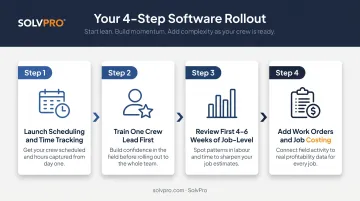
This sequence keeps disruption low while building adoption organically.
Frequently Asked Questions
What is the best landscape management software?
The best option depends on your business size and what problems you're actually solving. For most growing operations, prioritize platforms that combine scheduling, GPS crew tracking, job-level time tracking, and QuickBooks integration — without requiring enterprise-level implementation. Field service platforms built for crews in the field will outperform generic project management tools every time.
What features should landscaping crew management software have?
The non-negotiables: job-level time tracking with GPS verification, a mobile crew app with offline capability, scheduling with real-time updates, and integration with QuickBooks or your payroll system. Bilingual English/Spanish support is a practical necessity if your field crew includes Spanish-speaking members.
How does crew management software help reduce labor costs?
GPS-verified clock-ins create a factual record that makes drive-time padding, overstated breaks, and forgotten clock-outs visible rather than invisible. Job-level tracking identifies which accounts consistently run over estimated hours. That lets you reprice, reassign, or re-estimate before the pattern keeps eating into your margin.
Can landscaping crews use management software without reliable internet?
Good crew management apps include offline mode — crews can clock in and log job activity without a connection, and data syncs automatically when signal is restored. This is essential for rural properties and large commercial sites where cell coverage is unreliable.
Is $100 an hour too much for landscape work?
It depends on your fully-loaded cost per hour, not just wages. Lawn & Landscape's 2025 Benchmarking Report puts maintenance averages at $65.63/hour and snow and ice management at $108.07/hour. Job costing gives you the real numbers to price confidently.
How long does it take to set up crew management software for a landscaping business?
Modern platforms are built for fast onboarding — SolvPro, for example, is operational in under 10 minutes with no credit card required for the free trial. Start with scheduling and time tracking, get one crew lead comfortable with the app, then expand from there.