That gap between the visit and the follow-up is where jobs go to die.
Estimates built on paper or in a spreadsheet back at the shop delay approvals, introduce pricing errors, and slow down cash flow for HVAC, plumbing, electrical, and general contracting crews alike. Every extra hour between the quote and the signature is an hour a competitor can swoop in with a faster answer.
This guide breaks down what mobile estimate software actually does, the features that separate a genuinely useful tool from a glorified calculator, and a side-by-side look at the top platforms field techs can run directly from a phone or tablet in 2026.
KEY TAKEAWAYS
- Mobile estimate software lets technicians build and send quotes from the job site rather than back at the office.
- Offline operation, multi-stage pricing, and on-device e-signatures are the features that decide whether a quote can be finished on site.
- SolvPro, Jobber, Housecall Pro, ServiceTitan, and FieldEdge each suit different crew sizes.
- Offline reliability, payment integrations, and the time it takes to build an estimate matter more than the size of the template library.
- Platforms that combine estimating, scheduling, crew tracking, and payments remove the rekeying step between the quote and the invoice.
Overview of Mobile Estimate Software for Field Technicians
Mobile estimate software lets a field technician price out a job, generate a professional proposal, and get customer sign-off directly from a smartphone or tablet. No callback to the office. No "I'll have someone follow up."
Quoting is already eating into crews' days. In Jobber's 2026 Home Service Trends Report, 37% of home service owners name quoting as one of their three most time-consuming daily tasks.
54% of businesses using AI tools already apply it to estimates, quotes, or contracts. That's a workforce actively looking for faster ways to price jobs, not a niche preference.
The shift makes sense once you've watched a crew lose a job to slow paperwork. A tech who can:
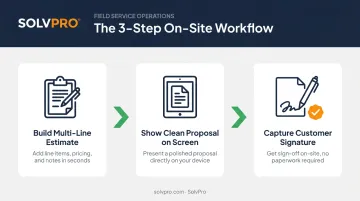
- Build a multi-line estimate in the driveway
- Show the customer a clean proposal on the same screen
- Capture a signature before pulling out of the neighborhood
...closes more work than one who promises to "send something over." The sections below cover what to look for and compare the platforms growing service businesses actually use in the field.
Qualities to Look for in Mobile Estimate Software for Field Technicians
Plenty of businesses pick estimating software based on brand recognition, then discover in the field that offline gaps or clunky mobile screens undo the value of the whole platform. Here's what actually matters once a tech is standing on a job site.
Offline Estimate Creation and Auto-Sync
Basements, rural properties, and new construction sites rarely have reliable signal. A plumber quoting a water heater replacement in a flooded basement can't wait around for a bar of signal to appear. A tech needs to build and save a complete estimate with zero connection and trust that it syncs automatically the moment the phone reconnects. Tools that only offer "offline viewing" force a second trip back to a hotspot before the customer can approve anything.
Fast, On-Site Estimate Building and Approval
Blank-line itemization is slow and error-prone when a customer is standing there watching. Multi-stage or template-driven pricing lets a tech assemble an accurate, multi-part estimate in minutes instead of typing every line from scratch.
The estimate should then end in a decision, not a follow-up call. Customers need to review a clean PDF proposal and sign on the same device, turning a "we'll think about it" into a same-visit yes.
Photo Documentation and Back-Office Integration
Photos attached directly to a line item document site conditions before work starts. That protects both sides:
- Reduces disputes over what was actually agreed to
- Speeds up invoicing since the office already has visual proof
- Gives techs a record if scope changes mid-job
Once approved, that same estimate should flow straight into a work order and invoice, syncing with accounting tools like QuickBooks Online so office staff aren't re-keying the same data twice.
Top Mobile Estimate Software for Field Technicians
Offline reliability, speed of on-site use, pricing transparency, and fit for different crew sizes and trades are what separate these tools in practice.
SolvPro
SolvPro is an all-in-one field service platform built by a team with over 50 years of combined experience in construction, estimating, and project management. The estimating tool uses multi-stage pricing with customer-facing PDF proposals, digital signatures, and instant conversion from estimate to job once a customer approves.
A few things set it apart from the crowd:
- Bilingual English/Spanish interface for both office staff and field crews
- Job and crew time tracking, recording time entries and photo uploads against the work order
- Native QuickBooks Online sync and built-in credit-card and ACH payments, included at no extra cost
- Setup in under 10 minutes, with a live team walking new users through onboarding rather than a chatbot and a knowledge base
| Key Features | Multi-stage mobile estimating, PDF proposals, bilingual support, QuickBooks sync, integrated payments |
| Best For | Growing multi-crew teams in electrical, plumbing, landscaping, general contracting, and commercial cleaning |
Jobber
Jobber is a widely used platform for small to lower-mid-market home service businesses, covering mobile quoting, job checklists, and invoicing in one app. Techs can build quotes from scratch, from templates, or by converting a customer request, and add line items, discounts, and deposits on the go.
It's genuinely technician-friendly, with route optimization and GPS tracking baked into the app. That said, those routing features live on the Connect tier and above, not the entry plan, and Jobber doesn't offer coordinate-based navigation or deeper proof-of-service tools like job-linked photo capture.
| Key Features | Mobile quotes, route optimization, checklists, invoicing |
| Best For | Small residential service teams wanting a simple, low-friction start |
Housecall Pro
Housecall Pro is built for residential teams of roughly 1 to 10 technicians, with on-site estimate creation, job notes, photo attachments, and integrated payments. The "On My Way" text feature is a small but truly useful touch, automatically letting customers know a tech is en route.
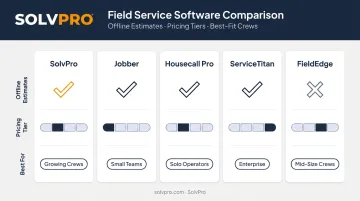
The catch is offline access. According to Housecall Pro's own pricing and feature documentation, offline mode is view-only, meaning a tech can review a previously loaded estimate without signal but can't build or finalize a new one until connectivity returns.
| Key Features | On-site estimates, GPS time tracking, one-tap customer notifications |
| Best For | Small residential teams needing fast setup without heavy implementation |
ServiceTitan
ServiceTitan is an enterprise-grade platform, and its mobile app supports price-book-driven estimates, equipment history, and an AI assistant (Field Pro's Atlas) for diagnostic and pricing guidance. It's the most feature-complete option on this list for large operations juggling recurring service work, dispatch, and multiple crews across markets.
That completeness comes at a cost. Pricing is per-technician and quote-based, with add-on modules for fleet tracking, marketing, and AI features that stack up quickly. Smaller teams often find the learning curve steeper than they need.
| Key Features | Price-book estimating, offline execution, AI-assisted diagnostics, recurring service workflows |
| Best For | Large enterprise and franchise field service operations |
FieldEdge
FieldEdge targets multi-truck HVAC, plumbing, and electrical contractors already organized around QuickBooks and flat-rate pricing. Technicians build estimates from a flat-rate price book, present Good-Better-Best options, and collect signatures and payment on-site, with data syncing through the QuickBooks integration.
It's a solid fit for shops that already run flat-rate pricing books and want that structure carried into the field without reinventing their pricing model.
| Key Features | Flat-rate price book estimating, QuickBooks sync, service agreement tracking |
| Best For | Established HVAC, plumbing, and electrical contractors on QuickBooks |
What to Look for in Mobile Estimate Software
Three factors separate these platforms:
- Offline reliability: how it behaves with no signal
- Estimate speed: how fast a tech can build a multi-item estimate on a phone screen
- Invoicing handoff: how cleanly an approved estimate flows into invoicing
The most common buying mistake is picking a well-known tool without checking whether it actually works in low-signal conditions or fits how a specific trade prices jobs. A flat-rate plumbing shop and a multi-stage general contractor need different estimate structures, and a platform that nails one can feel clunky for the other.
Conclusion
The right mobile estimate software matches how your trade actually prices jobs, not which platform boasts the longest feature list on paper.
Before committing to anything, put it through three quick checks:
- Test offline reliability in real-world field conditions
- See how easily your least tech-savvy crew member can build an estimate
- Add up total cost, including modules and per-user fees, not just the sticker price
If you're ready to see what multi-stage mobile estimating looks like without the enterprise-level cost, SolvPro sets up in under 10 minutes and includes QuickBooks sync and payment processing from day one. You can also schedule a demo to walk through the estimate-to-job workflow with the team.
Field service software helps you manage the work. SolvPro helps you make sure the work makes money.
The right tool depends on your trade, crew size, job mix and the systems you already run. Test it on real jobs before you commit, and check that crews will actually enter what the office needs. When you want to see it on your kind of work, Book a Demo.
Run the Job. Protect the Profit.
Frequently Asked Questions
Which Estimate Software Works Best on Mobile Devices for Field Techs?
The best options combine offline reliability, multi-stage or price-book estimating, and same-visit digital approval. SolvPro, Jobber, and ServiceTitan each suit different business sizes, from growing multi-crew teams to large enterprise operations.
Is There AI Estimating Software That Works on Mobile Devices for Field Techs?
Some platforms, like ServiceTitan, include AI-assisted pricing and diagnostic guidance through tools like Field Pro's Atlas. Most SMB-focused tools instead rely on customizable templates and price books rather than AI-generated quotes.
Can Field Technicians Create Estimates Without Internet Access?
Top platforms allow full estimate creation offline, with data syncing automatically once a signal returns. Some tools, including Housecall Pro, only offer view-only offline access, meaning new estimates can't be built until connectivity is restored.
How Much Does Mobile Estimating Software Typically Cost for Small Crews?
Pricing generally ranges from low monthly per-user plans for SMB-focused tools to quote-based enterprise pricing for larger platforms. Confirm current rates directly with vendors, since add-on modules can change the total significantly.
Does Mobile Estimate Software Integrate with Invoicing and Payment Collection?
Most modern platforms convert an approved estimate directly into an invoice and support integrated payment processing. This reduces manual data entry for office staff and speeds up cash flow.
What's the Difference Between a Quote and an Estimate in Field Service Software?
An estimate is a preliminary price based on the provider's experience, generally landing within 10-15% of the final cost, while a quote is a fixed, customer-approved price. Many platforms use the terms interchangeably in their mobile workflows.