That gap shows up fast. Office staff re-key the same customer and job data into a spreadsheet or a second app. Invoices sit unsent because nobody's confirmed the job is actually done. And by the time anyone checks job costs against the estimate, the project's already wrapped.
This guide breaks down the best construction software that integrates with QuickBooks Online, organized by the type of business and the operational gap each tool actually closes.
KEY TAKEAWAYS
- QuickBooks Online handles accounting and invoicing well, but not scheduling, field crews, or job costing.
- The right add-on depends on your biggest gap: project management, time tracking, estimating, inventory, or scheduling.
- Options range from enterprise tools such as Procore to residential platforms such as Buildertrend and all-in-one systems such as SolvPro.
- Integration depth and pricing clarity matter more than brand recognition when the two systems have to stay in step.
- A one-way sync and a two-way sync behave differently at month end, so confirm which direction the data actually flows.
Overview of Construction Software and QuickBooks Integration
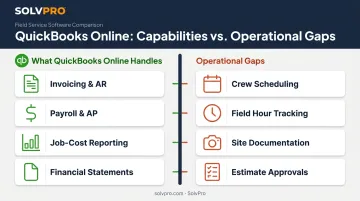
QuickBooks Online covers the financial backbone of a contracting business. For contractors specifically, it tracks project income and expenses, employee cost rates, and job profitability. Core capabilities include:
- Invoicing and accounts receivable
- Payroll and accounts payable
- Job-cost and profit reporting
- Standard financial statements
What it doesn't do natively is manage the operational side of a job. Gaps include:
- Assigning crews to jobs
- Tracking hours in the field
- Documenting site conditions
- Routing estimates through approval
That is why many growing contractors pair QuickBooks with a dedicated tool built for scheduling, job costing, or field operations. The trick is finding one that actually talks to QuickBooks well, instead of creating a second silo of data. Below are the options worth considering.
Best Construction Software That Integrates with QuickBooks
Each option below was evaluated on four things: depth of QuickBooks sync, relevance to construction or field service workflows, how easy it is to set up, and whether pricing is actually transparent upfront.
Procore
Procore is a large-scale, all-in-one construction project management platform used across commercial GCs, specialty contractors, and government projects. It handles budgets, RFIs, submittals, and change orders inside one system, with dedicated tools for each.
For QuickBooks specifically, Procore requires its Project Financials module plus the ERP Integrations tool to activate the connector, and it only supports QuickBooks Online Plus and Advanced plans. Note that budgets, prime contracts, change orders, commitments, and timecards don't sync; only jobs, vendors, job costs, and invoices flow between the two systems.
| Key Features | Project management, job costing, budget tracking, RFIs/submittals, dashboards |
| Best Fit | Commercial GCs and large contractors with dedicated ops/IT support |
Buildertrend
Buildertrend targets residential builders, remodelers, and specialty contractors, with a client-facing portal at the center of the experience. Homeowners can view progress photos, schedules, budgets, and change orders without calling the office.
It stands out for unlimited cloud document storage and a genuine two-way QuickBooks Online sync covering bills, invoices, time tracking, and client payments — meaning data updates flow in both directions instead of just exporting one way.
| Key Features | Scheduling, daily logs, change orders, client portal, QuickBooks sync |
| Best Fit | Homebuilders and remodelers managing client-facing residential projects |
SolvPro
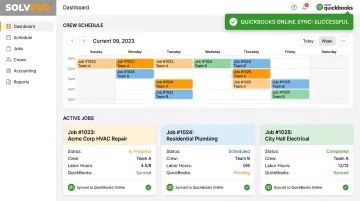
SolvPro is an all-in-one field service management platform built for growing service businesses running crews in the field — electrical, plumbing, landscaping, cleaning, excavation, and similar trades. QuickBooks Online sync isn't a bolted-on add-on here. It's built into the core platform and included on the core plan at no extra cost.
A few things set it apart for specialty trades:
- Bilingual English/Spanish interface across the entire platform, web and mobile, for office staff and field crews alike
- Job and crew time tracking that records time entries against the job, photos, and job status updates for accountability
- Digital estimates with client-facing PDF proposals, digital signatures, and instant conversion from estimate to job
- Setup in under 10 minutes with no credit card required and no long-term contracts on any plan, including custom Scale pricing
The QuickBooks sync supports labor hour tracking, job costing and one-click report exports, tying field activity directly to the numbers the office already relies on.
| Key Features | Scheduling, work orders, crew tracking, digital estimates, credit-card and ACH payments, native QuickBooks Online sync |
| Best Fit | Electrical, plumbing, HVAC, landscaping, cleaning, and multi-crew field service teams that want simplicity without enterprise complexity |
ClockShark
ClockShark is a dedicated time-tracking app built for field crews, with GPS tracking, geofencing, and drag-and-drop scheduling. It's a good fit if labor accuracy, not project management, is your actual gap.
Its QuickBooks connection pulls customers, service items, and employees from QuickBooks to build jobs and tasks in ClockShark, then pushes timesheets back for payroll and job costing.
| Key Features | GPS tracking, geofencing, drag-and-drop scheduling, manager approvals |
| Best Fit | Contractors whose main QuickBooks gap is accurate field labor tracking |
ContractorTools
ContractorTools is a lightweight estimating and invoicing app popular with small residential contractors who don't need full project management. It's affordable to start and QuickBooks sync is included on every plan tier, not locked behind a premium.
| Key Features | Estimating, QuickBooks sync, invoicing (higher tiers), optional cost books |
| Best Fit | Small remodelers and local contractors needing simple estimating, not full project management |
Acctivate
Acctivate specializes in inventory and materials management, built for product-heavy operations rather than field crews. Real-time inventory tracking across warehouses, purchase order management, and lot/serial tracking make it a strong fit for suppliers and inventory-heavy contractors.
Its QuickBooks integration is explicitly bi-directional: customers, salespeople, and payment terms sync over, while inventory adjustments and finalized invoices create summary entries back in QuickBooks.
| Key Features | Inventory tracking, purchasing, warehouse and lot management, QuickBooks sync |
| Best Fit | Commercial contractors or suppliers with inventory-heavy operations |
What to Look for in Construction Software for QuickBooks
The biggest mistake buyers make is assuming every "QuickBooks integration" works the same way. Some sync one direction only. Some update in real time; others batch overnight. And some, like Procore, only support certain QuickBooks Online plan tiers or require an additional module before the sync even activates.
Our team at SolvPro, built by people with hands-on experience in construction and field service, weighed each tool against five factors:
- Depth of QuickBooks sync — what data actually moves, and in which direction
- Construction or field-service relevance — built for the trades, not repurposed generic software
- Ease of setup — days versus minutes
- Pricing transparency — published rates versus "contact sales" for everything
- Scalability — whether it still works as crews and project volume grow
How to Choose the Right Fit for Your Business
Start with your single biggest workflow gap, not a wish list of every possible feature. Chasing an all-in-one platform you don't need usually means paying for modules that sit unused.
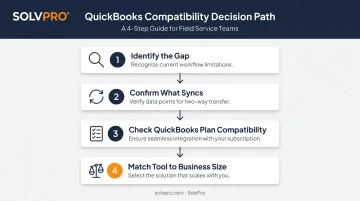
- Identify the gap first. Is it field documentation, labor tracking, materials, or estimating? Pick the tool built to solve that specific problem.
- Confirm exactly what syncs. Ask whether customers, invoices, time entries, and job costs all sync, or just some of them, and whether it happens in real time or on a batch schedule.
- Check QuickBooks plan compatibility. Some connectors, like Procore's, require QuickBooks Online Plus or Advanced. Confirm before you sign anything.
- Match the tool to your business size. A commercial GC running multimillion-dollar projects has different needs than a five-crew electrical company.
For growing specialty trades and multi-crew service businesses — electrical, plumbing, landscaping, cleaning — the best ROI usually comes from a purpose-built field service platform like SolvPro. It combines scheduling, crew accountability, and native QuickBooks Online sync in one system.
That's a different fit than an enterprise construction suite designed for large commercial GCs managing hundreds of subcontractors.
Conclusion
Choose construction software based on how well it closes your specific operational gap and syncs cleanly with QuickBooks Online, not on brand recognition. The right fit avoids creating a second data silo to manage.
Before committing, test the QuickBooks sync yourself during a trial or demo. Confirm what data actually moves, how the pricing scales as you add crew members, and whether setup takes ten minutes or ten days.
If you're managing field crews and tired of juggling spreadsheets and disconnected apps, see how SolvPro's native QuickBooks Online sync and under-10-minute setup can bring scheduling, job costing, and invoicing into one place.
Field service software helps you manage the work. SolvPro helps you make sure the work makes money.
The right tool depends on your trade, crew size, job mix and the systems you already run. Test it on real jobs before you commit, and check that crews will actually enter what the office needs. When you want to see it on your kind of work, Book a Demo.
Run the Job. Protect the Profit.
Frequently Asked Questions
Does QuickBooks Work for Contractors?
Yes, for core accounting: invoicing, payroll, and job-level expense tracking. Most growing contractors pair it with dedicated software for scheduling, field tracking, or estimating once crews and project volume increase.
What Is the Best Accounting Software for Contractors?
QuickBooks Online remains the most widely used option for small-to-mid contractors due to its ease of use and broad third-party integrations. Larger firms needing advanced job costing often move up to QuickBooks Enterprise.
What Software Is Compatible with QuickBooks?
Project management platforms, field service tools like SolvPro, time-tracking apps, estimating software, and inventory systems all integrate with QuickBooks. Many are listed directly in the QuickBooks App Store.
Why Should I Integrate Construction Software with My QuickBooks Online Account?
Integration cuts down duplicate data entry between spreadsheets and QuickBooks and speeds up invoicing. It also gives you real-time the ability to see job costs and what the job made, instead of finding out after the job closes.
What Construction Features Are Most Important to Sync with QuickBooks?
Job costing, time entries, invoices and estimates, and purchase orders deliver the most value. These are the data points that directly affect cash flow and job profitability tracking.
Can QuickBooks Alone Handle Construction Project Management?
No. QuickBooks is built for accounting, not project management. Scheduling, RFIs, and field coordination all require dedicated construction or field service software layered on top.