Small business owners and executives report their companies spend an average of 25 hours a week on manual data entry and reconciling information across different apps, according to an Intuit QuickBooks survey of 630 US business owners. Scheduling is a big chunk of that chaos.
Here's the catch: "scheduling app" actually means two different things. Salons and consultants need customer-facing booking pages. Contractors, plumbers, and cleaning crews need job dispatch tools. This guide covers both, so you can find the one built for how your business actually runs.
KEY TAKEAWAYS
- Scheduling apps split into two types: client booking tools and field crew dispatch systems
- Setmore, Calendly, and Square Appointments work well for client-facing booking
- SolvPro leads for multi-crew teams needing scheduling, dispatch, and payments together
- Free tiers exist across most tools, but user limits and features vary widely
- Payment and QuickBooks integrations should factor heavily into your decision
Overview of Scheduling Software for Small Businesses
Scheduling software replaces phone calls, texts, and spreadsheets with automated booking, calendar management, and staff or crew coordination. Instead of playing telephone tag with clients or radioing crews about the next job site, the software handles it.
Demand for these tools keeps climbing. The global appointment-scheduling software market was valued at $546.1 million in 2025 and is projected to reach $1.9 billion by 2034, a 14.70% compound annual growth rate, according to Fortune Business Insights.
That growth reflects two different buyer groups. Some need a booking page for one-on-one appointments. Others need to dispatch multiple crews across job sites daily. Both types matter, since not every small business runs on one-to-one bookings.
Top Scheduling Apps for Small Businesses in 2026
These tools differ on ease of setup, mobile access, integrations, pricing transparency, and fit for appointment-based versus crew-based work.
SolvPro
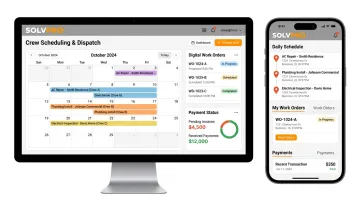
SolvPro is an all-in-one field service management platform built by a team with 50+ years of combined experience in construction, estimating, sales, and project management. It handles job scheduling, crew dispatch, digital work orders, and payments in one place.
What sets it apart:
- Fully bilingual English/Spanish interface across the mobile app, web dashboard, and crew scheduling tools
- QuickBooks Online sync and credit-card and ACH payments built into the core platform, not bolted-on add-ons
- Same-day go-live with guided onboarding and a live team walking you through setup
- No long-term contracts and a 14-day free trial with no credit card required
| Category | Details |
|---|---|
| Best For | Multi-crew field service and trade businesses (GCs, electricians, plumbers, landscapers, commercial cleaners) scheduling jobs, not appointments |
| Key Features | Crew dispatch, digital work orders with real-time job cost tracking, online estimates with e-signatures, time by job and crew member |
Unlike platforms that gate scheduling or reporting features behind pricier tiers, SolvPro includes the full feature set, including QuickBooks sync and payment processing, at every price point.
Setmore
Setmore is a free scheduling app built for appointment-based small businesses like salons, wellness studios, and tutoring services.
Standouts include a branded booking page, 24/7 live support, and integrations with Zoom, Stripe, and Square.
| Category | Details |
|---|---|
| Best For | Solo operators or small teams needing a free, branded booking page |
| Key Features | Branded booking page, calendar sync, video meeting integration, on-site payments |
Calendly
Calendly is a widely used meeting scheduler known for automatic time zone handling, popular among consultants and client-facing professionals.
Differentiators: automatic time zone adjustment, customizable appointment types, and workflow automation for reminders and follow-ups.
| Category | Details |
|---|---|
| Best For | Businesses coordinating meetings across time zones |
| Key Features | Time zone auto-adjust, custom booking links, automated workflows |
Square Appointments
Square Appointments comes bundled with Square's point-of-sale and payments ecosystem, a natural fit for businesses already using Square.
It offers on-the-spot payment collection, automated SMS and email reminders, and multi-staff calendar management.
| Category | Details |
|---|---|
| Best For | Businesses wanting scheduling and payment processing combined |
| Key Features | Payment integration, automated reminders, unlimited staff calendars |
Acuity Scheduling
Acuity, owned by Squarespace, is a highly customizable appointment scheduler used by businesses of every size.
It stands out with custom intake forms, group and class scheduling, buffer-time controls, and over 500 Zapier integrations.
| Category | Details |
|---|---|
| Best For | Businesses needing deep customization of booking rules and client intake |
| Key Features | Custom availability settings, group appointments, client portal |
Appointment Booking vs. Field Service Scheduling: Which Does Your Business Need?
Appointment scheduling apps manage one-to-one client bookings at a fixed location, think haircuts, consultations, or classes. Field service scheduling manages something entirely different: dispatching crews to multiple job sites throughout the day.
Field service and trade businesses need more than a calendar. They need to:
- Assign jobs by crew or technician, not just by time slot
- Update schedules in real time as crews move between sites
- Link schedules directly to work orders and invoicing
Industries like general contracting, electrical, plumbing, HVAC, landscaping, and commercial cleaning run on this crew-dispatch model rather than customer self-booking. That's exactly the segment SolvPro was built for.
It connects scheduling directly to crew accountability and job profitability, with real-time field data keeping everyone in the loop:
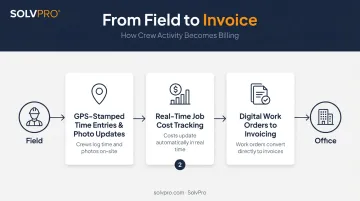
- GPS-stamped time entries and photo updates give office staff the ability to see which jobs are active, delayed, or complete
- Job cost tracking shows what a job is earning while it's still in progress, not weeks later
- Digital work orders flow straight into invoicing, so completed jobs get billed faster
This reflects SolvPro's mission to help businesses run "without the chaos." Scheduling, in this context, means connecting the office to the field so nothing falls through the cracks.
Not every business fits neatly into one model, though. Some businesses fall in between. A mobile service company with occasional client bookings might pair a customer-facing tool like Setmore with a backend crew scheduling platform like SolvPro. There's no rule against running both, especially if your business handles both walk-in style appointments and dispatched crew work.
What to Look for in Scheduling Apps
The platforms differ most on ease of setup, mobile accessibility, calendar and payment integrations, and pricing transparency.
A common mistake we see: picking an app based on price alone without checking whether it actually fits an appointment-based or crew-based workflow. A $10-a-month booking tool won't help a landscaping company dispatching four crews across a city.
We also considered:
- Reviewed real customer feedback and reported reliability
- Determined whether onboarding support is included or adds extra cost
- Assessed scalability as a team grows from 3 employees to 30
Every factor ties back to business outcomes that matter most: fewer missed jobs, faster invoicing, and less time spent reconciling schedules manually.
Conclusion
The right scheduling app depends entirely on how your business operates. If you're booking one-on-one client appointments, Setmore, Calendly, or Square Appointments will likely serve you well. For crews spread across multiple job sites, you need something built for that reality.
Before committing, test the free trial or plan, confirm payment and QuickBooks integration needs, and check whether onboarding support is actually included or costs extra.
Field service businesses ready to move beyond a basic calendar can go live with SolvPro the same day, backed by guided onboarding and no long-term contract to worry about.
Field service software helps you manage the work. SolvPro helps you make sure the work makes money.
The right tool depends on your trade, crew size, job mix and the systems you already run. Test it on real jobs before you commit, and check that crews will actually enter what the office needs. When you want to see it on your kind of work, Book a Demo.
Run the Job. Protect the Profit.
Frequently Asked Questions
What Is the Best Scheduling App for Small Businesses?
It depends on your business type. Setmore and Calendly work well for appointment-based businesses like salons and consultants, while SolvPro is built for field service and crew-based businesses managing job dispatch.
What Is the Best Free Scheduling App for Small Businesses?
Setmore's free tier supports up to 4 users and 200 appointments a month, making it a strong option for appointment-based businesses. Crew-based platforms like SolvPro typically offer a free trial instead of an ongoing free plan.
What's the Difference Between Appointment Scheduling Software and Field Service Scheduling Software?
Appointment scheduling manages one-to-one client bookings at a fixed location. Field service scheduling dispatches crews to multiple job sites throughout the day and links directly to work orders and invoicing.
Can I Use One App for Both Customer Appointments and Crew Job Scheduling?
Most tools specialize in one or the other. Businesses that handle both often pair a client-facing booking tool with a dedicated field service platform like SolvPro for crew dispatch.
How Much Does Small Business Scheduling Software Typically Cost?
Pricing ranges from free plans to $50 or more per month, depending on features, user count, and billing unit. SolvPro starts around for small teams needing crew dispatch tools.
Do Scheduling Apps Integrate with QuickBooks and Payment Processors?
Integration varies by tool. SolvPro includes QuickBooks Online sync and credit-card and ACH payments as built-in platform features, not add-ons, on the core plan.