That gap is where cash flow goes to die.
It's not a small problem, either. A 2026 QuickBooks survey found that 59% of US businesses had invoices at least 30 days overdue, with affected businesses owed an average of $17,700 at any given time. For contractors, plumbers, electricians, landscapers, and cleaning crews, that delay usually starts with manual data entry, not with customers refusing to pay.
This guide covers what invoice automation actually means for service businesses, how the process works step by step, the real benefits, the features worth paying for, and how to get started in 2026. One quick note: this is about billing your customers for completed work, not enterprise accounts payable software for processing vendor bills.
KEY TAKEAWAYS
- Invoice automation converts completed work orders into ready-to-send invoices, no re-typing needed
- Faster invoicing means quicker payments and steadier cash flow for growing crews
- Top platforms pair invoice automation with online payments and QuickBooks Online sync
- Modern platforms go live the same day you sign up, no IT department needed
- Automation only helps when the work order already carries labor and materials
What Is Invoice Automation?
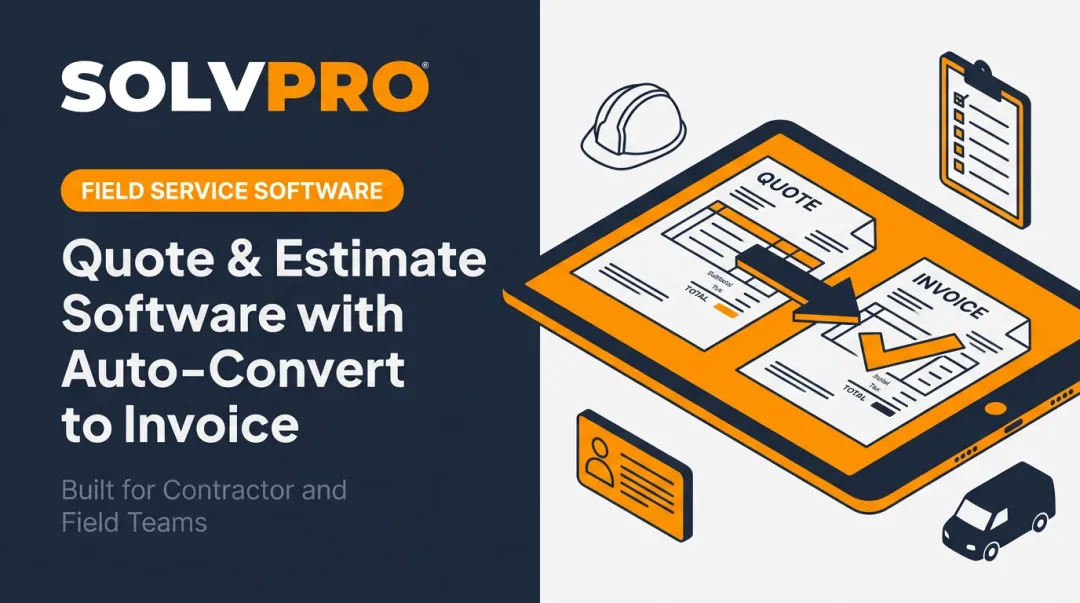
Invoice automation is software that creates, sends, and tracks invoices based on completed jobs, without anyone re-entering data by hand. A technician finishes a job, and the system already knows the labor hours, materials, and pricing. The invoice practically writes itself.
That automatic knowledge of hours and pricing is worth clarifying, though. Enterprise accounts payable (AP) automation handles bills your business owes to vendors and suppliers — that's a different animal entirely.
This guide focuses on accounts receivable (AR) automation, meaning the money your customers owe you for work you already completed. If you run a field crew and want faster customer payments, AR is the side that matters.
Manual Invoicing vs. Automated Invoicing for Service Businesses
The traditional process looks something like this: a crew member scribbles hours on a paper timesheet, the office manager keys that into a spreadsheet or generic invoicing tool days later, and a PDF gets emailed (or mailed) to the customer. Then everyone waits.
That waiting adds up. Xero's small business data showed US businesses waited an average of 29.6 days to get paid in mid-2024, with invoices arriving 9.5 days late on average. Multiply that across dozens of jobs a month, and you've got a serious cash flow squeeze.
The automated version skips almost all of that:
- Technician marks the job complete in a mobile app
- Invoice generates automatically from the work order data
- Customer receives it digitally, often within minutes of job completion
- Payment link is already embedded, so there's no separate step to 'figure out how to pay'
No re-typing. No waiting for someone to get back to the office.
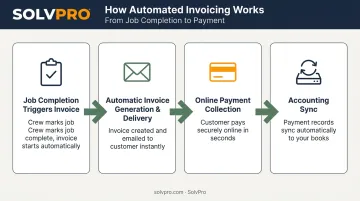
How Invoice Automation Works: The Step-by-Step Process
Automation works by connecting field work directly to office billing in one continuous flow. Instead of a handoff between "job done" and "invoice sent" that depends on someone remembering to do it, the two events happen almost simultaneously.
Step 1: Job Completion Triggers Invoice Creation
When a technician marks a job complete in a field app, the labor hours, materials used, and pricing already logged against that job flow straight into a draft invoice. There's no separate invoicing session where someone tries to reconstruct what happened on-site from memory or a crumpled receipt.
Step 2: Automatic Invoice Generation & Delivery
The draft invoice populates with your company branding and an itemized breakdown of costs, then gets delivered to the customer, typically by email or text, without an office employee lifting a finger. This is the step that closes the gap between "job finished" and "customer has an invoice in hand."
Step 3: Online Payment Collection
Instead of mailing a check and waiting for it to clear, customers pay directly from the invoice using a card or ACH transfer. This matters more than it sounds like it should.
Jobber states that field-service businesses get paid roughly 4x faster on average when customers pay with debit or credit compared to paying by check. That's a vendor-reported figure specific to Jobber's platform, but the underlying logic holds across the industry: a payment link removes the multi-day mail-and-deposit cycle entirely.
Platforms like SolvPro build credit-card and ACH payments directly into the invoice, so the "pay now" option is live the moment the invoice goes out.
Step 4: Syncing with Accounting Systems
Once a customer pays, that transaction should flow into your accounting platform automatically. In SolvPro, paid invoices sync with QuickBooks Online automatically, so your bookkeeper isn't manually re-entering the same job twice, once in the field app and once in the books. This is where double data entry (and the reconciliation headaches it causes) gets eliminated.
Benefits of Invoice Automation for Service Businesses
The step-by-step flow is nice in theory, but here's what it actually changes for a growing service business:
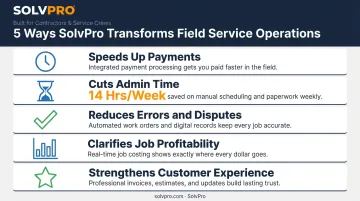
- Speeds up payments: Automatic reminders and embedded payment links shorten the gap between job completion and cash in hand, compressing a two-to-three-week collection cycle into days.
- Cuts admin time: Office staff stop re-keying job details into invoices, freeing hours for scheduling and customer calls. QuickBooks found that 65% of midsize business owners spend 14 hours a week chasing overdue invoices, a workload automation is designed to shrink.
- Reduces errors and disputes: When pricing and line items pull automatically from the work order, a typo can't turn a $450 invoice into a $540 dispute.
- Clarifies job profitability: Real-time invoicing shows owners which jobs and customers are actually making money, instead of waiting three weeks for the books to reconcile.
- Strengthens customer experience: A branded, itemized digital invoice with an instant payment button looks far more professional than a handwritten receipt or generic PDF, setting you apart from competitors still relying on paper in 2026.
Must-Have Features When Choosing Invoice Automation Software
Not every platform that calls itself "automated" actually removes the manual work. Here's what to check for before you commit:
- Work order-to-invoice automation that generates invoices directly from completed jobs or estimates, with no manual re-entry step
- Integrated online payment processing, covering both card and ACH, built directly into the invoice rather than bolted on as a separate app
- Native accounting sync, such as QuickBooks Online integration, so your books update automatically instead of requiring duplicate entry
- Mobile accessibility with bilingual support (English/Spanish), so crews and office staff can send and review invoices from any job site, in whichever language works best for them
If a platform is missing any of these, you'll likely end up doing manual work somewhere in the chain anyway.
How to Start Automating Your Invoicing
Getting started doesn't require a six-month IT rollout. Most service businesses can move in three phases:
- Audit your current process. Track where delays actually happen, whether it's the office waiting on paper timesheets, invoices sitting in a "to-do" folder, or payments taking weeks to arrive by mail.
- Choose a platform built for field service. Generic accounting software often requires extra setup and custom workflows to handle job-based billing. A field service platform handles that use case natively from day one.
- Roll out in phases. Start with one crew or job type, work out the kinks, then expand company-wide once your team is comfortable.
Why SolvPro Makes Invoice Automation Simple for Growing Service Businesses
This is the exact problem SolvPro solves. Completed work orders convert directly into invoices, with QuickBooks Online sync and credit-card and ACH payments included in the core platform, so customers can pay online the moment they get the invoice.
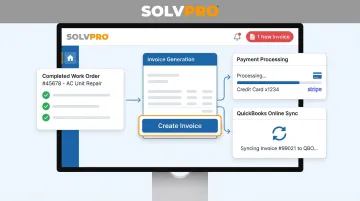
A few things make it practical for smaller crews specifically:
- Same-day go-live with guided onboarding, not a weeks-long implementation
- Transparent, SMB-friendly pricing, with no surprise add-on fees for invoicing or payments
- No long-term contracts, so you can cancel anytime if it's not the right fit
If you want to see the workflow before committing, book a demo to see how a completed job turns into a paid invoice in real time.
Conclusion
Your crews are busy. So why isn't there more money in the bank?
When the office can see labor, materials and documented changes against the job while the work is still open, the numbers at the end stop being a surprise. SolvPro keeps scheduling, work orders, time, job costing and invoicing on one record. When you want to see it on your kind of work, Book a Demo.
Run the Job. Protect the Profit.
Frequently Asked Questions
Is There a Way to Automate Invoices?
Yes. Field service platforms like SolvPro automatically generate invoices from completed work orders, deliver them digitally, and accept online payments, all without manual data entry.
What Is Invoice Automation?
It's software that creates, sends, and tracks invoices automatically based on completed jobs, removing the manual re-typing that traditionally slows down billing.
How Much Time Can Invoice Automation Save My Business?
Exact savings vary, but the workload it targets is real. QuickBooks reports midsize business owners spend an average of 14 hours a week chasing overdue invoices and collecting payments, and automation is built to shrink that number.
Does Invoice Automation Integrate with Accounting Software Like QuickBooks?
Modern platforms, including SolvPro, sync invoice and payment data automatically with QuickBooks Online, so your books update without duplicate entry.
How Much Does Invoice Automation Software Cost for a Small Business?
Pricing varies by provider. SolvPro's plans, with transparent pricing, no surprise add-ons, and no long-term contracts.
Is Invoice Automation Only Useful for Large Companies?
No, actually the opposite. Small and growing service businesses often benefit the most, since they typically lack dedicated billing staff to manually manage invoices and chase payments.