
It's 10 a.m. A job runs two hours long. A technician calls in sick. Now the office is stuck rerouting three crews by phone and text, while a customer sits in a missed service window wondering if anyone's coming.
This scene plays out daily in service businesses running on spreadsheets, whiteboards, and group chats.
The data backs up what you're feeling: a failed first visit leads to an average of 2.7 total visits to resolve a single service issue, according to Aquant's 2024 Field Service Benchmark Report. That report analyzed over 24 million work orders. That's a lot of wasted windshield time and frustrated customers.
This guide covers what technician scheduling software actually does, the features worth paying for, the real benefits it delivers, and how to pick the right tool for a growing service business.
KEY TAKEAWAYS
- Manual scheduling breaks down once you pass a handful of technicians or recurring jobs
- Real-time dispatch boards and mobile apps end the office-to-field phone-and-text shuffle
- Automated invoicing tied to job completion speeds up payment and cash flow
- The right software fits your team size today and scales without a costly switch later
- Travel time between jobs is part of the schedule, so routing affects how many calls a technician can realistically complete
What Is Technician Scheduling Software?
Technician scheduling software is a centralized system that helps service businesses plan, assign, dispatch, and track field jobs in real time. It replaces the manual coordination that happens over phone calls, sticky notes, and group texts with one shared source of truth.
Not Just a Calendar App
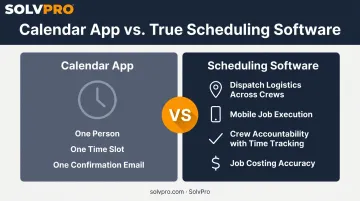
Basic appointment or calendar apps are built for booking meetings: think one person, one time slot, one confirmation email.
True technician scheduling software is built for something more complex:
- Dispatch logistics across multiple crews and job sites at once
- Mobile job execution so technicians can work from the field, not just check a calendar
- Crew accountability, with status updates, time tracking, and job history tied to every work order
- Job costing accuracy, tracking labor and material costs against every job in real time
A calendar app tells you when. Scheduling software tells you when, who, where, what's needed, and whether it actually got done.
Who Actually Uses This Category
This isn't niche software. Businesses that rely on multi-crew, multi-site coordination lean on it daily, including:
- Electrical and plumbing contractors juggling emergency calls and scheduled work
- Landscaping and lawn care companies managing recurring routes
- General contractors and excavation crews running multi-day, multi-phase jobs
- Commercial cleaning and janitorial teams servicing dozens of properties on rotating schedules
If your business sends people to job sites instead of having customers come to you, this is the software category built for you.
Signs Your Business Has Outgrown Manual Scheduling
There's usually a tipping point: maybe it's a double-booking, or a technician finding out about a schedule change from the customer instead of the office. Either way, once it starts happening regularly, that's your signal.
Here's the thing: manual scheduling isn't a fringe problem. In fact, 36% of field service software buyers, according to a 2026 Software Advice survey, still run daily operations off spreadsheets and paper.
Watch for these warning signs:
- Double-bookings or missed appointments happening more than once a month
- Office staff spending hours on phone calls and reshuffling instead of running the business
- Technicians learning about changes after the customer already knows
- Invoices going out days or weeks late because job completion isn't tracked until someone gets back to the office
That last point matters more than most owners realize: when job completion isn't tracked in real time, invoicing gets delayed. Delayed invoicing leads directly to delayed payment, which compounds into serious cash flow problems over time.
Key Features to Look for in Technician Scheduling Software
Not all scheduling tools are built the same. Here's what actually separates a functional platform from one that just looks nice in a demo.
Real-Time Dispatch and Job Tracking
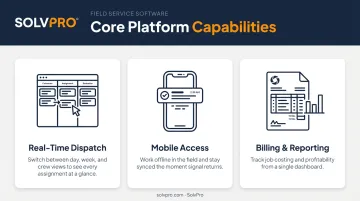
A drag-and-drop dispatch board should give you instant visibility into who's available, what's assigned, and what just changed. Look for day, week, and crew views so you can manage a single technician's day or an entire multi-crew operation from one screen.
Pair that with work order tracking tied to customer records. Every job's history, notes, and status should live in one place, not scattered across email threads and paper files.
Mobile Access That Works in the Field
Your technicians aren't sitting at a desk. A solid mobile app should show job details, customer history, and site notes without a call back to the office. It should also function even when a signal drops in a basement or rural job site.
Equally important: automatic push notifications. When a job gets reassigned, the technician should see it on their phone immediately, not find out secondhand.
Billing and Reporting Built in
A few features tend to separate basic tools from complete platforms:
- Built-in invoicing and payment processing connected directly to the schedule, so a completed job flows straight into billing without anyone re-entering data
- Reporting dashboards that show technician workload, job completion rates, and profitability by job or crew
- Job costing tools that tie material and labor costs to each job, so you know true profitability before the invoice goes out
Notably, the industry is shifting fast here. Gartner projects that by 2028, over 40% of field service organizations will use AI or machine learning in scheduling and triage, up from under 5% today. Features that feel advanced now will be table stakes soon.
Benefits of Technician Scheduling Software for Service Businesses
Once the right system is in place, the impact shows up fast, usually within the first few weeks.
Fewer missed or delayed jobs. Seeing the schedule as it changes means a sick call or a job running long doesn't derail the whole day. Dispatchers can reassign instantly instead of scrambling.
Greater crew accountability. Office staff can see job status and location updates without chasing technicians down for a check-in call. Nobody's guessing where a crew is or whether a job actually got finished.
Faster invoicing, quicker payments. When job completion automatically triggers the billing workflow, invoices go out the same day instead of sitting in a stack of paperwork for a week.
Less admin time for the office. Every reassignment handled through the app is a phone call that didn't need to happen. Over a week, that adds up to hours reclaimed for actually running the business instead of coordinating it.
Clear the ability to see what each job made. Owners often don't see this number until it's too late. Job costing tools that track labor and material costs against each job shows you, in real time, which jobs, crews, or service types are actually making money and which ones are losing it.
A few concrete outcomes:
- Dispatchers avoid double-booking because availability is visible at a glance
- Technicians spend less time calling in for job details they should already have
- Owners can compare estimated versus actual job costs without waiting for month-end reports
How to Choose the Right Technician Scheduling Software
Picking the wrong tool is expensive, not just in dollars but in the weeks it takes to switch again. Here's how to narrow the field.
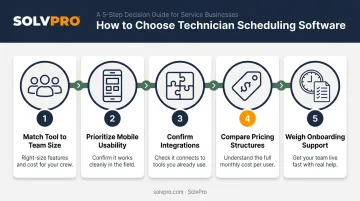
- Match the tool to your team size. A crew of 3-10 technicians has different needs than a 50-tech, multi-location operation. Don't pay for enterprise complexity you don't need, and don't outgrow a tool in six months either.
- Prioritize mobile usability. Your field crews will use the mobile app every single day. Check that it supports the devices your team already carries, and if you have Spanish-speaking crew members, confirm the app works in both languages.
- Confirm integrations with tools you already use. QuickBooks Online sync for accounting and a built-in payment processor for collecting on completed jobs should be non-negotiable, not an upsell.
- Compare pricing structures. Flat-fee versus per-user pricing can produce wildly different costs as your team grows. Read the contract terms closely. Some platforms lock you in for a year even if the software doesn't fit.
- Weigh onboarding support and time-to-value. A tool that takes three weeks to implement delays the ROI your business needs right now. Ask directly: how long from signup to actually dispatching a job?
Here's how these priorities typically shift based on crew size:
| Consideration | Small Crew (3-10 techs) | Growing Operation (10-50+ techs) |
|---|---|---|
| Pricing model | Flat monthly fee preferred | Per-user may scale better |
| Onboarding | Same-day setup ideal | Guided onboarding still valuable |
| Mobile needs | Basic job view, status updates | Multi-crew coordination, GPS tracking |
| Integrations | QuickBooks, payments | QuickBooks, payments, plus reporting depth |
Why Growing Service Businesses Choose SolvPro
SolvPro combines scheduling, work orders, crew tracking, and payments into one platform, built by a team with 50+ years of combined experience in construction, field service, estimating, and project management. That background shows up in the product decisions, not just the marketing copy.
A few things set it apart:
- Fully bilingual English/Spanish interface across the dispatch board, mobile app, and customer communications, so every team member works in whichever language they prefer.
- Same-day go-live, with account setup in under two minutes, full configuration in under 10, and live onboarding support included on the core plan.
- QuickBooks Online sync and credit-card and ACH payments built in as core features, not third-party add-ons bolted on after the fact.
- Transparent, SMB-friendly pricing, with no long-term contracts and cancel-anytime terms.
For a business that's outgrown spreadsheets but doesn't need (or want) enterprise-level complexity, that combination tends to matter more than a longer feature list. You can book a demo or start a free trial to see how it fits your specific crew size and job types.
Conclusion
Field service software helps you manage the work. SolvPro helps you make sure the work makes money.
The right tool depends on your trade, crew size, job mix and the systems you already run. Test it on real jobs before you commit, and check that crews will actually enter what the office needs. When you want to see it on your kind of work, Book a Demo.
Run the Job. Protect the Profit.
Frequently Asked Questions
What Is the Best Technician Scheduling Software?
The best tool depends on your team size, job complexity, and budget. Growing SMB service businesses should look for all-in-one platforms like SolvPro that combine scheduling, dispatch, and payments without enterprise pricing or complexity.
What Is Technician Scheduling Software?
It's a system for planning, assigning, and tracking field technician jobs in real time. This setup replaces manual coordination like spreadsheets and group texts with a centralized dispatch board and mobile app.
How Much Does Technician Scheduling Software Cost?
Pricing varies from per-user monthly fees to flat-rate SMB plans. SolvPro, for example, with no surprise add-ons or upgrade-to-unlock fees.
How Many Technicians Do I Need before Scheduling Software Is Worth It?
The tipping point tends to arrive as the number of technicians grows, or once recurring jobs become hard to track manually. If double-bookings or missed handoffs are happening monthly, it's already worth it.
Does Technician Scheduling Software Work Offline in the Field?
Top tools offer mobile apps with offline access, letting technicians view job details and update status even without signal. Changes typically sync automatically once the device reconnects.
Can Technician Scheduling Software Integrate with QuickBooks?
Most modern platforms, including SolvPro, sync with QuickBooks Online for invoicing, customer records, and payments. This is typically included at no extra cost rather than treated as a premium feature.