Not quite. Manual re-entry is where billing delays start. A mistyped quantity, a forgotten deposit, a tax rate that changed between quoting and job completion — any one of these can push payment back by weeks.
Results vary a lot depending on your setup. Spreadsheets and generic templates require rebuilding every line item by hand. Dedicated field service software, on the other hand, can carry that data over automatically. The process also looks different depending on whether you're billing a single payment or splitting a job into milestones.
This guide walks through the exact steps, what to prepare before you convert, the mistakes that slow payment down, and how platforms like SolvPro simplify the process for growing service businesses.
KEY TAKEAWAYS
- Converts approved line items, pricing, and customer details into a billable invoice without re-entry
- Works best with a detailed, formally approved estimate featuring clear phases or line items
- Manual conversion invites mismatched totals, missed change orders, and delayed sends
- Built-in "convert to invoice" tools finish the job in seconds and sync with QuickBooks
- Progress billing and deposits need a different conversion approach than single lump-sum jobs
How to Convert Estimates to Invoices: Step-by-Step
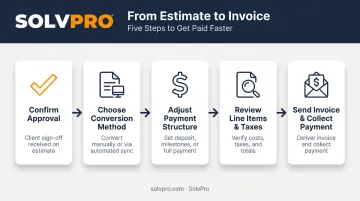
Step 1: Confirm the Estimate Is Approved and Finalized
Don't convert anything until the customer has signed off, whether that's verbally, in writing, or through an e-signature portal. According to QuickBooks's own guide to converting estimates, an estimate must reach Accepted status before it links to an invoice. That same logic should apply no matter what software you use.
Before you move forward, check:
- Any last-minute change orders or scope adjustments that need to be reflected
- Whether pricing, discounts, and taxes are still accurate — especially on materials-heavy jobs where costs shift between quoting and approval
- That the version being converted is the final one, not an earlier draft
Step 2: Choose Your Conversion Method
You've got two paths here. Manually re-enter the estimate into invoicing software or a template, or use a platform where the estimate already lives and converts with one click.
Manual entry means retyping quantities, rates, and job details from scratch. Every retype is a chance for a transcription error. Platforms with digital estimates, like SolvPro, skip that step entirely: an approved estimate becomes an invoice without touching a single line item again.
If you're still copying numbers between two systems, ask yourself why. That gap is exactly where billing delays and pricing mismatches creep in.
Step 3: Adjust for Payment Structure (Full, Deposit, or Progress Billing)
Not every job converts the same way:
- Lump-sum jobs convert the full estimate total into one invoice
- Deposit jobs need the collected deposit applied so the invoice reflects the correct remaining balance, not the full amount again
- Phased or milestone jobs require splitting the estimate into partial invoices tied to completed stages
Larger construction or multi-phase work often needs several progress invoices rather than one final bill. As AIA's guide to billing explains, commercial contractors use AIA's G702 and G703 forms to document contract value, completed work, stored materials, prior billing, and retainage at each stage.
Skip this step and you risk billing the full amount when the customer already paid a deposit.
Step 4: Review Line Items, Taxes, and Terms before Sending
Before the invoice goes out, run through this checklist:
- Verify customer information: confirm contact and billing details carried over correctly from the estimate
- Double-check taxes and discounts: make sure rates are current and any change-order costs are included
- Set clear payment terms: due date, accepted payment methods, and late fees should all be spelled out directly on the invoice
Skipping this review is how invoices go out with the wrong tax rate or no due date at all, which only slows down collections later.
Step 5: Send the Invoice and Set up Payment Collection
Send the invoice through whatever channel gets it seen fastest: email, a client portal, or text with an embedded payment link. According to QuickBooks's 2025 US Small Business Late Payments Report, invoices with a Pay Now option get paid up to 4x faster than paper invoices.
Once it's sent:
- Set up automated reminders for unpaid invoices instead of tracking follow-up dates by hand
- Track invoice status (sent, viewed, paid) so office and field teams stay aligned on what's outstanding
- Confirm the payment method options match what your customer actually prefers to use
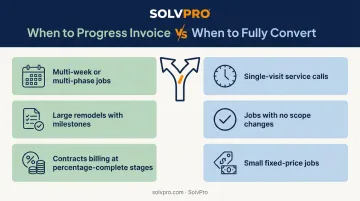
When Should You Convert an Estimate to a Progress Invoice?
Not every job needs immediate full conversion. Timing depends on job size, payment terms, and how the contract is structured.
Progress invoicing makes sense for:
- Multi-week or multi-phase jobs where steady cash flow during the project matters
- Large remodels or commercial builds with defined milestones
- Contracts that specify payment at percentage-complete stages rather than at the end
Full conversion right after completion fits:
- Single-visit service calls, like a plumbing fix or an electrical repair
- Jobs with no material scope changes expected between quote and finish
- Small, fixed-price jobs where splitting the invoice adds paperwork without added benefit
One caution worth repeating: converting too early, before scope is fully locked in, risks under-billing for last-minute changes or added work. If a customer adds something mid-job, that needs to hit the invoice before it goes out, not after.
What You Need before Converting Estimates to Invoices
Preparation is what keeps billing errors and payment delays from happening in the first place. Before you convert anything, make sure you have:
- A signed or digitally approved estimate with itemized pricing, quantities, and job scope spelled out clearly
- Up-to-date customer contact and billing information, so nothing bounces or gets sent to the wrong address
- Documented deposits already collected, so the converted invoice reflects the true remaining balance
- Templates or systems built for carryover, like SolvPro's estimate-to-invoice conversion, so you're not stuck retyping line items from scratch
Skip any one of these and you're setting up the conversion step to fail before it starts.
Common Mistakes When Converting Estimates to Invoices
Most estimate-to-invoice problems trace back to a handful of repeat mistakes:
- Converting before final approval — this leads directly to disputes over scope or pricing once the customer sees the invoice
- Manually re-typing line items instead of using software carryover, which introduces calculation or pricing errors
- Forgetting to apply collected deposits, resulting in customers being billed the full amount a second time
- Sending invoices without clear payment terms or due dates, which slows down collections and creates unnecessary back-and-forth
According to QuickBooks' guide on common invoicing mistakes, vague descriptions, missing invoice identifiers, and delayed delivery are habits that push payment further out. None of these are complicated to fix. They just require a system, like SolvPro's estimate-to-invoice carryover, that catches errors before the invoice leaves your hands.
How Software Simplifies Estimate-To-Invoice Conversion
Dedicated field service platforms remove manual re-entry entirely by linking the estimate and invoice into one connected workflow. Once approved, the estimate converts directly into the invoice, with no manual re-entry needed.
Digital estimates changes the math by splitting jobs into stages up front instead of one lump total. As each phase wraps, a partial invoice generates from that same original estimate, with no rebuilding required.
SolvPro's Estimates & Digital Contracts feature builds this in directly:
- Customer-facing PDF proposals with multi-stage line items convert straight into invoices
- QuickBooks Online sync is a core platform feature (not a bolted-on add-on), so accounting stays accurate without double entry
- credit-card and ACH payments (credit card, ACH, and digital payments) is included on the core plan at no added fee
- Real-time overdue tracking flags unpaid invoices without office staff having to check manually
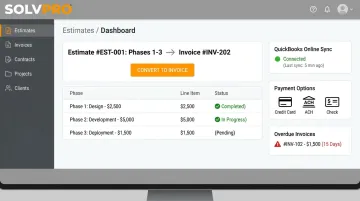
Automated payment processing and reminders shorten the gap between finishing a job and actually getting paid. And setup doesn't require a rebuild of your existing office or field process. SolvPro's onboarding is designed to be running in under 10 minutes.
Conclusion
Your crews are busy. So why isn't there more money in the bank?
When the office can see labor, materials and documented changes against the job while the work is still open, the numbers at the end stop being a surprise. SolvPro keeps scheduling, work orders, time, job costing and invoicing on one record. When you want to see it on your kind of work, Book a Demo.
Run the Job. Protect the Profit.
Frequently Asked Questions
What Is the Best Software to Convert Project Estimates to Invoices?
Leading tools like QuickBooks Online, Zoho Invoice, and field service platforms such as SolvPro let you convert approved estimates into invoices without re-entering line items. Your best pick depends on whether you need standalone accounting or a full field workflow with scheduling built in.
When Should You Convert an Estimate to a Progress Invoice?
Progress invoicing fits multi-phase or long-duration jobs where billing happens at milestones rather than waiting for full completion. Single-visit service calls typically skip this and convert the full estimate right after the job wraps.
Can ChatGPT Generate an Invoice?
ChatGPT can draft invoice text or formatting, but it can't pull real customer data, track payments, or sync with accounting systems on its own. For anything beyond a draft, dedicated invoicing software is the safer choice.
How Long Does It Take to Convert an Estimate to an Invoice?
Manual conversion can take several minutes per invoice once you factor in retyping and double-checking line items. Software with one-click conversion cuts that down to seconds.
Do You Need a New Invoice Number When Converting from an Estimate?
Yes. Invoices should carry their own sequential numbering separate from estimate numbers for clean bookkeeping and a clear audit trail.
Can One Estimate Be Converted into Multiple Invoices?
Yes, especially with progress billing. A single estimate can be split into a deposit invoice, one or more milestone invoices, and a final invoice tied to job phases.