According to an EY survey cited by Paycom, one in five U.S. payrolls contains errors, each averaging $291 to correct. For a 1,000-person workforce, time and attendance mistakes alone run about $250,000 annually. For smaller contractors, even a handful of timecard errors per month adds up fast.
The right app eliminates that friction. This guide breaks down five contractor foreman apps built specifically for scheduling and time tracking — what each one does well, who it's for, and what it costs.
TL;DR — Key Takeaways
- Apps covered: SolvPro, Contractor Foreman, Jobber, FieldPulse, BuildOps
- The strongest options combine scheduling and time tracking in one platform — not two separate tools stitched together
- Look for mobile-first design, real-time crew visibility, QuickBooks sync, and upfront pricing
- The right fit depends on crew size, trade type, bilingual needs, and how many job sites you're running at once
What Is a Contractor Foreman App for Scheduling & Time Tracking?
Contractor foreman apps are mobile-first platforms that let office staff assign jobs, dispatch crews, and monitor hours — while giving field workers real-time schedule access and a simple way to clock in and out from the job site.
Scheduling and time tracking belong in the same system. When they're siloed, labor costs slip through the cracks. Payroll runs late. Job profitability becomes guesswork.
The global field service management market is projected to reach $9.17 billion by 2030, growing at 12.5% annually — field teams are ditching disconnected tools for integrated platforms that keep the office and the job site in sync.
The best apps in this category cover:
- Crew scheduling — drag-and-drop dispatch with real-time updates pushed to field workers
- Mobile clock-in/out — GPS-verified time entries from the job site, not the parking lot
- Job costing visibility — labor hours tied directly to specific jobs and work orders
- Accounting sync — payroll-ready exports or direct QuickBooks integration
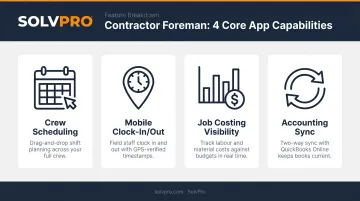
The apps below were evaluated on those four criteria — because those are the gaps that cost contractors money when they pick the wrong tool.
Best Contractor Foreman Apps for Scheduling & Time Tracking
Each app below was evaluated on:
- Scheduling flexibility and dispatch speed
- Time tracking reliability in the field
- Mobile usability for crews on-site
- Integration depth (QuickBooks, payroll, payments)
- Fit for small-to-midsize field service teams
SolvPro
SolvPro is an all-in-one field service management platform built for growing service businesses with crews in the field. It covers scheduling, work orders, crew time tracking, and payments in a single system — with a fully bilingual English/Spanish interface that extends to the mobile app, scheduling, and customer-facing proposals.
What sets it apart from most competitors is the combination of practical features without enterprise-level complexity. Event-based geolocation (called Smart Activity Tracking) geo-stamps time entries, photo uploads, and job status updates — giving the office location-confirmed accountability without continuous GPS surveillance or battery drain.
QuickBooks Online sync and NMI payment processing are built into the core platform at every pricing tier, not sold as add-ons. Setup takes under 10 minutes: create your account, add crew, and dispatch your first job. Onboarding includes live support from the SolvPro team — not a chatbot and a 40-page knowledge base.
| Key Features | Crew scheduling, work order management, event-based geolocation time tracking, bilingual EN/ES interface, QuickBooks Online sync, NMI payment processing, phase-based estimating, PDF proposals, recurring job management |
| Pricing | Starter: $179/mo (up to 3 users); Growth: $228/mo (4 users, +$49/user beyond 4); Scale: custom pricing |
| Best For | Growing multi-crew field service businesses (electrical, plumbing, HVAC, landscaping, janitorial) that want an all-in-one platform with no long-term contracts |
Contractor Foreman
Contractor Foreman is a construction-focused management platform used by contractors in more than 75 countries. It goes deep on project documentation — Gantt charts with Critical Path Method support, daily logs, change orders, and work orders — alongside crew scheduling and time tracking.
Its drag-and-drop scheduling interface makes reassigning crew straightforward. Geo-fencing restricts clock-ins to a defined radius around the job site, providing location-verified timecards. The integration list is broad: QuickBooks Online, Google Calendar, Outlook365, Gusto, Zapier, and more.
| Key Features | Drag-and-drop crew scheduling, Gantt charts with CPM, geo-fencing time cards, daily logs, QuickBooks Online/Google Calendar/Outlook integration, change orders, work orders |
| Pricing | Basic: $49/mo (1 user); Standard: $105/mo (3 users); Plus: $166/mo (8 users); Pro: $221/mo (15 users); Unlimited: $332/mo — all billed annually |
| Best For | General contractors and specialty trades managing multi-phase construction projects who need scheduling tied to project documentation |
Jobber
Jobber is a scheduling and operations platform built for home service businesses running high-volume, short-duration jobs. Its clean drag-and-drop calendar, automated client reminders, route optimization, and client-facing payment portal make it a reliable choice for smaller crews where client communication is as important as crew dispatch.
Time tracking, invoicing, and QuickBooks Online integration are included — though features like route optimization and automatic time tracking are only available on Connect and higher plans. Pricing scales with team size and changes based on whether you pay monthly or annually.
| Key Features | Job scheduling and dispatching, route optimization, automated client reminders, client portal, mobile time tracking, invoicing, QuickBooks Online and Stripe integration |
| Pricing | Core: $29/mo (annual) or $49/mo (monthly); Connect and Grow plans vary by team size; Plus: $529/mo (annual) — pricing scales with users |
| Best For | Small home service teams (landscaping, cleaning, handyman, pest control) with steady daily call volume and a need for clean client communication |
FieldPulse
FieldPulse is built around fast, professional field documentation. Foremen can capture daily job logs, photos and videos via custom forms, crew time entries, and customer signatures — then export polished PDFs. Custom forms include image and video field types with offline capture, syncing automatically when connectivity returns.
For teams where documentation quality is a business requirement — subcontractors, inspectors, service crews delivering customer-facing reports — the ability to build custom forms and export branded PDFs addresses a real operational need. Pricing is seat-based and not published publicly; FieldPulse requires a direct conversation to get a quote.
| Key Features | Custom forms and checklists, photo/video capture (offline-capable), mobile timecards, estimates and work orders, PDF form filler, bilingual support |
| Pricing | Customized seat-based pricing — contact FieldPulse for a quote; no standard monthly rates published |
| Best For | Service crews and subcontractors that prioritize documentation quality and need clean, auditable time and job records |
BuildOps
BuildOps is built for commercial-grade field service operations running parallel crews across service and project work. The platform connects real-time dispatch, cost-code timecards, daily logs, job costing dashboards, and CRM in one system — with in-field payment collection via card or ACH.
Technicians can log hours with location tags and cost codes tied to project phases, giving project managers live visibility into labor costs from initial budget through closeout. More than 1,500 commercial contractors in North America use the platform. Pricing is custom and requires a demo; it's built for commercial operations, not SMB entry-level budgets.
| Key Features | Crew scheduling and dispatch, cost-code timecards, real-time job costing, daily logs and RFIs, in-field payment collection, CRM and job history, reporting dashboards |
| Pricing | Custom pricing based on crew size, trades, and modules — contact BuildOps for a demo |
| Best For | Commercial HVAC, electrical, plumbing, and mechanical contractors managing multiple crews with complex service-plus-project workflows |
How We Chose These Apps
Every app on this list was assessed against the core foreman workflow: assign crews, push schedules to mobile, capture clock-in/out with location verification, and sync labor data back to the office without manual re-entry.
Key Selection Criteria
- Mobile usability — does it work reliably in low-signal conditions or on a job site?
- Scheduling flexibility — can you handle recurring jobs, drag-and-drop reassignments, and multi-crew calendars?
- Time tracking accuracy — geofencing or event-based location verification to confirm crew presence
- Accounting integration — QuickBooks connectivity to eliminate duplicate data entry
- Transparent pricing — are core features included in the base plan, or gated behind expensive tiers?
- Onboarding quality — how quickly can a non-technical team get operational?
Common Mistakes to Avoid
Even with clear criteria in hand, the evaluation process is where things go sideways. According to Software Advice's field service buyer research, 49% of current users rate mobile access as the top feature in field service management software — yet it's often the last thing evaluated during a purchase decision.
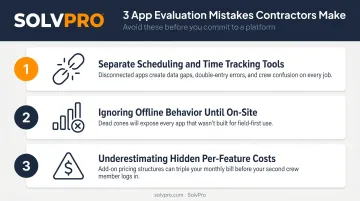
Here's where contractors consistently trip up:
- Choosing tools that handle scheduling or time tracking but not both — then struggling with manual data transfer between systems
- Ignoring offline behavior until a crew is standing in a basement with no signal
- Underestimating hidden per-feature costs — especially on platforms that gate integrations or route optimization behind higher tiers
Conclusion
The best contractor foreman app isn't the one with the longest feature list. It's the one your field crews will actually use — connected to payroll and invoicing, giving the office real-time visibility without piling on administrative work.
Evaluate based on crew size, trade type, existing accounting software, and whether bilingual support or geolocation accountability matters for your operation. Start with a trial or demo before committing.
If you run an electrical, plumbing, HVAC, landscaping, or janitorial operation and want an all-in-one platform built for field crews — with no long-term contracts and setup under 10 minutes — SolvPro offers a free trial with no credit card required.
Frequently Asked Questions
What is the best construction scheduling software?
It depends on business size, trade type, and workflow complexity. Contractor Foreman suits multi-phase general contracting; Jobber works well for smaller home service crews; SolvPro fits growing multi-crew operations that need an all-in-one platform. On any shortlist, prioritize mobile access, crew scheduling, and QuickBooks integration.
What features should a contractor foreman app include for time tracking?
Look for mobile clock-in/out, geofencing or event-based location verification, timecard approval workflows, and direct payroll or accounting integration. Without location verification, time entries can't be confirmed. Without accounting integration, someone's re-entering data by hand and introducing payroll errors.
Can contractor scheduling apps integrate with QuickBooks?
Most leading apps do. SolvPro, Contractor Foreman, and Jobber all offer QuickBooks Online integration. This matters because syncing labor hours, invoices, and job costs directly eliminates double entry and accelerates billing. Always confirm whether the integration covers QuickBooks Online specifically, since QuickBooks Desktop support varies by platform.
How much do contractor foreman apps typically cost?
Entry-level tiers start around $29–$49/month (Jobber and Contractor Foreman), while mid-market platforms like SolvPro start at $179/month for up to 3 users with all core features included. Enterprise platforms like BuildOps use custom pricing. Always check what's gated behind higher tiers and whether add-ons carry extra fees.
Do contractor scheduling apps work offline in the field?
The best ones do. FieldPulse and BuildOps both confirm offline sync — data captured without signal uploads automatically once connectivity is restored. If your crews work in basements, rural sites, or low-signal zones, test offline behavior specifically before committing. Some apps only offer partial offline support (for example, time cards but not full app access).
What is the difference between geofencing and event-based time tracking?
Geofencing restricts clock-ins to a GPS-defined radius around a job site — if you're outside that boundary, the system won't let you clock in. Event-based tracking logs location at key workflow moments (time entry, photo upload, job completion) without continuous monitoring. Geofencing offers strict boundary enforcement; event-based tracking provides lighter accountability with less battery drain. SolvPro uses event-based tracking; Contractor Foreman uses geofencing.