Paper timesheets can't capture job-site-to-job-site travel time, which the DOL requires employers to pay under the FLSA. Hours that aren't tied to a job code are useless for estimating. And a Friday payroll scramble built on memory is how profitable shops quietly become unprofitable ones.
Six time tracking tools are widely used by electrical contractors, and they differ in what each one solves, what it costs, and where it falls short — so you can pick the right fit for your specific problem.
KEY TAKEAWAYS
- Every clock-in should record a GPS location and a job code — not just a date.
- The right tool depends on your primary problem — knowing where crews are assigned, GPS accuracy, QuickBooks sync, full job management, or cost.
- Hidden costs matter more than headline pricing: watch for base fees, per-user tiers, and features locked behind higher plans.
- Free plans exist, but they typically exclude scheduling and advanced job costing.
- Test any tool during a full pay period on a real job site before committing.
Why Electrical Contractors Need Dedicated Time Tracking Software
The Problem Paper Timesheets Can't Solve
Electricians don't sit in one place. A crew might start at a commercial buildout, pull permits at the city office, and close out a service call on the other side of town — all before lunch. Paper timesheets and memory can't reconstruct that day accurately, and the gaps add up fast.
Consider a five-person crew where each member rounds their start time by just 10 minutes per day. That's 50 extra minutes of paid labor daily — over 200 hours annually — before you account for any deliberate padding.
Travel between job sites during the workday is legally compensable under 29 CFR 785.38. Without a tool that captures drive time between punches, those hours disappear from your records — either underpaid to employees or over-claimed on timesheets, depending on who's doing the estimating.
The Job Costing Connection
Hours that aren't tagged to a job are worse than useless for bidding. They tell you what you paid, but not what you paid for. That gap compounds over every project.
A QuickBooks survey of over 600 construction business owners found that 1 in 4 construction companies would go out of business from just two or three inaccurate estimates. Labor is the single most expensive — and hardest-to-estimate — project cost. When hours don't land against a job code at the time of the punch, every future bid carries the same blind spot forward.
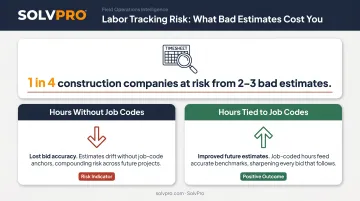
Dedicated time tracking software closes that loop by linking hours to jobs automatically. That's what makes accurate future estimates possible — not spreadsheets reviewed after the fact.
Key Features to Look for in Time Tracking Software for Electricians
GPS Punch Verification and Geofencing
Every clock-in should record a location. Geofences — virtual boundaries around job sites — add a second layer by restricting or prompting punches when a worker arrives or leaves.
One practical caveat: GPS accuracy degrades inside buildings, around metal structures, and underground, where signal reflection and obstruction affect positioning. The fix is simple: crews should punch at the truck before entering a metal building or heading into a basement. Some platforms also store punches offline and sync when a connection is restored — worth confirming before you buy.
Job and Project Costing
Hours should land against a job code at punch time — not get reclassified manually at the end of the week. When that connection happens automatically, a timesheet becomes a per-project labor cost report. You can see whether job #47 ran 12% over on labor before you bid job #48.
Look for platforms that display labor costs by job in real time, not just at export.
Payroll Integration and Scheduling
The tool needs to connect directly to your payroll system — QuickBooks, Gusto, ADP, or whichever you use. A time clock that exports a CSV and requires manual re-entry hasn't solved the problem; it's just moved it.
Scheduling compounds the value. When dispatch and time tracking live in the same platform, crews see their assignments and office staff see their hours without the phone tag. Beyond that, electrical businesses typically need more than a time clock alone:
- Payroll sync: Direct integration, not manual CSV exports
- Scheduling: Dispatch and time tracking in one view
- Work orders and invoicing: Tied to the same job record
- Payment collection: Collected before the invoice ages
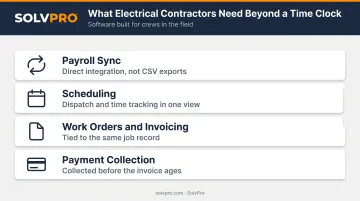
An all-in-one field service management platform covers all of this. Standalone time clocks cobbled together with separate tools rarely do.
Best Time Tracking Software for Electricians in 2026
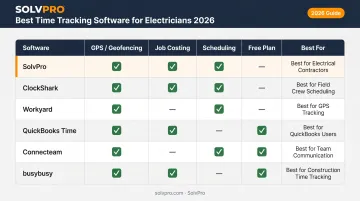
These six tools were selected based on how well each solves a specific problem electrical contractors face. The criteria:
- Field usability and mobile reliability
- GPS accuracy and geofencing capabilities
- Job costing depth and labor reporting
- Pricing transparency and contract terms
No single tool wins for every shop. Match the pick to your actual pain point.
SolvPro
SolvPro is an all-in-one field service management platform built by a team with decades of hands-on experience in construction, field service, estimating, and project management. For electrical contractors, it covers scheduling, work orders, crew tracking, job costing, QuickBooks Online sync, and payment processing in a single bilingual (English/Spanish) platform.
Where it stands out is the scope. Rather than stitching together a time clock, a scheduling tool, and an invoicing app, everything runs from one place.
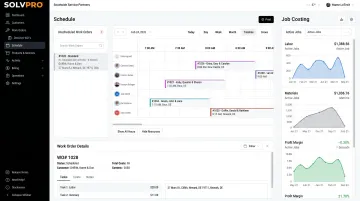
Dispatchers assign jobs via drag-and-drop scheduling, field crews update job status and log time from the mobile app, and the office sees labor costs per job in real time, no Friday data-entry session required.
SolvPro records time entries, photo uploads and status updates against the job as the work happens. This creates a documented record of the work without extra steps for the crew.
| Attribute | Details |
|---|---|
| Key Features | Job and crew time tracking, drag-and-drop scheduling, digital work orders, QuickBooks Online sync, credit-card and ACH payments, bilingual EN/ES interface |
| Best For | Electrical contractors who need scheduling, crew tracking, job costing, invoicing, and payments in one platform |
One thing to confirm: SolvPro's primary accounting integration is QuickBooks Online. If your shop runs a different payroll platform, verify compatibility before committing.
ClockShark
ClockShark is a construction and field service time tracking platform used by tens of thousands of contractors. It includes GPS geofencing, a "Who's Working Now" live crew map, job and task tracking, drag-and-drop scheduling, and integrations with QuickBooks, Sage, ADP, and Gusto. Spanish language support is built in across both plans.
The live crew map is genuinely useful for multi-crew commercial projects — dispatchers can see exactly who's clocked in and where. The trade-off is that all plans carry a three-year contract term, and advanced job costing is gated to the higher-priced Pro tier.
| Attribute | Details |
|---|---|
| Key Features | GPS geofencing, Who's Working Now crew map, job and task tracking, drag-and-drop scheduling, Spanish language support |
| Best For | Multi-crew commercial electrical projects needing live knowing where crews are assigned and geofenced punch reminders |
Workyard
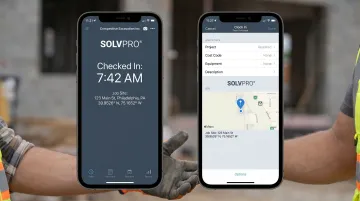
Workyard is a construction-focused platform built around high-accuracy GPS. It captures arrival time, departure, and drive time between job sites — plus job costing, labor reports by project, mileage tracking, and integrations with QuickBooks, ADP, and Gusto.
The accuracy claim is backed by real contractor results. Dan Hausmann, owner of American Craftsman Contracting, reported that Workyard saved $2,500 in inflated payroll costs from a single employee by capturing actual arrival times (7:14 or 7:18) instead of rounded 7:00 entries. Kathi Smith, Vice President of D&S Electric, noted that weekly time spent on payroll and job allocation dropped from four hours to under one hour.
Worth noting before you sign up: the $50/month company base fee hits harder for two- or three-van shops, and Capterra reviewers flag GPS lag and battery drain from continuous tracking.
| Attribute | Details |
|---|---|
| Key Features | High-accuracy GPS time clock, drive and mileage tracking between sites, job costing and labor reports, kiosk option |
| Best For | Shops where arrival time accuracy and drive-time capture between job sites are the primary pain point |
QuickBooks Time
QuickBooks Time (formerly TSheets) is Intuit's native time tracking product. Electricians clock in via the Workforce mobile app or a shop kiosk, and hours flow directly into QuickBooks payroll and invoicing without re-entry.
For shops already standardized on QuickBooks, this is the shortest path from punch to paycheck. Keep in mind it requires a separate QuickBooks Online subscription on top of its own fees (QBO runs $38–$275/month depending on plan), and geofencing is only available on the Elite tier.
| Attribute | Details |
|---|---|
| Key Features | Native QuickBooks and payroll sync, GPS location stamping, Workforce mobile app, kiosk mode, scheduling by job or shift |
| Best For | Electrical contractors whose books, invoices, and payroll already run in QuickBooks |
Connecteam
Connecteam is a mobile-first workforce platform combining a GPS time clock with geofencing, team chat, scheduling, and job site forms and checklists. Its free plan covers teams of 10 or fewer, making it accessible for small electrical service outfits.
For smaller crews, the combination of time tracking, crew communication, and scheduling in one app solves real friction. Paid features are split across separate hubs (Operations, Communications, HR & Skills), each billed independently, so costs stack up as you add capabilities. It also lacks the construction-specific job costing depth that larger commercial electrical shops need.
| Attribute | Details |
|---|---|
| Key Features | GPS time clock with geofencing, team chat, job site forms and checklists, drag-and-drop scheduling |
| Best For | Small electrical crews (10 or fewer) needing time tracking, crew communication, and scheduling in one mobile app |
Busybusy
busybusy is a construction-focused platform with a genuinely free plan covering unlimited users, GPS-tagged punches, and job costing tools — no user cap, no time limit. It also tracks equipment time alongside labor, which matters when electricians are tracking generator or lift usage on large commercial jobs.
The free plan is a legitimate starting point, not a stripped-down trial. Scheduling requires the paid Pro plan ($9.99/user/month + $40 admin license fee), and some Capterra reviewers report occasional sync delays and mobile reliability issues.
| Attribute | Details |
|---|---|
| Key Features | Free plan with unlimited users, GPS-tagged clock in/out, job costing on every plan, equipment time tracking |
| Best For | New or budget-constrained electrical shops that need GPS and job costing without immediate software spend |
What to Look for in Tools
Each tool was assessed against the core problems electrical contractors consistently raise:
- GPS verification at real job sites, including metal buildings and basements
- Job costing that ties hours to job codes at punch time
- Transparent, predictable pricing
- Payroll integration
- Scheduling that keeps crews and jobs organized from a single interface
Three Mistakes Contractors Make When Choosing
1. Selecting on per-user price without accounting for base fees. A platform at $8/user/month sounds cheap for a five-person crew — until you add a $50/month base fee. Run the full monthly math before comparing.
2. Choosing a tool without testing GPS in a dead-signal environment. A demo on a strong Wi-Fi connection tells you little about real performance inside a metal building or a basement electrical room. Run the trial on an actual job site.
3. Picking a time-only tool when the real problem is the full job workflow. If the pain point is disconnected scheduling, unbilled work orders, and late invoices — not just clock-in verification — a standalone time clock solves one piece of the problem. Map your actual bottleneck before evaluating software.
Conclusion
The best time tracking software for electricians is the one that solves your most expensive problem first. For some shops, that's padded punches. For others, it's hours that never land on the right job, a Friday payroll scramble, or the gap between field time and billing.
For electrical contractors whose problem spans the full workflow — scheduling, crew accountability, work orders, job costing, invoicing, and payments — SolvPro covers all of it in one place. The team behind it has lived the chaos: double-booked jobs, crews calling for info that wasn't there, invoices going out two weeks late.
Setup takes under 10 minutes, no contract required, and the platform runs in both English and Spanish. Start a free trial or book a demo at solvpro.com to see how it fits your shop.
Field service software helps you manage the work. SolvPro helps you make sure the work makes money.
The right tool depends on your trade, crew size, job mix and the systems you already run. Test it on real jobs before you commit, and check that crews will actually enter what the office needs. When you want to see it on your kind of work, Book a Demo.
Run the Job. Protect the Profit.
Frequently Asked Questions
What Is the Best App for Electricians?
Electricians who need full job management alongside time tracking should consider a field service management platform like SolvPro. Shops focused purely on punch verification and payroll may prefer a dedicated time clock tool like QuickBooks Time or ClockShark. The right choice comes down to your primary pain point.
Is There a Free Time Tracking App for Contractors?
Yes. busybusy offers a free plan with unlimited users and GPS-tagged punches, and Connecteam offers a free plan for teams of up to 10 users. Free plans typically exclude scheduling and advanced job costing — both of which matter as the business grows.
How Does GPS Time Tracking Work for Electrical Crews?
The app stamps each clock-in and clock-out with the phone's GPS location; geofencing adds a virtual boundary around a job site to restrict or prompt punches. Some platforms also capture drive time between sites. Crews should punch at the truck before entering low-signal environments like metal buildings or basements.
What Should I Look for in Time Tracking Software for Electricians?
Prioritize four things: GPS punch verification, job-level cost tracking, payroll integration with your existing provider, and transparent pricing without forced contracts. Shops also managing scheduling, work orders, and invoicing should look for an all-in-one field service platform rather than a standalone time clock.
Is Travel Time Between Job Sites Paid Time for Electricians?
Yes. Under 29 CFR 785.38, travel from job site to job site during the workday counts as hours worked and must be paid. The ordinary home-to-first-site commute is generally unpaid. Use a time tracking tool that captures drive time between punches so those paid hours don't disappear.
Does Time Tracking Software Help with Job Costing for Electrical Contractors?
Yes — provided workers assign hours to job codes at the time of the punch. That turns timesheets into per-project labor cost reports you can stack against original bid estimates, improving accuracy on every future bid.