Introduction
Picture this: a crew lead pulls up to a job site and immediately calls the office because the printed work order doesn't match what the customer actually requested. Back at the office, someone is manually re-entering last week's completed jobs into QuickBooks while hunting for a signed work order that may or may not be in the truck. Meanwhile, three invoices from jobs completed four days ago still haven't gone out.
This isn't an edge case. For many service businesses — HVAC companies, electrical contractors, landscaping crews, commercial cleaners — this is Tuesday.
According to Jobber's 2026 Home Service Trends Report, service pros who accept online payments get paid 4x faster than those using manual methods. That gap isn't just an operational headache. It shows up directly on your bottom line.
This guide breaks down what paper-based processes are actually costing you, what going paperless looks like across the full job lifecycle, and how to make the switch without disrupting your operations.
Key Takeaways
- Paper-based processes cost you money — through delayed invoicing, transcription errors, and admin rework that adds up fast
- Going paperless means digitizing the entire job lifecycle, not just swapping paper forms for PDFs
- Set up the right platform in under 10 minutes with live onboarding support
- Prioritize mobile-first design, accounting integrations, and bilingual support if you run mixed-language crews
The Real Cost of Paper-Based Field Service
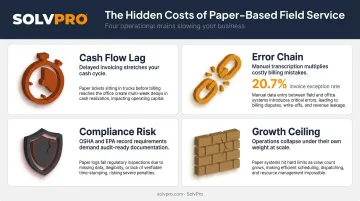
Cash Flow Suffers When Paperwork Lags
Every day between job completion and invoice delivery is a day you're not getting paid. In a service business running on tight margins, that lag compounds fast.
Paper creates the delay at every step: the crew finishes the job, the work order rides back in someone's truck, it gets handed to the office, someone deciphers the handwriting, and then — maybe — an invoice goes out. By the time the customer receives it, four or five days have passed.
Jobber's 2026 data shows nearly 80% of service pros receive payment within 3 days of job completion when using digital workflows. Paper makes that impossible.
The Error Chain from Handwritten Work Orders
Illegible field notes create a ripple effect that doesn't stop at the invoice:
- Handwritten job details get misread during data entry
- Invoice reflects wrong materials, hours, or scope
- Customer disputes the charge
- Payment is held while the dispute is resolved
- The relationship takes a hit regardless of outcome
Ardent Partners' 2024 AP benchmark found an average invoice exception rate of 20.7% across B2B billing operations — and that's with office-based teams, not field crews handing off handwritten notes.
Compliance Exposure in Regulated Trades
For electrical, HVAC, and fire safety contractors, missing paperwork isn't just inconvenient — it's a liability.
- OSHA requires employers to retain OSHA 300, 300A, and 301 records for 5 years
- EPA Section 608 requires HVAC technicians to maintain refrigerant servicing records, including dates, quantities added, and leak inspection documentation
- The 2021 International Fire Code mandates that fire protection inspection, testing, and maintenance records be retained and available to code officials
Paper records get lost. An audit shouldn't be the moment you find out.
Paper Is a Growth Ceiling, Not Just an Annoyance
A paper-based operation that functions with two crews often falls apart at five. Each crew you add multiplies the volume of work orders, the number of phone calls crews make back to the office for job details, and the hours your admin staff spends reconciling paperwork.
The SolvPro founding team lived this directly — their background includes 17 years of hands-on construction experience (across project management, estimating, and sales), and they describe the reality in direct terms: double-booked jobs, crews calling for information that should have already been on-site, invoices going out weeks late. Paper doesn't scale — it just multiplies the same problems until something breaks.
What Paperless Field Service Management Actually Means
"Going paperless" is frequently misunderstood as using digital forms or emailing PDFs. That's not it. True paperless FSM means digitizing the entire job lifecycle — every stage connected, with data flowing in real time between office and field. The real definition goes deeper than swapping paper for PDFs.
Gartner defines FSM as software managing work and commercial interactions for traveling workforces that install, inspect, maintain, and repair equipment. TSIA breaks core FSM operations down into scheduling, dispatch, job-status tracking, invoicing, and billing. Paperless FSM means all of those stages are digitized and connected — not scattered across five separate tools.
What Each Stage Looks Like: Paper vs. Paperless
| Stage | Paper-Based | Paperless |
|---|---|---|
| Estimate | Handwritten or emailed spreadsheet | Digital proposal with phase-based line items and e-signature |
| Dispatch | Printed work order, phone call to crew | Work order pushed to crew's phone with full job details |
| Job execution | Notes on paper, photos on personal phones | Structured work order with photo capture and geo-stamped updates |
| Completion | Paper returned to office at end of day | Job marked complete in field, office notified instantly |
| Invoicing | Manual entry after paperwork arrives | Invoice generated same day from field data |
| Payment | Mailed invoice, check or card at office | On-site payment accepted, or online link sent immediately |
The Real-Time Data Gap Paper Creates
In a paper-based operation, the office is always behind the field. A job completed at 2pm might not be reflected in the office until the next morning — if the paperwork makes it back at all.
When crews update job status digitally, office staff see it immediately. Photos are geo-stamped. Time logs are tied to specific jobs. Disputes get resolved with a documented record rather than competing recollections. The information gap that paper creates doesn't just slow invoicing — it creates the conditions for every other operational problem on this list.
Key Benefits of Going Paperless in Field Service
Faster Invoicing and Improved Cash Flow
When a crew marks a job complete in the field, the office can generate and send an invoice that same day — sometimes within minutes. That's the workflow in a connected FSM platform — no batching, no waiting for paper to come back to the office.
The payment-speed gap is significant. Jobber's 2026 research found 48% of service pros report same-day payment when using digital workflows. Businesses stuck on paper can't compete with that cycle time.
Fewer Errors, Fewer Disputes
Digital work orders eliminate several error sources at once:
- Job details are entered once and pulled through to the invoice automatically
- Photos and field notes are attached to the work order, not a separate email chain
- Change orders are documented in the system, not scrawled on a notepad
- Customer history is available before the crew arrives — not reconstructed after
The result is fewer billing disputes — and less time spent chasing down what actually happened on a job.
Real-Time Crew Accountability and Visibility
Paperless FSM gives dispatchers and owners visibility into job status through event-based updates — job started, work completed, photos attached — rather than GPS surveillance or constant phone calls.
When a crew member in SolvPro marks a job complete, the office sees it instantly. Time entries are geo-stamped. Photos are attached to the work order with location data. The dispatcher knows which crews are available for the next job without calling around to find out.
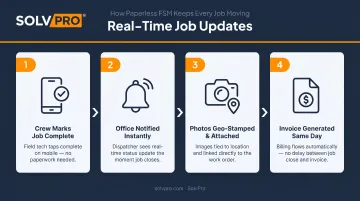
Crews stay accountable through job activity, not check-in calls — which keeps the field moving and the office informed.
A Complete, Searchable Service History
Every work order, customer note, job photo, and change order stored digitally is instantly accessible — for warranty claims, technician handoffs, recurring service visits, and customer disputes.
The alternative is a filing cabinet, a spreadsheet, and a phone call to the crew member who was on the job six months ago.
Stronger Customer Experience
More than 70% of customers expect a same-day response, and more than 55% expect a response within one hour, according to Jobber's 2026 Home Service Trends Report. Paper workflows make those expectations nearly impossible to meet consistently.
Paperless operations deliver on multiple customer-facing dimensions:
- Send professional digital proposals instead of handwritten estimates
- Technicians arrive with complete job history already on their phone
- Invoice the same day — no waiting for paperwork to come back to the office
- Accept on-site payment so the job closes completely before the crew leaves
How to Transition to Paperless FSM
Start with Your Highest-Friction Processes
Don't try to digitize everything at once. Identify the two or three workflows causing the most pain — typically work order creation and return, timekeeping, and invoicing — and prioritize those first.
Getting invoicing right immediately improves cash flow. Digitizing dispatch eliminates the most common crew-to-office phone calls. Once those are stable, add the rest.
Address the Crew Adoption Challenge Directly
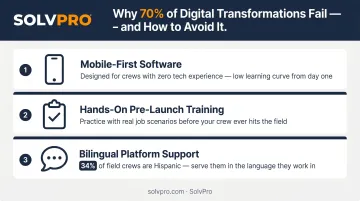
The biggest transition risk isn't the software — it's getting field crews to use it consistently. Service Council research found that only 30% of service-industry digital transformations succeed. The failure mode is almost always adoption, not technology.
Practical approaches that reduce adoption friction:
- Choose mobile-first software with a low learning curve — not a desktop application that technically has a mobile app bolted on
- Run brief hands-on training before go-live with actual job scenarios, not generic demos
- Account for language — CPWR data shows Hispanics represent 34% of the U.S. construction workforce, with a large share more comfortable working in Spanish. A platform that's English-only creates an adoption gap from day one
That last point is where a lot of platforms fall short. SolvPro is fully bilingual in English and Spanish — not just translated menus, but a complete interface for both office staff and field crews, maintained by an in-house translator. For mixed-language crews, that's a real operational difference.
Integration Is Non-Negotiable
Getting crews on board solves the field side — but the office side breaks down without accounting integration. A paperless FSM tool that doesn't connect to your accounting software just means your staff is re-entering the same numbers twice. Confirm that any platform you choose syncs directly with QuickBooks Online or your existing accounting system, so job data flows into financials automatically.
SolvPro includes QuickBooks Online sync as a core feature across all pricing tiers, not as a paid add-on.
What to Look for in a Paperless FSM Platform
Non-Negotiable Features
A paperless FSM platform needs to handle the full job lifecycle in one system — not require five separate tools stitched together. The minimum feature set:
- Mobile work order management with photo capture and digital sign-off
- Visual scheduling and GPS-tracked dispatch
- Real-time job status visibility for office teams
- Field-to-invoice workflow that eliminates manual re-entry
- Built-in invoicing with online payment acceptance
- Accounting integration (QuickBooks Online sync)
All of these should be standard — not gated behind premium tiers.
Ease of Setup and Real Onboarding Support
The right platform should be operational in hours, not weeks. SolvPro is designed to be set up in under 10 minutes, with a free trial that includes full platform access from day one — no credit card required.
When new customers need guidance, they get a live team walking them through setup — not a 40-page knowledge base and a chatbot. Kai Stanton, SolvPro's Technical Sales Specialist with 17 years of hands-on construction industry experience, runs one-hour demo and discovery sessions tailored to your specific workflows.
Pricing Transparency and Contract Terms
Avoid platforms with add-on pricing that obscures the true cost, or long-term contracts that lock you in before you've had a chance to validate whether the tool actually works for your crew.
Here's what SMB-friendly pricing actually looks like:
- Transparent monthly tiers with no hidden fees
- Flat per-seat rates for additional users (not volume-based pricing that spikes unpredictably)
- No long-term contract — cancel anytime
SolvPro's Starter plan is $179/month for up to 3 users. The Growth plan starts at $228/month and adds users at $49 each. No contracts, no surprise fees, and no features locked behind arbitrary upgrade tiers.
Frequently Asked Questions
How much does it cost to go paperless?
Pricing varies by platform and team size, but the more useful question is ROI: faster invoicing, fewer billing disputes, and reduced admin time typically offset software costs within the first few months. SolvPro's Starter plan begins at $179/month with no add-on fees for core features.
What is the best field service management software?
The right platform depends on your business size, crew structure, and integration needs. Look for a purpose-built FSM tool that handles scheduling, work orders, invoicing, and crew tracking together — with transparent pricing, no long-term contracts, and real onboarding support rather than self-serve documentation.
What are the three key elements of field service management?
The three core elements are: (1) scheduling and dispatch — assigning the right crew to each job; (2) work order and job management — capturing what gets done in the field; and (3) invoicing and payment — closing out jobs financially. Paperless FSM connects all three in real time.
What is paperless field service management?
It's the practice of digitizing the entire field service job lifecycle — from estimates and scheduling through work order execution, crew tracking, and invoicing — using connected, real-time digital workflows. The key word is connected: standalone digital tools don't qualify unless data flows between them automatically.
How long does it take to transition to paperless field service management?
The technical setup takes hours, not weeks — SolvPro is operational in under 10 minutes. The bigger investment is crew habit change, which goes faster with a mobile-first platform, brief pre-launch training, and live onboarding support from people who've actually worked in the field.