
Every contractor knows the feeling: a job wraps up, and the final numbers don't match what you bid. Usually, the culprit is labor or materials.
Those two categories make up the majority of direct costs on any job, whether you're running electrical crews, landscaping teams, or a commercial cleaning operation.
The problem is that many businesses log these costs loosely or lump them together in one bucket. When that happens, you lose the ability to pinpoint exactly where a job went sideways.
This guide breaks down why separating labor and material costs matters, plus the exact steps to track both accurately. You'll also learn the variables that affect your numbers, common mistakes to avoid, and how to pick a tracking method that fits your crew size.
KEY TAKEAWAYS
- Separating labor and material costs pinpoints exactly what caused a budget overrun
- Track labor costs using the fully burdened rate: wages, taxes, and benefits combined
- Log material costs at purchase, tied to a specific job, including waste and returns
- Reviewing job costs mid-project catches overruns before they finish killing your margin
- Spreadsheets work for solo operators; multi-crew businesses need real-time software
Why Tracking Labor & Material Costs Separately Matters for Job Cost Reporting
A job cost report rolls up every dollar spent on a project. Labor and materials make up the largest share of that total for most trades. The U.S. Census Bureau tracks payroll, benefits, and material costs separately at the industry level precisely because they behave differently and need to be evaluated on their own terms.
Here's the diagnostic problem with combined tracking: if a job runs 15% over budget, was it labor or materials? A blended number can't tell you. Maybe your crew took longer than estimated, or maybe lumber prices spiked mid-project.
Nearly 85% of contractors reported higher costs for materials, parts, and supplies in a March 2021 AGC survey. That's a clear signal that material price swings alone can sink your margin if you're not tracking them separately from labor.
Materials Are a Cost, Not Income
This trips up a lot of new business owners. Material costs are a direct expense, part of cost of goods sold, not income. According to IRS Publication 334, materials and supplies used to complete a job get subtracted from gross receipts to calculate gross profit.
They reduce your bottom line; they don't add to it. On a job cost report, material spend flows in as a cost against the job, then rolls up into your income statement as part of COGS.
Better Data Means Better Bids
Once you know your historical labor percentage and material percentage on past jobs, you can build tighter estimates on future ones. Instead of guessing at a markup, you're pricing off real numbers.
Platforms that combine crew time tracking with job-level cost reporting, like SolvPro, make this separation automatic. Labor hours and material entries get tagged to the job as they happen, so office staff aren't reconstructing costs from memory weeks later.
How to Track Labor & Material Costs for Job Cost Reporting
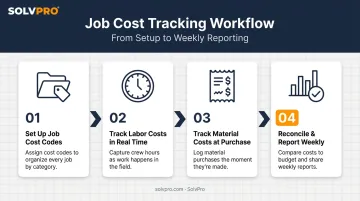
Step 1: Set up Job Cost Codes and Categories
Create separate line items for labor and materials under each job so costs never get blended together. Every job needs a unique identifier, whether that's a job number, customer name tag, or project code, so costs roll up correctly when you run reports.
Most businesses handle this one of two ways:
- Accounting software like QuickBooks Online Projects, which groups income, expenses, and time under one project
- Field service platforms with job-level tagging built in, so a crew member selects the job before logging anything
Step 2: Track Labor Costs in Real Time
Capture actual hours worked per job, then apply the fully burdened hourly rate, not the base wage. Crews should log time by job and by task, not just a single daily total. A general total tells you eight hours were worked; it doesn't tell you six went to Job A and two went to a warranty callback on Job B.
SolvPro's mobile time tracking supports this with manual entries and live timers. Every logged action, whether it's a time entry, a photo upload, or a status change, gets job-linked through event-based tracking. That creates a verifiable record of when and where the work actually happened, tied directly to the job.
Step 3: Track Material Costs as They're Purchased or Used
Log material costs at the time of purchase, pulling from receipts, purchase orders, or invoices, and tag each one to the job it supports. Waiting until the end of the month to reconstruct spending from a stack of receipts means you will probably miss something.
Also account for:
- Waste: material bought but not used productively
- Leftover stock: material that can roll to another job
- Returns: credits that should reduce the job's material cost
SolvPro's digital work orders let crews log materials in the field alongside photos and notes. Material use gets captured at the point of work, not reconstructed later from a glovebox full of paper.
Step 4: Reconcile and Report Job Costs Regularly
Pull a job cost report weekly, or at each project phase, and compare actual labor and material spend against the original estimate. Flag variances early, while there's still time to adjust staffing or purchasing, not after the job closes and the margin is already gone.
SolvPro's digital estimates carries the original phase structure directly into the active job, so actual spend can be compared against budget at each stage, not just at the finish line.
Key Factors That Affect Job Costing Accuracy
Your job cost report is only as good as the data feeding it. Four factors drive most of the accuracy problems businesses run into.
Labor Burden Rate Accuracy: Using base wage instead of the fully loaded rate systematically understates true labor cost. According to the BLS Employer Costs for Employee Compensation report, benefits made up 30.1% of total employer compensation costs as of March 2026, on top of wages. Skip that burden, and every labor-heavy bid comes in underpriced.
Timing of Material Cost Capture: Costs entered late, or estimated instead of pulled from actual invoices, distort real-time job profitability. A job can look healthy mid-project, then swing negative the moment real invoices land.
Level of Job/Phase Detail: Tracking at the whole-job level instead of by phase or task hides exactly which part of the work is losing money. Phase-level detail lets you isolate the framing crew's overrun from the finishing crew's clean numbers.
Consistency of Data Entry Across Crews: If one crew logs time and materials diligently while another guesses, your job cost reports become unreliable for comparison. Once leadership stops trusting the numbers, everyone reverts to gut-feel bidding.
Common Mistakes to Avoid When Tracking Job Costs
Even businesses with good intentions fall into predictable traps:
- Using estimated hours or material quantities instead of actual logged data from the field
- Omitting labor burden (payroll taxes, insurance, and benefits) from hourly labor cost calculations
- Waiting until job completion to reconcile costs, rather than checking progress mid-job
- Letting crews track time from memory or paper notes, which leads to missing or inflated hours on the report
Any one of these can erode margin on an otherwise well-bid job.
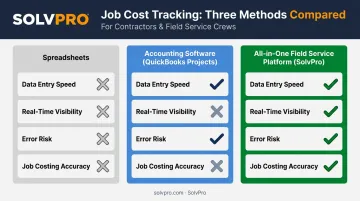
Manual Tracking vs. Job Costing Software: Choosing the Right Method
The right tracking method depends on how many jobs and crews you're running at once. What works for a solo operator breaks down fast the moment you add a second crew.
| Method | Best For | Trade-Offs |
|---|---|---|
| Spreadsheets | Single-owner operators with very few concurrent jobs | Manual entry is slow and error-prone; no real-time field visibility |
| Accounting software (QuickBooks Projects) | Businesses already on QuickBooks wanting costs tied to invoicing | Still depends on manual time/material entry unless connected to a field tool |
| All-in-one field service platforms (SolvPro) | Growing businesses with multiple crews needing real-time cost capture | Requires initial setup, though SolvPro is built to be running in under 10 minutes |
Spreadsheets work fine when you're the one running every job. Once you add crews, you're relying on people remembering to send you numbers, which rarely goes well.
QuickBooks Online Projects picks up some of that slack by tying job costs directly to invoicing. It still needs someone keying in hours and material costs by hand unless a field tool feeds the data in automatically.
SolvPro closes that gap. The platform combines:
- Job and crew time tracking for verified field hours
- Digital estimates linked to real job costs
- Built-in QuickBooks Online sync
Field activity flows straight into job cost reports without a separate reconciliation step. For a growing crew, that's the difference between knowing your numbers and guessing at them.
Conclusion
Your crews are busy. So why isn't there more money in the bank?
When the office can see labor, materials and documented changes against the job while the work is still open, the numbers at the end stop being a surprise. SolvPro keeps scheduling, work orders, time, job costing and invoicing on one record. When you want to see it on your kind of work, Book a Demo.
Run the Job. Protect the Profit.
Frequently Asked Questions
Are Material Costs an Expense or Income?
Material costs are a direct expense, part of cost of goods sold (COGS), needed to complete a job. They're not income. They reduce job profitability on the job cost report and flow into COGS on the income statement.
What Are the Main Methods for Tracking a Business's Income and Expenses?
Cash basis and accrual basis are the two core accounting methods. Accrual accounting matches job costs to revenue more accurately, since it records expenses when incurred rather than when paid.
What Transactions Are Not Recorded Under Cash-Basis Accounting?
Unpaid invoices (accounts receivable) and unpaid bills (accounts payable) aren't recorded until cash actually changes hands. This can distort job cost timing on a cash-basis report.
What Is the Financial Report That Shows Income and Expenses Called?
That's the income statement, also called the profit and loss statement. A job cost report is a more granular version specific to a single project.
How Do You Calculate Labor Cost per Job?
Multiply actual hours worked on the job by each crew member's fully burdened hourly rate. Then total those figures across everyone assigned to the job.
Can Software Automatically Calculate Job Costs from Labor and Material Entries?
Yes. Platforms like SolvPro combine crew time tracking, material logging, and QuickBooks Online sync so job cost reports update from real-time field data instead of requiring manual reconciliation later.