The stakes are real. Missed jobs cost revenue. Invoices that sit for days delay cash flow. Crews without real-time updates create confusion between the office and the field.
Mobile field service management apps range from enterprise platforms to SMB-friendly tools, and matching the right one to your crew size, budget, and trade.
KEY TAKEAWAYS
- Mobile FSM apps handle scheduling, dispatch, invoicing, and payments directly from a phone.
- Enterprise, mid-market, and SMB platforms differ mainly in configurability, onboarding time, and price.
- Offline access matters wherever crews work in basements, rural sites, or buildings with poor signal.
- SolvPro suits growing SMB crews that need an all-in-one bilingual platform with same-day go-live.
- Pricing transparency varies: some vendors publish rates, while others quote only after a sales call.
Overview of Mobile Field Service Management Apps in 2026
A mobile FSM app is the field-facing piece of a larger field service management system, the part technicians actually touch on job sites. Desktop-only software still handles admin work fine, but it leaves crews struggling with phone tag and lost paperwork the moment they step off-site.
The market backs up why this shift matters. Global field service management software is projected to grow from $5.10 billion in 2025 to $9.17 billion by 2030, a 12.5% compound annual growth rate, according to MarketsandMarkets. That kind of expansion means more vendors crowding the space and tougher competition for your subscription dollars.
Most service businesses with crews in the field now treat mobile tools as core infrastructure rather than an afterthought. The strongest mobile apps range from enterprise platforms built for large operations to simpler tools designed specifically for growing SMB crews.
Best Mobile Field Service Management Apps in 2026
Each app below is evaluated on five factors: ease of use, mobile functionality, scheduling and dispatch, invoicing, and pricing transparency.
SolvPro
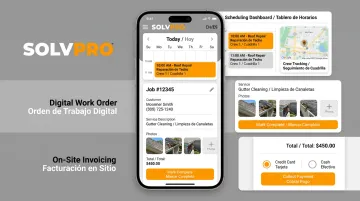
SolvPro is an all-in-one field service management platform built for growing crews in construction, plumbing, electrical, landscaping, and commercial cleaning. It handles scheduling, digital work orders, crew tracking, and payments in a single mobile-friendly app, so office staff and field teams work from the same real-time data.
What sets it apart:
- Fully bilingual English/Spanish interface for both office admin and field crews, not just translated menus
- QuickBooks Online sync and credit-card and ACH payments built into every plan at no extra cost
- Same-day go-live with guided onboarding — setup takes under 10 minutes, and a live team walks you through it
- No long-term contracts, with the option to cancel anytime
- Built by a team with real construction, estimating, and field service backgrounds, unlike most software-only teams
Crews can also invoice and collect payment on-site the same day a job wraps. That matters because QuickBooks reports that invoices with a Pay Now option get paid up to 4 times faster than paper invoices, closing the gap between finished work and cash in the bank.
| Key Features | Mobile scheduling and dispatch, digital work orders with photos and signatures, time by job and crew member, online estimates with e-signatures, QuickBooks Online sync, bilingual EN/ES interface |
| Best For | Growing multi-crew service businesses wanting simplicity without enterprise-level complexity |
ServiceTitan
ServiceTitan's mobile app is the field-facing arm of a much larger enterprise platform used by thousands of HVAC, plumbing, and electrical companies. Technicians can pull job details, customer history, and pricebook items straight from their phone, then build estimates and invoices on-site.
Its differentiators are depth and polish: tight CRM integration, presentation-mode sales tools for closing bigger tickets, and offline functionality that covers job updates, time tracking, and invoicing even without a signal.
The tradeoff is cost and complexity. Pricing isn't published; it's quote-based per technician, which tends to work better for larger operations with dedicated admin staff than for a five-person crew.
| Key Features | Job details and status updates, customer history, mobile estimates and invoices, on-the-spot payments, offline mode |
| Best For | Larger residential and commercial service companies needing deep sales enablement |
Housecall Pro
Housecall Pro is a mobile-first field service app designed for home service businesses, covering scheduling, estimates, invoicing, and online customer booking. Its QuickBooks integration and clean interface make it a common starting point for solo operators scaling into their first few crews.
The customer-facing booking feature is a real differentiator; homeowners can book jobs straight from a Google search result. What it lacks is the deeper pricebook and reporting depth that larger platforms like ServiceTitan offer, which matters more once you're running multiple crews across service lines.
| Key Features | Scheduling and dispatching, invoicing, online booking, QuickBooks Online integration |
| Best For | Small to mid-sized home service businesses wanting an easy-to-use mobile app |
Connecteam
Connecteam is a workforce management app, not a dedicated FSM platform, but its scheduling, GPS time tracking, and communication tools have made it popular with field teams focused on coordination over billing. A free plan covers teams under 10 users.
Its strength is affordability paired with genuine ease of use for drag-and-drop scheduling and digital checklists. The catch: Connecteam does not have a native invoicing feature, so businesses that need to bill customers directly from the app will need to pair it with separate accounting software.
| Key Features | GPS time clock, drag-and-drop scheduling, digital checklists and forms, team chat |
| Best For | Field teams prioritizing time tracking and communication over quoting and invoicing |
Workyard
Workyard targets construction and field service crews that need precise labor cost tracking. GPS-verified clock-ins, geofenced job sites, and job costing tied directly to labor hours are the core of what it does.
The geofencing accuracy is the standout feature, along with automatic time-card tagging when crews enter or leave a job site. There's no free tier, only a 14-day trial, and GPS features require some setup time during onboarding.
| Key Features | GPS time tracking, geofencing, job costing by cost code, mileage tracking, payroll integrations including QuickBooks and Gusto |
| Best For | Construction and field service businesses needing precise labor cost tracking |
Must-Have Features to Look for in a Mobile Field Service App
Not every FSM app treats mobile as a first-class citizen. Before committing, check that the platform covers these basics.
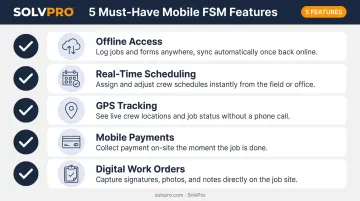
Offline access matters more than most buyers expect. Technicians working in basements, rural properties, or areas with weak signal need to keep logging job details and photos without losing data. The best apps sync everything automatically once the connection returns, rather than forcing a manual re-entry.
Beyond offline reliability, real-time scheduling, GPS tracking, and mobile payments directly affect how fast jobs get completed and paid. GPS adoption among fleet professionals reached 80% in 2026, up 11 percentage points year over year, according to Verizon Connect's 2026 Fleet Technology Trends Report. That jump signals location visibility has become standard practice, not a premium add-on.
Other must-haves:
- Digital work orders with photo attachments and customer sign-off
- Mobile invoicing that lets crews bill and collect payment on-site
- Real-time dispatch updates that reach crews the moment a schedule changes
Ease of use matters just as much as feature depth. A technician who finds an app confusing will go back to a paper clipboard within a week, and all that investment in mobile tools goes to waste.
What to Look for in Mobile Field Service Management Apps
Each platform was tested across five criteria: mobile usability, scheduling and dispatch capability, offline functionality, invoicing and payment tools, and pricing transparency.
A few common mistakes show up repeatedly when businesses shop for FSM software:
- Prioritizing feature count over ease of use — a long feature list means nothing if crews won't adopt it
- Ignoring free plan or user limits until the business outgrows them mid-contract
- Skipping the pricing fine print, only to discover add-on fees for features assumed to be included
For SMB-focused picks specifically, onboarding support and bilingual accessibility mattered most, along with contract terms that don't lock a growing crew into a bad fit. A business signing up its first five technicians has very different needs than an enterprise IT department rolling out software across 200 trucks.
Conclusion
The "best" mobile field service app depends entirely on your crew size, your industry, and whether you need enterprise depth or SMB simplicity. A 40-truck electrical contracting company and a 4-person landscaping crew shouldn't be shopping from the same shortlist.
Before committing to any name on that shortlist, test it with a free trial or live demo. Get your actual crew using it for a week and see what sticks.
For growing service businesses that want an all-in-one, bilingual, easy-to-launch mobile FSM app without enterprise complexity, SolvPro offers guided onboarding and transparent pricing that make it worth a look.
Field service software helps you manage the work. SolvPro helps you make sure the work makes money.
The right tool depends on your trade, crew size, job mix and the systems you already run. Test it on real jobs before you commit, and check that crews will actually enter what the office needs. When you want to see it on your kind of work, Book a Demo.
Run the Job. Protect the Profit.
Frequently Asked Questions
What Is the Best Mobile App for Field Service?
It depends on business size and needs. Enterprise platforms like ServiceTitan suit large teams with dedicated admin staff, while SolvPro and similar SMB-focused apps suit growing crews needing simplicity and bilingual support.
What Features Should a Mobile Field Service Management App Have?
Look for scheduling and dispatch, offline access, GPS tracking, digital work orders, and mobile invoicing. These five features directly affect job completion speed and how fast you get paid.
How Much Does Mobile Field Service Management Software Cost?
Pricing ranges from free plans for very small teams to per-user monthly fees in the $8-$50 range, with enterprise platforms like ServiceTitan requiring custom quotes based on technician count.
Can Field Service Apps Work Without Internet Access?
Many modern FSM apps support offline mode, letting technicians log job details, photos, and status updates that sync automatically once the device reconnects to the internet.
What Is the Difference Between Field Service Management Software and a Mobile App?
FSM software is the full platform, often including desktop and admin tools for scheduling and reporting. The mobile app is the field-facing piece technicians actually use on-site.
Which Mobile Field Service App Is Best for Small Businesses?
Small businesses benefit most from SMB-friendly, easy-to-launch platforms like SolvPro that avoid enterprise complexity, long contracts, and per-feature add-on fees.