That juggling act has a price tag. Construction professionals lose more than 14 hours a week, roughly 35% of their time, chasing down project info, fixing miscommunication, and redoing work that should've been right the first time. FMI pegged the industry-wide cost of that inefficiency at more than $177 billion annually.
For GCs, the pain shows up in familiar ways: double-booked crews, a foreman who never got the memo about a schedule change, missed deadlines that trigger client calls, and a job that "felt busy" but somehow lost money.
This guide breaks down five practical strategies covering scheduling, communication, accountability, training, and the software that ties it all together.
KEY TAKEAWAYS
- Centralized scheduling with buffer time prevents double-bookings and cascading delays
- Daily huddles and standardized field logs cut office-crew miscommunication
- GPS-verified time tracking replaces paper timesheets and ends disputes over hours
- Weekly, not daily, performance reviews build accountability without micromanaging
- Training and retention costs far less than replacing skilled crew members
Why Crew Management Matters for General Contractors
Crew management is the coordination of people, schedules, tasks, and communication across job sites, trades, and subcontractors. It answers one question: who's doing what, where, and by when?
For GCs, that question gets complicated fast. You're not running one trade on one site. You're syncing framers, electricians, plumbers, and inspectors around a single timeline, where one late delivery or no-show cascades into everyone else's schedule.
Delays happen on nearly every job site. In 2025, 78% of construction firms reported at least one delayed project, and 45% pointed to labor shortages among their own crews or subcontractors as the cause, according to the AGC and NCCER 2025 Workforce Survey.
The financial exposure is just as real:
- Poor project data and miscommunication drive an estimated 48% of U.S. construction rework, costing the industry roughly $31.3 billion a year
- In stressed projects reviewed by FMI, half involved internal planning or organizational failures
- A quarter involved contractors who simply didn't staff the job adequately
None of this is abstract for a GC running three sites with five subs. Weak crew management doesn't just slow one job down. It erodes margin on every job running at the same time.
Strategy 1: Master Scheduling and Resource Allocation
When a GC's schedule lives across a whiteboard, a group text, and someone's memory, conflicts aren't a matter of if, but when. Two crews show up to the same site. A sub gets booked twice. A job sits idle because nobody confirmed materials arrived.
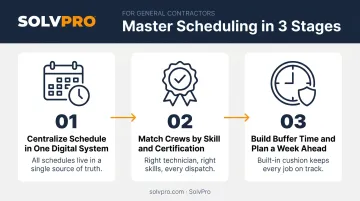
Centralize Your Schedule in One Digital System
A single visual calendar showing every crew, job, and sub in one place eliminates the guesswork. When office staff and field leads look at the same schedule in real time, double-booking stops being a recurring headache.
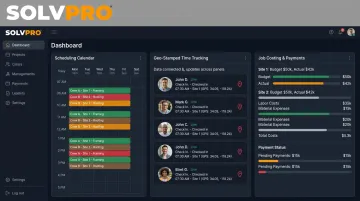
SolvPro's scheduling and dispatch dashboard gives GCs a drag-and-drop calendar where jobs get assigned in seconds and crew availability is visible instantly. Toggle between day, week, or crew views, and everyone from the office to the truck sees the same version of the plan.
Match Crews to Jobs Based on Skill and Certification
Assigning crews by availability alone is how rework happens. A framing crew thrown onto finish carpentry because they were "free" that day usually costs more in redo time than it saved in scheduling convenience.
Skill-based matching means:
- Keeping licensed trades on licensed work
- Pairing experience level to job complexity
- Documenting certifications so scheduling decisions aren't left to chance
Most scheduling tools are built primarily around availability rather than automated skill-matching. That's why job-specific notes inside a digital work order still matter: they let a scheduler flag "this job needs someone certified for X," even when the platform itself doesn't auto-filter by credential.
Build Buffer Time and Plan a Week Ahead
Weather delays, material shortages, and no-shows happen routinely, not occasionally. Buffer time between jobs absorbs those hits without knocking the next three projects off schedule.
A short weekly planning session, even 20 minutes, flags upcoming crew needs, pending time-off requests, and conflicts before they turn into a Monday morning scramble. Look one week out, not one day out.
Strategy 2: Build a Communication System Your Crews Will Actually Use
Fragmented communication (phone calls, texts, and sticky notes) is the most expensive hidden cost on a GC's job site. Nobody sees it as a budget line item, but it shows up in wasted material, redone work, and crews standing around waiting for direction.
Run Daily Huddles to Align Every Crew and Sub
Five minutes at the start of the day, covering today's plan, current blockers, and what changed since yesterday, prevents most of the confusion that snowballs by 10 a.m. Keep it under five minutes and stick to those three points.
Standardize Daily Logs and Field Updates
Mobile daily logs capture photos, notes, and progress updates. They protect GCs when a client disputes work or timeline, and keep the office informed without a dozen calls a day.
SolvPro's mobile work orders let crews upload job-linked photos, add progress notes, and mark job status directly from a phone. That data lands in the same work order the office is already looking at, so nobody's asking "did that job get finished" three hours after it did.
Create a Clear Escalation Chain for Problems
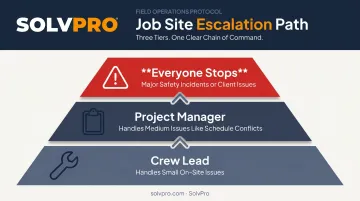
Confusion about who to call wastes time crews don't have. A simple tiered structure fixes it:
- Crew lead handles small, on-site issues like a missing tool or minor scope question
- Project manager handles medium issues, such as schedule conflicts or material delays
- Everyone stops for major safety incidents or client-facing problems
Write it down. Post it. Make sure every sub knows the chain before day one, not after the first incident.
For GCs running bilingual crews, this only works if instructions actually get understood. SolvPro's fully bilingual English/Spanish interface covers the mobile app, scheduling, job instructions, and customer communications, so directions given in the office don't get lost, garbled, or guessed at by the time they reach the field.
Strategy 3: Track Productivity and Accountability the Right Way
Paper timesheets and guesswork are how payroll disputes start. A crew member says they worked 9 hours, the foreman remembers 8, and the office is stuck refereeing a fight nobody wins.
Use Geo-Verified Time Tracking Instead of Paper Timesheets
GPS-based clock-in and clock-out removes the argument entirely. SolvPro's time entries recorded against the job capture location the moment a crew member logs hours, whether through manual entry or a live timer. That data feeds straight into job costing and payroll through a native QuickBooks Online sync. No re-entry, no reconciling two systems at month-end.
Measure Completed Work, Not Just Hours Logged
The better question is whether the crew hit today's target, not how many hours they logged.
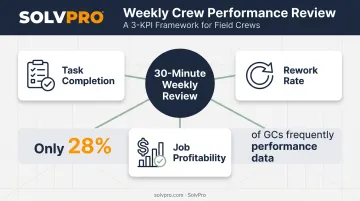
Shift your KPIs toward:
- Task completion against the day's plan
- Rework rate on completed jobs
- Job profitability, tracked in real time against the original estimate
A job costing dashboard that shows labor and material costs by job as they happen catches problems immediately. A crew that logged eight hours but only completed half the expected scope shows up right away, not at month-end when the invoice doesn't match the budget.
Review Performance Weekly, Not Daily
Checking every job every day is exhausting, and it reads as micromanagement to your crews. A 30-minute weekly review, covering hours against budget, flagged issues, and schedule progress, builds accountability without anyone feeling watched.
This weekly discipline pays off in measurable ways. A Dodge Construction Network study of more than 200 U.S. general contractors found that only 28% frequently tracked performance data. Firms using automated site-data tools reported above-average gains in profitability, schedule adherence, and quality compared to those relying on manual methods. The GCs winning on margin see their numbers sooner. That's the whole edge.
Strategy 4: Invest in Training, Safety, and Retention
Cross-trained crews flex where you need them most. A framer who can also handle basic finish work is worth more than two specialists who can each only do one thing.
Training investment across the industry is climbing for good reason. 42% of construction firms increased or initiated training spending in the past year, and ABC member contractors alone put $1.6 billion into upskilling roughly 1.3 million workers in 2023.
Safety protocols matter just as much as skill. Consistent checklists, PPE enforcement, and near-miss reporting reduce the incidents that stall a project for days and expose a GC to liability that outlasts the job itself.
Keeping the trained, safety-conscious crew you just built is the next challenge. Retention is the quiet cost most GCs underestimate. Replacing a skilled crew member costs far more than the wages saved by underpaying one. The cheaper path:
- Predictable schedules crews can plan their lives around
- Fair, competitive pay benchmarked to the local market
- Recognition for good work, not just correction for bad work
- A visible growth path, from apprentice to lead to foreman
A crew that's stayed together for two years moves faster than one rebuilt every six months.
Choosing Crew Management Software That Fits Your Business
Stitching together separate apps for scheduling, time tracking, and invoicing feels manageable at first. Then you're re-entering the same job three times, and information gets lost between systems that were never built to talk to each other.
That disconnect is exactly what SolvPro was built to fix. As an all-in-one field service management platform for growing GCs and multi-crew teams, SolvPro keeps scheduling, work orders, crew tracking, and payments in one system, not four.
What Makes It Practical for GCs
- Job and crew time tracking on time entries, photos, and activity logs, built in on the core plan rather than sold as a paid add-on
- Native QuickBooks Online sync that moves labor hours and job costs into accounting without manual re-entry, speeding up invoicing
- Setup in under 10 minutes, with account creation in under 2 minutes and no long-term contract required
- Bilingual English/Spanish interface covering the mobile app, scheduling, and customer communications
Pricing scales with your crew size:
| Plan | Users |
|---|---|
| Core plan | One plan for the whole team |
| Growth | 4 users |
| Scale | Unlimited users |
Every tier includes the same core features. No upgrade-to-unlock surprises.
Getting Your Crew to Actually Use It
New software fails when it's rolled out all at once. A better approach:
- Start with one feature. Scheduling or time tracking, not everything at once.
- Keep it simple. Don't add every module in week one.
- Have leadership use it first, visibly. Crews follow what the PM actually does, not what a memo says.
Give it two weeks on one feature before adding the next. You can book a free demo to see how the setup fits your crew size before committing to anything.
Conclusion
You shouldn't have to wait until the job is over to find out whether you made money.
Keeping the estimate, work order, time entries and invoice on one record reduces how much the office has to reconstruct before it can bill. That is the difference between finding out now and finding out at closeout. When you want to see it on your kind of work, Book a Demo.
Run the Job. Protect the Profit.
Frequently Asked Questions
What Does Crew Management Do?
Crew management coordinates scheduling, task assignment, communication, and accountability for field teams so projects stay on time and on budget. It's the system that keeps crews, subs, and the office working from the same plan.
How Much Does a GC Charge per Hour?
GC hourly rates vary by region, trade, and project scope, typically $50 to $150 per hour, though many GCs charge 10% to 20% of total project cost instead. Accurately tracking crew hours and job costs helps you set rates that protect your margin.
How Do I Schedule Crews Across Multiple GC Projects?
Use a centralized, skill-based scheduling system with built-in buffer time between jobs. A single visual calendar showing every crew and job prevents the double-bookings that cause cascading delays.
How Do I Track Crew Productivity Without Micromanaging?
Combine GPS-verified time tracking with output-based KPIs like task completion and rework rate, then review performance weekly instead of daily. This builds accountability without anyone feeling watched.
How Do I Keep Good Crew Members from Leaving?
Offer competitive, predictable pay, consistent schedules, real recognition for good work, and a clear path from apprentice to foreman. Replacing a skilled crew member almost always costs more than retaining one.
What Features Should Crew Management Software Have for General Contractors?
Look for scheduling, mobile time tracking, job costing, and communication tools bundled into one connected platform, such as SolvPro's all-in-one system built for field crews. Separate apps for each function create duplicate data entry and lost information over time.