Dedicated work order software fixes the disconnect between office and field. Jobs get assigned faster, crews stay accountable for what they complete, and invoices go out the same day a job wraps instead of three weeks later.
The scale of the problem is bigger than most owners realize. In a sample of over 6,000 buyer interactions, Software Advice found that 35% of small-to-midsize businesses shopping for field service software were still using spreadsheets or pen-and-paper, with nearly 26% running no tracking system at all.
This guide breaks down the best work order platforms built for small crews in 2026, not enterprise maintenance departments.
KEY TAKEAWAYS
- Mobile usability, transparent pricing, and fast onboarding matter more than enterprise feature depth for a small team.
- SolvPro, Jobber, Housecall Pro, MaintainX, UpKeep, and FieldPulse each target different crew sizes and trades.
- Fit depends on crew size, trade type, and requirements such as bilingual support or QuickBooks sync.
- Pricing structures vary widely, from free tiers to per-user models to custom quotes.
- Work orders that carry crew time and materials through to the invoice remove the rekeying step before billing.
Overview of Work Order Software for Small Business Field Service Teams
Work order software does one core job: it moves a task from "someone needs to do this" to "this is scheduled, assigned, tracked, and paid for," all inside one system. For a crew running three job sites in a day, that visibility matters more than almost any other business tool.
The market is growing fast because the problem is real. MarketsandMarkets projects the global field service management market will grow from $5.10 billion in 2025 to $9.17 billion by 2030, a 12.5% compound annual growth rate.
That growth doesn't mean every small service business has already digitized. A meaningful share of buyers are still comparing spreadsheets against dedicated software for the first time. The comparison below focuses on platforms built for small crews, not the sprawling asset-management systems designed for enterprise facilities departments. That means:
- Team sizes typically under 20 field employees, not hundreds
- Monthly subscription pricing, not six-figure enterprise contracts
- Job scheduling and invoicing tools, not full equipment-lifecycle asset tracking
Top Work Order Software for Small Businesses in 2026
Four criteria matter most to small crews: mobile-first usability, transparent SMB pricing, onboarding support quality, and integrations with accounting and payment tools like QuickBooks Online.
SolvPro
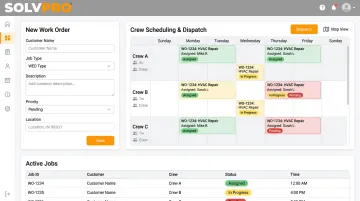
SolvPro is an all-in-one field service platform built by a team with hands-on backgrounds in construction, estimating, and project management, people who understand what crews actually need on the job. The platform combines scheduling, digital work orders, crew tracking, and payments into one connected system.
What sets it apart:
- Fully bilingual English/Spanish interface across the office dashboard and field crew mobile app, unlike Jobber and Housecall Pro's mobile-only Spanish support
- Live onboarding support from a real team member rather than a chatbot and a knowledge base
- Native QuickBooks Online sync and credit-card and ACH payments built into the core platform, included on the core plan
- No long-term contracts and a 14-day free trial with no credit card required
| Best For | Growing multi-crew service businesses (GCs, electrical, plumbing, landscaping, janitorial) needing simplicity without enterprise complexity |
| Key Features | Digital work orders, online estimates and proposals, crew scheduling, QuickBooks Online sync, bilingual platform, job costing |
New customers can typically go from sign-up to a live, dispatched work order the same day. Account creation takes under 2 minutes, and initial team setup runs under 10 minutes, according to SolvPro's own documented onboarding flow.
Jobber
Jobber built its reputation on scheduling, invoicing, and CRM tools for home service trades like plumbing and landscaping. It's a strong choice for businesses that lean heavily on customer-facing quoting.
Where it falls short: internal asset and maintenance tracking is thin, and pricing complaints show up consistently in reviews. One G2 reviewer described the jump from Jobber's Core plan to its Connect plan as a "significant jump in price" that may not fit every small business budget.
| Best For | Customer-facing service businesses prioritizing scheduling and invoicing |
| Key Features | Drag-and-drop scheduling, mobile app, online payments, CRM |
Housecall Pro
Housecall Pro packages booking, dispatch, and payment collection into a single app for home service businesses like plumbing, HVAC, and cleaning crews. Customer communication tools and reputation management are genuine strengths.
Reviewers frequently flag cost concerns and add-on solicitation. G2 aggregates multiple complaints about departments calling customers to upsell additional services, and mapping features are sold as a separate add-on rather than bundled in.
| Best For | Home service SMBs wanting booking and payments combined |
| Key Features | Online booking, dispatching, invoicing, customer text and email updates |
MaintainX
MaintainX is a mobile-first CMMS known for technician-friendly work order tracking, in-app chat, and customizable request portals. It's genuinely easy for a technician to pick up on day one.
The catch: it's built more for asset-heavy maintenance teams managing equipment than trade-based service crews managing job sites. G2 reviews frequently cite limited customization and inconsistent reporting as recurring frustrations.
| Best For | Small maintenance teams needing mobile work orders and asset tracking |
| Key Features | Work request portal, mobile app, preventive maintenance, reporting |
UpKeep
UpKeep is a cloud-based CMMS praised for ease of use and mobile accessibility, with solid preventive maintenance tracking baked in.
Reviewers point to a learning curve for advanced setup and inconsistent reporting. One G2 reviewer noted that exporting data to Excel was faster than working within the platform's native list view.
| Best For | Small facilities or maintenance teams wanting simple mobile work order tracking |
| Key Features | Work order creation, asset tracking, inventory, QuickBooks integration |
FieldPulse
FieldPulse bundles scheduling, quoting, and work order tracking for small trade businesses, with custom workflows and real-time job updates that scale as a team grows.
The tradeoff: FieldPulse doesn't publish pricing tiers online, and it lacks the deeper asset-management depth of dedicated CMMS platforms like MaintainX or UpKeep.
| Best For | Small field service businesses wanting scheduling, quoting, and work orders together |
| Key Features | Custom workflows, real-time job updates, drag-and-drop dispatch |
What to Look for in Work Order Software
Small business owners often pick software the way they'd pick a truck brand, based on name recognition rather than fit. That mistake gets expensive fast. A three-person landscaping crew doesn't need the asset-tracking depth built for a 200-location facilities team.
A growing electrical contractor doesn't need a maintenance management system designed around preventive schedules for industrial equipment.
Four factors drove every ranking in this guide:
- Mobile usability for field crews - If a technician can't update a job status from a truck with two bars of signal, the software isn't working for the field, only for the office
- Pricing transparency - Platforms that bury features behind upgrade walls or charge surprise add-on fees create budget headaches down the road
- Onboarding and support quality - Small businesses rarely have an IT department, so live human support during setup matters more than a self-service help center
- Integrations with accounting and payment systems - Native QuickBooks Online sync and built-in payment processing directly speed up invoicing and reduce double data entry
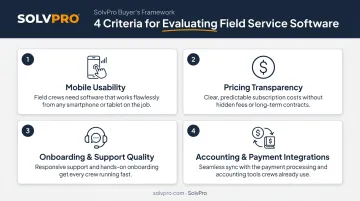
Each of these factors ties back to something concrete: fewer missed jobs, faster payments, and less time spent on admin work that doesn't generate revenue.
Conclusion
The best work order software matches how your specific trade and crew actually operate day to day, not the one with the most name recognition. A landscaping company juggling recurring stops has different needs than a general contractor running multi-stage projects.
Before committing to any platform, evaluate these three factors:
- How fast you can go live and start running jobs
- Whether the software scales with your crew size
- The total monthly cost once you factor in per-user fees and add-ons
If your team needs mobile-first work orders, transparent pricing, and support in both English and Spanish, SolvPro's same-day onboarding is built specifically for growing service businesses like yours. Book a demo or start a free 14-day trial with no credit card required.
Field service software helps you manage the work. SolvPro helps you make sure the work makes money.
The right tool depends on your trade, crew size, job mix and the systems you already run. Test it on real jobs before you commit, and check that crews will actually enter what the office needs. When you want to see it on your kind of work, Book a Demo.
Run the Job. Protect the Profit.
Frequently Asked Questions
What Is the Best Work Order Software?
The best option depends on your business size and trade. Platforms combining mobile-first work orders with transparent pricing, such as SolvPro for small service crews, tend to perform best as businesses scale and onboarding stays fast.
How Do I Keep Track of Orders in a Small Business?
Centralize work orders in one digital system with real-time status updates and mobile access for crews. Automated notifications keep everyone aligned, replacing paper tickets and text threads that get lost between the office and the field.
How Much Does Work Order Software Cost for Small Businesses?
Entry-level pricing ranges from free (MaintainX Basic) upward. SolvPro does not publish pricing; confirm it directly. Look for SMB-friendly platforms that avoid hidden add-on fees as your team grows.
Do Small Businesses Really Need Dedicated Work Order Software?
Yes, even small crews benefit from fewer missed jobs and faster invoicing, with accountability improving across the board. These gains compound as crew size or job volume increases.
Can Work Order Software Integrate with QuickBooks?
Yes. Most modern platforms, including SolvPro, Jobber, Housecall Pro, MaintainX, and UpKeep, offer native QuickBooks Online sync to simplify invoicing and cut down on manual data entry.
Is Work Order Software Available in Spanish for Bilingual Crews?
Most platforms offer only partial Spanish support, typically limited to the mobile app. SolvPro offers a fully bilingual English/Spanish interface across both office dashboards and field crew apps, at no additional cost.