
Field service business owners don't buy software on faith forever. At some point, someone — an owner, a partner, an accountant — asks the blunt question: was the field service management platform actually worth what you paid for it?
Many crews adopt scheduling and invoicing tools expecting fewer missed jobs and faster payments. Proving that payoff in hard dollars is trickier than it looks.
The ROI formula itself is simple: gains minus cost, divided by cost. The math takes ten seconds.
What takes longer, and trips up most business owners, is deciding what counts as a "gain" and what belongs in "total cost." Skip the implementation time, undercount admin hours saved, or measure too early, and your ROI number can swing wildly.
This article breaks down the exact formula, a step-by-step calculation process, the variables that move your results most, common mistakes that skew the math, and how to judge whether your number is actually good.
KEY TAKEAWAYS
- ROI = (Gains − Cost) ÷ Cost × 100, including savings and efficiency gains
- Total investment includes setup, training, hardware, and integration costs
- Most businesses see savings within months, with full returns by year one
- Crew size, technician cost, and adoption rate affect ROI most
- Payback period often tells you more than the raw ROI percentage alone
How to Calculate the ROI of a Field Service Management Platform
Getting an accurate number takes three steps: total up what you spent, total up what you gained, then run the math.
Step 1: Calculate Your Total Cost of Investment
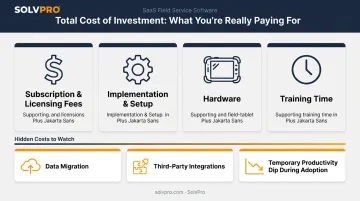
Your total cost of investment covers more than the number on your invoice. Add up:
- Subscription or licensing fees: the recurring cost of the platform
- Implementation and setup: configuration time and any onboarding charges
- Hardware: tablets, rugged phones, or devices crews need in the field
- Training time: hours staff spend learning the workflow instead of billing customers
Separate one-time Year 1 costs (setup, hardware, initial training) from recurring annual costs (subscription, ongoing support) so multi-year comparisons stay accurate. A one-time setup fee shouldn't get counted again in year two.
Watch for hidden costs that quietly inflate the real number:
- Data migration from spreadsheets or a legacy system
- Third-party integrations beyond what's included natively
- The temporary productivity dip while crews adjust to new workflows
Not every platform stacks these costs the same way. SolvPro, for example, charges no implementation, onboarding, or hardware fees. Plans, and crews use devices they already carry. That changes what "total investment" looks like compared to platforms with separate setup and training charges.
Step 2: Quantify Your Total Gains and Savings
Group your benefits into categories you can actually measure:
- Admin and scheduling hours saved: less time on paperwork and duplicate data entry
- Faster invoicing cycles: shorter gap between job completion and payment
- Fewer missed or delayed jobs: recovered revenue from appointments that used to fall through
- Reduced billing errors: fewer disputes, refunds, and rework
Convert time savings into a dollar figure with a simple formula:
Hours saved per week × hourly wage × number of staff = weekly dollar value
A 2022 survey of more than 100 field-service professionals found admin work eats roughly 5 to 6 hours per week per person, much of it from incomplete forms and duplicate data entry. If a five-person crew each reclaims just 3 of those hours weekly at $25/hour, that's over $1,600 a month in recovered labor value alone.
Don't stop at the obvious line items. Add measurable-but-overlooked gains:
- Improved crew accountability from time-stamped, location-verified work logs
- Faster response times that support repeat business and referrals
Features like on-site invoicing paired with integrated payment processing shrink the gap between "job done" and "invoice paid," often from days to hours.
Step 3: Apply the ROI Formula and Determine Payback Period
With costs and gains quantified, the formula is straightforward:
ROI = (Total Gains − Total Cost of Investment) ÷ Total Cost of Investment × 100
**SolvPro does not publish pricing; confirm current pricing directly with SolvPro.
Their measured gains over the year:
- $6,500 in recovered admin and scheduling labor
- $3,000 from fewer missed or delayed jobs
Total gains: $9,500
ROI = ($9,500 − $3,324) ÷ $3,324 × 100 = 185.7%
That's a strong return, but the percentage alone won't tell you how fast the investment paid for itself. For that, calculate payback separately:
Payback Period = Investment Cost ÷ Average Monthly Net Savings
Using the same numbers: $3,324 ÷ ($9,500 ÷ 12) = 4.2 months to break even.
Recalculate both figures quarterly during your first year, since crew size and adoption shift fast early on. After that, an annual check usually suffices.
Key Variables That Affect Your ROI Results
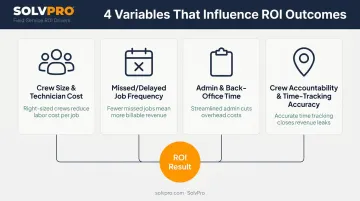
Identical software can produce very different ROI outcomes for two businesses, depending on a handful of controllable and situational factors.
Crew Size and Technician Hourly Cost
Labor savings scale directly with the number of field workers actively using the platform. Larger crews multiply the dollar value of time saved. Very small teams (one or two techs) may see a longer payback period because there's less total labor cost to recover from.
Missed, Delayed, or Double-Booked Job Frequency
Scheduling errors cost revenue and customer trust before software ever enters the picture. Salesforce reports that 47% of technician appointments don't proceed as planned, often due to miscommunication or poor time buffers. Businesses starting with high scheduling chaos typically see faster, larger ROI gains after adopting a platform that centralizes dispatch.
Admin and Back-Office Time Spent on Manual Tasks
Paperwork, manual invoicing, and duplicate data entry eat hours that could go toward billable work. Platforms with integrated invoicing and accounting sync, such as QuickBooks Online, cut this admin burden by removing the manual handoff between field data and the books.
Crew Accountability and Field Time-Tracking Accuracy
Without visibility into crew location and job duration, inefficiency often goes unnoticed. Job and crew time tracking, a feature built into SolvPro's core platform, records time entries, photo uploads and job completions against the job the moment they happen. That verified data converts accountability gains into real payroll savings, since payroll reflects actual field performance rather than self-reported hours.
What You Need before Calculating ROI
Accurate ROI depends on clean baseline data collected before adoption. Without it, you're estimating, not measuring.
Before rolling out a new platform, gather:
- Current labor costs — average hourly rate across crew members
- Average job cycle time — from dispatch to job completion
- Invoicing turnaround — days between job completion and invoice sent
- Error and rework rates — how often jobs need a second visit or billing correction
This data is often scattered across spreadsheets, paper timesheets, and separate accounting software, which makes pulling an accurate baseline harder than it should be.
Platforms with built-in reporting and QuickBooks Online sync fix that going forward. Job costing and crew performance data live in one place, and reports export in one click. Want to see how that reporting works before you start tracking? Book a quick demo to take a look.
Skip this step, and you're left comparing your new workflow to a vague memory of "how things used to be." That's not a calculation. That's a guess.
Common Mistakes That Skew Your ROI Calculation
Even careful business owners skew their own numbers. Watch for these traps:
- Counting only the subscription cost. Ignoring implementation, training, and hardware expenses understates your true investment and inflates your ROI artificially.
- Measuring too soon. Expecting full ROI within 30-60 days, before crews have fully adopted new workflows, will usually produce a disappointing number.
- Ignoring intangible benefits. Reduced staff turnover and improved customer satisfaction rarely show up as a direct line-item, but they still affect your bottom line.
- Failing to isolate the software's impact. If you're also raising prices or restructuring crews at the same time, you can't cleanly attribute results to the platform alone.
Each mistake pulls your number in a different direction. The fix: track costs completely, measure on a realistic timeline, and change one variable at a time whenever possible.
Interpreting Your ROI: Is a 2% ROI Good?
A "good" ROI depends heavily on context: industry benchmarks, size of investment, and the timeframe measured (annual versus cumulative) all shift what counts as a win.
Short answer: a 2% ROI is low for a software investment. Field service platforms typically pay for themselves through recovered labor hours, faster invoicing, and fewer missed jobs.
These categories often add up to more than 2% in gains across a full year. A well-adopted platform with active crew usage should be recovering its cost several times over, not barely breaking even.
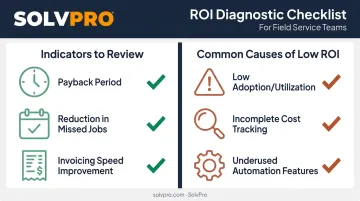
That said, don't fixate on the percentage alone. Look at complementary indicators:
- Payback period — how many months until the investment covers itself
- Reduction in missed or delayed jobs — a direct measure of scheduling improvement
- Invoicing speed improvement — days shaved off the completion-to-payment gap
If your ROI comes in lower than expected, check these adjustable factors before assuming the software itself isn't working:
- Low adoption or utilization — crews still using paper alongside the new platform
- Incomplete or inconsistent cost tracking — hidden costs left out, or gains undercounted
- Underused automation features — invoicing, payments, or job-level time tracking sitting unused
Even after ruling out these factors, remember that ROI calculation isn't a one-time exercise you run once and file away. Revisiting the numbers quarterly at first, then annually, keeps you honest about whether the investment is still paying off as your business grows.
Conclusion
Your crews are busy. So why isn't there more money in the bank?
When the office can see labor, materials and documented changes against the job while the work is still open, the numbers at the end stop being a surprise. SolvPro keeps scheduling, work orders, time, job costing and invoicing on one record. When you want to see it on your kind of work, Book a Demo.
Run the Job. Protect the Profit.
Frequently Asked Questions
How Do You Calculate ROI for a Field Service Management Platform?
Use the formula (Total Gains − Total Cost) ÷ Total Cost × 100. Total cost includes setup and training, not just subscription fees, while gains cover time savings, faster invoicing, and fewer missed jobs.
Is a 2% ROI Good?
No. A 2% return is low for a field service software investment. Well-adopted platforms typically recover their cost several times over within the first year through labor and admin savings.
How Long Does It Typically Take to See ROI from FSM Software?
Savings such as fewer scheduling conflicts and faster invoicing may become measurable within the first few months. Full ROI usually builds out over the first year as crew adoption matures.
What Key Metrics Should I Track to Measure FSM ROI over Time?
Track technician utilization, first-time fix rate, admin hours saved, and invoicing turnaround. Industry data shows first-time fix rates ranging from 55% among lower performers to 87% among top performers. Compare your own trend instead of chasing a universal benchmark.
What Costs Should I Include When Calculating Total Investment in FSM Software?
Include subscription fees, implementation or setup charges, hardware, training time, and any data migration or integration costs. Some platforms bundle several of these into the subscription with no extra fees.
Can Intangible Benefits Like Customer Satisfaction Be Included in ROI Calculations?
Partially. You can't put a clean dollar figure on satisfaction itself, but you can track proxies like repeat business rate, referral rate, and customer retention to fold intangible gains into your broader ROI picture.