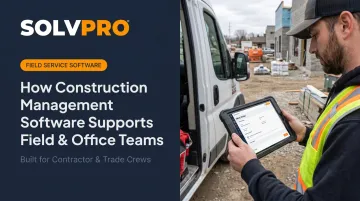
Fewer hands on deck means less room for miscommunication, double-booked jobs, or invoices that go out weeks late.
Construction management software gets pitched as a feature list: scheduling, invoicing, GPS tracking, take your pick. But the real value shows up somewhere else entirely — fewer missed jobs, faster payments, and a lot less daily chaos for the people running the business. This article breaks down how that actually happens, not just what the vendor slide deck claims.
KEY TAKEAWAYS
- Real-time mobile updates eliminate phone tag and cut costly rework
- Centralized scheduling eliminates double-bookings and confusion
- Job-linked invoicing shortens the gap between job completion and getting paid
- Job-linked time tracking builds accountability without extra paperwork
- Skipping this software means rising costs, unbilled hours, and stalled growth
What Is Construction Management Software (Brief Context)
Construction management software is a digital platform that centralizes scheduling, crew management, job documentation, and invoicing so field and office teams work from the same information — instead of two different versions of the day.
You'll typically find it running behind the scenes at:
- General contractors managing multiple job sites at once
- Electrical and plumbing crews dispatched across a service area
- Landscaping and excavation teams handling recurring seasonal contracts
- Commercial cleaning crews rotating through dozens of locations each week
What ultimately matters is the outcome: staying organized, keeping crews accountable, finishing jobs faster, and getting paid sooner. The software is simply the mechanism that makes it possible.
Key Advantages of Construction Management Software for Field and Office Teams
The advantages below aren't abstract feature benefits. They're measured in communication speed, admin hours saved, and how fast cash actually moves through the business.
Bridging Real-Time Communication Between Field and Office
This isn't about faster reporting. It's about two-way, instant visibility instead of updates that lag by hours or a full day.
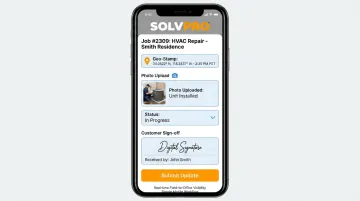
With a mobile app, crews log job status, photos, and notes that office staff see the moment they're posted. Schedule changes or new instructions from the office reach the crew's phone just as fast — no callback required.
SolvPro's mobile app, for example, records every time entry and photo upload against the job. This allows crews to update job status, flag issues, and capture customer sign-offs and payments on-site, all without a trip back to the office.
Why this matters:
- Poor project data and miscommunication were tied to 48% of all U.S. construction rework in 2018, an estimated $31.3 billion cost that year, according to FMI and PlanGrid's research
- Faster field-to-office visibility means management can make decisions mid-job instead of after the damage is done
- Crews spend less time calling in for information that should already be on their phone
KPIs impacted: rework rate, incident response time, frequency of miscommunication-driven delays.
This matters most when you're running multiple crews across different sites at once, or onboarding new field staff fast. Bilingual crews benefit too. If the app runs in English and Spanish, a new hire isn't stuck guessing at instructions on day one.
Centralized Scheduling and Job Tracking
Spreadsheets and whiteboards work fine for one or two crews. Beyond that, they become a liability. Centralized scheduling creates one single source of truth for calendars, work orders, and crew assignments.
Office staff build or adjust schedules from a single dashboard — drag, drop, done. Crews see their assignments directly on their phones without a confirmation call. SolvPro's scheduling view lets office teams toggle between day, week, and crew views, and reschedule instantly when weather, cancellations, or new jobs shift the plan.
Why this matters:
- 36% of field service buyers still relied on paper or spreadsheets in 2024, and among them, 52% reported slowdowns or inefficiencies directly tied to those manual methods, per Software Advice's field service buyer research
- A single shared schedule prevents the double-booked crews and missed appointments that manual coordination tends to produce
- Fewer scheduling conflicts means fewer admin hours spent untangling them after the fact
KPIs impacted: missed/delayed job rate, scheduling conflicts per week, admin hours spent on manual coordination.
This becomes critical once you're managing more than a couple of crews or job sites simultaneously — that's usually the point where phone-based coordination starts breaking down.
Faster Invoicing, Payments, and Knowing What Each Job Made
This is where field data actually earns its keep. Instead of relying on paperwork that trickles back to the office days later, completion data flows straight into billing.
Crews clock time and location against specific jobs. That data — recorded against the exact job — feeds directly into cost tracking and invoicing.
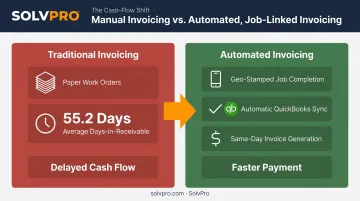
With accounting sync in place, once a job is closed in the field the office can generate an invoice the same day instead of waiting on a stack of paper tickets.
Why this matters:
- The average days in accounts receivable for construction firms sat at 55.2 days in fiscal 2024, per CFMA's 2025 Construction Financial Benchmarker. Automated, job-linked invoicing directly shortens that gap
- Job-level cost tracking (labor, materials, time) shows which jobs are actually profitable, not just which ones felt busy
KPIs impacted: days to invoice, days sales outstanding (DSO), job-level profit margin, labor cost accuracy.
This matters most for businesses with thin per-job margins, or owners who currently find out a job lost money weeks after it wrapped up. By then, the damage is already baked into the books.
What Happens When Construction Management Software Is Missing or Ignored
Skip this coordination layer and here's what tends to happen instead:
- Inconsistent job information: what the office believes is happening rarely matches what's actually happening on-site
- Higher error rates from manual data entry, duplicate paperwork, and verbal handoffs that lose details in translation
- Reactive firefighting: office staff spend the day chasing crews for updates instead of running the business
- Rising costs over time from missed jobs, unbilled hours, and invoices that go out far too late
- Difficulty scaling or delegating because critical information lives in one person's head, or one truck
This last point is often the most expensive. SolvPro's own founding team built the platform after watching this exact pattern play out repeatedly: double-booked jobs, crews calling in for info that should've already been there, and invoices trailing weeks behind job completion.
When everything runs through five disconnected systems, growth stalls no matter how good the crews are.
How to Get the Most Value from Construction Management Software
The software only pays off when both field and office actually use it every day — not when office staff enter data after the fact to "catch up."
A few things that make the difference:
- Weekly reviews: Track missed jobs, invoicing delays, and job profitability every week, not just occasionally.
- Data-driven adjustments: Use real numbers, not gut feel, to adjust staffing, estimating, or scheduling.
- Fast onboarding: Tools that take too long to set up rarely get used by field crews. Setup time and onboarding support vary by vendor; confirm both before you commit.
Software that sits half-adopted is just another disconnected system. The value compounds only when it's the one place everyone actually checks.
Conclusion
Construction management software earns its value by eliminating daily headaches: missed jobs, late invoices, and constant phone calls chasing status updates.
These advantages compound. Fewer missed jobs and faster invoicing strengthen cash flow. Better accountability makes it easier to delegate and scale. Together, they turn a business that runs on one person's memory into one that runs on shared, reliable information.
Getting the most from a platform means treating it as a daily habit for both field and office — not a one-time setup you configure and forget.
Field service software helps you manage the work. SolvPro helps you make sure the work makes money.
The right tool depends on your trade, crew size, job mix and the systems you already run. Test it on real jobs before you commit, and check that crews will actually enter what the office needs. When you want to see it on your kind of work, Book a Demo.
Run the Job. Protect the Profit.
Frequently Asked Questions
What Are the Benefits of Using Construction Management Software?
It improves field-office communication, reduces missed or double-booked jobs, speeds up invoicing, and gives clear visibility into which jobs are actually profitable. The combined effect is less daily chaos and stronger cash flow.
What Software Is Used in Construction Management?
The range spans enterprise platforms like Procore, built for large project-centric firms. On the simpler end, all-in-one tools like SolvPro serve growing crews that need scheduling, invoicing, and job tracking without enterprise complexity.
Is Construction Management Software Only Useful for Large Companies?
No. Many platforms, including SolvPro, are built specifically for small and mid-sized crews. You don't need enterprise scale to benefit from centralized scheduling and invoicing.
How Does Construction Management Software Improve Communication Between Field and Office Teams?
Real-time mobile updates let crews log job status, photos, and notes that office staff see instantly. Centralized job documents replace the scattered calls and texts that usually fill the communication gap.
How Much Does Construction Management Software Typically Cost for Small Crews?
Pricing varies by platform and team size. SMB-focused tools like SolvPro offer transparent tiers starting around with no add-on fees, compared to enterprise platforms that often charge per feature.
Can Construction Management Software Integrate with Accounting Tools Like QuickBooks?
Yes. Many platforms offer QuickBooks Online sync, including SolvPro, where it's a built-in core feature rather than a paid add-on. Job data flows directly into invoicing and bookkeeping without manual re-entry.