Facility teams in 2026 are stretched thin. Work requests pile up from tenants, aging HVAC units break down without warning, and coordinating five different vendor crews on the same property feels like herding cats.
Picking the wrong software doesn't just slow things down. It creates missed jobs, angry clients, and invoices that go out weeks late.
Work order software fixes that by giving in-house facility teams and their contractors (HVAC, plumbing, electrical, janitorial, landscaping) one system for creating, assigning, and tracking every job.
The right platform builds accountability into every step and keeps costs visible, which matters most now that budget scrutiny has tightened across facility operations.
This guide breaks down the top work order software options for 2026, how to evaluate them, and how to match a platform to your team's actual size and workflow, not just its feature list.
KEY TAKEAWAYS
- Work order software centralizes requests, assignments, and job tracking in one system
- Options range from enterprise CMMS platforms to simpler, all-in-one field service tools
- Team size and mobile usability should drive your choice, not feature count
- SolvPro, MaintainX, UpKeep, Limble, and Fiix each target a different mix of asset maintenance and field service work
- Bilingual access and transparent pricing are now deciding factors for SMB teams
Overview of Work Order Software in Facility Management
Work order software is a digital system for logging, routing, assigning, and tracking maintenance and service tasks from the moment they're requested until they're closed out. Most platforms today fold this into a broader CMMS (computerized maintenance management system) or field service management tool, layering on:
- Asset history and equipment tracking
- Scheduling and dispatch tools
- Reporting and analytics dashboards
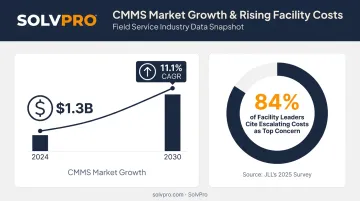
The category is growing fast. According to a Grand View Research industry report, the global CMMS market hit $1.3 billion in 2024 and is projected to grow at an 11.1% CAGR through 2030 as more organizations move off spreadsheets and paper logs.
That growth tracks with what's keeping facility leaders up at night. According to JLL's 2025 global facilities management survey of 248 organizations, 84% of respondents named escalating operating costs and budget constraints as their top concern. Software that reduces missed jobs and speeds up billing directly addresses that pressure.
With that cost pressure in mind, we cover both ends of the spectrum below: enterprise-grade CMMS platforms built for asset-heavy operations, and simpler, contractor-friendly work order tools built for growing service businesses that support facilities from the outside.
Top Work Order Software for Facility Management in 2026
Five factors separate these platforms:
- Mobile usability for technicians and crews working outside an office
- Ease of adoption for teams without a dedicated IT department
- Pricing transparency, including whether add-ons inflate the sticker price
- Integration depth, especially with accounting and payment tools
- Fit for either in-house facility teams or the multi-crew service businesses supporting them
SolvPro
SolvPro is an all-in-one field service management platform built by a team with more than 50 years of combined experience in construction, estimating, and field operations. It's purpose-built for growing service businesses handling facility work orders across HVAC, plumbing, electrical, landscaping, janitorial, and general contracting.
What sets it apart:
- Fully bilingual English/Spanish interface for both office staff and field crews, an uncommon feature among competitors in this space
- Job and crew time tracking that records time entries, photo uploads and activity logs against the job for crew accountability
- QuickBooks Online sync and built-in credit-card and ACH payments, supporting card, ACH, and digital payments directly from a job site
- Digital estimates with customer-facing PDF proposals and digital signatures that convert into active jobs once signed
- Setup in under 10 minutes, with a live team walking new customers through onboarding instead of a chatbot and a knowledge base
| Category | Details |
|---|---|
| Key Features | Work order creation and assignment, crew scheduling, mobile access, job and crew time tracking, QuickBooks and in-app credit-card and ACH payments |
| Best For | Multi-crew service businesses and facility maintenance contractors that need simplicity without enterprise-level complexity |
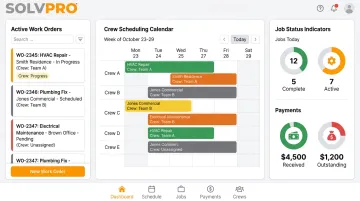
Every SolvPro tier includes the full feature set. There's no paying extra to unlock QuickBooks sync or payment processing later.
MaintainX
MaintainX is a mobile CMMS used widely across manufacturing, facilities, and multi-site operations, with a strong reputation for fast technician adoption.
It stands out for built-in team messaging directly on work orders, photo and video attachments, and preventive maintenance automation that can trigger from meters or connected IoT sensors, not just calendar dates.
| Category | Details |
|---|---|
| Key Features | Mobile work order execution, PM automation, connected asset history, inventory and purchase-order tracking |
| Best For | Asset-intensive, multi-site organizations needing fast frontline adoption |
UpKeep
UpKeep positions itself as an AI-powered, mobile-first CMMS designed for teams moving off paper and spreadsheets and into a straightforward digital workflow.
Its strength is simplicity: technicians create and close work orders from a phone without hunting through a dense desktop interface. Preventive maintenance scheduling and custom checklists become available starting at the Premium tier.
| Category | Details |
|---|---|
| Key Features | Work order tracking, PM scheduling, mobile app for iOS and Android, basic-to-custom reporting depending on tier |
| Best For | Small-to-midsize maintenance teams wanting a simple digital upgrade |
Limble
Limble is a configurable CMMS known for strong onboarding support and flexible preventive maintenance setup, backed by consistently positive reviews on responsiveness.
Its calendar-based scheduling and QR-code asset tracking make it easy to link work orders directly to physical equipment. Reviewers on G2 and Capterra repeatedly point to fast, knowledgeable support during setup as a differentiator.
| Category | Details |
|---|---|
| Key Features | PM planning, QR-code asset and parts tracking, spare-parts reorder alerts, drag-and-drop scheduling calendar |
| Best For | Teams wanting guided implementation and flexible preventive maintenance setup |
Fiix
Fiix, now a Rockwell Automation company, brings strong asset and inventory tracking built for larger, multi-site facility teams.
Nested PM triggers group maintenance tasks of varying complexity when they become due together, cutting down on redundant site visits. Role-based permissions and site-aware user groups make it a solid fit for operations managing several locations under one account.
| Category | Details |
|---|---|
| Key Features | Work order and PM management, barcode-linked inventory, multi-site dashboards, ERP integration hub |
| Best For | Larger, multi-site facility operations needing advanced configuration and reporting |
What to Look for in Work Order Software
Mobile usability, pricing transparency, integration depth, and real customer feedback separate these tools across use cases ranging from three-person contractor crews to enterprise facility teams managing dozens of sites.
The most common mistake buyers make? Choosing a platform based on how long its feature list is, rather than matching software complexity to their actual crew size and workflow. A five-person plumbing outfit doesn't need nested PM triggers and multi-site dashboards, though a 200-location retail chain probably does.
We tied every evaluation factor back to measurable outcomes:
- Faster job completion, not just faster job logging
- Fewer missed or duplicated work orders
- Better crew accountability through location and time verification
- Quicker invoicing and payment cycles once a job wraps
Key Features to Look for in Work Order Software
Regardless of which platform you're considering, a handful of features separate the tools that actually get used from the ones that get abandoned after three months.
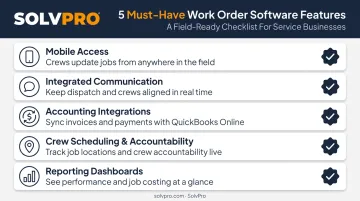
- Mobile access for technicians to view, update, and close work orders from any job site, eliminating trips back to the office.
- Integrated communication tools that attach comments, photos, and status updates directly to the work order, preventing details from getting lost in text threads.
- Direct accounting integrations with platforms like QuickBooks and built-in payment processing to speed up invoicing and improve cash flow.
- Crew scheduling and accountability features, such as geolocation or check-ins, to confirm job attendance and build client trust.
- Clear reporting dashboards that display job status, completion times, and profitability, enabling data-driven management decisions.
Conclusion
The best work order software isn't the one with the most features. It's the one that matches your team's actual size and complexity, whether that's an enterprise facility operation running multiple sites or a growing multi-crew service business trying to get out of spreadsheets.
Before committing to any platform long-term, evaluate onboarding support, integration depth, and pricing transparency. A tool that looks affordable on the surface can get expensive fast once add-ons and per-seat fees kick in.
If you run a growing facility or service team and want a simple, bilingual, all-in-one work order and crew management solution, book a demo with SolvPro to see how it fits your workflow.
You shouldn't have to wait until the job is over to find out whether you made money.
Keeping the estimate, work order, time entries and invoice on one record reduces how much the office has to reconstruct before it can bill. That is the difference between finding out now and finding out at closeout. When you want to see it on your kind of work, Book a Demo.
Run the Job. Protect the Profit.
Frequently Asked Questions
What Is a Work Order in Facility Management?
A work order is a documented request outlining a maintenance or repair task. It specifies what needs attention, who's responsible, and how progress gets tracked through to completion.
What Is the Difference Between CMMS and FMS?
A CMMS focuses on maintenance activities like work orders, assets, and preventive maintenance. A broader facility management system (often called CAFM) combines maintenance with functions like space planning and vendor management.
What Are the Pillars of Facility Management?
The ISO-adopted, IFMA-recognized definition centers on people, place, and process. Many practitioners also add technology as a practical fourth element, since software now underpins how the other three function.
Is Work Order Software the Same as CMMS?
Not exactly. Basic work order software focuses on creating and tracking tasks, while a full CMMS typically adds asset history, PM scheduling, inventory management, and reporting on top.
How Much Does Work Order Software Typically Cost?
Pricing varies widely by team size and features. Software Advice reports basic single-user CMMS plans starting around $21/month, with advanced multi-user plans running several hundred dollars monthly. Compare per-user versus flat-rate models carefully before deciding.
Can Work Order Software Integrate with Accounting Tools Like QuickBooks?
Yes. Many modern platforms, including SolvPro, offer native QuickBooks Online sync built into the core plan, simplifying invoicing and cutting out duplicate data entry between field work and office accounting.