
A technician stands in a customer's driveway, phone in hand, trying to remember what was quoted last time. Was there a prior complaint about this unit? Did someone already replace this part six months ago?
Nobody knows, so the truck sits idle while calls go back and forth to the office.
This scene plays out constantly at growing service businesses. Construction and field crews report spending 5.5 hours every week just searching for job information, according to a 2018 survey of 599 construction leaders by PlanGrid and FMI. That's nearly a full workday lost to hunting down details that should've been one tap away.
Sticky notes and "ask the senior guy" work fine for a one-truck operation. Once you add crews, that informal system breaks down fast, and it starts costing real money. This guide covers what field service knowledge management actually looks like for small and mid-sized crews, and how to build a system that doesn't require enterprise software or a six-month rollout.
KEY TAKEAWAYS
- Crews need job history, pricing, and customer notes on their phones—not in a filing cabinet.
- Scattered information causes repeat truck rolls and slower invoicing.
- Look for mobile access, centralized data, and integrated scheduling and billing.
- You don't need heavyweight KM software—an all-in-one platform works better.
- Job history attached to the customer record prevents a second technician repeating diagnostic work already done.
What Is Field Service Knowledge Management?
Field service knowledge management is the process of capturing, organizing, and delivering the information crews need to complete jobs correctly and quickly. That includes procedures, customer history, equipment specs, pricing, and safety steps, all available at the point of work rather than back at the office.
Done well, it means a technician never has to guess. They pull up the job, see what happened last visit, check the agreed price, and get to work.
The Three Types of Knowledge Every Field Business Holds
Every service business is sitting on three distinct kinds of knowledge, whether they realize it or not:
- Explicit knowledge: documented material like manuals, SOPs, checklists, and price sheets. It's the easiest to capture since it's already written down.
- Tacit knowledge: the judgment calls a veteran crew lead makes without thinking twice, built from years on the job. It's the hardest to document and the fastest lost when someone retires or moves on.
- Embedded knowledge: information baked into daily workflows and systems, such as job history, past estimates, and customer notes. It lives in how work actually gets done, not in a document.
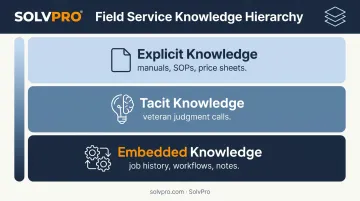
Most businesses focus their documentation efforts on explicit knowledge and completely ignore the other two. That's a mistake, since tacit and embedded knowledge often carry the most operational risk.
How This Differs from Traditional Office-Based Knowledge Management
Enterprise KM platforms were built for call centers and IT help desks, where agents sit at a desk searching an internal wiki between calls. Field crews don't have that luxury.
They need information on a mobile device, often with spotty signal, standing at a job site with a customer waiting. A knowledge system that requires logging into a separate portal or searching a 40-page manual isn't built for that reality.
What actually works is quick access to job details, past invoices, and crew notes inside the same tool they're already using to clock in and manage the day.
Why Knowledge Management Matters for Growing Service Businesses
The cost of disorganized knowledge isn't abstract. It shows up in missed appointments, repeat visits, and invoices that go out weeks late.
The Real Cost of Poor Knowledge Management
When a job isn't resolved on the first visit, Aberdeen Group's research found it typically takes 1.6 additional dispatches to close it out, with each truck roll costing somewhere between $200 and $300.
Across the organizations Aberdeen studied, average first-time fix sat at 75%, while top-performing companies hit 89% and the weakest performers landed around 56%, according to their 2013 field service benchmark report.
Do the math on that gap. A crew making repeat trips isn't just wasting fuel. They're burning hours that could've gone to the next paying job.
Beyond repeat visits, disorganized knowledge creates accountability gaps:
- No clear record of who was on-site, what time they arrived, or what they actually did
- Disputes over what was quoted versus what got billed
- Profit leakage when change orders get verbally agreed to but never documented
Without a paper trail, every disagreement turns into a "he said, she said" conversation with a customer, and those conversations rarely end well for the business.
Key Benefits When Knowledge Is Organized and Accessible
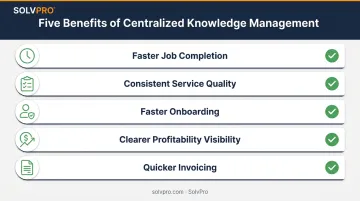
When job history, pricing, and notes live in one accessible place, the payoff is immediate:
- Faster job completion: crews stop wasting time calling the office for information they should already have.
- Consistent service quality: every crew follows the same documented approach, not whatever the individual tech remembers.
- Faster onboarding: new hires get context from the system instead of shadowing a senior tech for weeks.
- Clearer knowing what each job made: office staff see labor and material costs tied to each job in real time.
- Quicker invoicing: billing happens the moment a job wraps, not days later.
This isn't just a nice-to-have. Deloitte's Global Human Capital Trends survey of 8,949 respondents across 119 countries found that 75% of organizations called preserving knowledge across their workforce "important" or "very important" to business success.
Only 9% said they felt very ready to actually do it, according to Deloitte's 2020 knowledge management strategy report. That gap between "we know this matters" and "we're prepared for it" is exactly where most growing service businesses sit today.
Key Features to Look for in a Field Service Knowledge Management Solution
Not every KM feature matters equally for a crew of five or fifteen. Here's what actually moves the needle:
- Mobile-first access — crews need job and customer details on a phone or tablet at the site, not from a desktop back at the shop.
- Centralized job and customer history — past estimates, invoices, photos, and notes tied to each customer or property so any crew member gets full context instantly.
- Real-time crew accountability — event-based check-ins or geolocation logging that record who did what and when, without relying on self-reported updates.
- Simple search and organization — a field worker should be able to find a past job note or price sheet without formal training.
- Integration with scheduling, estimating, and invoicing — knowledge only helps if it's connected to the workflows crews already use daily, not sitting in a separate app nobody opens.
- Multi-language accessibility — for teams with mixed English- and Spanish-speaking staff, the tool needs to work for everyone in the field, not just the office.
Skip any platform that treats these as premium add-ons. If centralized job history or mobile access costs extra, that's a sign the software wasn't built with field crews in mind.
How to Build a Simple Knowledge Management Strategy for Your Crews
You don't need a formal KM committee or a six-month rollout plan. Three steps get most service businesses most of the way there:
Audit what already exists informally. Look at group texts, paper notes, and what's only stored in your senior techs' heads. Identify the highest-impact gaps first, meaning the information that causes the most repeat calls or confusion when it's missing.
Centralize job and customer data in one system. If your office runs on QuickBooks, your crews text photos to a group chat, and pricing lives in a spreadsheet somewhere, you've got three disconnected sources of truth. A platform like SolvPro pulls job notes, pricing, and QuickBooks data into one place so crews and office staff work from the same information.
Build a lightweight update habit. Assign ownership of job notes and pricing to specific people. Review recurring issues monthly. If the same question keeps coming up from the field, that's a documentation gap worth closing.
This works as an ongoing habit that keeps your knowledge current as your crew grows and your jobs get more complex.
How SolvPro Brings Knowledge Management to Everyday Field Operations
SolvPro was built by a team that spent years working out of job sites, truck beds, and job trailers, watching firsthand what happens when a crew calls the office for information that should've already been available. That experience shaped a platform where knowledge management lives inside the everyday workflow, not bolted on as a separate system.
Here's how it plays out in practice:
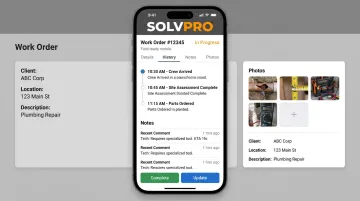
- Centralized job data: every digital work order stores complete job history, notes, photos, material tracking, and change order documentation in one place, so crews never start a visit blind.
- Job and crew time tracking: time entries, photo uploads, and status updates are recorded against the job, creating a transparent record of who did what and when without anyone filling out a report.
- Digital estimates with customer-facing PDF proposals: quotes break into project phases and arrive as polished, professional documents, with each approved estimate converting instantly into a live job.
- Fully bilingual English/Spanish interface: job knowledge is accessible to every crew member, not just office staff who happen to speak English.
Setup takes under 10 minutes, and there's no long-term contract required. For a service business that's outgrown sticky notes but doesn't want the complexity of enterprise software, that's the difference between another tool to manage and a system that actually gets used. You can book a demo or start a free trial to see how it fits your crew's day-to-day.
Conclusion
You shouldn't have to wait until the job is over to find out whether you made money.
Keeping the estimate, work order, time entries and invoice on one record reduces how much the office has to reconstruct before it can bill. That is the difference between finding out now and finding out at closeout. When you want to see it on your kind of work, Book a Demo.
Run the Job. Protect the Profit.
Frequently Asked Questions
What Is Knowledge Management in Field Service?
It's the process of capturing and delivering job procedures, customer history, and technical information directly to technicians so they can resolve issues on-site without delays. The goal is fewer callbacks and faster completions.
What Are the Different Types of Knowledge Management?
Explicit knowledge covers documented procedures like manuals and price sheets. Tacit knowledge is the experience and judgment a veteran technician builds over years. Embedded knowledge lives inside daily workflows, like job history and crew assignments.
How Do Field Technicians Access Knowledge Management Systems on the Job?
Mostly through mobile apps that work with limited connectivity and integrate directly with the scheduling and invoicing platform they already use. Standalone portals or desktop-only systems don't hold up in the field.
What Is the Difference Between a Knowledge Base and Knowledge Management?
A knowledge base is the repository itself, meaning the stored content and documents. Knowledge management is the broader ongoing process of capturing, organizing, updating, and delivering that content to the people who need it.
Do Small Service Businesses Need Enterprise Knowledge Management Software?
Usually not. Most small and mid-sized crews get more value from an all-in-one field service platform with built-in job history and notes than from a standalone enterprise KM system designed for call centers.
How Does Knowledge Management Improve First-Time Fix Rates?
Quick access to past job notes and equipment history helps technicians diagnose problems correctly on the first visit. Aberdeen research found 82% of top performers rely on a centralized service history, versus 48% of low performers.