A crew shows up to a job site without the right details. The office manager is on hold with another technician who doesn't know which address to go to. Two jobs got double-booked for Tuesday, and nobody caught it until Monday afternoon.
This is what scheduling chaos actually looks like — and it costs field service businesses real money.
According to Software Advice's 2026 field service buyer research, 52% of field service software buyers cited inefficiency as their top pain point with their current methods. Another 35% still rely entirely on manual scheduling — spreadsheets, whiteboards, and phone calls.
Those numbers reflect a real gap — and generic scheduling tools don't close it. Calendar apps and HR platforms weren't built for crews moving job to job, working outdoors with a phone in hand.
The right app connects the office and the field in real time, with GPS accountability, mobile work order access, and dispatch built for how field service actually works.
This guide breaks down the five best mobile apps for managing remote field worker schedules — what each one does well, where it falls short, and which business sizes it fits best.
KEY TAKEAWAYS
- Field worker scheduling requires real-time dispatch, GPS accountability, and mobile-first design — not just a shared calendar
- Apps differ significantly in scope: some handle full job management, others focus on shift scheduling only
- SolvPro, Connecteam, Jobber, ServiceTitan, and When I Work each serve different business sizes and complexity levels
- Bilingual English/Spanish interfaces matter for diverse US field crews — and most apps still lack them
- Avoid apps with hidden costs, mandatory annual contracts, or GPS features locked behind premium tiers
What Remote Field Worker Scheduling Actually Requires
Managing a remote office worker and managing a field crew are fundamentally different problems. Office workers have desks, browsers, and reliable Wi-Fi. Field crews have trucks, unpredictable schedules, and a phone screen they're checking between jobs. That gap shapes every feature a scheduling tool actually needs to have.
The Core Requirements
Field-specific scheduling tools need to handle:
- Real-time job updates pushed to a mobile device, not a desktop
- GPS verification of where crews are and when jobs start or end
- Work order access on-site — scope, notes, site instructions, all in one place
- Dispatch flexibility when a job runs long or something changes mid-day
- Offline-accessible job details for crews in low-connectivity areas
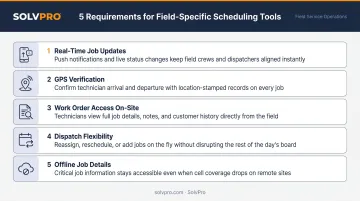
None of those requirements show up in a general HR scheduling app. Shift swaps and time-off requests are handled well — but those tools won't tell you whether a crew made it to the right job site or when they actually finished.
What Poor Scheduling Actually Costs
Managing field crews on spreadsheets and phone calls creates the same problems every time:
- Double-booked jobs that surface the morning of
- Crews arriving without job details, special instructions, or customer notes
- Delayed invoicing because the office doesn't know when a job closed
- No verifiable record of when or where work was completed
BCG estimates that approximately 80% of the global workforce is deskless — people who work away from a fixed workstation every day. Most scheduling software was built for the other 20%. That's the gap the right field service app needs to fill.
Best Mobile Apps for Managing Remote Field Worker Schedules
These apps differ on real-world field usability, scheduling depth, GPS and accountability features, mobile performance, and value for growing service businesses. Each entry includes standout features, pricing, and the business type it fits best.
SolvPro
SolvPro is an all-in-one field service management platform built for growing service businesses with crews in the field. The team behind it brings 50+ years of combined experience across construction, field service, estimating, and project management — including Technical Sales Specialist Kai Stanton's 17 years working as a project manager, estimator, and installations expert.
The platform covers scheduling, work orders, time tracking, invoicing, and payments in a single system. Setup takes under 10 minutes, and there are no long-term contracts.
What sets it apart:
- Job and crew time tracking — location is job-linked to time entries, photo uploads, and activity logs, creating crew accountability without continuous surveillance
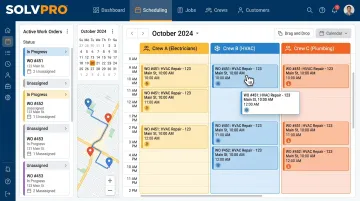
- Drag-and-drop scheduling with work order creation directly from the calendar
- Fully bilingual English/Spanish interface — covers the full platform including scheduling, work orders, mobile app, and customer communications, on the core plan at no additional cost
- QuickBooks Online sync and credit-card and ACH payments included as core features, not add-ons
- Digital estimates with instant estimate-to-work-order conversion
- Drag-and-drop scheduling with day, week and crew views included standard
| Detail | Info |
|---|---|
| Key Features | Drag-and-drop scheduling, crew dispatch, digital work orders, bilingual EN/ES interface, QuickBooks Online sync, credit-card and ACH payments, digital estimates, recurring job management |
| Best For | Electrical, HVAC, plumbing, landscaping, janitorial, and general contractors with growing field crews who need an all-in-one platform without enterprise overhead |
Connecteam
Connecteam is a mobile-first workforce management platform widely used by deskless industries including construction, cleaning, and field services. It combines scheduling, GPS time tracking, and team communication in a single app — a practical fit for businesses coordinating workers across multiple job sites.
What sets it apart:
- AI-powered auto-scheduling that assigns shifts based on availability, roles, and certifications
- GPS time clock with geofencing — captures location stamps at clock-in and clock-out
- Shift swapping with manager approval and real-time notifications when schedules change
- Built-in team chat, forms, and checklists tied to shifts
| Detail | Info |
|---|---|
| Key Features | Drag-and-drop scheduler, GPS time clock, geofencing, shift swaps, team chat, forms and checklists, time-off management |
| Best For | Frontline and deskless teams prioritizing communication, shift management, and mobile accountability across multiple job sites |
Jobber
Jobber is a field service platform designed for small and growing home service businesses. It covers scheduling, client management, quoting, invoicing, and job tracking in one place — with a clean interface and relatively fast setup.
What sets it apart:
- Online booking and automated client follow-ups
- Built-in payment collection and digital invoicing
- Simple job tracking accessible from mobile
Worth noting: GPS tracking is a paid add-on rather than a standard feature, digital estimates is not available, and the mobile app switches to English for admin users regardless of device language settings.
| Detail | Info |
|---|---|
| Key Features | Scheduling and dispatch, client management, quotes and estimates, invoicing, job tracking, online booking, mobile app |
| Best For | Small home service businesses — landscaping, cleaning, pest control, handyman — looking for a simple, client-facing operational tool |
ServiceTitan
ServiceTitan is an enterprise-grade field service management platform built for larger service businesses managing technicians across multiple locations. It covers HVAC, plumbing, electrical, and garage door industries with a comprehensive feature set and advanced analytics.
What sets it apart:
- Advanced smart dispatch board with real-time technician tracking
- Comprehensive reporting — closing rates, revenue per technician, and operational dashboards
- Robust customer management with full service history
The tradeoff: opaque pricing that requires a demo request, and a learning curve that assumes dedicated operations staff to implement and manage it.
| Detail | Info |
|---|---|
| Key Features | Smart dispatch board, real-time technician tracking, customer management, digital forms, invoicing, call booking, reporting and analytics |
| Best For | Mid-to-large HVAC, plumbing, and electrical service businesses with higher operational complexity and budget for enterprise tooling |
When I Work
When I Work is a simple shift scheduling and time tracking app suited for small teams that need basic schedule management. It offers a clean mobile interface with clock-in/out, shift swapping, and time-off requests.
What sets it apart:
- Affordable per-user pricing with labor forecasting tools
- GPS punch verification and geofencing to restrict clock-ins to job sites
- Easy employee-facing interface for schedule visibility and availability
One important limitation: When I Work supports GPS verification at clock-in and clock-out, but it is not a full field service management platform. It lacks live job tracking, work orders, invoicing, or dispatcher tools — which limits its usefulness for businesses that need more than shift coverage.
| Detail | Info |
|---|---|
| Key Features | Shift scheduling, open shifts, mobile clock-in/out, time-off requests, availability tracking, overtime alerts |
| Best For | Small service teams that need basic, affordable shift scheduling with mobile access and don't require advanced field tracking |
What to Look for in Apps
These apps weren't evaluated against generic HR software criteria. The benchmark was simple: does this app actually work in the hands of a crew member who's outside all day, not sitting at a computer?
Scheduling Capability
A calendar view is a starting point, not a solution. The most useful scheduling tools offer:
- Drag-and-drop or auto-scheduling to reduce manual effort
- Real-time updates pushed to field workers when jobs change
- Conflict detection or crew availability visibility to prevent double-booking
- Recurring job support for contract-based work
The ability to push schedule changes to a worker's phone in real time is more operationally valuable than any desktop calendar feature.
Field Accountability Tools
GPS tracking in field service is about verifiable records, not surveillance. When a client disputes whether a crew was on-site, job-linked activity logs provide documentation that phone calls and spreadsheets never could.
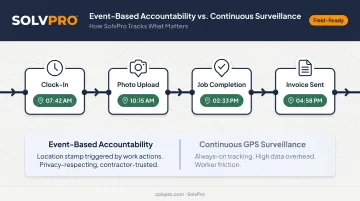
Event-based tracking — where location is captured at meaningful work actions like clock-ins, photo uploads, and job completions — provides accountability without monitoring every movement throughout the day. SolvPro records time by job and by crew member rather than offering fleet-style location tracking.
Mobile Experience for Field Workers
Accountability tools only work if field workers actually open the app. Poor mobile UX kills adoption — and when crews stop using it, the office loses visibility entirely.
Two factors matter more than they get credit for: offline access (verify before committing if your crews work in low-connectivity areas) and bilingual interfaces. Hispanic workers represent approximately 34% of the US construction workforce — yet most scheduling apps still operate in English only. SolvPro's fully bilingual English/Spanish interface, built with a dedicated in-house translator, addresses this directly.
Pricing Transparency for SMBs
Watch for:
- Features locked behind higher tiers (GPS, bilingual support, dedicated onboarding)
- Annual contract requirements with early termination clauses
- Per-user pricing that jumps unpredictably as a team grows
Growing service businesses need to know what they're paying before they commit — and what it will cost as the crew grows.
Conclusion
The right mobile scheduling app for remote field workers does more than build a calendar. It connects the office and the field in real time, gives crews the job details they need before they arrive, and creates verifiable records of when and where work was completed — without adding admin overhead to do it.
Enterprise platforms like ServiceTitan handle the complexity that larger operations require. For growing service businesses — the electrical contractor adding a second crew, the janitorial company expanding to new commercial accounts, the HVAC shop tired of coordinating by phone — SolvPro delivers the same operational power without the implementation burden or long-term contracts.
If jobs are falling through the cracks, crews are calling the office for information they should already have, or invoices are going out days after work closes — that's a scheduling infrastructure problem, not a people problem.
Start by auditing where the breakdowns actually happen in your current workflow. Then see what SolvPro's all-in-one platform can do — built by a team with 50+ years of combined experience in construction, estimating, and field service management. If the chaos sounds familiar, the fix probably does too.
Field service software helps you manage the work. SolvPro helps you make sure the work makes money.
The right tool depends on your trade, crew size, job mix and the systems you already run. Test it on real jobs before you commit, and check that crews will actually enter what the office needs. When you want to see it on your kind of work, Book a Demo.
Run the Job. Protect the Profit.
Frequently Asked Questions
What Is a Good App for Scheduling Employees?
The best fit depends on your team size, industry, and whether field workers need GPS accountability and mobile job access. General scheduling apps like When I Work handle shifts well. Purpose-built platforms like SolvPro or Jobber go further — adding work orders, invoicing, and field tracking for service businesses with crews on the move.
How Do I Keep Track of Remote Work Hours?
GPS time clocks, geofencing, and event-based tracking in field scheduling apps allow managers to verify hours worked and job locations without requiring workers to manually log time. SolvPro's time entries and photo uploads recorded against the job create a verifiable activity record tied to each job.
What Are the Best Apps for Remote Work?
Remote office apps like Slack, Asana, and Zoom solve collaboration problems — they're not built for field crews. Field workers need dispatching, location tracking, mobile job management, and on-site invoicing. SolvPro, Connecteam, and Jobber are purpose-built for that.
What Features Should a Mobile Scheduling App Have for Field Workers?
Core must-haves include real-time dispatch and job updates, GPS tracking or geofencing, mobile-first design, shift conflict detection, and integration with invoicing or payroll tools. For businesses with diverse crews, a bilingual interface is essential — not optional.
Can Field Service Scheduling Apps Work Offline?
Offline capability varies by platform. Ask any vendor directly whether their app supports offline job access and syncs data once reconnected — especially if crews work in areas with poor cellular coverage.
Do Employee Scheduling Apps Support Bilingual Teams?
Most scheduling apps default to English only or offer limited Spanish support for non-admin users. SolvPro offers a fully bilingual English/Spanish interface across the entire platform — scheduling, work orders, mobile app, and customer communications — included at no additional cost on all plans.