This is still how a lot of small service businesses run in 2026. The problem is, it doesn't scale.
Service scheduling software has moved way past simple appointment booking. Today's platforms handle crew dispatch, job tracking, digital work orders, and payments, all of which affect how fast you get paid and how much you actually keep. This guide breaks down the top service scheduling software for small businesses in 2026, what to look for, and how to pick the right fit for your crew size and trade.
KEY TAKEAWAYS
- Service scheduling software organizes jobs, dispatches crews, and speeds up payment for plumbing, electrical, landscaping, and cleaning teams.
- Real-time scheduling, GPS and crew tracking, mobile access, and QuickBooks-synced invoicing are the features that change daily operations.
- SolvPro suits growing multi-crew teams, Jobber and Housecall Pro fit established operations, and ServiceTitan serves larger enterprises.
- Pricing spans free basic tools through to $200 or more each month for enterprise platforms.
- Bilingual support and crew accountability tools have become deciding factors rather than optional extras.
Overview of Service Scheduling Software for Small Businesses in 2026
Service scheduling software isn't the same thing as a booking calendar. Appointment tools like Calendly help customers reserve a time slot. Field service scheduling software goes further: it manages the entire job lifecycle for businesses that send crews to a physical location instead of just seating someone in an office.
That distinction matters because the market has grown around it. The U.S. field service management software industry reached $3.1 billion in 2026, following a 7.7% compound annual growth rate from 2021 to 2026. Small and midsize service businesses are a big part of that growth.
A true field service platform combines:
- Job scheduling and dispatch
- Work orders and job tracking
- Crew accountability
- Invoicing and payment collection
Trying to stitch these together with separate apps creates gaps. A job gets scheduled in one tool, tracked on paper, and invoiced three weeks later in QuickBooks. The leading platforms serve general contractors, electrical, plumbing, landscaping, excavation, and commercial cleaning businesses in noticeably different ways.
Key Features to Look for in Service Scheduling Software
Not every scheduling tool is built for crews in the field. Here's what actually moves the needle for service businesses.
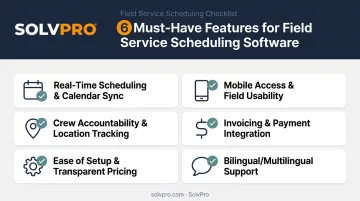
Real-time scheduling and calendar sync. A double-booked job doesn't just annoy a customer. It costs you a truck roll and a wasted afternoon. Two-way calendar sync with Google or Outlook prevents the office from booking a slot that's already taken.
Mobile access and field usability. Your crew isn't sitting at a desk. They need to see job details, update status, and upload photos from the truck, not wait until end-of-day to log everything from memory.
Crew accountability and location tracking. Job and crew time tracking (tagging time entries, photos, and activity logs with location data) creates transparency without turning into micromanagement. A WBR Insights survey of 100 field service and operations leaders found 53% already use GPS tracking as part of their operations.
Invoicing and payment integration. Slow invoicing is a real cash-flow problem. In a January 2025 survey, 56% of small U.S. businesses reported being owed money from unpaid invoices, averaging $17,500 per business. Built-in payment processing and QuickBooks Online sync close that gap faster.
Ease of setup and transparent pricing. Plenty of small businesses stick with a broken system because switching feels risky. Look for platforms with quick onboarding and no hidden add-on fees.
Bilingual or multilingual support. With more Spanish-speaking field crews on job sites, an English-only interface creates a communication gap. This is a feature many legacy platforms still overlook entirely.
Top Service Scheduling Software for Small Businesses in 2026
These platforms differ on ease of use, pricing transparency, feature depth beyond simple booking, and how well each supports growing crews rather than static teams.
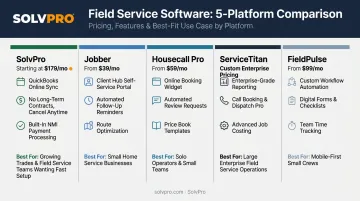
SolvPro
SolvPro is an all-in-one field service management platform built by a team with 50+ years of combined experience in construction, estimating, and field operations. It covers scheduling, work orders, crew tracking, and payments in a single system rather than requiring three or four separate tools.
What sets it apart:
- Fully bilingual English/Spanish interface for office staff and field crews, including a Spanish-language mobile app
- Job and crew time tracking that records time entries against the job, photos, and activity logs for crew accountability
- Digital estimates with customer-facing PDF proposals and digital signatures
- QuickBooks Online sync and credit-card and ACH payments built into the core platform, not sold as add-ons
- Setup in under 10 minutes, with account creation alone taking less than 2 minutes and no long-term contracts
| Category | Details |
|---|---|
| Key Features | Scheduling, work orders, crew and job time tracking, digital estimates, QuickBooks Online sync, credit-card and ACH payments |
| Best For | Growing multi-crew field service teams (HVAC, plumbing, electrical, landscaping, general contracting, commercial cleaning) that want full functionality without enterprise complexity |
Jobber
Jobber is a long-established field service platform known for GPS routing and integrated invoicing across HVAC, plumbing, and landscaping businesses.
Its strengths include a solid customer support reputation and a client hub that lets customers self-serve requests and payments. The tradeoff: several advanced features, including GPS waypoints and route optimization, sit behind higher-tier plans, so costs can climb quickly for very small teams.
| Category | Details |
|---|---|
| Key Features | GPS routing, integrated invoicing and payments, client self-service hub |
| Best For | Established field service teams wanting a widely adopted, feature-rich platform |
Housecall Pro
Housecall Pro focuses on the full job lifecycle, from initial booking through payment collection, for home service contractors.
It includes a drag-and-drop dispatch view and built-in marketing automation like email and postcard follow-ups. Some of the more advanced marketing and team features are locked to its higher-priced plans.
| Category | Details |
|---|---|
| Key Features | Drag-and-drop dispatch view, GPS routing, marketing automation |
| Best For | Home service contractors who want dispatching plus built-in marketing tools |
ServiceTitan
ServiceTitan is an enterprise-grade platform covering scheduling, dispatching, invoicing, and reporting for larger residential and commercial service companies.
It offers advanced real-time technician tracking and flat-rate pricebook management, plus KPI dashboards. Pricing is quote-based and per-technician, with no published dollar figure, and onboarding typically runs several weeks.
| Category | Details |
|---|---|
| Key Features | Advanced dispatching, flat-rate pricebook tools, KPI dashboards |
| Best For | Mid-size to large service companies with the staff to manage a longer implementation |
FieldPulse
FieldPulse sits between simpler schedulers and full enterprise systems, combining scheduling, CRM, and estimating for growing teams.
It offers a customer approval portal and QuickBooks sync, with pricing customized to team size and seat type (full-access vs. field-only). Its integration ecosystem is smaller than more established competitors like Jobber.
| Category | Details |
|---|---|
| Key Features | Built-in CRM, estimate builder, customer approval portal, QuickBooks sync |
| Best For | Growing field service teams that need CRM and scheduling without enterprise-level pricing |
What to Look for in Service Scheduling Software
The scheduling flow, pricing pages, and mobile app tell you more than marketing claims taken at face value.
The most common mistake small business owners make? Picking software based on brand recognition or the lowest sticker price, without confirming it actually supports crew dispatch, field accountability, and fast invoicing.
Factors that matter:
- Ease of onboarding and time to first dispatch
- Transparency of pricing, including hidden add-on fees
- Integration depth with QuickBooks and payment processors
- Mobile and field usability, not just back-office features
- Suitability for multi-crew accountability as the team grows
Conclusion
The best service scheduling software for your business is rarely the biggest name in the space. Look for the platform that matches your crew size, your trade, and how your team works day to day.
Test a few platforms with free trials or demos before committing. Pay attention to ongoing costs as you add users, not just the entry price, and confirm the support team will help you get set up.
If you're running a growing service business with crews in the field, you need scheduling, work orders, crew tracking, and payments in one bilingual platform. SolvPro delivers that, with setup in under 10 minutes and no long-term contracts.
Field service software helps you manage the work. SolvPro helps you make sure the work makes money.
The right tool depends on your trade, crew size, job mix and the systems you already run. Test it on real jobs before you commit, and check that crews will actually enter what the office needs. When you want to see it on your kind of work, Book a Demo.
Run the Job. Protect the Profit.
Frequently Asked Questions
What Scheduling Software Is Free for Small Businesses?
Tools like Calendly's free tier or Connecteam's free plan (up to 10 users) offer basic scheduling at no cost. Most true field service platforms with dispatch and invoicing typically start around $30-50/month.
What Is the Difference Between Scheduling Software and Field Service Management Software?
Scheduling software usually means simple appointment booking. Field service management software such as SolvPro, Jobber or Housecall Pro adds crew dispatch, work orders and invoicing for teams sent to job sites. Location features vary by vendor, so confirm what each one offers.
How Much Does Service Scheduling Software Typically Cost for a Small Business?
Pricing ranges from free basic tools to roughly $30-100/month for small teams. Enterprise-grade platforms can run $200-450+/month depending on modules and team size.
Does Service Scheduling Software Integrate with QuickBooks?
Most modern field service platforms, including SolvPro, Jobber, and FieldPulse, offer QuickBooks Online sync to speed up invoicing and cut down on manual bookkeeping.
Is It Worth Using Scheduling Software for a Small Crew of Just 1-5 Employees?
Yes. Even small crews benefit from fewer double-bookings, faster invoicing, and clearer accountability. Several platforms, including SolvPro's core plan, are built specifically for teams this size.
Can Service Scheduling Software Support Bilingual English/Spanish Crews?
Yes, though it's still a growing need most platforms haven't addressed. SolvPro offers a fully bilingual interface, including a Spanish-language mobile app, for both office staff and field crews — a feature many competitors, including Jobber, don't offer.