Wage and hour litigation isn't slowing down. Private FLSA lawsuits filed in federal court climbed to 5,702 in 2025, up from 5,456 the year before — a 4.5% increase according to Seyfarth Shaw's 2025 litigation report. For businesses with hourly or field-based employees, manually tracking time, overtime, and breaks isn't just tedious. It's a minefield.
Rounding errors, missed breaks, and inconsistent record-keeping create legal exposure and quietly erode profit margins. Workforce management (WFM) software automates the compliance side of the equation and builds an audit-proof paper trail. Five options are worth evaluating, and the criteria that separate them are set out first.
KEY TAKEAWAYS
- WFM software automates overtime, break enforcement, and record-keeping to satisfy FLSA and state labor laws.
- Look for rule-based calculations, mobile time tracking with geofencing, audit trails, and payroll integration.
- SolvPro offers job and crew time tracking and bilingual crew support for field service teams.
- Fines, back pay, and lawsuit costs typically exceed the price of a solid WFM subscription.
- Overtime rules differ by state, so a system that applies one national rule can still leave a business exposed.
Why Accurate WFM Is Crucial for Labor Compliance and Cost Control
Every hourly employer operates under the Fair Labor Standards Act, plus a patchwork of state and local rules covering minimum wage, overtime, meal and rest breaks, and record-keeping. California alone requires a 30-minute meal break for any shift over five hours, due before the end of hour five, with a second meal break required past ten hours.
Miss it, and the employer owes an extra hour of pay at the employee's regular rate for each violation, per day.
That's one state. Multiply similar nuances across every jurisdiction where you employ workers, and manual tracking becomes untenable.
The Real Cost of Getting It Wrong
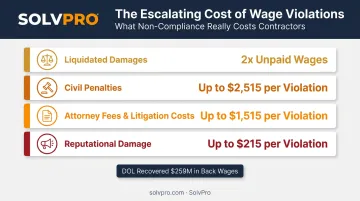
Non-compliance isn't cheap. The Department of Labor's Wage and Hour Division recovered more than $259 million in back wages for nearly 177,000 workers in fiscal year 2025 alone — an average of $1,465 per affected worker in enforcement actions. That figure only reflects DOL recoveries. It doesn't include:
- Liquidated damages: federal law allows courts to double unpaid wages as a penalty, meaning liability can hit 2x the original shortfall
- Civil penalties up to $2,515 per willful or repeat violation
- Attorney fees and litigation costs for defending a wage claim
- Reputational damage that follows a public wage lawsuit
A good-faith defense can reduce liquidated damages, but only if the employer can prove it acted with reasonable grounds for believing it complied. That's nearly impossible without documented, timestamped records.
Overtime Errors Cut Both Ways
Meal break violations aren't the only compliance risk lurking in payroll data. Overtime rounding creates its own liability, in either direction.
Without automated tracking, businesses often round hours inconsistently. Federal rules under 29 CFR 785.48 permit rounding to the nearest 5 or 15 minutes, but only if it doesn't systematically shortchange workers over time.
Round the wrong direction too often, and you've built a wage claim into your own payroll process. Round too generously, and you're overpaying labor costs that eat straight into margin.
The 5 Best WFM Software for Compliance & Overtime Tracking
These platforms made the list for their compliance automation, tracking accuracy, and reporting depth. Each serves a different type of business, so the "best" one depends on your team structure and industry.
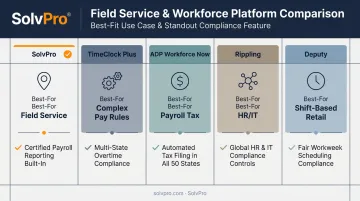
SolvPro: Best for Field Service Businesses
SolvPro is an all-in-one field service management platform built by people who've actually run job sites: general contractors, electricians, plumbers, landscapers, and commercial cleaning crews among its core users.
What sets it apart for compliance:
- Job and crew time tracking. SolvPro records against the job specific actions, like clocking in or marking a job complete, instead of pinging location every 30 seconds. This creates a defensible record of exactly when and where work happened.
- Bilingual English/Spanish interface. Every screen, from time entry to crew scheduling, works in both languages at no extra cost, reducing logging errors caused by language barriers on mixed-language crews.
- Simple, transparent pricing. Plans, with no long-term contracts and cancel-anytime terms. Compliance shouldn't require an enterprise budget.
- One connected workflow. Time entries link automatically to work orders, schedules, and invoices, so office staff aren't reconciling five separate spreadsheets to figure out who worked where.
TimeClock Plus: Best for Complex Pay Rules
TimeClock Plus targets organizations with genuinely complicated labor environments: government agencies, healthcare systems, and unionized workforces. Its configurable rules engine handles shift differentials, blended rates, and collective bargaining agreement terms automatically, applying the right overtime calculation in real time as hours accrue.
It supports biometric, mobile, web, and kiosk clock-ins, plus GPS validation. For compliance documentation, it generates detailed audit logs and employee attestations that hold up under scrutiny during a wage and hour review.
ADP Workforce Now: Best for Integrated Payroll and Tax Compliance
ADP built its reputation on payroll, and Workforce Now leans into that strength. It automates tax calculations and filings across every federal, state, and local jurisdiction where you operate (a meaningful advantage for multi-state employers juggling different withholding rules).
The platform includes built-in error detection and AI-powered anomaly alerts, flagging issues like missing tax IDs before they become filing problems. If payroll tax compliance is your biggest headache, ADP's depth here is hard to match.
Rippling: Best for All-In-One HR and IT Compliance
Rippling unifies HR, IT, and finance under one system, extending compliance enforcement across every tool an employee touches. When you hire someone in a new state, Rippling automatically handles tax registration and withholding setup: no manual paperwork chasing state agencies.
Its Workflow Studio lets admins build custom automation rules, such as auto-assigning required safety training the moment an employee's work location changes. It's a strong fit for companies that need compliance logic woven into onboarding and IT provisioning, not just timesheets.
Deputy: Best for Shift-Based Retail and Hospitality
Deputy fits businesses running dynamic, rotating shift schedules — think restaurants and retail chains. It flags missed breaks before the end of a shift and can calculate Missed Break Allowance pay automatically. For jurisdictions with predictive scheduling laws, like New York City, Seattle, or Los Angeles, Deputy documents required notice periods and calculates predictability pay for last-minute schedule changes.
Its mobile app handles shift swaps and manager timesheet approvals on the go, cutting down the back-and-forth that usually stalls payroll processing.
Key Features to Look for in a WFM Compliance Solution
The right platform depends on your workforce structure, but a few capabilities matter regardless of industry.
Automated Overtime and Pay Rule Calculations
A configurable rules engine should apply federal and state-specific overtime, break, and travel time rules automatically. This includes edge cases like proper quarter-hour rounding (1-7 minutes down, 8-14 minutes up, not blanket rounding every seven minutes) and California's stricter meal break mandates.
Mobile Time Tracking with Geofencing
For any business with crews working off-site, this isn't optional. It confirms employees clocked in at the correct job location and creates a verifiable record of hours worked away from a central office. That record becomes critical when a client or employee disputes hours logged.
Real-Time Alerts and Exception Management
Proactive alerts for missed punches, approaching overtime thresholds, or skipped breaks let managers fix issues before they hit payroll. Catching a problem mid-week beats discovering it during an audit six months later.
Detailed, Audit-Ready Reporting
Software should generate instant reports covering:
- Total hours worked and overtime paid
- Breaks taken (or missed)
- Complete edit history on every timesheet entry
This documentation is what protects you if the Department of Labor comes knocking.
Seamless Payroll Integration
Direct integration with platforms like QuickBooks Online removes manual data entry between time tracking and payroll. SolvPro's native QuickBooks sync, for example, pulls job-level labor hours straight into accounting with a single export, so the hours tracked are the hours actually paid.
Conclusion
Manual time tracking is too risky and too expensive to rely on anymore. Between rising FLSA litigation and DOL enforcement actions recovering hundreds of millions annually, the math favors automation every time.
General-purpose platforms like ADP, Rippling, TimeClock Plus, and Deputy each solve specific compliance puzzles well. But field service businesses face a different reality: crews spread across job sites, language barriers on mixed teams, and the need for location-verified proof of work.
If that sounds like your business, see how SolvPro's job and crew time tracking and bilingual platform can remove the chaos from your time tracking and compliance workflow.
Field service software helps you manage the work. SolvPro helps you make sure the work makes money.
The right tool depends on your trade, crew size, job mix and the systems you already run. Test it on real jobs before you commit, and check that crews will actually enter what the office needs. When you want to see it on your kind of work, Book a Demo.
Run the Job. Protect the Profit.
Frequently Asked Questions
What Is the Difference Between Workforce Management and Time Tracking Software?
Time tracking simply records hours worked. Workforce management is broader, covering scheduling, labor forecasting, and applying compliance rules to that time data automatically.
How Does Workforce Management Software Help with FLSA Compliance?
It automates accurate record-keeping of hours worked, calculates overtime at the required 1.5x rate, and maintains audit trails, all core FLSA requirements that manual systems struggle to satisfy consistently.
What Features Are Essential for Tracking Overtime in the Field?
Mobile clock-in/out, GPS or geofencing to verify job site location, and reliable tracking in low-connectivity areas are the essentials for field-based teams.
Can WFM Software Automatically Calculate Blended Overtime Rates?
More advanced WFM systems can be configured to calculate weighted-average overtime for employees who work multiple pay rates within a single pay period. Confirm this capability directly with any vendor before assuming it's included.
Is WFM Software Expensive for a Small Business?
Pricing varies widely across these platforms. SolvPro does not publish pricing; confirm current pricing directly with SolvPro, and weigh it against the cost of a single wage and hour penalty.
How Does GPS Tracking in WFM Software Improve Labor Compliance?
It creates a verifiable digital record of where an employee was when they clocked in and out, helping validate hours for payroll and defend against wage disputes if they arise.