For a contractor running four crews across three job sites, this isn't an abstract statistic. It's a foreman rounding up a late arrival, a laborer clocking in for a buddy stuck in traffic, or an office admin spending Friday afternoons untangling timesheet disputes.
A basic biometric fingerprint clock typically costs $100 to $220 per device, plus a monthly software fee that often starts under $30 for small teams and climbs with headcount. That's real money, but it's rarely the biggest cost driver.
Crew management costs aren't high because biometrics are expensive. They're high because manual processes, disconnected software, and no way to see where jobs stand let small errors multiply across every crew and site. This article breaks down where those costs come from and what actually reduces them.
KEY TAKEAWAYS
- Small unrecorded minutes and manual corrections drive up crew costs more than any single large expense.
- Manual tracking, weak integration, subcontractor complexity, and compliance gaps are the main cost drivers.
- Biometric verification confirms who actually clocked in, which ends buddy punching and cuts reconciliation work.
- Real savings come from smarter procurement, tighter management, and systems that pass data to payroll without rekeying.
- Hardware, enrolment, and ongoing support costs should be counted alongside the licence fee when comparing options.
How Costs Around Biometric Crew Management Build up
Crew management costs rarely show up as one line item on a budget. They build in small increments that are easy to miss day to day.
A few minutes of early clock-in here, a rounded-up lunch break there, an occasional buddy punch when someone's running behind: none of these look like a problem in isolation.
The math changes at scale. A five-minute rounding error per worker, per shift, might cost a few dollars a day for one crew. Multiply that by:
- 15 crews across multiple sites
- 20 workdays a month
- Subcontractors who aren't on your payroll system at all
Suddenly you're looking at thousands of dollars a month in labor that was never actually worked, plus the office hours spent untangling it during payroll.
These costs stay invisible until something forces a closer look:
- Payroll audits that flag inconsistent hours
- Job costs that blow past budget with no clear explanation
- Compliance reviews that surface missing records
By the time any of these happen, the cost has already compounded across weeks of pay periods. Manual tracking doesn't fail loudly; it quietly drains margin until someone finally adds up the numbers.
Key Cost Drivers for Biometric-Based Crew Management
Not every driver comes from the same place. Some get baked in the moment you choose a vendor. Others creep up as your crew count grows.
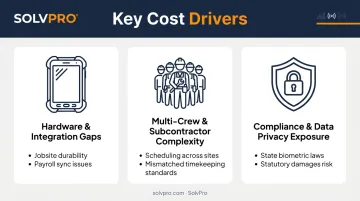
Manual Tracking, Hardware Fit, and Integration Gaps
Paper timesheets and manual sign-in sheets are still common on job sites, and they invite the exact kind of buddy punching mentioned earlier. Biometric verification closes that gap by tying a clock-in to a fingerprint or face scan instead of a name someone else can write down.
But the device itself matters just as much as the technology behind it. Fingerprint readers built for office lobbies don't hold up well against:
- Dust and debris
- Gloved hands
- Rain, heat, or freezing temperatures
IEC ingress protection standards note that dust and water entering an enclosure can cause equipment to deteriorate or malfunction, which is exactly why outdoor-rated terminals (some carry an IP67 rating) exist for jobsite use.
Choosing the wrong hardware doesn't just risk downtime. It means paying for replacements sooner than planned, and that's before the software side adds its own costs.
A biometric clock that doesn't talk to your payroll or job costing software just moves the manual work somewhere else. Instead of chasing paper timesheets, your office staff exports data from one system and re-enters it into another.
Multi-Crew and Subcontractor Complexity
The more crews and subcontractors you manage, the more administrative load stacks up:
- Tracking hours across workers who aren't on your payroll
- Confirming site access for people who rotate between jobs
- Reconciling schedules across multiple job sites at once
A ten-person crew running three subcontractor teams can mean juggling four different timekeeping standards on the same job. Each additional crew or subcontractor relationship multiplies the coordination work, not just the headcount.
Compliance and Data Privacy Exposure
Biometric data isn't like a punch card. Several states regulate how it's collected, stored, and destroyed.
Illinois' Biometric Information Privacy Act, for example, allows for statutory damages of $1,000 for negligent violations and $5,000 for intentional or reckless ones, on top of actual damages and legal fees. A vague consent form can turn a $150 time clock into a five-figure legal problem.
Some of these drivers are locked in at the procurement stage: vendor choice, hardware rating, consent policy. Others emerge only as you scale, which is why cost reduction needs to happen at more than one level.
Cost-Reduction Strategies for Biometric Crew Management
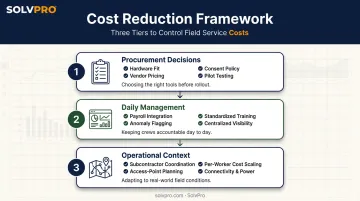
Where a cost-reduction strategy works best depends on where the cost originated: the decisions made before rollout, how the system gets managed day to day, or the broader operational context crews work within.
Strategies That Reduce Costs by Changing Decisions
These are choices made before you ever install a device.
- Match hardware to jobsite conditions. Choose readers rated for dust, moisture, and temperature swings rather than office-grade units that fail early.
- Pick vendors with published pricing. Transparent monthly tiers beat quote-based models that can balloon once your crew count changes.
- Set consent and retention policies upfront. Decide how long biometric data is stored and who can access it before collecting a single fingerprint.
- Pilot before you scale. Test on one crew or site first. If clock-ins don't sync cleanly with payroll, you'll want to know before buying 40 devices instead of four.
Strategies That Reduce Costs by Changing How Crew Management Is Handled
Once the system is live, daily management habits determine whether it reduces the manual work it was meant to remove.
- Connect attendance data straight to payroll and job costing. Platforms like SolvPro centralize verified hours, job costs, and invoicing in one system, eliminating the manual reconciliation between time clocks, spreadsheets, and QuickBooks that eats office hours every pay period.
- Flag anomalies before payroll runs, not after. Missed clock-outs and unapproved overtime are cheaper to fix in real time than to untangle after a pay period closes.
- Standardize training across crews and subcontractors. Inconsistent adoption is its own cost driver. A crew that half-uses the system generates half-clean data that still needs manual cleanup.
- Keep centralized visibility into who's on which job. When office staff can see crew assignments and job costs in one dashboard instead of five spreadsheets, profitability tracking stops being guesswork.
Strategies That Reduce Costs by Changing the Context Around Crew Management
Some of the biggest cost drains have nothing to do with the biometric device itself.
- Fix fragmented subcontractor and multi-site coordination first. A fingerprint scanner won't repair a scheduling process that's already broken across three job sites.
- Plan access points before you buy devices. A thoughtful site layout can mean two well-placed readers instead of six, cutting hardware and installation costs.
- Expect cost per worker to drop as your crew grows. Most vendors, SolvPro included, structure pricing so per-user costs shrink as headcount grows. SolvPro does not publish pricing; confirm current per-user cost directly with SolvPro before you model a 10-person crew.
- Account for connectivity and power at remote sites. A device with no reliable Wi-Fi or backup power turns into a maintenance headache that adds cost month after month.
Conclusion
Cutting crew management costs starts with figuring out where your costs actually originate, not with buying the fanciest biometric reader on the market. Maybe it's a procurement decision made two years ago, a daily habit that never got standardized, or a fragmented system stitched together with spreadsheets and text messages.
Biometric verification solves one piece of that puzzle. It ties attendance to a real person, which shuts down buddy punching at the source. But identity verification alone won't fix disconnected payroll, invisible job costs, or invoices that go out three weeks late.
Lasting cost control comes from pairing accurate attendance data with a platform that connects crew tracking, job costing, and invoicing in one place. That's the gap SolvPro was built to close, giving multi-crew contractors one system instead of five, with real visibility into what every job actually costs.
Your crews are busy. So why isn't there more money in the bank?
When the office can see labor, materials and documented changes against the job while the work is still open, the numbers at the end stop being a surprise. SolvPro keeps scheduling, work orders, time, job costing and invoicing on one record. When you want to see it on your kind of work, Book a Demo.
Run the Job. Protect the Profit.
Frequently Asked Questions
How Much Does the Employee Fingerprint Biometric Cost for Attendance?
Basic fingerprint clocks typically run $100 to $220 per device, plus a monthly software fee starting around $25-$30 for small teams. Exact pricing depends on ruggedness, device count, and whether payroll integration is included.
What Are the Biometrics for Construction Workers?
Fingerprint and facial recognition are the two most common methods used for site access and time tracking. Both tie a clock-in or entry event to a specific worker instead of a shared badge or PIN.
How Much Is Construction Management Software?
Pricing ranges widely, from free basic time-tracking apps to platforms charging $10-$15 per user monthly, up to all-in-one systems. SolvPro does not publish pricing; confirm it directly. Enterprise-level platforms often require custom quotes.
Do Biometric Systems Really Reduce Payroll Costs in Construction?
Yes, mainly by eliminating buddy punching and cutting the manual payroll corrections that come from illegible timesheets or disputed hours. Savings compound as crew size and site count grow.
What Is Buddy Punching and How Much Does It Cost Contractors?
Buddy punching happens when one employee clocks in or out on behalf of another. One frequently cited estimate put nationwide costs at $373 million annually, though that figure is now years old and likely understates today's cost.
Can Biometric Time Tracking Integrate with Existing Crew Management Software?
Many modern platforms support APIs or built-in integrations, though availability varies by vendor and plan. Centralized platforms like SolvPro consolidate time data with job costing and invoicing so nothing needs manual reconciliation.