If you're still scheduling from a notepad, group text, or spreadsheet, those pain points compound fast. According to the Bureau of Labor Statistics, 11.9 million Americans work as independent contractors — representing 7.4% of total U.S. employment, with construction and extraction occupations running even higher at 15.1%. That's a massive workforce managing complex field operations, often without the right systems behind them.
This guide covers what scheduling software for independent contractors actually does, which features matter most in the field, and how to choose a tool that fits your work.
KEY TAKEAWAYS
- Manual scheduling breaks down fast as job volume grows — conflicts cost you twice, in time and delayed payment
- The best tools connect invoicing and payment collection directly to the job, in one workflow
- Mobile-first design matters — the tool must work from a job site, not just a desk
- SolvPro, Jobber, Housecall Pro, and Workiz each serve different contractor types and crew sizes
- Setup doesn't have to take weeks — several platforms, including SolvPro, can be running in under an hour
Why Independent Contractors Struggle Without the Right Scheduling System
When you're the one doing the work and managing the calendar, every scheduling conflict hits twice: once in wasted time, once in delayed payment. A missed appointment means a client waiting, a job window lost, and sometimes an invoice that never gets sent because the whole day falls apart.
Manual systems — texts, spreadsheets, paper calendars — hold up at low volume. Once you're juggling five or more active clients, those systems collapse under the weight.
How Scheduling Gaps Create Downstream Problems
A missed reschedule text doesn't just create a no-show. It triggers a chain:
- Client doesn't know you're running late — they call, you're mid-job
- Job gets rescheduled last-minute, but the notes from the original visit aren't transferred
- Invoice goes out the following week, if at all, because the job details are scattered across three different places
- Payment drags while you're already onto the next job
Businesses spend an average of 25 hours per week on manual data entry and reconciling data across apps, according to Intuit research. That's time a solo contractor doesn't have.
The payment impact compounds it: U.S. small business invoices were paid in an average of 28.8 days in Q1 2026 — already 9 days late on average. That gap widens when invoicing is manual and slow.
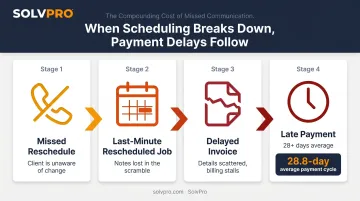
Closing that gap means connecting scheduling, job status, and invoicing in one place — so nothing falls through between the appointment and the payment.
Must-Have Features in Scheduling Software for Independent Contractors
Drag-And-Drop Job Calendar
Contractors need to see the full week at a glance. A list view doesn't cut it — you can't instantly spot an open window on Thursday or drag a canceled Tuesday job over to Wednesday afternoon without a visual board.
Look for platforms that offer day, week, and crew views, with color-coded jobs showing client details and locations. When a schedule change hits, you should be able to reassign a job in seconds — not make three phone calls and update two spreadsheets.
Mobile Access
Independent contractors are almost never at a desk. The scheduling tool must work from a phone at the job site, not just from a desktop in an office. Specifically, the mobile app should let you:
- View job assignments and details before you arrive
- Update job status in real time when work starts or finishes
- Add job-linked photos and notes from the site
- Capture customer sign-off on completion
- Generate and send an invoice before you leave
If the mobile experience is a stripped-down version of the desktop app, it won't hold up in the field.
Automated Client Notifications
Manually texting appointment confirmations burns time you don't have. Auto-sending reminders and job updates to clients — when a job is scheduled, when you're en route, when it's complete — reduces confusion and builds the kind of professionalism that drives referrals. Research from Housecall Pro found that 97% of homeowners say an immediate response influences their hiring decision, and 73% say they'd refer a Pro after an excellent experience. Automated communication is a direct contributor to both.
Time Tracking and Job Documentation
Built-in time tracking tied to individual jobs matters most when you bill by the hour. Every hour logged should attach to a specific job — visible on the invoice, synced to your accounting software, and job-linked with a verifiable record of when and where work happened. That paper trail protects you in billing disputes and ensures no hours slip through the cracks.
Invoicing and Payment Integration
The fastest path to getting paid is closing the job and sending the invoice before you leave the site. Platforms that connect scheduling to invoicing in a single workflow eliminate the "I'll bill it later" gap that turns a 28-day payment cycle into a 45-day one.
Key features to confirm:
- Generate and send invoices from the mobile app before leaving the site
- Collect payment on-site via credit card or ACH
- Sync automatically with QuickBooks Online — no manual re-entry
- Support English and Spanish for mixed-language office staff and field crews
Geolocation and Job Check-In Tracking
Once the job is invoiced and closed, accountability doesn't end — it feeds directly into your records. Job-linked time tracking creates a record whenever a crew member checks in, logs time, or uploads a photo, building a paper trail without continuous GPS monitoring. For clients who require proof of service — commercial cleaning, landscaping, janitorial work — this documentation is often a contract requirement. And when a client questions whether a job was completed, you have a timestamped, location-verified record to back it up.
Top Scheduling Software for Independent Contractors
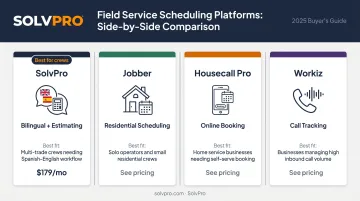
The right tool depends on your trade, crew size, and whether you need scheduling tightly connected to billing. Here's how the main options compare.
The right tool depends on your trade, crew size, and whether you need scheduling tightly connected to billing. Here's how the main options compare.
| Tool | Best For | Standout Feature |
|---|---|---|
| SolvPro | Multi-crew field service teams | Bilingual interface + digital estimates |
| Jobber | Residential service contractors | Clean scheduling + client communication |
| Housecall Pro | Home service independents | Online booking + payment processing |
| Workiz | Solo operators & small teams | Integrated call tracking + phone system |
SolvPro
SolvPro is an all-in-one field service management platform built specifically for service businesses with crews in the field: HVAC, electrical, plumbing, landscaping, general contractors, and commercial cleaners.
What separates it from generic scheduling tools is that the platform was built by people who actually worked in these trades. The founding team describes building it "from job sites, truck beds, and job trailers" — not from a corporate IT department.
Key features:
- Drag-and-drop visual job calendar with day, week, and crew views
- Job and crew time tracking (Smart Activity Tracking) with time entries and photos recorded against the job
- Digital estimates with customer-facing PDF proposals
- On-site invoicing and payment collection (credit card, ACH, digital)
- QuickBooks Online sync and credit-card and ACH payments — both built in, not add-ons
- Fully bilingual English/Spanish interface for office staff and field crews
- Setup in under 10 minutes, no long-term contract, live onboarding support included
The bilingual interface is a genuine differentiator. SolvPro is the only field service platform with a full Spanish-language mobile app for field crews, making it particularly strong for contractors managing mixed-language teams.
Pricing (core plan), with no credit card required for the free trial.
Jobber
Jobber is a solid choice for general and residential service contractors managing short-to-mid-length jobs across multiple clients. Its scheduling interface is clean, the client communication features are solid, and it integrates with QuickBooks.
Key features:
- Calendar views and team tracking
- Automated client reminders and job checklists
- Invoicing with QuickBooks integration
Best fit: Residential contractors who prioritize ease of use and need integrated scheduling and billing without complex project phases.
Housecall Pro
Housecall Pro works well for home service independents — plumbers, electricians, HVAC techs — who need quick scheduling, client-initiated online booking, and payment processing in one place.
Key features:
- Client-initiated online booking
- Mobile access and client reminders
- Payment processing with QuickBooks integration
Strongest for high-volume residential service calls rather than complex multi-phase projects.
Workiz
Workiz is built for the solo independent contractor or small team managing everything from the field — scheduling, estimates, job reminders, and payments without needing separate office support. Its call tracking and client messaging features are a standout for one-person operations.
Key features:
- Job scheduling, estimates, and invoicing
- Integrated phone system with call tracking
- Mobile access for field-only operators
Ideal for one-person or small-team operators who handle sales, scheduling, and field work themselves.
How to Choose the Right Scheduling Software for Your Contracting Business
Match the Tool to Your Work Type
A solo contractor doing quick residential service calls needs different features than a contractor managing multi-phase jobs with subcontractors. If cash flow speed is the priority, choose a platform that connects scheduling directly to invoicing and on-site payment — not one where invoicing is a separate step handled later.
Use your own work type as the filter:
- Multi-phase project contractors need detailed estimates, staged billing, and job costing
- Single-trade service businesses usually do fine with a simpler, faster platform
- Crews with subcontractors need scheduling tools that track who's where and when
Evaluate Integrations and Real Mobile Usability
QuickBooks sync matters if you're already using it — double data entry between your scheduling tool and accounting software is just a different form of manual work. Confirm whether the sync is native (built in) or relies on a third-party connector that can break.
For mobile usability, go beyond checking whether an app exists. Ask:
- Can you generate and send an invoice from the app?
- Can you capture photos and attach them to a job record?
- Does it work with limited connectivity?
Factor in Setup Time and Support
Once you've confirmed the integrations work, the next question is how fast you can actually get up and running. Few independent contractors have time for a weeks-long implementation. Look for platforms that offer live onboarding support — not just a help center — and can get you operational in a single session. SolvPro offers a live team walkthrough so you're set up by a real person, not left to work through a knowledge base on your own.
Key Benefits Independent Contractors See after Making the Switch
Contractors often notice three changes in the first few weeks of switching.
Fewer Missed Jobs, Faster Response to Changes
Centralized scheduling with real-time mobile updates means a client cancellation at 8am doesn't throw your whole day into confusion. You see the gap, find an available slot, move a job, and the updated schedule is live immediately.
Faster Invoicing and Quicker Payments
According to QuickBooks research, 56% of U.S. small businesses were owed money from unpaid invoices, averaging $17,500 per business — and 47% had invoices overdue by more than 30 days.
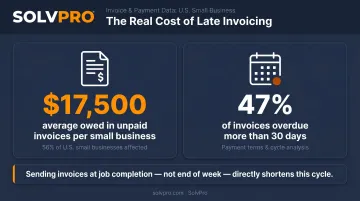
Sending the invoice the moment a job is marked complete — rather than at the end of the day or the end of the week — directly shortens that cycle.
A More Professional Image with Clients
Automated appointment reminders, digital proposals, and on-site sign-off change how clients perceive you. A contractor who sends a confirmation the night before and a digital invoice the moment the job's done looks more established than one who follows up three days later. That perception directly impacts repeat business and referrals.
How to Get Started with Scheduling Software in Under an Hour
If you're an independent contractor, the last thing you need is software that takes a week to configure. Most platforms are built to get you running fast — here's a practical sequence that works:
- Create your account — Start a free trial (SolvPro requires no credit card). Most platforms offer full access from signup.
- Import or enter your client list — Add your active clients first. This is the foundation for booking jobs and sending invoices.
- Set up your first service type — Define what you do (e.g., "HVAC service call," "landscape maintenance") so jobs book cleanly.
- Book a test job — Schedule a sample job, assign it to yourself, and walk through the full workflow: schedule → field update → invoice → payment.
- Connect QuickBooks — Connect QuickBooks Online before your first real invoice goes out. It syncs automatically from that point forward.
- Enable mobile notifications — Make sure your field device is receiving real-time job updates before your first live job.
- Activate automated client reminders — Set up confirmation and reminder messages so clients hear from you automatically.
If you're using SolvPro, live onboarding support is included. The team walks you through each step so you're confident before your first real job goes into the system.
Conclusion
Field service software helps you manage the work. SolvPro helps you make sure the work makes money.
The right tool depends on your trade, crew size, job mix and the systems you already run. Test it on real jobs before you commit, and check that crews will actually enter what the office needs. When you want to see it on your kind of work, Book a Demo.
Run the Job. Protect the Profit.
Frequently Asked Questions
What Is the Most Commonly Used Scheduling Software for Independent Contractors?
Jobber, Housecall Pro, Workiz, and SolvPro are among the most widely used options for field service contractors. The best fit depends on your trade, crew size, and whether you need scheduling tightly integrated with invoicing and payment tools.
Are There Scheduling Apps for Independent Contractors?
Yes — most modern scheduling platforms include dedicated mobile apps. Contractors can view jobs, update status, capture photos, and send invoices directly from the field without needing desktop access.
How Does Scheduling Software Help Independent Contractors Get Paid Faster?
When scheduling is connected to invoicing, you can send an invoice the moment a job is marked complete — rather than billing manually at the end of the day or week. That alone removes days from the typical payment cycle.
What Should I Look for in Scheduling Software as a One-Person Contracting Business?
Prioritize mobile-first design, simple job booking, automated client reminders, and built-in invoicing. You don't have office staff handling billing, so the tool needs to handle billing from the field.
Can I Manage Both Scheduling and Invoicing in One Tool?
Yes — SolvPro, Jobber, and Housecall Pro all combine scheduling, job tracking, and invoicing in a single workflow, so you don't need separate tools for each function.
Is There Scheduling Software That Works for Spanish-Speaking Contractors or Bilingual Crews?
Most platforms are English-only. SolvPro offers a fully bilingual English/Spanish interface — including a Spanish-language mobile app for field crews — which makes it a practical choice for contractors running bilingual office and field operations.