The right time tracking software fixes this in real time, capturing hours the moment work happens instead of reconstructing them days later.
This matters because time tracking touches everything downstream: payroll accuracy, job costing, and whether your crew actually shows up where they say they do. A 2023 Capterra survey found that 70% of construction respondents already use time-tracking software, meaning a meaningful share of the industry still hasn't made the switch. This guide breaks down the top platforms for 2026 so you can pick one that fits your crew size and existing systems.
KEY TAKEAWAYS
- GPS accuracy and offline reliability matter more than flashy features in low-signal work zones.
- Payroll integration depth varies widely, from native two-way sync to basic CSV exports.
- SolvPro bundles time tracking with scheduling, work orders, and invoicing for growing service businesses.
- Pricing spans free tiers to per-user fees plus admin costs, so crew size directly affects your rate.
- The best tool depends on your crew size, connectivity, and back-office setup, not brand recognition.
Overview of Time Tracking Software in the Construction Industry
Construction time tracking software isn't the same as a generic employee time clock. Contractors need tools built for how field work actually happens:
- Job and cost-code tracking that ties hours to a specific project or phase, not just a punch-in time
- Geofencing that confirms a worker is physically on-site before hours count
- Offline clock-in for sites with poor or no cell signal
- Crew-based clock-ins that let a foreman clock in an entire team at once
Demand for this kind of software keeps climbing. According to MarketsAndMarkets research, the global field service management market is projected to grow from $5.10 billion in 2025 to $9.17 billion by 2030, a 12.5% compound annual growth rate.
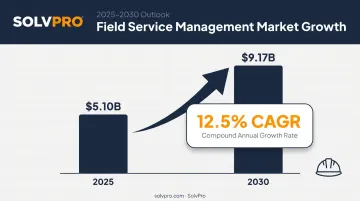
That growth reflects a broader shift toward digital field-workforce tools, not just time clocks in isolation.
The platforms that serve contractors and multi-crew teams differ most in features, pricing, and how crews rate them in practice.
Top Construction Time Tracking Software for 2026
Each tool below was evaluated on GPS accuracy, offline reliability, payroll integration depth, ease of field use, and overall value for growing crews.
SolvPro
SolvPro is an all-in-one field service management platform built by a team with hands-on backgrounds in construction, estimating, and project management. Instead of bolting time tracking onto a generic app, SolvPro bundles scheduling, work orders, crew tracking, invoicing, and payments into a single system.
What sets it apart:
- Job and crew time tracking records against the job clock-ins, clock-outs, and photo uploads the moment they happen, rather than tracking location continuously in the background
- Fully bilingual English/Spanish interface across the mobile app, web dashboard, and crew scheduling tools, not just a translated menu
- Native QuickBooks Online sync and built-in credit-card and ACH payments, both included as core features rather than paid add-ons
- Transparent, no-contract pricing with setup in under 10 minutes and free live onboarding support
| Category | Details |
|---|---|
| Key Features | Job-level time tracking, crew scheduling, work orders, invoicing, QuickBooks Online sync, credit-card and ACH payments |
| Best For | Growing general contractors, electrical, plumbing, HVAC, landscaping, excavation, and cleaning crews wanting one system instead of five |
For a business running five different apps to cover scheduling, timesheets, and invoicing, consolidating into one platform tends to save hours of admin work every week.
Workyard
Workyard is a mobile-first GPS time and attendance platform built specifically for construction and field service labor tracking. Its standout feature is continuous GPS tracking while a worker is clocked in, which automatically stops during breaks or after clock-out.
| Category | Details |
|---|---|
| Key Features | Auto clock-in/out via geofencing, photo ID verification, cost-code tracking, payroll integrations (QuickBooks, ADP, Gusto) |
| Best For | Contractors prioritizing the most precise GPS verification across multiple job sites |
Workyard also automatically assigns time spent at each site to the correct project and captures mileage for drive time, which helps tighten up job costing accuracy.
Busybusy
busybusy leans hard into equipment tracking alongside standard labor hours, making it a favorite among heavy civil and excavation crews that need to know where machines are, not just people.
| Category | Details |
|---|---|
| Key Features | GPS geofencing, equipment/asset tracking, photo verification, customizable overtime rules |
| Best For | Excavation, demolition, and heavy equipment-heavy construction crews |
The free tier is genuinely usable for small operations, which is rare in this category.
ClockShark
ClockShark pairs time tracking with light CRM functionality, tracking client conversations and job details alongside hours worked.
| Category | Details |
|---|---|
| Key Features | GPS/geofencing, crew scheduling, job costing, client/CRM conversation tracking, kiosk facial recognition clock-in |
| Best For | Teams that want time tracking bundled with basic customer relationship management |
Its kiosk mode with facial recognition is a solid buddy-punching deterrent for crews clocking in from a shared device.

QuickBooks Time
If your accounting already runs through QuickBooks, this native add-on offers the tightest two-way payroll sync available. Just be aware that geofencing and GPS mileage tracking sit behind the Elite tier, not the base plan.
| Category | Details |
|---|---|
| Key Features | Mobile/kiosk clock-in, geofencing and GPS mileage (Elite tier), project tracking, native QuickBooks payroll sync |
| Best For | Contractors already invested in the QuickBooks ecosystem for payroll and accounting |
ExakTime
ExakTime has been around long enough to become a fixture on large, multi-site job sites that need biometric verification and rugged hardware.
| Category | Details |
|---|---|
| Key Features | FaceFront biometric photo ID, rugged hardware time clocks, cost-code tracking, Arcoro HR suite integration |
| Best For | Large contractors (50+ workers) needing detailed cost-code reporting and hardware clock options |
The rugged, weatherproof clock hardware also tends to hold up better than phone-only apps in dusty or wet job conditions.
Connecteam
Connecteam goes beyond time tracking into full workforce management, adding digital forms and team chat for crews spread across multiple locations.
| Category | Details |
|---|---|
| Key Features | GPS/geofencing, NFC clock-in, crew scheduling, digital forms, team chat |
| Best For | Contractors managing crews across multiple sites who also want built-in team communication |
That built-in chat feature can also cut down on the scattered text threads crews often use to relay mid-shift changes.
What to Look for in Construction Time Tracking Software
The most common mistake contractors make? Picking a tool based on price alone, then discovering it doesn't work offline or barely talks to their accounting software.
Five factors separate these platforms:
- GPS/geofencing accuracy - prevents workers from clocking in before they reach the job site, cutting down on time theft disputes.
- Offline functionality - field crews on rural sites or underground often work without a signal for hours, so offline capture with later sync isn't optional—it's essential.
- Payroll and accounting integrations - according to ForConstructionPros, connecting mobile time tracking to accounting software can shrink a six-hour manual payroll process to about one hour.
- Construction-specific features - cost-code tracking and compliance reporting that generic time clocks don't offer.
- Field crew ease of use - a tool your foreman abandons after week one isn't saving anyone money, no matter how good the feature list looks on paper.
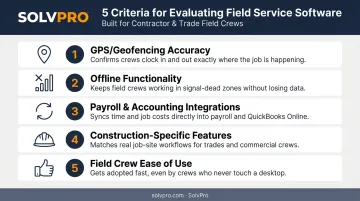
Each factor ties back to a real business outcome: fewer payroll disputes, faster invoicing, and job costs you can trust.
Conclusion
There's no single "best" construction time tracking software. What works for a 60-person excavation crew won't fit a 4-person plumbing outfit. A tool built around QuickBooks payroll sync won't help a business running on different accounting software, either.
Match your choice to your crew size, your job-site connectivity, and what's already sitting in your back office. Before committing, run a free trial and test GPS accuracy and offline performance in the actual conditions your crews work in, not just in a demo video.
If you're a growing trades business that wants time tracking bundled with scheduling, invoicing, and QuickBooks sync in one place, get started with SolvPro today. Setup takes under 10 minutes, with no contract required.
Field service software helps you manage the work. SolvPro helps you make sure the work makes money.
The right tool depends on your trade, crew size, job mix and the systems you already run. Test it on real jobs before you commit, and check that crews will actually enter what the office needs. When you want to see it on your kind of work, Book a Demo.
Run the Job. Protect the Profit.
Frequently Asked Questions
What Is Time Tracking Software for Construction?
It's digital software that lets crews clock in and out via a mobile app. GPS verifies job-site presence, and hours sync directly to payroll instead of relying on paper timesheets.
What Is the Best Way to Track Time as a Contractor?
Use a mobile GPS-based time clock with offline support and payroll integration. An all-in-one platform reduces the need for separate scheduling and invoicing tools on top of it.
How Much Does Construction Time Tracking Software Cost?
Pricing ranges from free tiers to per-user monthly fees plus a base company fee. Costs climb as you add GPS, geofencing, and job-costing features.
Does Construction Time Tracking Software Work Offline on Job Sites?
Many construction-focused tools support offline clock-in with automatic sync once connectivity returns. This matters most for remote or low-signal sites, such as rural areas or underground work.
Can Time Tracking Software Integrate with QuickBooks for Payroll?
Most construction time tracking tools, including SolvPro, offer native or two-way QuickBooks Online sync, eliminating manual payroll data entry.
How Do I Prevent Buddy Punching on a Construction Crew?
GPS geofencing, photo ID capture, or event-based location verification at clock-in confirm the right worker is physically on-site before their hours get logged.