Picture this: a framing crew shows up Monday morning with a printed drawing from two weeks ago. The layout changed. The wall they're about to build no longer exists in the revised plan. By the time anyone figures out what happened, you've burned half a day, the sub is furious, and now you're cutting out work that shouldn't have been started.
This scenario plays out on job sites every week — not because GCs are disorganized, but because project documents live in too many places at once.
Drawings get emailed. Change orders land in someone's texts. Work orders get printed and shoved in a binder. The office updates a file; the field never sees it.
According to a report from Autodesk and FMI, poor project data and miscommunication account for 48% of U.S. construction rework — projected at $31.3 billion in 2018 costs alone. That's not an inconvenience — it's a direct hit to your margins.
Understanding where document control breaks down is the first step to fixing it. This post covers why GCs lose track of project documents, which documents demand real-time access, and the practical systems that keep every stakeholder on the same version.
KEY TAKEAWAYS
- Outdated documents cause rework that directly eats into project margins — this is a financial risk, not a paperwork problem
- Five document types drive most field errors: work orders, drawings, change orders, submittals, and billing docs
- Cloud storage, mobile access, and version control are non-negotiable foundations for any document system that works in the field
- Documents must connect directly to job workflows — not live in a separate folder requiring manual updates and extra logins
- Version control matters most at the point of use, because a crew working from a superseded drawing creates rework nobody planned for
Why General Contractors Lose Control of Project Documents
Construction projects generate documents constantly — and involve dozens of people who all depend on them. Owners, subs, inspectors, suppliers, crews, and PMs each create and consume different files, often at the same time. Without a structured system, that volume alone creates version confusion.
But volume isn't the root cause. The way documents get distributed is.
The Five-System Problem
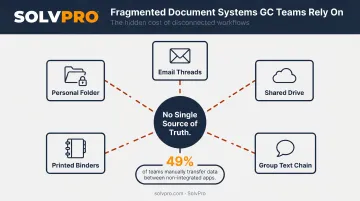
Many GC teams do not have one document system. They have five:
- Email threads with attachments that go stale the moment a revision is issued
- A shared drive that nobody updates consistently
- A group text chain where critical changes disappear under unrelated messages
- Printed binders in the job trailer that reflect the drawing set from week one
- Someone's personal folder that the rest of the team can't access
When a drawing gets revised, that update might reach three of those five places — and the crew relying on the fourth location will never know. A JBKnowledge construction technology survey found only 5% of construction firms had all software fully integrated, while 49% manually transferred data between non-integrated apps and 27% had zero app data integration at all.
Those gaps create real operational problems:
- Rework costs real money when completed work gets torn out
- Disputes over which version was current generate legal exposure
- Delayed approvals idle crews while subs wait for answers
- Billing falls out of sync with field progress, which drags out pay applications and cash flow
Every project running across five disconnected systems carries this risk — and many teams do not realize the cost until a dispute surfaces or a crew tears out work that was already approved.
The Key Project Documents GCs Need Real-Time Access to
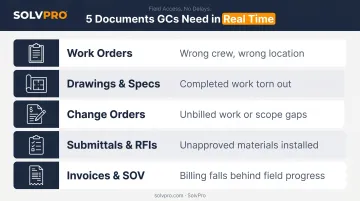
Not every file on a project carries the same urgency. These five document types are where outdated information causes the most direct financial damage.
Work Orders and Job Assignments
Field crews depend on current work orders to know what they're doing that day — scope, location, materials, crew assignments, special instructions. An outdated work order can send the wrong crew to the wrong location with the wrong materials, shutting down a full day of productive work before 8 AM.
Drawings and Specifications
Active drawings are the most frequently revised documents on any commercial project. A revision distributed even one day late can result in completed framing, MEP rough-in, or concrete work being torn out. Crews need confidence that the drawing on their device is the current approved set — not a version from two weeks ago.
Change Orders
Change orders are high-stakes documents. When an approved change order doesn't reach the field, crews either do the extra work for free (no billing documentation) or skip it entirely (scope gap, client dispute). Both outcomes cost money. The financial impact shows up fast:
- Unbilled work: Extra scope gets completed with no documentation to support an invoice
- Scope gaps: Skipped work triggers client disputes and rework
- Margin erosion: Either way, the project absorbs a loss that should have been billable
Submittals and RFIs
Submittals confirm whether a material or method has been approved before installation begins. RFIs capture design clarifications that affect how field work proceeds. Without real-time access to both, field supervisors end up guessing, installing unapproved materials or interpreting ambiguous details on the fly.
Research from CMAA and Navigant analyzed over 1 million RFIs across 1,362 projects and found an average of 796 RFIs per project at roughly $1,080 each to process. The average first response time was 6.4 days — meaning field crews often wait a week for clarifications that should take hours.
Invoices and Schedule of Values
Billing accuracy depends on real-time alignment between what's been completed in the field and what's been invoiced. When PMs can't see current progress tied to the schedule of values, pay applications get delayed, cash flow suffers, and the billing cycle drifts further behind actual work.
How General Contractors Get Real-Time Views of Project Documents
Getting everyone on current information isn't complicated in theory. In practice, it requires deliberate decisions about where documents live and how they reach the field.
Cloud-Based Central Storage
Moving all project documents into a cloud-based platform creates one accessible location where every authorized team member — office, field, subs — works from the same file. Changes made at the office desk are instantly visible on a foreman's phone at the job site. No version lag. No "did you get my email?" Cloud adoption among contractors jumped from 14% in 2022 to 51% in 2023, according to L.E.K.'s construction management survey — and 77% of contractors said consolidation onto fewer platforms outperforms adding point solutions.
Mobile Access for Field Crews
Up-to-date job information only works if field crews can pull current documents from their phones without calling the office. The JBKnowledge survey found 78% of construction workers already use mobile devices to view project documents in the field, with smartphone daily usage at 92%. The gap isn't adoption — it's giving field crews access to a system where documents are actually current, not a shared drive where nobody remembers to update the folder.
Version Control and Automatic Notifications
Version control eliminates the "which drawing is current?" conversation by automatically tracking revisions, retiring outdated files, and pushing notifications to the right people when a document changes. When multiple versions of the same drawing circulate at once, crews act on stale information. Version control closes that gap: anyone who opens a file sees the current approved set, and anyone affected by a revision gets notified before work begins.
Key things version control handles automatically:
- Retires outdated files so old versions can't be opened by mistake
- Logs every revision with timestamps and author records
- Pushes notifications to affected team members when a document changes
Linking Documents to Job Workflows
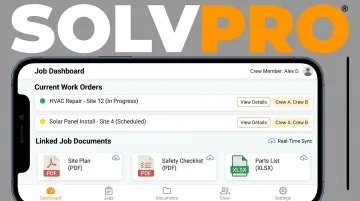
The most effective document systems connect files directly to job execution — not store them separately. Attaching the current work order to the scheduled task, or linking a change order to the affected budget line item, keeps documents and execution synchronized.
SolvPro builds this connection into the job record itself: work orders, crew assignments, job notes, change order documentation, photos, and billing all live in one place. Field crews and office teams pull from the same current information without a separate file search.
Role-Based Access and Permissions
Not everyone on a job needs every document. Field crews need their assigned work orders and current drawings. PMs need contracts and billing documents. Role-based access reduces clutter, prevents unauthorized edits, and ensures each person gets the right information at the right moment — without opening a folder containing 400 unrelated files.
What to Look for in a Field-Ready Document System
Choosing the right platform comes down to two non-negotiable criteria:
- Mobile-first usability — Field crews won't adopt a complicated tool. If pulling up a current work order takes more than a few taps, it won't get used, and the visibility problem persists. The interface needs to work for someone with muddy gloves and 20 minutes before the crew starts asking questions.
- Integration with scheduling, work orders, and invoicing — A document system siloed from the rest of job operations just creates another place where information gets stuck. The goal is one platform where documents live alongside the jobs, crews, and costs they relate to.
Both criteria shaped how SolvPro was built. The team spent years in construction, estimating, and field service management, watching firsthand as jobs fell apart when communication broke down between the office and the field, paperwork got lost, and invoices went out days after work was already complete.
SolvPro consolidates work orders, crew assignments, job documents, time tracking, and billing in one place. The mobile interface is designed to get a field crew member to their current job information in a few taps, not a phone call. It's also available in both English and Spanish, which matters for mixed-language crews where language barriers carry the same operational risk as paper-based document chaos.
Common Pitfalls That Undermine Real-Time Document Access
Even GCs who invest in the right tools can undermine their own system. These are the three most common failure patterns.
Relying on email for document distribution. Email creates version chaos by design. Each recipient gets a copy of the file at the moment it was sent. When revisions happen, nobody gets an automatic update — only people who notice the new email thread. With 16% of construction firms still using email as their primary method of transferring data between systems, the problem isn't fading — it's ongoing.
Printing documents instead of using digital access. Printed drawings and work orders are obsolete the moment a revision is issued. A GC who relies on paper distribution has essentially built a time-delay into their project communication — every revision takes at least one extra step to reach the field, and that step usually gets skipped under schedule pressure.
Choosing software the crew won't actually use. Adoption failure kills more document systems than bad technology does. Dodge Data & Analytics found that 61% of contractors cited field worker acceptance as the main barrier to adopting construction technology.
A platform that's too complex, too slow on mobile, or requires too much setup pushes field crews back to calling the office for information they should already have. Ease of use determines whether a system actually gets used — or just creates a false sense of security while real communication still happens over text.
Conclusion
You shouldn't have to wait until the job is over to find out whether you made money.
Keeping the estimate, work order, time entries and invoice on one record reduces how much the office has to reconstruct before it can bill. That is the difference between finding out now and finding out at closeout. When you want to see it on your kind of work, Book a Demo.
Run the Job. Protect the Profit.
Frequently Asked Questions
How Do You Monitor Progress on a Construction Project?
GCs track progress by combining real-time document access — current work orders, updated drawings, daily field logs — with crew check-ins and mobile reporting tools. Cloud-based platforms make it possible to see job status, crew activity, and completion milestones from any device without being physically on-site.
What Are the 5 Key Performance Indicators in Construction?
Construction teams typically track five KPIs: schedule variance, cost variance, rework rate, change order frequency, and labor productivity. Real-time document access supports accurate tracking across all five — particularly rework rate and change order frequency, where outdated documentation is often the root cause.
What Documents Do General Contractors Need Real-Time Access to on a Job Site?
Priority documents include current drawings and specs, active work orders, approved change orders, submittals, and open RFIs. These are the files most likely to cause rework or crew downtime when outdated versions are in circulation.
What Is Document Version Control in Construction and Why Does It Matter?
Version control tracks every revision, flags the current approved version, and removes outdated files from circulation. Without it, multiple versions of the same drawing can exist at once — and crews have no reliable way to know which one to follow.
How Does Cloud-Based Storage Help General Contractors Manage Project Documents in Real Time?
Cloud storage gives every authorized team member — office and field — instant access to the latest document version from any device. Updates are visible to the whole team immediately, eliminating the version lag that makes email and printed distribution so unreliable.