
Many business owners use "workflow" as a stand-in for "scheduling." It's not the same thing. Scheduling is one step. The workflow is everything that happens before and after it, including the handoffs where most delays actually occur.
This guide breaks down how a field service workflow functions end-to-end, what affects its efficiency, the mistakes that trip up growing service businesses, and when you genuinely don't need a formal system yet.
KEY TAKEAWAYS
- A field service workflow connects job intake, scheduling, execution, reporting, and invoicing into one process.
- Miscommunication between office and field costs the most time once you run multiple crews or job sites.
- Five stages make up the workflow: request, dispatch, execution, reporting, and payment.
- Efficiency hinges on data accuracy, clear communication, and connected tools.
- The right software supports this workflow instead of adding another disconnected system.
What Is a Field Service Management Workflow (and Why It Matters)
A field service management workflow is the coordinated sequence of steps and handoffs that carries a job from creation to close. This process exists independently of any particular software tool.
Workflow vs. software: The workflow is the process. FSM software is the tool that enables and automates that process. You can technically run a workflow with a whiteboard and a notebook. Software just makes it faster and less error-prone.
Done right, a workflow produces three outcomes:
- Predictable service delivery: jobs get scheduled, dispatched, and completed without last-minute scrambling
- Shared visibility — office staff and field crews see the same job status at the same time
- Faster payment cycles: invoicing starts the moment a job wraps, not three days later
Why SMB Service Businesses Formalize This Process
Growing service businesses formalize this workflow for practical, bottom-line reasons:
- Fewer missed or double-booked jobs
- Faster invoicing tied directly to job completion
- Clear visibility into which jobs actually make money
This applies across HVAC, plumbing, electrical, landscaping, general contracting, commercial cleaning, and excavation. Without a defined workflow, these trades run into the same recurring problems:
- Paperwork gets lost in a truck cab
- Crews call the office for details that should've been in the work order
- Invoices go out weeks after the job is done
How the Field Service Management Workflow Works: Step-by-Step
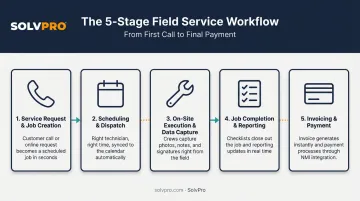
At a high level, the workflow takes in customer and job details, runs them through scheduling and dispatch logic, tracks execution in the field, and produces a closed, invoiced job with a full paper trail.
Every step in this chain is a handoff — office to crew, crew back to office, job to invoice. Breakdowns almost never happen during the actual work. They happen in the gaps between steps, when information gets lost, delayed, or never recorded at all.
Step 1: Service Request and Job Creation
A job starts one of three ways: a phone call, an online form, or a repeat customer request. Whatever the source, it needs to get logged as a work order with the job details that a crew will actually need: location, scope, access notes, and customer history.
This is also where estimating fits in. Platforms like SolvPro support digital estimates and customer-facing PDF proposals at intake, so once a customer approves a quote, it converts directly into a job record. No re-typing the same details into a second system.
Step 2: Scheduling and Dispatch
The job gets assigned to a crew based on skill, location, and availability, then dispatched with the job details attached. A dispatcher needs to see, at a glance, who's free, who's closest, who's qualified for the work, and who's already booked solid for the day.
Manual dispatch (sticky notes, a shared spreadsheet, a group text) works for a single crew. It falls apart fast once you're coordinating three or four crews across different job sites in the same week.
Step 3: On-Site Execution and Field Data Capture
Once the crew arrives, they need access to job history, the ability to complete the work, and a way to capture what happened (photos, notes, materials used, and time worked) directly from the field.
Tools with job and crew time tracking change what you can actually see while a job is open. SolvPro's time entries and photo uploads recorded against the job give office staff a verifiable record of when and where work happened, without a single check-in call. Crews can also log change orders and materials on the spot, so nothing gets billed from memory later.
Step 4: Job Completion and Reporting
The technician marks the job complete, secures customer sign-off, and the record syncs back to the office system. This step matters more than it looks.
Research from Service Council's 2021 survey of 725+ field technicians found that only 62% agreed completing service forms was easy, with paperwork and administration ranking as the top job dislike overall.
Digital sign-off solves the biggest part of that friction. Instead of paper forms that get lost between the truck and the office, the customer's approval attaches directly to the digital work order alongside photos, notes, and job history.
Step 5: Invoicing and Payment
Job completion should trigger invoicing immediately, not three days later once someone finds the paperwork. Syncing job data with accounting tools like QuickBooks Online, plus built-in payment processing, shortens the gap between "job done" and "money in the bank."
With SolvPro, crews can generate an invoice on-site, collect a signature, and take payment via credit card or ACH before they even leave the property.
QuickBooks Online sync and NMI payment processing are core features across every pricing tier, so there's no separate billing tool to manage on the side.
Key Factors That Affect Field Service Workflow Efficiency
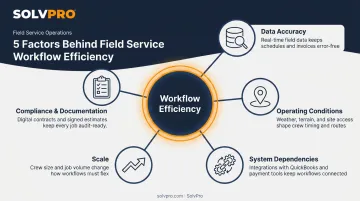
A workflow is only as strong as the inputs feeding it. Several factors determine whether it runs smoothly or creates new problems.
- Data accuracy — inaccurate job details, outdated customer information, or unclear crew availability records cause bad scheduling decisions before the job even starts
- Operating conditions — the number of active job sites, geographic spread, and trade-specific constraints like weather or site access change how much coordination a job needs
- System dependencies — whether scheduling, dispatch, field data capture, and invoicing live in one connected platform or across four disconnected apps
- Scale — workflow needs shift the moment a business grows from one crew to several working simultaneously; what worked with one truck breaks down with five
- Compliance and documentation — licensing, safety checklists, and customer sign-off requirements vary by trade and need to be built into the workflow, not bolted on afterward
Communication Clarity Across a Diverse Workforce
Language gaps between office staff and field crews are a real, measurable risk in the trades. CPWR research using national data found that more than 80% of Hispanic construction workers did not speak English at home, and over a third reported not speaking English very well or at all.
That's specific to construction, but the implication carries across field trades with similar workforce makeup: unclear instructions lead to mistakes, safety issues, and rework.
A bilingual platform closes that gap. SolvPro's fully bilingual English/Spanish interface covers the desktop platform, the mobile app, crew scheduling, and customer communications, at no added cost across any plan.
Connected Systems Beat Patchwork Tools
Service Council's 2023 research on 100 service leaders recommends simplifying the technology stack to avoid the "patchwork effect" of disconnected systems. When scheduling lives in one app, dispatch in another, and invoicing in a third, information has to be manually re-entered at every handoff. That's exactly where errors creep in.
Common Workflow Mistakes and Misconceptions
Even businesses with the right intentions run into the same handful of mistakes.
Assuming software alone creates a workflow. Buying a platform doesn't automatically fix a broken process. McKinsey's research on digital transformation found that only 16% of organizations achieved performance improvement that was actually sustained. Success was tied to training, role clarity, and team adoption — not the tool itself.
A platform supports a workflow. It doesn't replace the thinking behind it.
Treating dispatch as guesswork. Some businesses assign jobs by whoever answers the phone first, rather than building repeatable logic based on skill, location, and job priority.
This works until you're running four crews at once and nobody remembers who's qualified for what.
Confusing the workflow with the outcome. A smooth workflow and a happy customer are related, but they're not the same thing. You can have a clean, fast process and still lose a customer over a pricing dispute.
Don't judge workflow health purely on customer satisfaction scores.
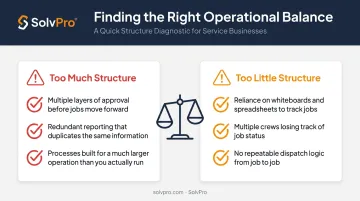
Over-engineering for a size you're not yet. Watch for both signals:
- Too much structure: multiple approval layers, redundant reporting, or steps designed for a fifty-crew operation when you're running four
- Too little structure: still relying on a whiteboard and spreadsheets once you're coordinating multiple crews across different job sites and losing track of who's where
Conclusion
A field service management workflow ties job creation, scheduling, execution, reporting, and invoicing into one connected process. Understanding each step, not just buying software, is what gives growing service businesses control over their jobs, their time, and their money.
That control comes from having the right amount of structure for where your business stands today, not from piling on every process available. Platforms built specifically for growing service teams, like SolvPro, are designed to get set up in under 10 minutes. That means you can support this workflow without dragging in enterprise-level complexity you don't need yet.
You shouldn't have to wait until the job is over to find out whether you made money.
Keeping the estimate, work order, time entries and invoice on one record reduces how much the office has to reconstruct before it can bill. That is the difference between finding out now and finding out at closeout. When you want to see it on your kind of work, Book a Demo.
Run the Job. Protect the Profit.
Frequently Asked Questions
What Is Field Service Management?
Field service management is the coordination of technicians, work orders, scheduling, and customer service delivered outside a central office. It typically runs on software that connects dispatch, field execution, and billing.
What Is the Field Service Management Process Flow?
The typical flow runs through five stages: job request, scheduling and dispatch, on-site execution, completion and reporting, and invoicing and payment. Each stage hands off to the next, and breakdowns usually happen at the handoff points.
What Is the Difference Between CRM and FSM?
CRM manages customer relationships and the sales pipeline before a job is won. FSM manages the operational execution of the job itself, including scheduling, dispatch, field work, and invoicing.
What Software Is Used to Manage a Field Service Workflow?
Look for a platform that combines scheduling, work orders, mobile field access, and invoicing and payment integration in one place. Disconnected tools force manual data re-entry at every step, which slows the whole process down.
How Do I Create a Field Service Workflow for My Business?
Start by mapping your current job steps from request to payment, and identify where delays or miscommunication happen most often. Standardize that process before adding software automation on top of it.
Do Small Service Businesses Need a Formal FSM Workflow?
Yes, once you're managing more than one job or technician at a time. Even a lightweight, documented process helps avoid missed jobs and delayed invoicing as you add crew members.