The right scheduling software cuts down on double-bookings, keeps crews accountable once they're out of sight, and gets invoices out the door faster. Without it, jobs slip through the cracks and cash flow stalls.
SolvPro, Jobber, Housecall Pro, ServiceTitan, and Workyard are the field service scheduling platforms most often shortlisted, and they differ on features, pricing, and who each one actually fits.
KEY TAKEAWAYS
- Scheduling software centralizes dispatch and crew tracking, giving office and field teams up-to-date job information.
- Your best fit depends on crew size, trade complexity, and bilingual or reporting needs.
- SolvPro suits multi-crew teams needing fast setup, bilingual support, and built-in payments.
- Pricing across the category runs from roughly $20 to $100+ per user, per month.
- Rescheduling is the real test: how quickly a dispatcher can move a job and have the crew see it decides how the day recovers.
Overview of Field Service Scheduling Software in the US Market
Field service scheduling software is a digital system for assigning jobs, dispatching crews, and tracking work as it happens. It replaces the spreadsheet-and-phone-call combo that most trades started with, giving office staff a live view of who's where and what's done.
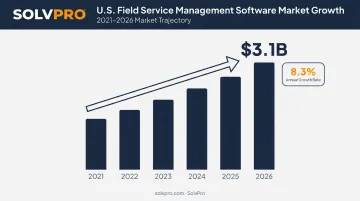
This isn't a niche category anymore. The US field service management software industry is projected to reach $3.1 billion in 2026, growing at an 8.3% annual rate since 2021.
That growth tracks a simple reality: more service businesses are outgrowing manual dispatch and looking for tools built specifically for crews who work away from a desk.
The sections below break down five platforms serving general contractors, electricians, plumbers, HVAC teams, landscapers, and cleaning crews in 2026. Each review covers what the platform does well, where it falls short, and which businesses it actually fits.
Top Field Service Scheduling Software for 2026
Each platform below was evaluated on ease of adoption, scheduling and dispatch depth, mobile usability, integrations, pricing transparency, and how well it scales for growing multi-crew teams.
SolvPro
SolvPro was built by a team with more than 50 years of combined experience across construction, field service, estimating, and project management. It's positioned as an all-in-one platform for service businesses that have outgrown paper schedules but aren't ready for enterprise-level complexity.
A few things set it apart from the rest of this list:
- Fully bilingual interface: English and Spanish, across office and field/mobile apps, not just a translated menu
- Job and crew time tracking: records time entries against the job, photos, and activity logs so crew accountability doesn't rely on trust alone
- Digital estimates: breaks quotes into project phases with milestone billing, then generates customer-facing PDF proposals
- Built-in QuickBooks Online sync and credit-card and ACH payments: no third-party add-ons required
- Setup in under 10 minutes, with live onboarding support and no long-term contract
| Key Features | Scheduling, dispatching, work orders, crew tracking, invoicing, and payments in one platform |
| Best For | Growing multi-crew service businesses (electrical, plumbing, landscaping, GCs) that need bilingual support and fast onboarding |
Jobber
Jobber built its reputation as a scheduling and invoicing tool for solo operators and small home service teams. It's straightforward, and that's the point.
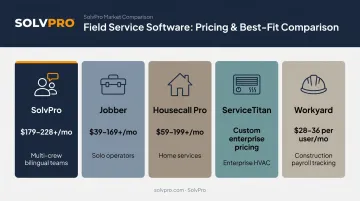
The interface is clean, the quote-to-job workflow makes sense on first use, and client management doesn't require training. The catch: costs climb quickly as you add users or need deeper dispatch and GPS features. Jobber's published pricing starts at $29/month for a single user when billed annually, but scales up to $529/month on higher tiers.
| Key Features | Scheduling, quoting, invoicing, online payments, and client communication |
| Best For | Solo operators and small teams prioritizing simplicity over deep dispatch or GPS features |
Housecall Pro
Housecall Pro targets home service businesses (HVAC, plumbing, electrical) that need scheduling and payments without a long rollout.
Drag-and-drop dispatch and built-in online booking are strong points, and automated customer communication cuts down on missed appointments. Job costing and deeper reporting, though, stay locked behind the higher tiers. Basic starts at $59/month billed annually for one user; job costing doesn't show up until you reach Essentials at $149/month.
| Key Features | Scheduling, dispatching, online booking, invoicing, and payment processing |
| Best For | Home service businesses wanting an approachable tool without a long rollout |
ServiceTitan
ServiceTitan is enterprise-grade software for large HVAC, plumbing, and electrical companies handling high job volume.
The dispatch board runs deep, with route optimization, technician tracking, and customizable schedule views. Add sales tools, call booking, and business intelligence reporting, and you get a platform that can genuinely run a large operation.
The trade-off is a steep learning curve and pricing that's negotiated per technician rather than published. Software Advice reports most reviewers run companies with 11 to 200 employees, which tells you where it fits best.
| Key Features | Advanced dispatch, CRM, call booking, and business intelligence reporting |
| Best For | Larger service companies with complex, high-volume office-to-field workflows |
Workyard
Workyard leans into construction and multi-crew field teams that need scheduling tied directly to GPS time tracking and payroll.
The real-time dispatch board covers the basics, but the standout is GPS-verified time on every job paired with automatic payroll and timesheet sync. Workyard integrates with QuickBooks, Gusto, ADP, and Paychex. It's built more for labor accountability than customer relationship management, so businesses expecting a full CRM should look elsewhere first.
| Key Features | Real-time scheduling, GPS tracking, work order management, and payroll integration |
| Best For | Construction and multi-crew field teams needing labor accountability tied to scheduling |
What to Look for in Field Service Scheduling Software
Most buyers make the same mistake: they compare monthly price tags and skip everything else. A cheap plan that takes three weeks to onboard, or one where field crews can't figure out the app, ends up costing more in lost jobs and frustrated staff.
Five factors matter here, each tied to a real operational outcome:
- Scheduling and dispatch depth: The tool should actually prevent double-bookings, not just display a calendar.
- Mobile accessibility: Crew leads need to update job status from a truck, not just from a desktop.
- Integrations: Does it sync cleanly with accounting and payment systems, or force manual re-entry?
- Pricing transparency: Core features like GPS tracking and reporting shouldn't be locked behind paid add-ons.
- Scalability: Can the platform grow from 3 users to 30 without a full re-implementation?
Each factor maps to a specific cost of getting it wrong. Weak dispatch depth means missed jobs. Poor mobile usability means crews calling the office for information that should already be on their phone. And pricing surprises tend to show up right when a business is trying to add its next hire.
Conclusion
The best field service scheduling software fits how your specific crews and trade actually operate day to day. Feature lists and name recognition matter less than practical fit.
Before committing, test onboarding speed, mobile usability, and integration fit with accounting and payment tools using your own crew, not a sales demo script.
If bilingual support, fast setup, and built-in payments and QuickBooks sync matter to your team, SolvPro is worth a look. There's no long-term contract, and you can be up and running in under 10 minutes.
Field service software helps you manage the work. SolvPro helps you make sure the work makes money.
The right tool depends on your trade, crew size, job mix and the systems you already run. Test it on real jobs before you commit, and check that crews will actually enter what the office needs. When you want to see it on your kind of work, Book a Demo.
Run the Job. Protect the Profit.
Frequently Asked Questions
What Is Field Service Scheduling Software and How Does It Work?
It centralizes job assignment, dispatch, and crew tracking in one system, syncing schedule changes to office and field devices in real time so nobody's working off outdated information.
What Features Should I Look for in Field Service Scheduling Software?
Prioritize scheduling and dispatch depth, mobile access for crews, GPS or activity-based crew tracking, invoicing and payments, and integrations with accounting software.
How Much Does Field Service Scheduling Software Typically Cost in 2026?
Pricing generally ranges from $20 to over $100 per user, per month. G2's benchmarks show $30–$50/month for one user, with additional users priced separately, though platforms like ServiceTitan use custom quotes instead of published rates.
Is There Free Field Service Scheduling Software Available?
Most major platforms offer free trials rather than permanent free tiers. Growing crews needing real scheduling and dispatch features will typically need a paid plan.
Which Field Service Scheduling Software Is Best for Small Crews vs. Large Enterprise Teams?
Small and growing multi-crew teams often do better with faster-to-onboard platforms like SolvPro or Jobber. Large enterprises with complex workflows may need ServiceTitan-level depth and reporting.
Does Field Service Scheduling Software Integrate with QuickBooks and Payment Processors?
Most modern platforms, including SolvPro, offer QuickBooks Online sync and built-in payment processing as core features, which speeds up invoicing and keeps cash flow moving.