That repetition eats hours you don't have. QuickBooks points to recurring invoicing as the fix for exactly this situation, recommending it for businesses that charge a fixed amount on a predictable schedule — landscaping and commercial cleaning contracts are two examples they cite directly.
But automating a recurring invoice isn't a single switch. Results depend on how you configure the billing schedule, the payment terms, and whether your software connects to actual job data or just spits out a template blindly. This guide walks through the setup process, the variables that make or break it, common mistakes, and where platforms like SolvPro fit in.
KEY TAKEAWAYS
- Set up a retainer template once, then let it invoice automatically every cycle
- Ideal for fixed-fee maintenance, crew coverage, and multi-location contracts
- Setup errors in billing date, amount, or terms repeat every cycle unnoticed
- SolvPro links retainer invoicing to job tracking and QuickBooks Online sync for accurate billing
- Because a retainer repeats on its own, a review of the first two cycles catches setup errors before they compound
How to Automate Recurring Invoices for Contractor Retainers
Automating a retainer invoice is a four-part setup: build the template, set the schedule, lock in payment terms, then monitor the results. Skip any one of these and you're just automating a mistake.
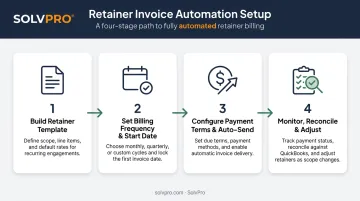
Step 1: Build the Retainer Invoice Template
Start with the signed contract, not a blank invoice. Pull the client and job details, then add line items that match the retainer scope exactly: monthly maintenance, ongoing crew coverage, or whatever the agreement calls for.
Before saving the template, confirm it matches the retainer agreement line by line. Every future invoice inherits whatever error you leave in the template today.
For pricing context, commercial cleaning retainers illustrate how scope drives the number. ISSA publishes general office cleaning rates of $0.09 to $0.17 per cleanable square foot, with industrial facilities running $0.08 to $0.20 and retail spaces $0.07 to $0.15.
Their worked example divides a $12,000 monthly contract by 100,000 square feet to land at $0.12 per square foot.
Frequency, traffic levels, and included tasks (trash removal, restroom sanitation, floor care, disinfection) all move that number. There's no single "average retainer fee" that applies across trades. Build yours from the actual scope, not a generic benchmark.
Step 2: Set the Billing Frequency and Start Date
Match the billing interval to the service period in the contract:
- Weekly for high-frequency service agreements
- Monthly for standard maintenance retainers
- Custom intervals for anything else the contract specifies
Align the "start issuing" date with when service actually begins. If the crew starts on the 3rd but the first invoice fires on the 1st, expect a confused client asking why they're being billed for work that hasn't happened yet.
For fixed-term retainers, set an end date so billing stops when the contract does. Open-ended contracts can run without one, but check the schedule periodically anyway.
Step 3: Configure Payment Terms and Auto-Send Settings
Set net terms (Net 7, Net 15, Net 30) exactly as agreed in the contract. This single field determines the due date and cash flow timing for every invoice the template will ever generate.
Then decide how invoices go out. Use auto-send for fixed-amount retainers where nothing changes cycle to cycle, or switch to review mode when add-on work, materials, or overtime crew hours might shift the total.
SolvPro's built-in credit-card and ACH payments lets clients pay by ACH or credit card directly from the invoice, removing a step that otherwise stalls payment for days.
Step 4: Monitor, Reconcile, and Adjust
Don't set it and forget it, not right away. Check the first automated invoice closely: amount, dates, line items, client info. Once that first cycle looks clean, later cycles need less hand-holding.
From there, use a payment status view to track what's sent, paid, and overdue across every retainer client at once. Platforms like SolvPro sync automatically with QuickBooks Online, so reconciling job costs against retainer payments doesn't mean re-entering the same data twice.
When & What You Need to Automate Retainer Billing
Automation earns its keep on retainers where the amount and schedule barely move. Set it up once, and it runs.
Good candidates include:
- Fixed-fee maintenance contracts
- Ongoing multi-crew service agreements
- Standing janitorial contracts
It's a worse fit for retainers with variable scope, where materials, overtime, or add-on work change the total every cycle. A fixed template on a fluctuating job either overbills or underbills the client, and neither builds trust.
If the retainer includes usage-based components, pair automation with a manual review step rather than skipping it entirely.
Before turning anything on, confirm you have:
- Accurate client and job records — names, addresses, billing contacts, service details
- A signed contract with clear payment terms and scope
- Invoicing software with recurring billing plus accounting or QuickBooks sync built in
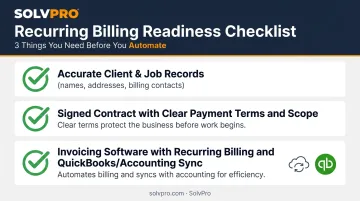
Missing any of these means automation just moves the error further down the line, faster.
Key Parameters That Affect Recurring Retainer Invoicing
Turning on automation isn't the hard part. Configuring it correctly is. A handful of variables determine whether the system runs smoothly or quietly creates problems.
Four settings deserve the closest attention:
| Parameter | Why It Matters | Impact If Misconfigured |
|---|---|---|
| Billing Frequency & Start Date | Mismatched start dates confuse clients about which service period is being billed | Delayed payments and support tickets that eat up office time |
| Payment Terms (Net Terms) | Incorrect net terms shift the due date on every future invoice, not just one | Slower payment across the entire client relationship, not a single cycle |
| Auto-Send vs. Review Mode | Auto-send suits fixed amounts; review mode handles variable add-ons like materials or overtime crew hours | Fixed invoices against variable-scope work spark billing disputes and erode client trust |
| Payment Processing & Accounting Sync | Built-in payment collection and accounting sync (like SolvPro's in-app card and ACH payments and QuickBooks Online sync) reduce manual re-entry | Fewer manual entries and more delay before work is billed |
Online payment options measurably speed up collections. FreshBooks reports that accepting payments directly through the invoice helps businesses get paid an average of 18 days faster, delivering real cash flow rather than a marginal improvement.
Get these four settings right, and retainer invoicing runs on autopilot. Miss one, and it quietly creates the exact support burden automation was meant to eliminate.
Common Mistakes to Avoid When Automating Retainer Invoices
Automation doesn't fix bad inputs — it just repeats them faster. Watch for these four:
- Using generic invoice details instead of the signed contract. Whatever error slips into the template repeats every cycle until a client flags it.
- Skipping template updates after a rate or scope change. Clients keep getting billed under outdated terms, an awkward conversation once they notice.
- Letting overdue invoices sit unnoticed. New cycles keep generating while the unpaid balance grows into a cash flow gap that's hard to trace once it spreads across several clients.
- Skipping billing contact or payment verification. Do this before go-live, or invoices can bounce silently until a payment turns up weeks late.
Automation only amplifies whatever setup mistakes already exist in the invoicing process.
Best Software Options for Automating Contractor Retainer Invoices
Generic invoicing tools handle the basics of recurring billing fine. What they typically lack is job-level context — the ability to tie a retainer invoice to actual crew hours or completed work orders, rather than a static dollar figure.
| Platform | Strength | Limitation for Contractors |
|---|---|---|
| QuickBooks Online | Recurring Transactions with scheduled, reminder, and unscheduled templates | Project-level cost tracking requires Plus or Advanced; no native field crew data |
| FreshBooks / Zoho / Wave | Solid recurring billing and AutoPay features | Operate separately from scheduling and crew tracking, forcing reconciliation across systems |
| SolvPro | Recurring job scheduling, QuickBooks Online sync, built-in credit-card and ACH payments, job-level cost reporting | Built specifically for multi-crew field service, not a generalist billing tool |
QuickBooks Online Recurring Transactions works fine for a simple, fixed retainer. Where it falls short is job-level tracking — if you're running multiple crews or job sites, you'll be doing manual workarounds to connect what's happening in the field to what's on the invoice.
The same disconnect shows up with standalone invoicing apps like FreshBooks, Zoho Invoice, and Wave. They handle recurring billing mechanics capably, but operate in their own lane, separate from scheduling, crew tracking, and job profitability. That means reconciling data across multiple systems instead of one.
SolvPro was built for contractors and multi-crew field teams specifically, closing the gap that generalist tools and standalone apps leave open.
The core plan includes:
- Recurring job scheduling on nightly, weekly, or custom intervals
- Retainer invoicing tied to actual job costing data
- QuickBooks Online sync and credit-card and ACH payments
- Bilingual English/Spanish interface for office staff and field crews
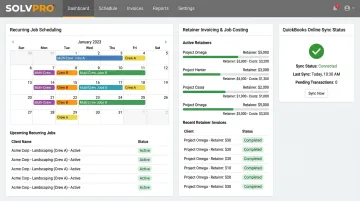
Because job costing flows directly into invoicing, billed amounts reflect actual work instead of a disconnected spreadsheet — and there's no upgrade-to-unlock pricing tier standing in the way.
The right choice depends on what you're actually trying to solve: invoicing alone, or invoicing connected to scheduling, crew accountability, and job profitability. If it's the latter, a standalone invoicing tool will eventually feel like half a solution.
Conclusion
Your crews are busy. So why isn't there more money in the bank?
When the office can see labor, materials and documented changes against the job while the work is still open, the numbers at the end stop being a surprise. SolvPro keeps scheduling, work orders, time, job costing and invoicing on one record. When you want to see it on your kind of work, Book a Demo.
Run the Job. Protect the Profit.
Frequently Asked Questions
What Are the Best Contractor Invoice Software Options for Automated Recurring Invoices and Retainer Billing?
It depends on your needs. Standalone tools like Wave, Zoho, or QuickBooks work for simple invoicing, while an all-in-one platform like SolvPro connects retainer billing directly to job tracking and crew management.
How Do I Create an Invoice for a Retainer?
Add the client and contract details, the fixed retainer amount, and line items matching the service period, then set the correct payment terms. Save it as a recurring template so it generates automatically going forward.
How Often Should Retainer Invoices Be Sent to Clients?
Frequency should match the service agreement, most commonly monthly. Consistency matters more than which specific interval you choose, since clients get used to a predictable billing rhythm.
Can I Use QuickBooks to Automate Recurring Invoices for Retainers?
Yes, QuickBooks Online's Recurring Transactions feature supports this well for simple, fixed retainers. It has limits around job-level tracking if you're managing multiple crews or job sites.
What Happens If a Client's Payment Fails on an Automated Recurring Invoice?
Most platforms flag the failed payment and offer automatic retries or reminder notifications. Keep a backup payment method on file so a single failed charge doesn't stall the whole cycle.
Is Recurring Invoicing Suitable for Milestone-Based Contractor Work?
Not usually. Milestone or variable-scope work is better handled with one-off invoices or a review-mode setup, since fully automated fixed billing doesn't adjust for shifting scope.