That's where per-client visibility matters. Instead of a generic "overdue" list, your office staff needs to see who owes what, so they know exactly who to call first and which jobs risk stalling over unpaid work.
Software for tracking overdue invoices by client ranges from dedicated field service platforms to general accounting tools built for freelancers and small teams.
KEY TAKEAWAYS
- Tracking invoices by client, rather than only by invoice number, shows which customers are repeatedly late.
- The stronger tools combine aging reports, automated reminders, and payment tracking in one dashboard.
- SolvPro, QuickBooks Online, FreshBooks, Chaser, and Zoho Invoice cover the main options for service businesses.
- Workflow fit, setup effort, and whether you need job or crew context should drive the choice.
- Spreadsheets work for a handful of clients and then break down once reminders and part-payments have to be tracked.
Overview of Invoice Tracking Software for Service Businesses
"Tracking overdue invoices by client" means grouping unpaid invoices under each customer's profile, showing the total amount owed, days overdue, and last contact date. Compare that to a flat invoice list, where you're scanning dozens of line items trying to mentally sort them by customer.
That per-client view gets more complex for contractors, plumbers, electricians, and landscaping crews, since invoices are usually tied to specific jobs or project phases. This creates a unique challenge: your software needs to connect billing to job history, not just track dollar amounts in isolation.
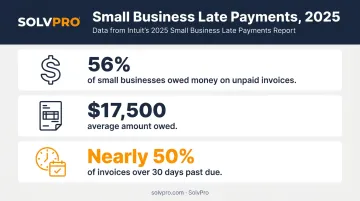
That challenge shows up in the numbers, too. According to Intuit's 2025 Small Business Late Payments Report:
- 56% of small businesses are currently owed money from unpaid invoices
- The average amount owed sits at $17,500
- Nearly half of those invoices are more than 30 days past due
That's real money sitting on the table, waiting for someone to notice.
The tools below range from all-in-one field service platforms to standalone accounting and accounts-receivable software, each with a different take on solving this same problem.
Top Software to Track Overdue Invoices by Client
Every tool on this list was evaluated on four things: client-level visibility, automation of reminders, ease of use for small teams, and integration with the accounting or payment systems you already use.
SolvPro
SolvPro is an all-in-one field service management platform built for growing service businesses, contractors, plumbing, electrical, landscaping, and cleaning crews. It handles scheduling, invoicing, and payments in one place.
What makes it stand out for overdue invoice tracking specifically:
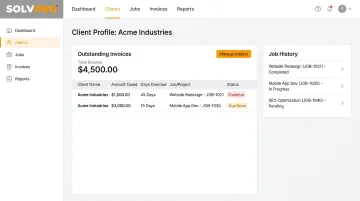
- Client profiles connect billing to job history, so office staff see outstanding balances alongside the work that generated them
- QuickBooks Online sync keeps your accounting records in step automatically
- credit-card and ACH payments lets clients pay directly from the invoice using credit card or ACH
- Setup takes under 10 minutes, with free live onboarding support (a real person walks you through it, not a chatbot)
- Full bilingual English/Spanish support across the platform
| Best For | Service businesses with crews in the field needing job-linked, client-level invoice tracking |
| Key Features | Client-level invoice history, QuickBooks Online sync, built-in payment processing, no long-term contracts |
Unlike some competitors that gate payment processing or QuickBooks sync behind premium tiers, SolvPro includes these on its single core plan.
QuickBooks Online
Where SolvPro focuses on field crews, QuickBooks Online takes a pure accounting approach. It's one of the most widely used platforms among small businesses, with accounts receivable aging reports built into the core product.
The Customer Balance Detail report and A/R Aging Summary let you filter overdue invoices by individual client instead of hunting through a master invoice list. QuickBooks also supports up to three automated reminders, scheduled as far as 90 days before or after an invoice's due date.
| Best For | Businesses already using QuickBooks for full accounting, not just invoicing |
| Key Features | Customer-level aging reports, automated payment reminders, bank reconciliation |
If you're already running payroll and bookkeeping through QuickBooks, this is the path of least resistance. The tradeoff: it wasn't built with field crews or job phases in mind, so linking overdue amounts back to specific work can take extra manual effort.
FreshBooks
Not every business needs QuickBooks' full accounting depth. FreshBooks is an invoicing and accounting tool aimed at freelancers, consultants, and small service providers who want simple billing without a steep learning curve.
Each client dashboard shows a color-coded Outstanding Revenue graph, overdue invoices in red, other outstanding invoices in yellow, plus quick access to account statements. FreshBooks also supports up to three automatic late-payment reminders and converts tracked time directly into invoices.
| Best For | Freelancers and small service teams wanting simple client billing without complexity |
| Key Features | Per-client outstanding balance view, automated reminders, online payment acceptance |
Chaser
Once invoice volume grows beyond what basic reminders can handle, Chaser is dedicated accounts receivable automation software focused on chasing overdue invoices while preserving client relationships, an approach that appeals to businesses tired of sounding like a collections agency.
Reminder sequences are sent from your own business email address rather than a generic "Chaser" sender, and you can build custom follow-up schedules by customer or customer group. A built-in communication hub tracks every reply.
| Best For | Growing businesses with higher invoice volume wanting relationship-friendly automated chasing |
| Key Features | Custom follow-up schedules by client, payment portal, credit checks |
Zoho Invoice
For businesses watching every dollar, Zoho Invoice is a free, cloud-based invoicing tool aimed at freelancers and small businesses that don't want to pay for a full accounting suite yet.
It's genuinely free, $0, with no catch, offering client-level invoice history and automated reminders. Limits apply (500 invoices per year, 2 users), and when you outgrow those, there's a clear upgrade path to Zoho Books for deeper aging reports.
| Best For | Very small businesses or solo operators wanting a no-cost starting point |
| Key Features | Client invoice history, automated reminders, expense tracking |
What to Look for in Software
Six criteria separate these tools:
- Client-level visibility, not a flat invoice list
- Ease of setup for non-accountants
- Automation depth
- Integration with accounting or payment systems already in common use
- Pricing transparency
- Contract flexibility
A mistake we see constantly: service businesses pick a tool based on how the invoice looks, without checking whether it actually links billing to job or client history. Six months later, they're back to tracking overdue amounts in a separate spreadsheet because the software never connected those dots in the first place.
Beyond features, contract terms carried real weight. Many service businesses want to test-drive a tool before fully committing, so month-to-month options without long-term lock-in mattered more than a slightly cheaper annual plan buried behind a contract.
Conclusion
The "best" software depends on what you actually need: a standalone AR chaser, a general accounting tool, or an all-in-one platform that connects invoicing to your real field operations.
Prioritize client-level visibility and ease of daily use over flashy features your office staff won't touch after week one.
That kind of client-level visibility is exactly what SolvPro was built to deliver. Founded by a team with decades of hands-on field service experience, SolvPro offers a free trial and live onboarding for businesses that want job tracking and overdue invoice visibility from day one.
Your crews are busy. So why isn't there more money in the bank?
When the office can see labor, materials and documented changes against the job while the work is still open, the numbers at the end stop being a surprise. SolvPro keeps scheduling, work orders, time, job costing and invoicing on one record. When you want to see it on your kind of work, Book a Demo.
Run the Job. Protect the Profit.
Frequently Asked Questions
What's the Best Way to Keep Track of Invoices?
The most reliable method combines a centralized client-level dashboard with automated aging reports and reminders. Spreadsheets can't scale the way software can, and they don't send reminders on their own.
How to Chase up Overdue Invoices?
Start with a friendly reminder shortly after the due date, then a firmer follow-up around 15-30 days. Escalate to a final notice with clear next steps if payment still hasn't arrived, ideally automated through your software.
Can I Track Overdue Invoices by Client for Free?
Yes. Free tiers from Zoho Invoice or Wave offer basic client-level tracking. Most add automation or reporting limits eventually, which pushes growing businesses toward paid plans.
What Features Should Invoice Tracking Software Have?
Look for client-level aging reports, automated reminders, payment processing integration, and accounting software sync. Platforms like SolvPro build QuickBooks Online sync and payment processing directly into the core platform, so office staff aren't juggling separate tools to get paid.
Does QuickBooks Track Overdue Invoices by Client?
Yes. QuickBooks Online's Customer Balance Detail and A/R Aging reports let you filter overdue invoices by individual client rather than scanning a flat list.
How Often Should I Follow up on Overdue Invoices?
A common cadence is a reminder at the due date, another at 7-15 days, and a firmer notice around 30 days. BILL's guidance suggests escalating further at 60-90 days if payment still hasn't arrived. Software with scheduled follow-ups keeps this timing consistent across every client.