Introduction
Friday afternoon, your last crew finishes a full day of mowing and mulching. By Monday morning, those jobs still haven't been invoiced. One crew called the office three times asking for a gate code. Another showed up to a property that was already rescheduled — nobody told them. And somewhere in the shuffle, a material charge from last week never made it onto a bill.
This is the daily reality for landscaping businesses running on spreadsheets, text threads, and memory. It's manageable when you have one crew and a handful of clients. It becomes expensive when you have three crews and 40 recurring contracts.
Field service management (FSM) software exists to close that gap — keeping your office and crews on the same page, turning completed jobs into invoices faster, and giving you actual visibility into what's profitable. This article looks at whether that's worth paying for by examining what changes operationally when landscaping businesses make the switch.
Key Takeaways
- One platform replaces five: FSM software connects scheduling, crew tracking, work orders, invoicing, and payments
- The biggest wins for landscapers are faster invoicing, fewer scheduling breakdowns, and real field visibility
- 25% of landscaping businesses spend more than 5 hours per week on scheduling and crew assignment alone
- Manual workflows built for two crews collapse at five — software scales where spreadsheets don't
- Purpose-built tools like SolvPro can be set up in under 10 minutes with no long-term contract
What Is Field Service Management Software for Landscapers?
FSM software replaces the disconnected stack — spreadsheets, text chains, paper job sheets, phone calls — with a single system that manages how work gets assigned, tracked, and billed.
For a landscaping business, that flow looks like this:
- A job is scheduled and assigned to a crew
- Crew members receive job details on a mobile app — scope, site notes, address
- Work gets done; crew updates job status and logs time from the field
- Office sees real-time progress and generates an invoice the moment the job is marked complete
- Customer pays digitally; data syncs to QuickBooks
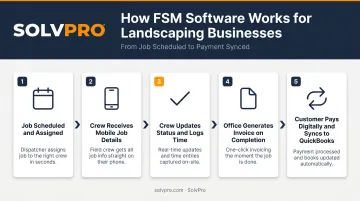
The result is fewer missed jobs, faster cash collection, and a clear view of what's happening across every crew — without chasing anyone down for an update.
Key Advantages of FSM Software for Landscaping Businesses
Three areas account for most of the wasted time and lost margin in landscaping operations: scheduling, invoicing, and job visibility. FSM software targets all three.
Smarter Scheduling and Crew Coordination
Scheduling is where most landscaping operations bleed hours. Managing multiple crews, recurring contracts, and weather rescheduling across phone calls and group texts is slow and error-prone — and the cost shows up in double-booked jobs, crews arriving unprepared, and owners acting as the dispatcher for half the day.
According to a 2023 survey of 450 North American landscaping professionals, 25% of landscaping businesses spend more than 5 hours per week on scheduling, timesheets, and crew assignment. That's a full half-day every week on work that software handles automatically.
FSM software changes the mechanics entirely:
- Jobs are assigned through a drag-and-drop calendar with live crew availability
- Crews receive job details — scope, notes, site instructions — directly on a mobile app
- Schedule changes push to the field in real time, no phone call chain required
- The office sees which jobs are active, delayed, or complete without checking in
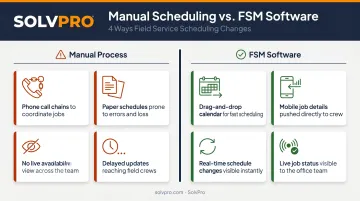
Most scheduling breakdowns trace back to one problem: the office and the crew are working from different information. Closing that gap is the core function of scheduling software.
When it matters most: Running two or more simultaneous crews, managing recurring maintenance contracts, or dealing with weather rescheduling during peak season.
KPIs to watch: Missed or delayed jobs per week, hours spent on scheduling admin, number of callbacks from crews asking for job details.
Faster Invoicing and Shorter Payment Cycles
Most landscaping businesses don't have a cash flow problem — they have an invoicing delay problem. Jobs complete on Friday; invoices go out Tuesday or Wednesday if the admin gets to it. That delay compounds across dozens of recurring clients and pushes payment cycles out by weeks.
According to Xero's Small Business Insights, small businesses wait an average of 28 days to receive payment. Payment doesn't start that clock until the invoice is sent — so every day of delay on your end extends your actual collection timeline.
FSM software closes that gap at every step:
- A crew marks a job complete in the field
- The office sees the update in real time
- An invoice is generated directly from the completed work order — labor hours, materials, and any change orders already captured
- Customer receives a branded digital invoice and pays online
- Data syncs to QuickBooks automatically
No end-of-week paperwork run. No chasing crews for job details before billing. No invoices falling through because the work order was lost.
When it matters most: High-volume recurring maintenance contracts, end-of-season closeouts when many jobs close simultaneously, and any period when cash flow is tight between seasons.
KPIs to watch: Days sales outstanding (DSO), invoice-to-payment cycle time, percentage of invoices sent within 24 hours of job completion.
Job Visibility and Crew Accountability
Without field visibility, you manage by memory and phone. You don't know if the crew is on-site or running 45 minutes late. You don't know if the job was completed or pushed. And by the time a job is invoiced, you've often lost the detail needed to understand why it cost more than estimated.
A 2026 Verizon Connect fleet technology report found that 44% of GPS fleet tracking users reported improved productivity, and 80% of fleet professionals now rely on GPS tracking to manage their vehicles and field teams.
FSM software gives landscaping owners a real-time view of the field without continuous surveillance:
- Event-based GPS tracking geo-stamps time entries, photo uploads, and status updates
- Job status updates flow from crew to office the moment work starts or finishes
- Labor hours are tracked per job and per crew member, feeding directly into job costing
- Every change order, material used, and site photo is attached to the work order
That last point matters for profitability. If you don't know a job ran 90 minutes over estimate until you look at it three weeks later, you can't fix the pricing or the crew briefing. Real-time job costing lets you see which jobs are consistently unprofitable before the pattern costs you a full season.
When it matters most: When headcount grows beyond what you can personally supervise, when crews run multiple sites in a day, or when you're trying to figure out why certain jobs never seem to make money.
KPIs to watch: Labor cost per job vs. estimate, crew hours tracked accurately, number of billing disputes or missed charges.
What Happens When Landscapers Skip FSM Software
Manual systems don't just cause problems — they multiply them as the business grows.
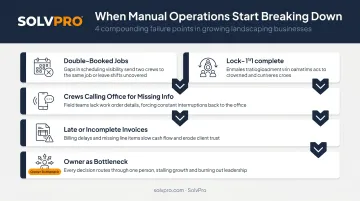
With two crews, you can manage scheduling in your head and catch most billing gaps before they're a real problem. With five crews running 30 jobs a week across 20 clients, the same manual approach produces compounding failures:
- Jobs get double-booked because no one has a live view of crew availability
- Crews call the office for information that should already be in their hands
- Invoices go out late or with missing line items — a material charge here, a change order there
- The owner becomes the bottleneck: the scheduler, the dispatcher, the invoice chaser, and the only person who knows what's actually happening in the field
The cost is real. According to a 2025 QuickBooks survey of more than 2,000 small businesses, 56% of small businesses are currently owed money from unpaid invoices. For landscaping businesses specifically, that often traces back not to customers who won't pay, but to invoices that went out late, were missing charges, or were never sent at all.
That same LMN survey found 24% of landscaping businesses spend more than 5 hours per week on invoicing alone — on top of scheduling time. Together, that's 10+ hours a week in administrative work that FSM software eliminates.
Growth doesn't fix the underlying problem. More clients and crews just mean more scheduling conflicts, more missed charges, and more time the owner spends firefighting instead of running the business.
How to Get the Most Value from FSM Software
Software only delivers value when it runs through the whole workflow — not just scheduling or invoicing in isolation.
A few principles that separate businesses that see strong ROI from those that don't:
- Use it end-to-end. Run scheduling, field updates, time tracking, and invoicing through the same system. Using software for scheduling but still invoicing from a spreadsheet cuts the benefit in half.
- Check your numbers monthly. Job completion rates, invoice turnaround time, and labor hours vs. estimates only help if someone is actually reviewing them.
- Pick a tool built for how your crew actually works. For landscaping businesses with bilingual crews, the mobile app needs to work in Spanish — not just be technically translatable. For small operators, setup should take minutes, not weeks.
SolvPro was built around those last two points specifically. The platform includes a fully bilingual English/Spanish interface for office staff and field crews, event-based crew tracking, QuickBooks Online sync, and recurring job scheduling — all on the base plan, no long-term contract required.
Setup takes under 10 minutes, and there's no credit card needed to start a free trial. For landscaping businesses that aren't sure whether software will stick with their team, that's a low-stakes way to find out.
Conclusion
FSM software is worth it for landscaping businesses not because of any single feature, but because the parts of the operation it addresses — scheduling, field visibility, and invoicing — are exactly where time and revenue disappear without it.
The compounding effect matters: the business that builds clean operational habits now is the one that can take on more clients, more crews, and more contracts without the owner manually holding every piece together. Tools like SolvPro are built around that reality — keeping the office and the field connected so work gets done, tracked, and paid without things falling through the cracks.
Frequently Asked Questions
How much does field service management software cost?
Most SMB-focused FSM platforms run between $50 and $300 per month depending on users and features. SolvPro's Starter Plan is $179/month for up to 3 users; the Growth Plan starts at $228/month. Evaluate cost relative to time saved on admin and faster payment cycles — not the monthly fee in isolation.
What is the best CRM for a landscaping business?
Most landscaping businesses get more value from a purpose-built FSM platform — one that handles customer management alongside scheduling, crew tracking, and invoicing in a single system. A standard CRM is the better fit only if sales pipeline management is your primary need over field coordination.
Can field service management software work for small landscaping teams?
Yes — and small teams often benefit most, because all admin burden falls on the owner. Modern platforms are designed to set up quickly with no technical background required. If you're managing more than a handful of recurring clients or more than one crew, the time savings show up fast.
Does field service management software integrate with QuickBooks?
Many FSM platforms include QuickBooks Online integration. SolvPro includes it across all pricing tiers at no additional cost, eliminating manual data transfer between your field operations and your books.
How long does it take to set up FSM software for a landscaping business?
It varies by platform. Purpose-built SMB tools like SolvPro are configured in under 10 minutes, with live onboarding support included — no technical background required.
What's the difference between FSM software and landscaping-specific software?
Landscaping platforms like Aspire or LMN are built for larger operations and focus heavily on estimating, budgeting, and industry-specific job costing. FSM software is broader and typically more accessible for growing businesses that need scheduling, crew tracking, and invoicing without enterprise-level complexity or pricing.