Many contractors deal with clunky workarounds: running Parallels just to open a Windows-only program, or forcing a crew lead to email PDFs because the "official" software won't load properly in Safari. Those workarounds cost real time. A missed schedule update or a miscommunicated start time can push a job back a full day.
This guide covers construction scheduling software confirmed to work well on macOS and iOS, how to evaluate your options, and answers to the questions Mac-based contractors ask most.
KEY TAKEAWAYS
- Most "Mac construction software" runs in a browser, not as a native macOS app.
- Confirmed browser and iOS support matters more than brand name.
- SolvPro, Fieldwire, Buildertrend, Procore, and GanttPRO all work via macOS browsers or dedicated iOS apps.
- Microsoft Project has no native Mac app, forcing users toward Project Online or alternatives.
- Pricing spans free tiers to custom enterprise quotes, so let budget and crew size guide your pick.
Overview of Construction Scheduling Software for Mac Users
"Construction scheduling software for Mac" doesn't usually mean a downloadable macOS app. In practice, it means tools accessible through a Mac browser like Safari or Chrome, or through dedicated iOS apps that sync with a web-based dashboard. Gantt charts, crew calendars, and task tracking all live in the cloud rather than on your hard drive.
This matters because of how many construction professionals are actually working on Apple hardware. In JumpCloud's Q3 2024 survey of IT decision-makers at small and mid-sized businesses, macOS accounted for 24% of the average device mix, up from 22% just two quarters earlier. That's a meaningful and growing share of the office and field devices contractors are using every day.
Despite this growth, the problem is legacy software. Programs like desktop Microsoft Project were built exclusively for Windows, so Mac-based contractors historically had two choices: run a Windows emulator like Parallels or Boot Camp just to access one piece of software, or switch to a purpose-built cloud alternative that runs natively in a browser.
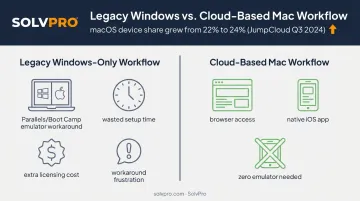
Tools confirmed to run well on macOS range from field-service platforms built for smaller crews to enterprise suites built for large general contractors.
Top Construction Scheduling Software for Mac
Each tool below was evaluated against the same criteria: confirmed Mac/browser compatibility, real scheduling and Gantt capability, mobile app support for iOS, useful integrations, and pricing that's actually published or clearly explained.
SolvPro
SolvPro is an all-in-one, browser-based field service management platform built for general contractors, electricians, plumbers, landscaping crews, and similar service-based teams. It runs fully through a Mac browser and mobile app, with no Windows dependency anywhere in the workflow.
What sets it apart for Mac-based teams:
- Bilingual English/Spanish interface across both office and field views, useful for crews where not every team member is a native English speaker
- Job and crew time tracking that logs where and when work happens, giving office staff a clear accountability trail
- Digital estimates with itemised line items and customer-facing PDF proposals
- Native QuickBooks Online sync built into the core platform, not bolted on as an add-on
| Category | Details |
|---|---|
| Key Features | Scheduling/dispatch calendar, crew and job time tracking, work order management, digital estimates, QuickBooks Online sync, credit-card and ACH payments |
| Mac/Mobile Compatibility | Fully browser-based (Safari/Chrome on macOS), plus mobile apps for field crews; setup takes under 10 minutes |
Fieldwire
Fieldwire is construction-specific software built around blueprint-based task management and jobsite documentation. It's accessible through a Mac browser and has a dedicated iOS app for site teams working off iPads.
For crews who live inside plan sets, Fieldwire offers a Gantt view for scheduling and detailed plan markup tools for annotating drawings. Offline mobile access keeps both working even when a jobsite has no signal.
| Category | Details |
|---|---|
| Key Features | Gantt scheduling, plan markup, file/document management, punch lists |
| Mac/Mobile Compatibility | Web-based for Mac (Chrome recommended, Safari also supported), dedicated iOS app for iPad and iPhone |
Buildertrend
Buildertrend is browser-based construction management software popular with residential builders and remodelers who need more than a basic calendar. It's fully Mac-compatible through any modern browser, with iOS and Android apps for the field.
Buildertrend stands out through:
- Open API integrations with QuickBooks and Xero
- Customizable workflows for different project types
- A client communication portal that keeps homeowners updated without constant phone calls
| Category | Details |
|---|---|
| Key Features | Job costing, scheduling, client portal, document management |
| Mac/Mobile Compatibility | Fully browser-based (Mac-compatible), iOS and Android mobile apps |
Procore
Procore is enterprise-grade construction management software used by general contractors managing large, complex projects. It's browser-based and macOS-compatible, with dedicated iOS and Android apps rounding out field access.
At this scale, Procore includes unlimited users at no added cost alongside Gantt-based scheduling with critical path visualization. Real-time budget tracking across multiple active jobs rounds out the feature set.
| Category | Details |
|---|---|
| Key Features | Gantt scheduling, financial management, quality/safety modules, document version control |
| Mac/Mobile Compatibility | Browser-based and macOS-compatible (Safari supported), with dedicated iOS/Android apps |
GanttPRO
GanttPRO is a visual scheduling tool built around the Gantt chart, popular with construction teams because it has a short learning curve compared to heavier enterprise suites.
It offers work breakdown structure (WBS) creation, resource and budget management, ready-made construction templates, and real-time sync between the web dashboard and mobile app.
| Category | Details |
|---|---|
| Key Features | Gantt chart builder, Kanban board, WBS tool, resource management, templates |
| Mac/Mobile Compatibility | Cloud-based, Safari/Chrome/Firefox supported, iOS and Android mobile apps |
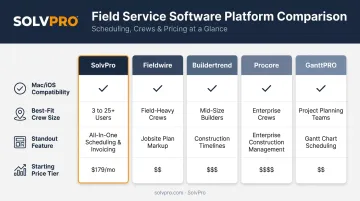
Other Notable Mac-Compatible Tools Worth a Look
If none of the five above fit your crew size or budget, a few other tools deserve a mention:
- Jobber: mobile-first job and subcontractor scheduling, runs in any Mac browser plus an iOS app
- CoConstruct: cloud-based client communication built for remodelers, with an iPhone/iPad app
- monday.com or ClickUp: general project management platforms with construction-specific templates, both offering native Mac desktop apps
Microsoft Project deserves its own flag: it has no native Mac desktop version. Microsoft's own installation documentation only covers a PC installation path, so Mac users choose between Project Online through a browser or one of the Mac-friendly alternatives above.
Treat these as secondary options if the top five don't match your team's size, budget, or the specific mix of scheduling and field features you need.
What to Look for in Construction Scheduling Software for Mac
We checked every tool on this list for one thing first: does it actually work on a Mac without requiring a Windows emulator like Parallels or Boot Camp? Many contractors assume that any "cloud" tool automatically works well on macOS. It doesn't always.
Beyond basic compatibility, these points matter:
- Scheduling depth: Gantt charts, critical path tracking, and crew calendar views
- Crew and resource visibility: can office staff see where people and equipment are in real time
- Integrations: QuickBooks sync, payment processing, and other tools contractors already use
- Support responsiveness: how quickly a team can get help when something breaks mid-job
- Pricing transparency: whether SMB-friendly tiers are published or hidden behind a sales call
These factors tie directly to outcomes contractors care about: fewer missed jobs, faster invoicing, and less time spent chasing paperwork between the office and the field.
Conclusion
Choosing construction scheduling software for Mac comes down to three factors: confirmed macOS and iOS compatibility, real-world usability in the field, and fit for your crew size and workflow.
Test before you commit. Most of these platforms offer a free trial or demo, and that's the fastest way to see whether the day-to-day time savings justify the ongoing cost.
If you're running a smaller service business and want scheduling, crew tracking, and invoicing in one bilingual, Mac-friendly platform, SolvPro's setup takes under 10 minutes. See for yourself how much admin time it can save your office and how much faster payments can move.
Field service software helps you manage the work. SolvPro helps you make sure the work makes money.
The right tool depends on your trade, crew size, job mix and the systems you already run. Test it on real jobs before you commit, and check that crews will actually enter what the office needs. When you want to see it on your kind of work, Book a Demo.
Run the Job. Protect the Profit.
Frequently Asked Questions
What Is the Best Scheduling Software for Construction?
There's no single "best" for every business. Tools combining scheduling, crew tracking, and invoicing, like SolvPro, suit growing service-based contractors, while enterprise suites like Procore fit large general contractors managing complex projects.
What Is the Best Project Management Tool for Mac?
Browser-based platforms confirmed to run smoothly on macOS, such as SolvPro, GanttPRO, and Procore, work just as well as native apps since most modern project management software is cloud-based anyway.
What Is the Best Gantt Chart Software for Mac?
GanttPRO and similar cloud tools are strong picks for visual timeline scheduling on Mac. Because they run through a browser, operating system limitations mostly disappear.
Is Microsoft Project Available for Mac?
No. Microsoft Project has no native macOS desktop app. Mac users rely on Project Online through a browser or switch to a dedicated Mac-compatible alternative.
Does Construction Scheduling Software Need to Be Mac-Native to Work Well?
No. Browser-based and cloud platforms typically perform identically across Mac and Windows. Compatibility comes down to verified browser and mobile app support, not a native install.
Can Construction Scheduling Software Integrate with QuickBooks for Mac Users?
Yes. Platforms like SolvPro and Buildertrend offer built-in QuickBooks Online sync that works identically for Mac and Windows users, since QuickBooks Online itself is cloud-based.