Paper timesheets get lost. Buddy punching goes unnoticed. And by the time payroll runs, nobody can say for certain whether a job actually made money.
Labor efficiency tracking software closes that gap. It connects hours worked to hours billed, flags time theft before it becomes a payroll problem, and gives owners real job costing data instead of a gut feeling. This guide breaks down the top platforms worth considering in 2026, what separates them, and how to pick the right one for your crew size and trade.
KEY TAKEAWAYS
- Labor efficiency tracking software replaces manual timesheets with GPS-verified hours linked to specific jobs and cost codes.
- SolvPro, ClockShark, ExakTime (Arcoro Time), QuickBooks Time, and Connecteam cover the main options for crew-based businesses.
- Site verification, job costing, field usability, and payroll integrations are the practical comparison points.
- Pricing runs from about $9 to $20 or more per user each month, and most SMB-friendly platforms avoid long-term contracts.
- Hours that arrive already coded to a job remove the reconciliation work that manual timesheets create before payroll runs.
Overview of Labor Efficiency Tracking Software in the Field Service Industry
Labor efficiency tracking software is any digital tool that captures when, where, and how long crew members work, then ties that data to specific jobs for cost analysis. For general contractors, electricians, plumbers, landscapers, and excavation crews, that distinction matters more than it sounds.
A generic time clock tells you someone worked eight hours. A labor efficiency platform tells you which job those eight hours belong to and whether the job is still profitable because of it.
That profitability question explains why trade and field service businesses have been slow to move off spreadsheets and paper timecards, but that's shifting. More owners are realizing that disputed hours, missed billables, and guesswork job costing cost far more than the software meant to fix them.
Five platforms are worth evaluating, and specific factors separate a tool crews will actually use from one that gets abandoned after a month.
Top 5 Best Labor Efficiency Tracking Software in 2026
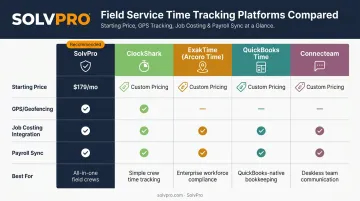
Five criteria separate these platforms: field usability, GPS/geolocation accuracy, job costing integration, pricing transparency, and support quality. Here's how they stack up.
SolvPro
SolvPro is an all-in-one field service management platform built by a team with real construction, estimating, and project management backgrounds. It serves general contractors, electrical, plumbing, HVAC, landscaping, excavation, and janitorial crews managing multiple jobs at once.
What makes it stand out for labor efficiency specifically:
- Job and crew time tracking: records against the job location only at meaningful moments, such as time entries, photo uploads, and activity logs, creating a verifiable audit trail without draining device batteries
- Digital estimates ties labor directly to job costs, letting contractors compare estimated hours against actual hours phase by phase
- Job costing and analytics dashboard that surfaces labor costs, material costs, and profitability in real time — no spreadsheets required
| Key Features | Crew and job time tracking, scheduling, work orders, QuickBooks Online sync, bilingual English/Spanish interface |
| Best For | Multi-crew field service and trade businesses wanting an all-in-one platform without enterprise complexity |
All core features, including job costing and time tracking, are included on the core plan. There's no upgrade wall to unlock the tools you actually need. Businesses can book a free demo to see the digital estimates and job costing flow before committing.
ClockShark
ClockShark started as a family-run trade business and is now part of the Simpro Group, built specifically for construction and field-service crews. It's one of the more established names in dedicated GPS time tracking.
Its differentiators center on geofencing, detailed job costing reports, and a mobile-first design that lets field crews clock in, switch jobs, and attach photos without much friction. The Pro tier adds more advanced job-costing controls for businesses that need deeper cost breakdowns.
| Key Features | GPS tracking, geofencing, job/task tracking, labor cost reports by customer/job/task, mobile clock-in with photo and note attachments |
| Best For | Construction and field service crews that want dedicated GPS time tracking with solid job costing reporting |
ExakTime (Now Arcoro Time)
ExakTime rebranded to Arcoro Time but kept its focus on construction labor tracking with GPS and biometric verification. It's built for contractors who need more than a basic clock-in app, particularly those bidding on government or prevailing-wage work.
Its standout features include FaceFront biometric clock-in for identity verification and built-in certified payroll reporting, which matters a lot for contractors working public projects. It also offers a rugged on-site time clock option alongside its mobile GPS app.
| Key Features | GPS location tracking with geofence perimeter controls, FaceFront biometric clock-in, certified payroll and compliance reports, rugged hardware option |
| Best For | Construction contractors needing certified payroll compliance and identity verification for larger crews |
QuickBooks Time (Formerly TSheets)
QuickBooks Time is part of the Intuit ecosystem, which makes it the obvious choice for businesses already running QuickBooks Online for payroll and invoicing. Intuit has fully rebranded the former TSheets product under this name.
The biggest draw is native payroll sync — hours logged in the field flow straight into QuickBooks Online Payroll without exporting or reconciling anything manually. Scheduling tools let managers assign shifts and jobs with automatic change alerts.
| Key Features | GPS tracking with geofencing, offline mobile clock-in, shift scheduling, native QuickBooks payroll sync, project estimates vs. actuals (Elite) |
| Best For | Businesses already using QuickBooks Online Payroll that want time tracking to sync natively without a third-party bridge |
Connecteam
Connecteam positions itself as an all-in-one app for deskless workforces, combining time tracking with task management and internal team communication. It's less construction-specific than the others on this list, but the breadth appeals to teams juggling multiple functions in one tool.
Its Operations Hub covers GPS clock-in, scheduling, checklists, and forms, while a separate Communications Hub handles chat and company updates. Geofencing capability scales by tier, from 10 sites on the Advanced plan to unlimited on Expert.
| Key Features | GPS geolocation stamps, tiered geofencing, scheduling with open/repeating shifts, checklists and forms, team chat and updates |
| Best For | Deskless workforce teams that want time tracking bundled with task management and communication, not necessarily deep job costing |
What to Look for in Labor Efficiency Tracking Software
Most businesses make the same mistake when picking labor tracking software: they compare price tags first and usability last. A cheap tool that field crews refuse to use in the truck bed isn't actually cheap: it becomes a subscription nobody touches after week two.
Five factors matter here, each tied to a real operational outcome:
- Site verification: Does the tool verify presence at the job site, or just log a timestamp? This directly affects disputed hours and payroll accuracy.
- Job costing integration: Can labor hours be tied to a specific job and phase, or does that require exporting to a spreadsheet? This determines how fast an owner can catch a job going over budget.
- Onboarding support: Is there a real person walking new users through setup, or just a help article? Faster onboarding means faster time to value.
- Scalability: Per-user pricing that jumps sharply as a crew grows makes budgeting unpredictable, so look for tools that scale in a straight line instead.
- Customer feedback: Sales pages promise ease of use, but daily reviews from field crews and office admins tell the real story.
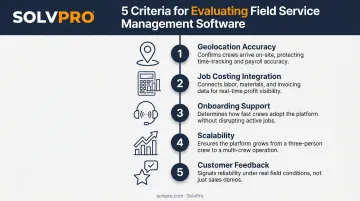
A platform that scores well on all five tends to produce fewer disputed timesheets, faster invoicing, and cleaner books at tax time. That's the real return on this kind of software, not the feature list itself.
Conclusion
The right labor efficiency tracking software should match how your crews actually work day to day, not just carry a familiar logo. A platform built for enterprise general contractors won't necessarily serve a five-person plumbing outfit well, and vice versa.
Once you've narrowed down the right fit, weigh ongoing performance against total cost of ownership. Look past the sticker price to per-user fees, contract terms, and whether job costing is included or gated behind a higher tier.
If you're evaluating options, SolvPro's crew and job time tracking and job costing tools are worth a look. Here's what you get:
- Setup takes under 10 minutes
- Live onboarding support at no extra charge
- No long-term contract to sign
Your crews are busy. So why isn't there more money in the bank?
When the office can see labor, materials and documented changes against the job while the work is still open, the numbers at the end stop being a surprise. SolvPro keeps scheduling, work orders, time, job costing and invoicing on one record. When you want to see it on your kind of work, Book a Demo.
Run the Job. Protect the Profit.
Frequently Asked Questions
What Software Tracks Productivity?
Field tools such as SolvPro, ClockShark or QuickBooks Time track productivity through clock-ins and job costing reports. This differs from generic desktop monitoring software built for office use.
Is It Illegal for Employers to Use Employee Monitoring Software?
Generally, no, as long as employers disclose their monitoring practices and comply with applicable state consent laws. SHRM recommends written policies and clear notice before implementing GPS or location tracking.
What Is Labor Efficiency Tracking Software?
It's software that measures hours worked against job output and cost to identify inefficiencies. It replaces manual timesheets with GPS-verified, job-linked time data that feeds directly into job costing reports.
What Features Should I Look for in Labor Tracking Software for Construction and Field Service Teams?
Look for GPS or geofencing accuracy, mobile accessibility for crews in the field, job costing tied to specific projects, and payroll or accounting integrations like QuickBooks sync. Skipping any of these usually means manual workarounds later.
How Much Does Labor Efficiency Tracking Software Typically Cost?
Pricing varies widely, with Capterra reporting a general range of $1.99 to $20+ per user per month depending on features. SMB-friendly platforms typically avoid long-term contracts and hidden add-on fees.
Can Labor Tracking Software Integrate with Payroll and Accounting Tools Like QuickBooks?
Yes, most modern labor tracking platforms offer native QuickBooks Online sync. SolvPro includes this integration at no extra cost on the core plan, syncing labor hours and job costs directly for faster payroll and invoicing.