By 2026, scheduling software isn't a nice-to-have. It's the backbone of crew accountability, faster job turnaround, and getting paid without chasing invoices for weeks. The global field service management market reflects that shift: it's valued at $5.10 billion in 2025 and is projected to hit $9.17 billion by 2030, a 12.5% CAGR according to MarketsandMarkets.
Scheduling platforms for field crews fall into two broad groups: all-in-one field service tools that also handle work orders and invoicing, and general shift-scheduling apps that only cover who works when.
KEY TAKEAWAYS
- Scheduling software unifies job assignment, dispatch, and office-to-field communication in real time
- Mobile access, payment integrations, and transparent pricing matter more than flashy dashboards
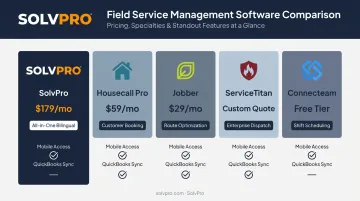
- Top picks include SolvPro, Housecall Pro, Jobber, ServiceTitan, and Connecteam, each suited to different business sizes
- Pricing ranges from free plans for small teams to enterprise quotes exceeding $500/month
- Scheduling that writes back to the same job record removes the need to re-enter the visit before it can be invoiced
Overview of Scheduling Software in the Field Service Industry
Scheduling software, in a field service context, does more than fill calendar slots. It assigns jobs to specific crews, dispatches work orders to mobile devices, and keeps the office and field synced without a dozen phone calls a day.
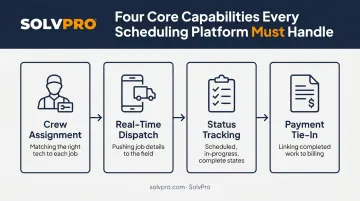
That's different from a generic meeting scheduler. A tool built for trades needs to handle:
- Crew assignment — matching the right technician or team to each job
- Real-time dispatch — pushing job details straight to a phone in the truck
- Status tracking — knowing whether a job is scheduled, in progress, or complete
- Payment tie-in — connecting completed work to invoicing without re-entry
Despite these demands, plenty of businesses still run scheduling out of shared spreadsheets or a whiteboard in the office. No single industry survey pins down exactly what percentage still operate this way heading into 2026.
Anyone who's worked dispatch knows the pattern, though: sticky notes work fine until the third crew calls in with a question nobody can answer.
The platforms below were evaluated specifically for businesses managing crews in the field, not office teams booking internal meetings.
Top Scheduling Software for Service Businesses in 2026
Five factors separate these platforms: industry relevance, mobile usability for crews on job sites, integration depth with payment and accounting tools, pricing transparency, and onboarding support quality. Platforms that scored well on paper but buried key features behind upsells or required a sales call just to see pricing got docked.
SolvPro
SolvPro is an all-in-one field service management platform built by a team with over 50 years of combined experience across construction, estimating, sales, and project management. It covers scheduling, work orders, crew tracking, and payments in a single system rather than stitching together separate tools.
A few things set it apart from other platforms on this list:
- Fully bilingual English/Spanish interface across the entire platform, including scheduling, the mobile app, CRM, and customer communications, not just a translated login screen
- QuickBooks Online sync and credit-card and ACH payments built into the core platform, included on the core plan with no add-on fees
- Same-day go-live with live, human-guided onboarding rather than a chatbot and a knowledge base
- No long-term contracts — cancel anytime
| Category | Details |
|---|---|
| Key Features | Drag-and-drop scheduling, digital work orders with photo and note documentation, crew accountability tracking (manual entries, live timers), online estimates and digital proposals, mobile invoicing |
| Best For | General contractors, electrical, plumbing, landscaping, janitorial, and excavation crews wanting one platform instead of five |
Job costing is baked into the core product too. Labor, materials, and profitability data sync straight to QuickBooks, so office staff aren't reconciling spreadsheets at month's end.
Housecall Pro
Housecall Pro is a widely used field service platform built around scheduling, dispatching, and invoicing for home service businesses. It's been around long enough to build a strong customer-facing booking presence, which is its biggest strength.
| Category | Details |
|---|---|
| Key Features | Online booking widget, dispatching, automated customer reminders, one-click digital invoicing |
| Best For | Home service businesses that want a polished, customer-facing booking experience |
The booking widget is genuinely useful for businesses fielding a lot of inbound residential calls. Just know that additional users and features can push the bill up quickly once you move past the entry tier.
Jobber
Jobber targets small-to-mid-sized trade businesses with a scheduling and client management system that leans heavily on route optimization and a smooth quote-to-invoice workflow.
| Category | Details |
|---|---|
| Key Features | Job scheduling, automatic route planning, client hub, quoting-to-invoice workflow |
| Best For | Small to mid-sized trade businesses that want strong client-facing scheduling and routing |
Jobber's route optimization can re-plan a crew's day automatically after a schedule change, which saves real drive time. Budget carefully: pricing scales fast once you add users or move up tiers.
ServiceTitan
ServiceTitan is built for larger operations with complex dispatch needs and dedicated admin staff. It's the enterprise option on this list, and it prices itself that way.
| Category | Details |
|---|---|
| Key Features | Advanced dispatch board, deep reporting dashboards, built-in marketing tools, call booking |
| Best For | Large, established field service companies with dedicated admin teams and budget for a steeper learning curve |
If your business runs dozens of technicians and needs granular reporting, ServiceTitan's depth is hard to match. For a five-person crew, it's likely overkill in both cost and complexity.
Connecteam
Connecteam isn't a field service scheduler in the traditional sense. It's an all-in-one team management app built around shift scheduling, time tracking, and internal communication for hourly and mobile workforces.
| Category | Details |
|---|---|
| Key Features | Drag-and-drop shift scheduler, GPS time clock, open shift claiming, in-app chat |
| Best For | Teams needing internal shift scheduling rather than client-facing job dispatch |
Connecteam is worth a look if your priority is workforce management rather than job assignment and customer-facing scheduling. It doesn't handle work orders or client dispatch the way the other tools here do.
What to Look for in Scheduling Software
The most common mistake we see: a service business picks a generic meeting scheduler or a shift-planning app because it's cheap or familiar, then discovers it has no dispatch board, no work orders, and no way to track a crew once they leave the shop.
These factors matter most for field operations:
- Industry fit: does it handle dispatch, work orders, and crew tracking, or just calendar slots?
- Mobile usability: can a crew member use it one-handed from a job site with spotty signal?
- Integration depth: does it connect to accounting and payment tools without manual data entry?
- Pricing transparency: are add-ons and per-user fees disclosed upfront, or buried until checkout?
- Onboarding quality: is support handled by a real person, or does it go into a ticket queue?
Platforms that required a sales call just to reveal pricing, or that gated basic features like GPS tracking behind premium tiers, scored lower even when their feature lists looked impressive on paper.
Conclusion
The right scheduling software matches how your crews actually work, not just how good the demo looks. Before committing, evaluate:
- Scalability as you add more crews
- Real cost-effectiveness once add-ons are factored in
- How fast the platform can go live
A tool that takes weeks to configure costs you money every day it sits unused.
SolvPro was built around that same-day go-live principle. It offers bilingual scheduling tools designed for growing service businesses that need to stop losing hours to spreadsheets and start tracking crews, jobs, and payments in one place. You can start a free trial in under two minutes, or book a demo to walk through it with a live team member first.
Field service software helps you manage the work. SolvPro helps you make sure the work makes money.
The right tool depends on your trade, crew size, job mix and the systems you already run. Test it on real jobs before you commit, and check that crews will actually enter what the office needs. When you want to see it on your kind of work, Book a Demo.
Run the Job. Protect the Profit.
Frequently Asked Questions
What Is the Most Common Scheduling Software?
General tools like Google Calendar and Calendly are common for booking meetings, but field service businesses typically rely on industry-specific platforms like SolvPro, Housecall Pro, or Jobber for job scheduling and dispatch.
What Is the Best Scheduling Software for Small Service Businesses?
Small service businesses generally do best with all-in-one platforms like SolvPro that offer simple setup, transparent pricing, and same-day onboarding rather than complex enterprise systems built for large crews.
How Much Does Scheduling Software Cost for a Field Service Business?
Pricing ranges from free tools to $500+/month for enterprise platforms like ServiceTitan, which require a custom quote based on technician count. SolvPro does not publish pricing, and runs month-to-month with no long-term contracts and cancel-anytime terms.
Can Scheduling Software Integrate with QuickBooks?
Many leading platforms offer QuickBooks Online sync, including SolvPro, which bundles it as a core feature on the core plan with no add-on fees.
Is There Scheduling Software Available in Spanish for Field Crews?
Yes. Bilingual English/Spanish scheduling interfaces exist, including SolvPro's platform-wide bilingual experience covering scheduling, mobile apps, and crew communications.
What Features Should I Look for in Scheduling Software for 2026?
Prioritize mobile accessibility, dispatch and crew tracking, payment and accounting integrations, and no long-term contract requirements.