Contractors lose real money to this cycle every year, not from bad work, but from bad paperwork. Slow payments cost the US construction industry $280 billion in 2024, and 82% of contractors waited more than 30 days to get paid, up from just 49% two years earlier.
Invoice automation software fixes the gap between finishing a job and getting paid for it. It turns approved estimates into invoices automatically, tracks who owes what, and syncs with accounting tools so nobody's re-entering the same numbers twice.
This guide breaks down the 8 best invoice automation platforms for contractors in 2026, with pricing, features, and who each one actually fits.
KEY TAKEAWAYS
- Invoice automation converts estimates into invoices instantly, eliminating manual re-entry and syncing directly with QuickBooks
- Field contractors need mobile invoicing, job costing, and payment processing in one app, not three
- SolvPro is the top pick for multi-crew contractors, offering bilingual support and transparent pricing
- Jobber and Housecall Pro suit teams comfortable with per-user add-on pricing
- QuickBooks Online, FreshBooks, and Xero pair best with a separate field management tool
Overview of Invoice Automation Software in the Contracting Industry
Invoice automation software converts an approved estimate into a billable invoice, captures payment status, sends automated reminders, and syncs with accounting platforms like QuickBooks. It's the layer that stops a contractor's office staff from manually copying job details from a clipboard into a spreadsheet, and then again into an invoice.
Skipping this step carries a real cost. The $280 billion payment delay figure above is only part of the picture.
Broader construction digitalization data tells a similar story: 41% of contractors now use digital tools for progress monitoring, up slightly from 39% in 2022. Adoption is growing, but plenty of crews still run billing off paper and memory.
Why Field-Based Invoicing Matters More than Generic Accounting Software
- Jobs get approved and completed on-site, not at a desk
- Crew hours and materials need to attach to the invoice automatically
- Payment collection often happens the moment a job wraps up
- Office staff shouldn't have to re-key what the field already recorded
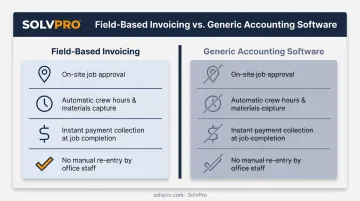
The 8 platforms below were selected specifically for how well they handle contractor workflows in the field, not generic office invoicing.
Top 8 Invoice Automation Software for Contractors in 2026
Each platform was compared on mobile usability, payment processing, job costing depth, setup speed, and pricing transparency for contractor crews.
SolvPro
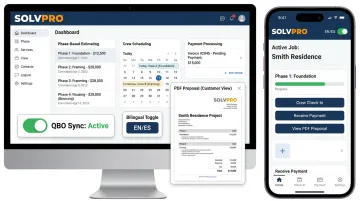
SolvPro is an all-in-one field service management platform built by people who've actually worked construction and field service jobs, not just software. It combines scheduling, crew tracking, digital estimates, and invoicing in one system.
Setup takes under 10 minutes: create your account, add your crew and jobs, then start dispatching.
What sets it apart:
- Bilingual English/Spanish interface across the entire platform, including the mobile app, for office staff and field crews alike
- Built-in QuickBooks Online sync and credit-card and ACH payments for credit card and ACH payments, with no add-on fees
- Job-level time tracking that records time entries, photos, and job updates against the work order, so office staff can see what was logged and when
- Digital estimates with itemised line items and customer-facing PDF proposals
- Free, live onboarding support included on every plan, not reserved for top-tier customers like some competitors
| Key Features | Digital estimates with PDF proposals, QuickBooks Online sync, credit-card and ACH payments, bilingual EN/ES interface, job and crew time tracking |
| Best For | General contractors, electricians, plumbers, HVAC, landscaping, and multi-crew teams wanting faster invoicing and clearer job profitability |
Jobber
Jobber is a widely used field service platform with one-click quote-to-invoice conversion, automated payment reminders, and a client hub for online payments. It's a solid all-rounder for home service teams.
The catch is cost as you grow. Jobber's entry plan starts at $29 to $49 a month, but job costing and two-way SMS are locked behind the Grow tier, which runs $199/month for a single user. Add crew members at $29 each, and the bill climbs fast.
| Key Features | One-click quote-to-invoice, automated reminders, client self-serve payment portal |
| Best For | Small home service teams comfortable with per-user pricing and add-on costs |
Housecall Pro
Housecall Pro is a mobile-first invoicing and dispatch tool aimed at residential trades like HVAC, plumbing, and electrical. Invoice creation from the field is fast and simple.
The tradeoff: QuickBooks integration requires the Essentials plan or higher, and the visual estimate builder costs an extra $40/month unless you're on the top MAX tier. Additional users run $35 each.
| Key Features | Fast mobile invoicing, automated review requests, online booking |
| Best For | Residential service businesses prioritizing quick mobile invoicing over deep scheduling |
QuickBooks Online
QuickBooks Online is the industry-standard accounting platform, with branded invoice templates, automated reminders, bank reconciliation, and tax reporting built in.
What it lacks is field-specific functionality. There's no scheduling, dispatch, or route optimization, so most contractors pair it with a separate job management tool to handle the field side.
| Key Features | Branded invoices, recurring billing, bank reconciliation, tax reporting |
| Best For | Contractors who need deep accounting and work closely with an accountant |
FreshBooks
FreshBooks is a clean, straightforward invoicing and accounting tool built for freelancers and small service businesses. Time tracking ties directly into invoices, and the client portal makes payment easy.
Scaling is where it gets tight. The entry Lite plan caps billable clients at just 5, and adding paid team members costs $11/month each, which limits it for contractors bringing on crew.
| Key Features | Time tracking tied to invoices, client portal, automated late-payment reminders |
| Best For | Solo contractors and small businesses that invoice often but don't need field workflows |
BILL
BILL is a cloud-based accounts payable automation platform that uses AI to capture invoice data, route approvals, and process payments. It's less about billing customers and more about managing what you owe vendors.
Its standout feature is a payment network reporting 8.3 million standalone members as of mid-2025, which helps reduce fraud risk and speeds up vendor payment coordination for contractors juggling multiple suppliers.
| Key Features | Smart invoice capture, customizable approval workflows, flexible payment options |
| Best For | Contractors processing dozens to hundreds of vendor invoices monthly |
Xero
Xero is a reliable accounting platform with automated invoice capture, bank feed integration, and mobile tools for managing books on the go.
Like QuickBooks, it's accounting-first. The entry Early plan caps you at 20 invoices and 5 bills per month, and there's no scheduling or crew tracking, so it won't replace a dedicated field service tool.
| Key Features | Automated bank feeds, mobile invoicing, flexible vendor payment options |
| Best For | Small to mid-sized contractors wanting reliable accounting without enterprise complexity |
Joist
Joist is a mobile-first invoicing app built for independent tradespeople like painters, carpenters, and flooring installers who need something simple.
It's single-user only, with no scheduling, CRM, or recurring billing. The Basics tier also caps you at just 5 documents per month, so it fits only very small, solo operations.
| Key Features | Mobile estimate-to-invoice conversion, QuickBooks integration, offline mode |
| Best For | Solo tradespeople who only need basic mobile invoicing without team features |
What to Look for in Invoice Automation Software for Contractors
These platforms differ on mobile usability, payment processing options, accounting integrations, pricing transparency, and whether the tool actually understands field-based workflows.
That last point matters more than most buyers realize. A common mistake is picking software based on brand recognition alone, rather than fit for crew size and job type. A solo painter and a 12-person electrical crew have almost nothing in common when it comes to invoicing needs.
How specific factors connect to real business outcomes:
- QuickBooks sync removes duplicate data entry between field tools and the books, saving hours of admin weekly
- Bilingual support keeps crews and office staff on the same page, cutting miscommunication that delays invoicing
- Per-user fee structures can double your monthly cost as you add crew members, driving up your software spend fast
- Payment processing built in shortens the gap between job completion and cash in the bank
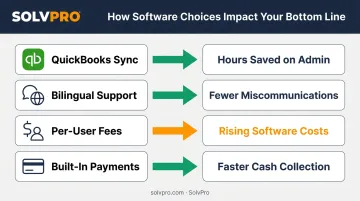
The platforms that scored best combined field-ready mobile tools with straightforward pricing that doesn't punish growth.
Conclusion
The right invoice automation software should match how your contracting business actually operates in the field, not just look impressive on a features page. A platform packed with functions you'll never touch, gated behind pricing tiers you'll eventually need, isn't a win.
Before committing, weigh setup time, ongoing support, and scalability alongside price. A cheap entry price that triples once you add three crew members isn't actually cheap.
Once you've weighed those trade-offs, you're ready to see how invoicing, scheduling, and payments work together without the chaos. SolvPro's team offers a free demo, walking you through digital estimates, QuickBooks sync, and credit-card and ACH payments in real time.
Your crews are busy. So why isn't there more money in the bank?
When the office can see labor, materials and documented changes against the job while the work is still open, the numbers at the end stop being a surprise. SolvPro keeps scheduling, work orders, time, job costing and invoicing on one record. When you want to see it on your kind of work, Book a Demo.
Run the Job. Protect the Profit.
Frequently Asked Questions
What Is Invoice Automation Software for Contractors?
Invoice automation software converts approved estimates into invoices and tracks payment status automatically. Many platforms also sync with accounting tools like QuickBooks, eliminating manual data entry between field and office.
How Does Invoice Automation Help Contractors Get Paid Faster?
Invoice automation combines automated payment reminders, one-tap estimate-to-invoice conversion, and integrated online payment options. Together, these features shorten the time between finishing a job and receiving payment.
What Features Should Contractors Look for in Invoice Automation Software?
Look for mobile usability, native QuickBooks sync, built-in payment processing, and job-level cost reporting so you can see profitability on every project, not just revenue.
Is Invoice Automation Software Worth It for Small Contracting Businesses?
Yes. Even small crews save meaningful admin time and get paid faster, often recovering the software cost within the first month through fewer late payments and less manual work.
Does Invoice Automation Software Integrate with QuickBooks?
Most leading platforms do, including SolvPro, which offers native QuickBooks Online sync built into the core plan to avoid duplicate data entry between systems.
What Is the Best Affordable Invoice Automation Software for Contractors?
Pricing varies by feature depth, but platforms like SolvPro offer transparent, SMB-friendly pricing with no long-term contracts. That's a notable contrast to per-user models, which climb quickly as crews grow.