Missed appointments, invoices that go out three weeks late, and a dispatcher playing phone tag with five different trucks — these are the problems eating into plumbing margins right now. Add code compliance headaches and a disconnect between the office and the field, and it's easy to see why so many shops feel like they're always one step behind.
This guide breaks down the top plumbing apps by category: field service management, reference and calculator tools, and part-identification apps. By the end, you'll know exactly which combination fits your crew size and job mix.
KEY TAKEAWAYS
- FSM platforms like SolvPro, Housecall Pro, and Jobber form the backbone of a modern plumbing business.
- Specialty apps like code calculators and AI part ID tools complement an FSM system, not replace it.
- Pricing ranges from free calculator apps to per-seat FSM subscriptions that scale with your team.
- The right stack depends on crew size, job mix, and how much admin time you want to eliminate.
- Offline access matters in plumbing work, since much of the job happens in basements and crawl spaces with poor signal.
Overview of Plumbing Apps in the Plumbing Industry
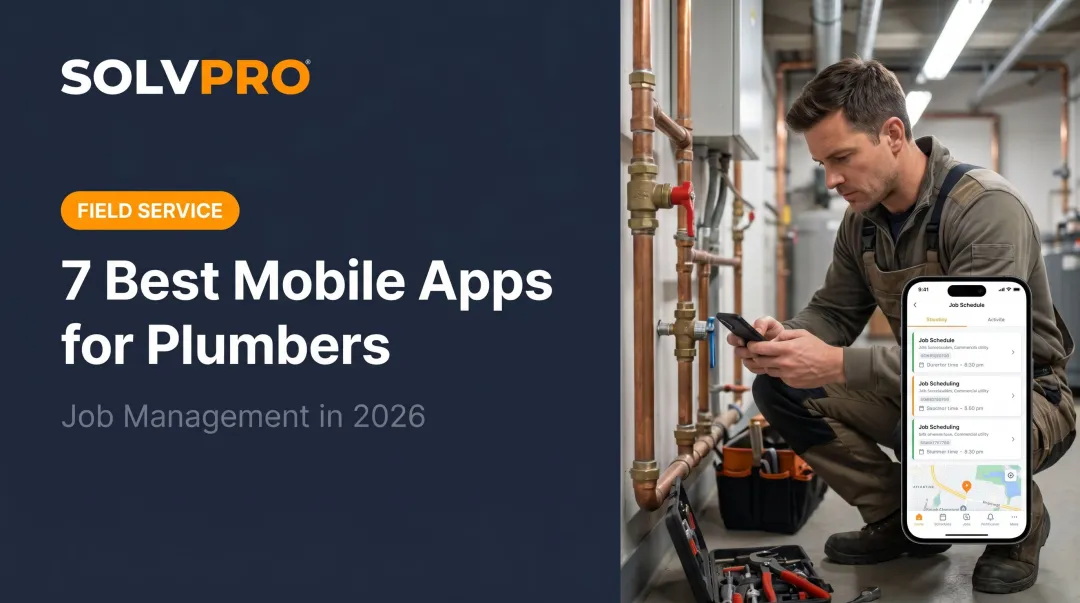
Plumbing apps are mobile and web-based tools that digitize the parts of the job that used to live on clipboards: scheduling, dispatch, invoicing, code compliance, and technical calculations. Instead of a dispatcher calling five trucks to find out who's free, a manager sees crew availability on a single screen.
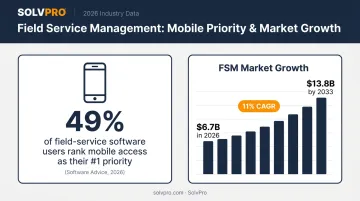
Mobile access has become the top priority for buyers evaluating field service software. Software Advice's 2026 buyer research surveyed over 6,000 small and midsize businesses shopping for FSM tools. The result: 49% of current field-service software users rank mobile access as their top feature priority, making it a baseline expectation rather than a bonus feature.
The broader market backs this up. Grand View Research projects the global field service management market will grow from $6.7 billion in 2026 to $13.8 billion by 2033, an 11% annual growth rate. Plumbing businesses are riding that wave, whether they've noticed it or not.
Grouping apps by the job they are built to do makes it easier to spot which tools fill the gaps in a current setup.
Best Plumbing Apps for 2026
Four criteria separate these apps: relevance to actual plumbing workflows, ease of use on a phone in the field, integration capability with accounting and payments, and real adoption among service businesses.
The list splits into three groups:
- Field service management platforms: the core system running your day-to-day operations
- Reference and calculator tools: for on-site technical math
- Part identification and measuring apps: for faster on-site decisions
SolvPro
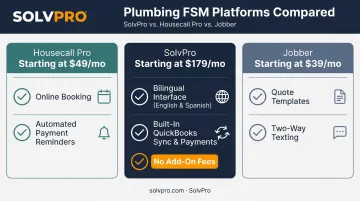
SolvPro is an all-in-one field service management platform built for growing plumbing businesses. It covers scheduling, digital work orders, crew tracking, invoicing, and payments in a single system, so office staff and field crews aren't juggling five disconnected tools.
A few things set it apart:
- Fully bilingual English/Spanish interface for both office dashboard and field mobile app, useful for mixed-language crews common in trades
- QuickBooks Online sync and built-in credit-card and ACH payments, included at no extra cost on the core plan
- Transparent, SMB-friendly pricing with no add-on fees for core tools and no long-term contracts
- Same-day go-live with live, guided onboarding (not a chatbot or a 40-page manual)
Field crews can view job assignments, log time, attach photos, and collect signatures and payments on-site, all from a phone. Office teams get real-time job costing that separates service call profitability from installation project margins, a distinction plumbing owners rarely get clean visibility into otherwise.
| Details | |
|---|---|
| Key Features | Drag-and-drop scheduling, digital work orders with material tracking, crew accountability with time entries by job and crew member, online estimates with digital signatures |
| Platforms Supported | Web dashboard for office staff; mobile app for field crews (English and Spanish) |
Plumbing businesses can start with a 14-day free trial with no credit card required, or book a 1-hour demo and discovery session to see the platform mapped to their specific workflow.
Housecall Pro
Housecall Pro built its reputation on residential home services: scheduling, invoicing, and online payment collection wrapped into one deployable-fast package. For plumbing teams that run heavy service call volume with less complex project work, it's a solid fit.
Customers can book and pay online 24/7, and the platform automates payment reminders so invoices don't sit unpaid for weeks.
| Details | |
|---|---|
| Key Features | Online booking, technician dispatching, digital invoicing, automated payment reminders |
| Platforms Supported | Web portal, iOS, and Android |
Jobber
Jobber positions itself as a clean, fast-setup FSM tool that's especially popular with smaller plumbing outfits that want quoting and scheduling without a steep learning curve.
It handles the basics well: quote templates, drag-and-drop calendar scheduling, and two-way texting with customers. That said, some G2 reviewers have flagged limited workflow customization for more complex jobs, and one reviewer specifically asked for deeper job-costing detail. That's relevant if your business handles multi-phase installations.
| Details | |
|---|---|
| Key Features | Professional quoting, drag-and-drop scheduling, two-way text messaging, on-my-way notifications |
| Platforms Supported | Web, iOS, and Android |
Next up: reference and calculator tools. These won't schedule your day, but they'll save you from doing pipe-sizing math on the back of an invoice.
Plumbing Formulator
Plumbing Formulator packages plumbing-specific math into a single mobile interface. Think pipe velocity, flow rates, fixture unit demand, and Hazen-Williams friction loss calculations — over 200 formulas, according to its App Store listing.
For estimates and installs where a manual calculation error means a redo, this app is cheap insurance.
| Details | |
|---|---|
| Key Features | Pipe sizing, flow rate calculations, fixture unit conversions, drain and vent sizing |
| Platforms Supported | iPhone and iPad only (no Android version) |
Now for part identification and measuring apps: older systems and unlabeled fittings slow down techs constantly, and AI and camera-based tools are starting to close that gap.
Partelligence
Partelligence uses AI-driven photo recognition to identify plumbing parts and fittings: snap a photo of an old faucet stem or unfamiliar cartridge, and it returns replacement-part candidates. Useful for techs working on legacy systems where the part number wore off decades ago.
It's free on iOS, with no Android version currently available.
EasyMeasure
EasyMeasure turns your phone camera into a rough distance and height measuring tool using AR overlay technology, handy when a tape measure isn't practical in a tight crawlspace or unsafe spot. It's free with in-app purchases ranging from $3.99 to $17.99, and it runs on both iOS and Android.
One important caveat: the developer explicitly states measurements aren't as accurate as standard tools and shouldn't be used for final cuts. Treat it as a fast estimate, then verify with a tape or laser before anything gets installed.
How to Choose the Right Plumbing App for Your Business
Team size should drive your decision first. A solo plumber needs quick setup and low monthly cost, not a platform built for managing twenty crews. Growing teams need stronger scheduling, job costing, and reporting to keep visibility as headcount climbs.
Job mix matters just as much. A service-heavy business prioritizes fast dispatch and mobile invoicing. An install- or project-focused shop needs solid estimating and change-order tracking to protect margins on longer jobs.
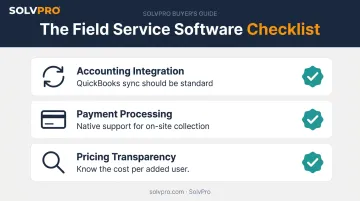
A few non-negotiables worth checking before you commit:
- Accounting integration: QuickBooks sync should come standard, not a $50/month add-on
- Payment processing: native support lets techs collect on-site instead of chasing checks
- Pricing transparency: know exactly what happens once you add a fourth or fifth user
Platforms built for service businesses, like SolvPro, often bundle QuickBooks sync and payment processing into the core plan rather than treating them as premium upsells. Pricing structures still vary more than people expect. Per-user fees, feature-gated tiers, and implementation costs add up fast as a team scales. CONTRACTOR Magazine points out that the monthly subscription is often the smallest cost of adopting new software — customer-record migration, retraining, and workflow disruption during rollout tend to matter more in the long run.
Run the math on total cost at your projected team size in 12 months, not just today's headcount.
Conclusion
The smartest plumbing businesses skip the app-hopping. They anchor operations around one solid FSM platform, then add specialty tools for calculations and part identification where they actually fill a gap.
Before you sign up for anything, map your daily workflow and find where time actually gets lost — a missed appointment, a late invoice, a code lookup that eats twenty minutes. Choose based on those gaps, not a feature checklist. That homework makes the next call easy.
If your team needs bilingual support and transparent pricing, plus same-day onboarding that skips the enterprise complexity, see how SolvPro's all-in-one platform helps plumbing businesses cut admin time and get paid faster.
Field service software helps you manage the work. SolvPro helps you make sure the work makes money.
The right tool depends on your trade, crew size, job mix and the systems you already run. Test it on real jobs before you commit, and check that crews will actually enter what the office needs. When you want to see it on your kind of work, Book a Demo.
Run the Job. Protect the Profit.
Frequently Asked Questions
What Is the Plumbing App for iPhone?
Several plumbing-specific apps run on iOS, including business management platforms like SolvPro and Housecall Pro, plus reference tools like Plumbing Formulator for on-site calculations.
Is There an App to Identify Plumbing Parts?
Yes. Partelligence uses AI and photo recognition to identify plumbing parts and fittings, helping technicians save time on unfamiliar or legacy components.
What Is the Best Free Plumbing App?
Many reference apps and field service management (FSM) platforms offer free tiers or trials. Value depends on whether you need full business management or just a technical calculator — the two solve very different problems.
Do Plumbing Apps Work Offline?
Offline capability varies by app. Modern FSM platforms increasingly support offline data capture that syncs once reconnected, while reference apps often need an initial download to work without a connection.
Can Plumbing Apps Integrate with QuickBooks?
Most modern FSM platforms, including SolvPro, offer built-in QuickBooks Online sync at no extra cost, eliminating double data entry between job costing and accounting.
How Much Do Plumbing Business Apps Typically Cost?
Pricing ranges from free calculator apps to monthly FSM subscriptions that scale with team size. Watch for per-seat charges and add-on fees that add up fast as you grow.