Introduction
It's Friday afternoon. Your crew just finished a 12-site week, and you're staring at a stack of paper timesheets—some smudged, one missing entirely—trying to piece together payroll before 5 PM. Meanwhile, a client is calling to dispute whether your team actually showed up Tuesday night.
This is the reality for thousands of cleaning business owners across the US. And it's not just a paperwork headache. According to BSCAI, labor typically accounts for 50% to 80% of a commercial cleaning bid's total price—meaning sloppy time tracking doesn't just create admin chaos, it directly eats into your margins.
Those margins don't leave room for error—yet most generic time tracking tools weren't designed for how cleaning businesses actually operate. The real challenges look like this:
- Crews clocking in from home instead of the job site
- No location proof when a client disputes a visit
- Timesheets spread across multiple sites with no central view
- Payroll taking hours because data lives in five different places
This guide breaks down the best time tracking software for cleaning companies—what to look for, what to avoid, and which tools are worth your time.
Key Takeaways
- GPS verification and geofencing are the only reliable way to prove which crew was at which site and when.
- Per-job hour tracking is what separates cleaning-ready tools from generic time clocks.
- 1 in 5 US payrolls contains errors averaging $291 each to fix; payroll integrations cut that risk directly.
- The right platform handles scheduling and time tracking together, enabling no-show visibility without extra apps.
- Bilingual support (English/Spanish) matters for cleaning businesses with mixed-language crews.
What Makes Time Tracking Uniquely Challenging for Cleaning Companies
Most time tracking apps were built for freelancers or office workers who sit at a desk. Cleaning crews don't. They show up at 10 PM to clean a medical office, work across six locations in a single shift, and clock out before the building manager arrives in the morning.
The Problems Generic Tools Can't Solve
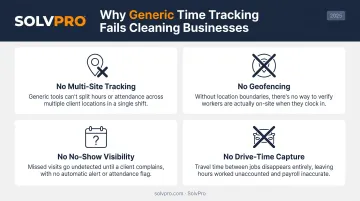
Office-based time tracking tools fail cleaning businesses in four specific ways:
- No multi-site tracking — they record daily totals per employee, not hours per location
- No geofencing — they can't verify a crew was actually at the client's building
- No no-show visibility — a missed shift looks identical to a completed one until someone calls to complain
- No drive-time capture — transit between job sites during the workday counts as paid work time under the FLSA, and most basic tools ignore it entirely
The Hidden Cost of Bad Time Tracking
Time theft and buddy punching are real concerns when crews work unsupervised. The bigger financial risk, though, is inaccurate billing: you end up undercharging clients, overpaying crews, or both at once.
The numbers add up quickly. An EY study cited by Paycom found that 1 in 5 US payrolls contains errors, with each error costing an average of $291 to remedy. For a cleaning company running payroll weekly, that's a recurring drain that's easy to miss and hard to recover.
Billing errors aren't the only exposure. When a client claims your crew didn't show up—or didn't finish the job—you need timestamped location proof, not just your crew's word against theirs. Paper logs and group texts don't hold up in those conversations.
Best Time Tracking Software for Cleaning Companies
Tools on this list were evaluated on:
- GPS accuracy and geofencing capabilities
- Mobile ease of use
- Multi-site job tracking
- Payroll integration
- Bilingual support
- Pricing transparency
SolvPro
SolvPro is an all-in-one field service management platform built specifically for growing service businesses with crews in the field—including commercial cleaners and janitorial companies. The platform was built by a team with 50+ years of combined experience in field service and operations, available in both English and Spanish.
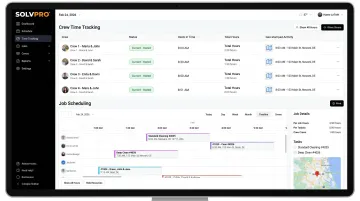
For cleaning companies, SolvPro's standout feature is how it ties time tracking to crew accountability. Time entries, photo uploads, and on-site updates are geo-stamped at the moment they're recorded, creating a verifiable, location-anchored audit trail.
The tracking is event-based: location data is captured when your crew actually does something — clocks in, uploads a photo, marks a job complete. Not passive background logging.
Every hour is tracked by job and crew member, so you can see exactly what each client account costs in labor—not just totals per employee. That per-job visibility feeds directly into job costing and syncs with QuickBooks Online for payroll and financial management.
Setup takes under 10 minutes, there are no long-term contracts, and onboarding support from a live team is included at every pricing tier.
| Feature | Details |
|---|---|
| Key Features | Per-job and per-crew time tracking, geo-stamped activity tracking, event-based geolocation, GPS-tracked crew dispatch, scheduling with real-time visibility, digital work orders with photo proof, QuickBooks Online sync, bilingual English/Spanish interface |
| Best For | Growing cleaning and janitorial businesses that need crew tracking, scheduling, and payroll sync in one platform |
| Pricing | Starter: $179/month (up to 3 users); Growth: $228/month (4 users, +$49/user beyond that); Scale: custom pricing for unlimited users. No long-term contracts, cancel anytime. Free trial available—no credit card required. |
Connecteam
Connecteam is a widely used workforce management platform popular with deskless and field-based teams, including cleaning companies. Its GPS time clock, geofencing, digital checklists, and team chat are all in one app—making it particularly useful for operations that need service verification alongside time tracking.
Attaching cleaning checklists per job site is something most time tracking apps skip: crews check off tasks as they complete them, and clients get timestamped proof of what was done. There's also a free plan for teams of 10 or fewer.
Paid features are split across separately billed "hubs" (Operations, Communications, HR & Skills), so costs grow faster than the per-user pricing suggests as you add capabilities.
| Feature | Details |
|---|---|
| Key Features | GPS time clock, geofencing (10 sites on Advanced; unlimited on Expert), NFC/kiosk punching, digital checklists per job site, team chat, scheduling, payroll exports |
| Best For | Cleaning businesses that need crew checklists and communication tools alongside time tracking |
| Pricing | Free Small Business Plan for up to 10 users. Operations Hub: $35/mo (Basic), $59/mo (Advanced), $119/mo (Expert) for first 30 users on monthly billing; additional users $1–$5/user/mo depending on plan. 14-day free trial on paid plans. |
ClockShark
ClockShark is a time tracking and job scheduling app built for field service and construction teams, with strong GPS capabilities and per-job hour tracking suited to cleaning businesses that bill clients individually.
Drag-and-drop scheduling, geofencing, and integrations with both QuickBooks and Xero cover most of what a cleaning operation needs. ClockShark also offers built-in Spanish language support, listed directly on the official pricing page.
Pricing follows a base fee plus per-user structure, which can add up for smaller operations. Pro plan pricing wasn't fully published at the time of research, so check the official page for current rates.
| Feature | Details |
|---|---|
| Key Features | GPS tracking, geofencing, job-based clock-ins, drag-and-drop scheduling, timesheets, QuickBooks and Xero integration, built-in Spanish language support |
| Best For | Cleaning businesses that need per-client hour tracking and job costing alongside GPS accountability |
| Pricing | Standard: $40/month + $9/user/month. 14-day free trial. Check ClockShark's pricing page for current Pro plan rates. |
OnTheClock
OnTheClock is a straightforward time clock app used by small service businesses, with GPS-verified punches, geofencing, photo verification, and scheduling—all included in one base plan without feature gating.
For a small residential or commercial cleaning operation, the pricing model is predictable: a flat $5 base fee plus $4 per employee per month for time tracking. It handles mixed W-2 and 1099 workers, which is common in cleaning businesses that use subcontractors. Payroll integrations include Gusto, QuickBooks, ADP, Square, Paychex, and SurePayroll.
Payroll processing is a separate add-on: $40/month base + $6/worker/month, plus a one-time $250 migration fee.
| Feature | Details |
|---|---|
| Key Features | GPS punch recording, geofencing per account, photo verification, per-job tracking, scheduling, overtime alerts, payroll integrations (Gusto, QuickBooks, ADP, and more) |
| Best For | Small cleaning businesses (under 50 staff) that want GPS and geofencing without enterprise pricing |
| Pricing | $5/month base + $4/employee/month. 30-day free trial, no credit card required. |
Janitorial Manager
Janitorial Manager is a purpose-built platform for commercial cleaning and janitorial contractors. Time tracking is one piece of a broader system that includes work orders, quality inspections, inventory tracking, and client communication—all designed specifically for the cleaning industry.
Crews clock in via QR code scan using the JM Connect app, which validates who was on-site and documents the time punch. Geofencing restricts clock-ins to specific locations, and the platform also supports NFC tags, phone call-in, and facial recognition for identity verification.
Where it's less flexible: QR code kiosk clock-in works best for fixed commercial locations. Crews who jump between multiple sites and punch in from personal phones may find the workflow less convenient.
| Feature | Details |
|---|---|
| Key Features | QR code time clock (JM Connect), geofencing, NFC and facial recognition options, work orders, quality inspections, inventory tracking, payroll integrations, scheduling |
| Best For | Mid-to-large commercial cleaning contractors who need full operational management beyond time tracking |
| Pricing | Custom proposal pricing—no publicly listed rates. Contact Janitorial Manager directly for a personalized quote. Live demo available on request. |
How to Choose the Right Time Tracking Software for Your Cleaning Company
Start with GPS and Geofencing
Any tool a cleaning company adopts must verify crew location at clock-in—not just record when, but where. GPS snapshots at punch capture location at a single moment (useful for billing disputes). Live/continuous tracking shows movement throughout the shift (useful for route supervision but heavier on battery and data).
Event-based GPS at clock-in is sufficient for most cleaning operations—and less invasive for crews. What matters is that the data exists when a client dispute arises.
Prioritize Per-Job Hour Tracking
Daily totals per employee won't tell you whether your Thursday night medical office account is profitable. Per-job hour tracking breaks labor down by client account—which is what you need to understand margins, price contracts accurately, and catch jobs running at a loss before they do real damage. Without it, you're pricing contracts on gut feel instead of actual labor data.
Calculate Total Cost at Your Actual Crew Size
Per-user pricing looks affordable at 5 people and alarming at 25. Before committing to any platform, calculate the monthly cost at:
- Your current crew size
- Your expected size in 12–18 months
A $5/user/month tool with 20 employees costs $100/month. A $29/month flat-rate tool with the same crew costs less than a third of that. Run the math before signing up.
Verify Payroll Integration Before You Commit
Time tracking only saves time if it feeds directly into payroll. The DOL's Fact Sheet #22 is clear: travel from job site to job site during the workday counts as compensable work time. Your tool needs to capture or account for it, and your payroll provider needs to receive accurate data.
Verify the specific integration your payroll provider supports—QuickBooks, Gusto, ADP, Paychex—before choosing a platform.
Test the Clock-In Flow on an Actual Phone
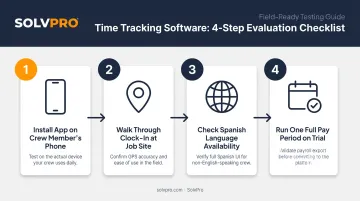
The most powerful software fails if crews won't use it consistently. Before deploying it company-wide:
- Install the app on a crew member's phone (Android or iOS)
- Walk through a full clock-in at a job site
- Check whether the interface is available in Spanish if your team is bilingual
- Run one complete pay period on a trial before committing
If the clock-in takes more than 30 seconds or requires steps a tired crew member won't remember at 11 PM, the tool won't stick.
Conclusion
The right time tracking software for a cleaning company isn't just a digital time card. It's the infrastructure behind accurate billing, crew accountability, labor law compliance, and per-account profitability visibility.
Match your choice to your specific pain point: GPS proof for client disputes, clean integrations for payroll chaos, per-job tracking for multi-site billing, and a platform that scales if you're planning to grow.
For cleaning and janitorial businesses that need more than a time clock, SolvPro brings scheduling, crew tracking, digital work orders, QuickBooks sync, and bilingual support into one platform built for exactly this kind of operation.
Setup takes under 10 minutes, no long-term contract, no credit card required. Start a free trial or book a demo at solvpro.com and see it in action.
Frequently Asked Questions
What is the best software for a cleaning company?
The best option depends on your size and needs. All-in-one platforms like SolvPro suit growing cleaning businesses that need scheduling, crew tracking, and QuickBooks sync together. Simpler tools like OnTheClock work well for small crews that need GPS clock-ins at a predictable low cost.
What features should time tracking software for cleaning companies have?
At minimum: GPS-verified clock-ins, geofencing per job site, mobile clock-in from any device, per-client hour tracking, and payroll integrations. No-show visibility and photo verification are strong additions for crews working unsupervised at multiple locations.
How does GPS time tracking help cleaning businesses?
GPS-stamped punches prove a crew was physically on-site when billed. That prevents time theft, resolves client disputes with evidence instead of memory, and gives managers visibility into who is where across multiple locations—no constant phone calls required.
Can time tracking software help prevent buddy punching in cleaning crews?
Yes. Geofencing, photo verification at clock-in, facial recognition kiosks, and individual PIN logins all make it significantly harder for one crew member to punch in for another. Choosing a tool with at least one verification layer is worth it for any unsupervised crew.
How much does time tracking software for cleaning companies cost?
Most tools run $4–$9 per user per month, with some adding a flat base fee on top. Always calculate your total at actual crew size. The advertised starting rate rarely reflects what you'll pay at 15 or 20 employees.
Do I need separate software for scheduling and time tracking?
The best tools for cleaning companies combine both in one platform. Connecting schedules to clock-in data enables no-show visibility, auto clock-in reminders, and accurate per-shift reporting—reducing the need for multiple disconnected apps that don't share data cleanly.