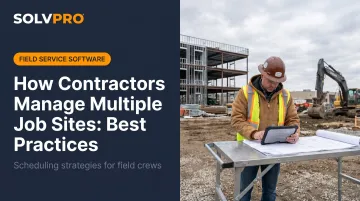
The contractors who scale successfully aren't working longer hours than everyone else. They build systems that handle the complexity before it becomes chaos: crew accountability structures, centralized scheduling, standardized workflows, and knowing costs while the job is open across every active site.
This guide covers the practical frameworks that keep multi-site operations under control — from delegating authority to site leads, to knowing what each job is actually earning before the invoice goes out.
KEY TAKEAWAYS
- Managing multiple sites requires structure first, more hours second
- Every active site needs a lead with the authority and information to act without calling the boss
- Centralized scheduling eliminates the collisions that fragmented tools create
- Crew accountability means visibility, not distrust — it protects your margins
- Real-time job costing separates profitable growth from just being busy
Why Managing Multiple Job Sites Gets Complicated Fast
A single miscommunication on one job is a headache. The same miscommunication across five jobs becomes a scheduling collision that costs you a client and a day of rework.
The problems don't change as you scale — they compound. Here is where the wall tends to appear:
- Fragmented communication — Job details live in texts, calls, and verbal updates that never get documented. When something goes wrong, there's no record.
- No unified crew view — You don't know who's where, what's started, or what's delayed until someone calls to tell you.
- Cost overruns that surface too late — By the time labor hours and materials show up wrong on a job, the work is done and the money is gone.
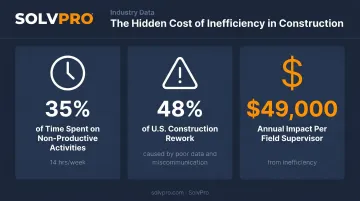
According to FMI and PlanGrid's Construction Disconnected report, construction professionals spend 35% of their time — roughly 14 hours per week — on non-productive activities. That breaks down to 5.5 hours searching for project data and 4.7 hours resolving conflicts.
Poor data and miscommunication alone account for 48% of all U.S. construction rework.
Field supervisors absorb the worst of it: the same research found they lose nearly 14 hours per week to non-optimal activities — an estimated annual impact of over $49,000 per supervisor.
That's the measurable cost of running multiple job sites without the right systems in place.
Delegate Authority to Trusted Site Leads
There's a ceiling on how much a single contractor can personally oversee. When you're spread across multiple active sites, becoming the bottleneck for every decision slows every site down and pulls your focus away from running the business.
The fix is putting the right people in place — site leads who have what they need to act without waiting on a callback.
What a Site Lead Actually Needs
Telling someone they're "in charge" isn't enough. A site lead needs three things to function effectively:
- Defined decision authority — What can they decide on the spot? Material substitutions? Minor scope adjustments? Customer interactions? Be specific.
- Access to job information — Scope, schedule, materials, and instructions, all accessible on their phone. Not in a binder at the office.
- A daily reporting rhythm — A short check-in format that gives you visibility without requiring a 20-minute phone call.
Setting Leads up to Succeed
Practical steps for structuring site lead accountability:
- Give them a mobile work order before the job starts — job location, scope, crew assignments, materials needed, and site-specific instructions. No chasing the office for details.
- Define a short escalation path — What's in their lane? What goes to you? Make the line clear, so they don't default to calling you for everything.
- Set a daily check-in format — Progress update, current issues, plan for tomorrow. Three items, five minutes. Consistent across every site.
Site leads who are set up correctly don't just keep jobs moving — they give you the visibility to catch problems early, before a delay on one site disrupts your whole schedule.
Centralize Scheduling, Dispatch, and Communication
The most common multi-site management mistake isn't bad planning — it's fragmented tools. Schedules live in a spreadsheet, dispatch happens over group texts, updates go out by email — and none of it syncs. That fragmentation means you're always catching up instead of staying ahead.
When information lives in too many places, nothing stays current. Changes made in one tool don't reflect elsewhere. The office loses the real-time picture.
Consolidate Jobs into a Single Operational View
Centralized scheduling means every active job is visible in one place — crew assignments, timelines, delays, and reassignments — updated in real time for everyone involved, office and field alike.
SolvPro's drag-and-drop scheduling calendar gives contractors exactly this. From one dashboard, you can:
- Assign or reassign crews in seconds
- View crew availability instantly across all active sites
- Toggle between day, week, and crew views depending on what you need to see
- Spot unscheduled work orders before they fall through the cracks
When a schedule change happens, crews see it immediately on their mobile device — no phone calls, no risk of someone showing up to the wrong site.
Set a Communication Standard Across All Sites
A scheduling tool only works if the people using it follow the same process. Without a shared communication standard, you'll still have information gaps — just in a different system.
A structured communication protocol across sites looks like this:
- Run daily check-ins with a fixed format: progress update, open issues, tomorrow's plan
- Define a clear escalation path so leads know what to handle and what to escalate
- Keep a shared digital record — documented and accessible, not buried in a chat thread
Brief, consistent touchpoints give the office up-to-date job information without pulling crews away from the job.
Keep Your Crews Accountable Across Every Site
Trusting your crews and having visibility into what they're doing aren't the same thing. Without a system, you're relying on memory and phone calls to know whether a job is on track — and by the time something looks wrong, the labor cost is already locked in.
When you know when crews arrived, what they worked on, and when they wrapped up, you can catch problems early enough to actually respond.
Track Arrivals, Departures, and Time Without the Paperwork
Manual time cards have a fundamental flaw: crews fill them out at the end of the week based on memory. Hours get estimated, start times get rounded, and by the time something looks off, the labor cost is already locked in.
Job and crew time tracking solves this. When a crew member clocks in or out, the system records the exact time and GPS location — tied to the specific job and crew member. No phone calls. No reconstruction.
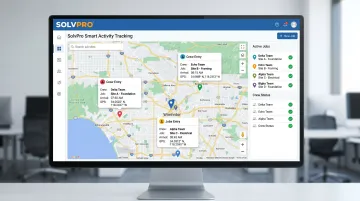
SolvPro's Smart Activity Tracking records against the job every time entry, photo upload, and field update. The office sees when the crew arrived on site, how long they worked, and when they left — across every active job simultaneously. That data flows directly into job costing, so labor hours are always connected to the right project.
Reduce No-Shows, Delays, and Miscommunication
Seeing problems while the job is open changes your ability to respond. When a crew is delayed or a job isn't progressing, you see it before it becomes a missed deadline or an unhappy client.
Practical accountability habits for multi-site operations:
- Require job check-ins before work starts — status updated on mobile, not called in
- Confirm completion before crews move to the next site — no assumptions about what's done
- Use digital records on billing day — labor hours, materials, and time on site already tied to the right job, no scrambling to reconstruct the week
That last point matters more than most contractors realize: the faster your records close out, the faster your invoices go out — and the faster you get paid.
Standardize Your Workflows and Know What Each Job Is Actually Making
Standardize Site Checklists and Work Orders
When every job runs on a different format, every job requires different training. Standardized work orders and checklists change that dynamic.
The same template that works on Job 1 should work on Job 10. A consistent work order format includes:
- Job location and scope
- Crew assigned and materials needed
- Site-specific instructions
- Documentation fields for photos, notes, and change orders
- Completion verification tied to the job record
SolvPro's digital work orders cover all of this in a mobile-accessible format. Field crews never chase paper. Office teams get a complete, documented record on every job. And when you onboard a new site lead, the format is already there — they're learning the job, not reinventing the documentation system.
Custom work type configuration lets contractors build standardized job formats for their specific trade and apply them consistently across every dispatch.
Know Which Jobs Are Actually Profitable
Many contractors running multiple sites don't realize a job is losing money until the invoice goes out. By then, there's nothing to adjust.
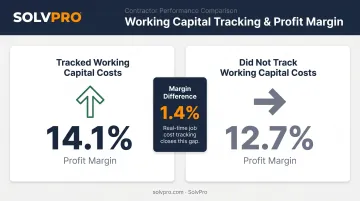
Real-time job cost tracking at the individual project level changes this. According to the Billd 2024 National Subcontractor Market Report, subcontractors who accounted for working capital costs in their bids reported 14.1% profit margins versus 12.7% for those who didn't — a margin difference that compounds across every active project.
That same principle applies while jobs are in progress. When you can see labor hours, material costs, and time on site for each active project, you can catch overruns before they're locked in.
SolvPro's QuickBooks Online sync connects field activity directly to financial records — at no additional cost on the core plan. Everything flows into your accounting workflow without manual re-entry:
- Labor hours logged in the field
- Materials tracked on the work order
- Invoices generated at job completion
For a contractor managing five or ten active sites, that connection means the office always knows where each job stands — in real time, not at billing time.
Conclusion
You shouldn't have to wait until the job is over to find out whether you made money.
Keeping the estimate, work order, time entries and invoice on one record reduces how much the office has to reconstruct before it can bill. That is the difference between finding out now and finding out at closeout. When you want to see it on your kind of work, Book a Demo.
Run the Job. Protect the Profit.
Frequently Asked Questions
Frequently Asked Questions
How Do Contractors Manage Multiple Job Sites?
Successful contractors combine three things: empowered site leads who can make real-time decisions, a centralized scheduling and communication system, and live visibility into crew activity and job costs. Without all three working together, growth adds complexity faster than it adds capacity.
Can a Contractor Work for Multiple Companies?
Independent contractors can take on work from multiple clients or general contractors simultaneously, provided their contracts allow it. The operational challenge is managing overlapping schedules and tracking each client's jobs separately — distinct work orders and shared visibility tools for each project are essential.
What Is the Biggest Mistake Contractors Make When Managing Multiple Job Sites?
Relying on calls, texts, and memory instead of building a system. When job information lives in someone's head or a group chat, it disappears the moment something goes wrong with no record to fall back on.
How Do You Track Crew Hours Across Multiple Job Sites?
Digital time tracking tied to job-level check-ins (with location verification) is the most accurate method. It replaces manual time cards with real-time records that automatically connect to job costing and payroll, so you're not piecing together hours at the end of the week.
How Do You Prevent Scheduling Conflicts When Running Multiple Jobs?
The only reliable approach is managing all jobs from a single scheduling system where crew assignments, availability, and timelines are visible together. When everything is in one place, conflicts surface before dispatch — not after a crew arrives at a site that's already been covered.