Across HVAC, electrical, plumbing, and landscaping businesses, the shift toward mobile-first coordination is picking up speed. It's not a niche trend, either. BCG estimates that roughly 2.7 billion people, or 70% to 80% of the global workforce, work outside a traditional office setting.
This guide breaks down what mobile workforce management software actually is, the features that matter most, and how to figure out whether it's the right fit for your crews.
KEY TAKEAWAYS
- MWM software replaces calls and paperwork with live scheduling, tracking, and communication.
- Core features include GPS tracking, dispatch tools, digital work orders, and invoicing.
- MWM covers all mobile workers; FSM focuses narrowly on field technicians.
- One connected platform outperforms five disconnected tools for growing service businesses.
- Prioritize transparent pricing and fast onboarding when comparing options.
What Is Mobile Workforce Management Software?
Mobile workforce management (MWM) software is a category of tools used to coordinate, schedule, track, and communicate with employees who work outside a traditional office. TechTarget's industry definition covers exactly this ground: planning, scheduling, dispatch, tracking, mobile access, and communication for workers away from company premises.
This applies to any team that spends the workday on the move rather than at a desk:
- General contractors managing multiple job sites
- Electrical and plumbing crews running service calls
- Landscaping teams handling recurring routes
- Commercial cleaning and janitorial staff covering several properties a night
MWM software replaces phone calls, paper sign-in sheets, and outdated spreadsheets with a connected system accessible from a smartphone or tablet.
The Office Side of the Workflow
Dispatchers build schedules, assign jobs, and push real-time updates to crews' devices. If a job gets cancelled or a new one comes in, the reassignment happens in the platform, not through a string of texts. SolvPro's scheduling calendar, for example, is built as a visual drag-and-drop tool so office staff can reassign a crew in seconds when weather or a last-minute cancellation throws off the plan.
The Field Side of the Workflow
Crew members check job details, update status, capture photos and signatures, and log time directly from the job site. There's no calling in for an address or waiting until end of day to report what happened. A crew marks a job "in progress," snaps a photo of the completed work, and gets a customer signature before pulling out of the driveway.
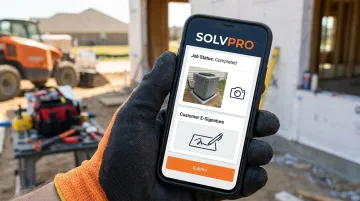
Data flows back to the office instantly. Admins see job progress, trigger invoicing, and check profitability without waiting for a crew to physically return and hand over paperwork.
Key Features of Mobile Workforce Management Software
Not every platform includes the same feature set, but a few capabilities separate a genuine MWM tool from a glorified calendar app.
- GPS-based location tracking and time clock: Confirms crews arrived at the right site and clocked in accurately, cutting down on time theft and payroll disputes.
- Scheduling and dispatch tools: Let managers assign the right crew to the right job and instantly notify them of changes or new work orders.
- Digital work orders, forms, and e-signatures: Give field teams everything they need on-site and eliminate lost paperwork.
- Real-time two-way communication: Keeps office and field connected without phone tag, reducing miscommunication over job details.
- Invoicing and payment processing built into the platform: Speeds up the move from "job complete" to "invoice sent," with SolvPro's built-in QuickBooks Online sync and credit-card and ACH payments letting crews invoice and collect payment on-site the same day.
- Job costing and profitability reporting: Surfaces which jobs, crews, or clients are actually making money, something a spreadsheet built after the fact can't show you in real time.
Together, these features determine whether a platform can keep pace with daily field operations. Missing even one often means gaps in accountability, billing, or profitability tracking.
Benefits of Mobile Workforce Management Software for Service Businesses
The features matter because of what they actually change day-to-day for a service business.
- Fewer missed or double-booked jobs. Automated scheduling reduces the human error that comes with juggling multiple crews on a whiteboard or spreadsheet.
- Faster invoicing and quicker payments. Jobs marked complete in the field can trigger an invoice the same day instead of weeks later, and PYMNTS found that many construction firms planned to automate customer payments in 2024.
- Greater crew accountability. GPS check-ins and digital job logs create a clear record of who did what, where, and when — useful for resolving disputes without he-said-she-said conversations.
- Less admin time in the office. Eliminating manual data entry between scheduling, timesheets, and invoicing frees up staff for higher-value work.
- Clearer the ability to see what each job made. Owners see in real time which jobs are profitable and which are eating into margins, rather than finding out at month-end when it's too late to adjust.
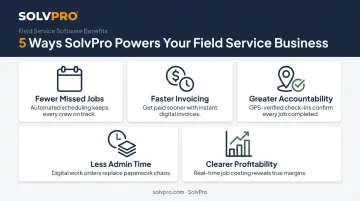
None of these are abstract wins. They show up directly in cash flow and in how many phone calls your office fields on a Wednesday afternoon.
Mobile Workforce Management vs. Field Service Management: What's the Difference?
The terms get used interchangeably, but they're not identical. Mobile workforce management is the broader concept, covering any employee who works outside an office. Field service management (FSM), on the other hand, typically refers more narrowly to dispatching technicians for repairs, installations, and maintenance.
| Mobile Workforce Management (MWM) | Field Service Management (FSM) | |
|---|---|---|
| Scope | Any mobile employee | Field technicians specifically |
| Typical use | Scheduling, tracking, communication across roles | Work order dispatch tied to equipment/service calls |
| Example users | Sales reps, delivery drivers, service crews | HVAC techs, repair specialists |
TechTarget draws this same distinction, noting that MWM extends to roles like sales representatives and delivery drivers, while FSM centers on specialized field technicians and their equipment.
In practice, though, many growing service businesses do not need to draw a hard line between the two. They need one platform that handles scheduling, crew tracking, work orders, and payments together. This is exactly why all-in-one platforms built for trades, rather than enterprise HR suites, tend to fit smaller service businesses better than trying to stitch together separate scheduling, dispatch, and billing tools.
Which Industries Use Mobile Workforce Management Software?
Any business dispatching multiple crews to different job sites in a day, rather than staffing one fixed location, benefits from the ability to see where work stands. That covers a wide range of trades:
- General contractors
- Electrical and plumbing companies
- Landscaping crews
- Excavation and earthwork companies
- Commercial cleaning and janitorial teams
Construction contractors are already leaning into mobile tools for exactly this reason. In AGC's 2025 Construction Outlook survey, contractors selected daily field reports (69%), field access to customer and job information (56%), and employee time tracking and approval (54%) among their top planned mobile-software uses.
Language matters too. Bilingual crews, English and Spanish speakers on the same job site, need software that works in both languages, or instructions get lost between office and truck. SolvPro runs fully in English and Spanish, keeping crews and office staff aligned.
How to Choose the Right Mobile Workforce Management Software
Not every platform is built for a 15-person landscaping crew or a family-run plumbing business. A few things to check before signing up:
- Ease of use for crews with varying tech comfort. The best software is the one your team will actually open every day without resistance, not the one with the longest feature list.
- Transparent, SMB-friendly pricing. Look for no long-term contracts and no surprise add-ons. Many enterprise-grade platforms are priced for teams far larger than a growing trade business.
- All the essentials in one place. Scheduling, work orders, crew tracking, and payments should live in a single system rather than requiring separate tools bolted together.
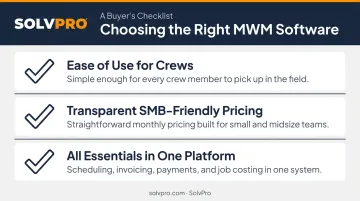
That third point is the exact gap SolvPro was built to close.
Here's what that looks like in practice:
- SolvPro does not publish pricing; confirm current pricing directly with SolvPro.
- No long-term contracts, plus a 14-day free trial
- Setup takes under 10 minutes, with a live team walking you through onboarding instead of a self-serve knowledge base
Want to see how the dispatch-to-payment flow works before committing? You can book a demo directly.
Conclusion
You shouldn't have to wait until the job is over to find out whether you made money.
Keeping the estimate, work order, time entries and invoice on one record reduces how much the office has to reconstruct before it can bill. That is the difference between finding out now and finding out at closeout. When you want to see it on your kind of work, Book a Demo.
Run the Job. Protect the Profit.
Frequently Asked Questions
What Is Mobile Workforce Management?
Mobile workforce management is the combination of software and processes used to schedule, track, and communicate with employees who work outside a traditional office. It's most commonly used by field service and trade crews.
What Is the Difference Between Mobile Workforce Management and Field Service Management?
MWM is the broader category, covering any mobile employee including sales reps and delivery drivers. FSM is more narrowly focused on dispatching technicians for repairs and installations.
What Features Should I Look for in Mobile Workforce Management Software?
Look for scheduling and dispatch tools, GPS tracking, digital work orders, real-time communication, and built-in payment or invoicing integration. These five cover most of what a growing crew actually needs.
How Much Does Mobile Workforce Management Software Cost?
Pricing varies by per-user versus flat-rate models and by how deep the feature set goes. Look for transparent pricing with no long-term contracts, since some enterprise platforms charge for tiers a small business will never use. SolvPro, for example, with no contract required.
What Industries Use Mobile Workforce Management Software?
Contractors, electrical and plumbing companies, landscaping crews, excavation businesses, and commercial cleaning teams are among the primary users. Any business dispatching crews to multiple sites daily fits this category.
Is Mobile Workforce Management Software the Same as GPS Tracking Software?
No. GPS tracking is just one feature within a full MWM platform, which also includes scheduling, communication, digital work orders, and invoicing tools working together.