Growing service businesses lose real money every week to work orders that fall through the cracks.
Common failure points include:
- A text message about a job gets buried in a crew member's phone
- A paper ticket goes missing in a truck
- A spreadsheet column doesn't get updated, leaving two crews at the same address while a third job never gets dispatched
The global field service management market is projected to jump from $5.10 billion in 2025 to $9.17 billion by 2030, a 12.5% compound annual growth rate driven largely by scheduling, dispatch, and work order tools.
That growth reflects a shift happening in electrical, plumbing, HVAC, landscaping, and general contracting shops across the country: crews are moving off paper and onto mobile-first systems.
Work order management platforms built for small-to-midsize service businesses running field crews differ from the enterprise CMMS tools built around asset registers.
KEY TAKEAWAYS
- Work order software centralizes job creation, scheduling, crew assignment, tracking, and invoicing in one system.
- The right fit depends on whether you need CMMS-style asset maintenance or multi-crew field service software.
- SolvPro, MaintainX, UpKeep, Limble, and Coast cover different business types and budgets.
- Mobile usability, scheduling, crew accountability, payment integrations, and transparent pricing are the practical comparison points.
- CMMS tools organise work around assets and their service history, while field service tools organise it around customers and jobs.
Overview of Work Order Management Software for Service Businesses
Work order management software is a digital system for creating, assigning, scheduling, and tracking jobs from the initial request through completion. That "job" might be a maintenance ticket on a factory floor or a service call for a plumbing crew across town.
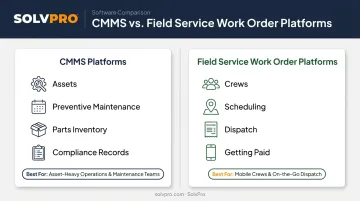
Not every platform in this category solves the same problem, though. Two distinct models have emerged:
| Model | Built Around | Best For |
|---|---|---|
| CMMS platforms | Assets, preventive maintenance schedules, parts inventory, compliance records | Manufacturing plants and facilities teams tracking equipment history |
| Field service work order platforms | Crews, customer jobs, scheduling, dispatch, getting paid | Trades businesses coordinating multiple crews across job sites |
The overlap is real. Both categories handle work orders, mobile access, and scheduling. But a CMMS tracks an asset's lifecycle, while a field service platform tracks a crew's day and a customer's invoice. Picking the wrong category for your business model is the single most common mistake buyers make.
Strong options exist in both categories, and the right one depends on how the team actually works.
Top Work Order Management Software for 2026
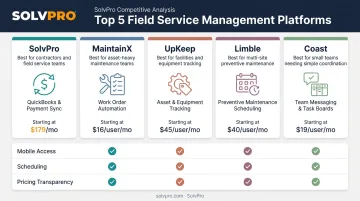
Each platform here was evaluated on five criteria: mobile usability, crew or technician accountability, scheduling and dispatch capability, integrations (payments and accounting), and pricing transparency for growing businesses.
SolvPro
SolvPro is an all-in-one field service management platform built by a team with 50+ years of combined experience in construction, estimating, and project management. It's designed specifically for growing trades and multi-crew service businesses, with every feature built around real field workflows from day one.
What sets it apart:
- Bilingual English/Spanish interface across scheduling, work orders, and crew tools — a rarity among competing platforms in this space
- Job and crew time tracking that records time entries, photo uploads and activity logs against the job, giving office staff verifiable proof of when and where work happened
- Digital estimates with polished, customer-facing PDF proposals and digital signatures
- Built-in QuickBooks Online sync and credit-card and ACH payments, included at no extra cost on every plan
| Category | Details |
|---|---|
| Best For | General contractors, electrical, plumbing, HVAC, landscaping, cleaning, and excavation businesses managing multiple crews and jobs |
| Standout Feature | Bilingual platform with job and crew time tracking and digital estimates built into the core system |
Every SolvPro plan includes the full feature set — scheduling, work orders, time tracking, invoicing, CRM, and analytics — with no upgrade-to-unlock tiers. A 2-person crew gets the same tools as a 10-person team, because there is one core plan.
MaintainX
MaintainX is a mobile-first CMMS widely used in manufacturing, facilities, and other asset-intensive industries for work order execution and preventive maintenance.
Field technicians tend to adopt it fast, thanks to:
- Offline mobile access that lets crews complete saved work orders without a signal, syncing once reconnected
- QR and barcode scanning for assets, parts, and locations
- Team messaging tied directly to work orders, so a conversation can spin up a new ticket instantly
| Category | Details |
|---|---|
| Best For | Asset-intensive operations and multi-site maintenance teams needing preventive maintenance automation |
| Standout Feature | Mobile work order execution with connected asset history and communication tools |
UpKeep
UpKeep is an AI-powered CMMS built around a clean, fast mobile experience for creating and updating work orders on the fly.
Its strengths lean toward speed:
- Quick work order creation from a technician's phone, with minimal friction
- Digital sign-off and audit trails on the Professional and Enterprise tiers
- AI-assisted scheduling (Smart Scheduler) that recommends technicians based on availability and priority
| Category | Details |
|---|---|
| Best For | Maintenance teams prioritizing speed and mobile ease of use over deep customization |
| Standout Feature | Fast work order creation with integrated inventory reorder alerts |
Note: full analytics and AI-driven scheduling tend to require the higher-priced tiers, which is worth factoring in before you budget based on the entry price.
Limble
Limble is a mid-market CMMS with a fuller feature set for preventive maintenance, asset management, and multilingual technician support.
It stands out for teams managing larger, more complex asset lists:
- A drag-and-drop PM calendar for rescheduling preventive maintenance visually
- Bulk asset import supporting up to 2,000 assets and 50 custom fields per file
- Native support for 27 languages, useful for diverse technician teams
| Category | Details |
|---|---|
| Best For | Teams that have outgrown basic ticketing and want deeper automation and reporting |
| Standout Feature | Visual preventive maintenance planning combined with bulk asset/data import tools |
Coast
Coast is a flexible work order and maintenance platform popular with small teams for its customizable fields and built-in messaging.
Its appeal is accessibility:
- QR-code-based work requests tied directly to an asset's maintenance history
- A free plan that covers unlimited work orders (with some history and upload limits)
- Team-access and public-access QR code options depending on who needs to view or edit asset details
| Category | Details |
|---|---|
| Best For | Small maintenance teams wanting an affordable, customizable starting point |
| Standout Feature | QR-code work requests linked automatically to asset maintenance history |
What to Look for in Work Order Software
This comparison leaned on five factors: mobile usability, scheduling and dispatch capability, crew or technician accountability features, integrations for payments and accounting, and pricing transparency. Findings came from product documentation, published pricing pages, and customer review platforms.
The most common buyer mistake: choosing software based on total feature count instead of matching the tool to their actual workflow.
A facilities team drowning in preventive maintenance tickets needs asset history and parts inventory. A plumbing company running a handful of trucks is usually looking for scheduling, dispatch and on-site invoicing — not a spare-parts module they'll never touch.
A few factors deserve equal weight to core work order functionality, especially for small teams without dedicated IT support:
- Onboarding speed: Can your team be running jobs in days, not weeks?
- Bilingual support: Does the platform work for every crew member, not just English-speaking office staff?
- Accounting integration: Does it sync with QuickBooks or another system you already use, or will you be re-entering data manually?
Conclusion
There's no single "best" work order management software for every business. The right platform is the one that matches how your team actually operates — whether that's industrial preventive maintenance across multiple facilities or coordinating five crews across five job sites on a Tuesday morning.
Before committing to any platform, evaluate setup time, ongoing support, and total cost over a full year, not just the sticker price on the pricing page. A tool that's "free" but takes three weeks to configure isn't actually free.
With those criteria in mind, if you're running crews in electrical, plumbing, HVAC, landscaping, cleaning, or general contracting, SolvPro centralizes scheduling, work orders, crew tracking, and payments in one bilingual platform built specifically for your industry. Setup takes under 10 minutes, and there's no credit card required to try it.
Run a profitable shop, not just a busy one.
Seeing what a job is costing while it is still open gives you a chance to act on it. SolvPro connects scheduling, work orders, time, job costing and invoicing so that information is in one place. When you want to see it on your kind of work, Book a Demo.
Run the Job. Protect the Profit.
Frequently Asked Questions
What Is a CMMS Work Order System?
A CMMS work order system manages the full maintenance lifecycle — from creation through completion — along with asset history, preventive maintenance schedules, and parts inventory. It tracks an asset's entire record, not just a single task.
What Are the Four Types of Maintenance?
The four common types are reactive (run-to-failure), preventive (scheduled), predictive (condition-based), and corrective maintenance. Each serves different assets and business needs, and many teams use a mix.
What's the Difference Between Work Order Software and a Full CMMS?
Basic work order software focuses on creating and tracking tasks. A full CMMS builds on that, adding asset management, preventive maintenance scheduling, and inventory tracking.
How Much Does Work Order Management Software Cost?
Pricing ranges from free basic plans to $65-75+ per user per month for advanced tiers. SMB-friendly platforms like SolvPro often use flat, transparent pricing instead of per-user rates that climb quickly.
Is Work Order Software Worth It for a Small Service Business?
Yes. Centralizing scheduling and job tracking helps even a 2-3 person crew avoid missed appointments. It also speeds up invoicing, which means faster payments and less admin time on the back end.
What Features Should Field Service Businesses Look for in Work Order Software?
Look for mobile accessibility, crew scheduling and accountability tools, payment and accounting integrations, and fast onboarding. These matter more than a long feature list you'll never use.