Paper inspection sheets get left in trucks. Photos get texted and lost in a group chain. A crew lead signs off on work the office never sees until a customer disputes the invoice three weeks later. Missed inspections and inconsistent documentation don't just slow down one job, they create callbacks, payment delays, and arguments over who did what.
Field inspection software built for growing service businesses works differently from the heavy-industrial and enterprise IT platforms that dominate search results. We focused on tools that electrical, plumbing, HVAC, landscaping, and general contracting teams can actually adopt without months of setup.
KEY TAKEAWAYS
- Field inspection software replaces paper checklists with photos, GPS sign-offs, and instant visibility
- Offline capability and customizable checklists matter more than template count
- SolvPro, SafetyCulture, GoCanvas, ProntoForms, Fulcrum, and GoAudits each suit different crew sizes
- Total cost per crew and system integrations should drive your decision, not brand recognition
- Photos attached to the inspection record are what make a finding defensible weeks later when a client disputes it
Overview of Field Inspection Software for Growing Service Businesses
Field inspection software is a mobile or tablet application that swaps paper checklists for digital forms, photo and video capture, GPS tagging, and automated reporting. Instead of a crew lead filling out a carbon-copy form and mailing it to the office, the record gets built and shared in real time.
Adoption is climbing fast among trade contractors. Among HVAC contractors specifically, 56% now use some form of field service management software, according to ACCA's 2025 Contractor of the Future Study, which surveyed more than 1,000 contractors.
The broader market backs this up. Grand View Research projects the global field service management market growing from $6.7 billion in 2026 to $13.8 billion by 2033, an 11% annual growth rate.
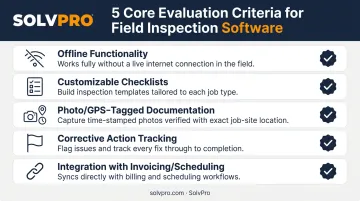
With adoption rising, growing service businesses should prioritize a few core criteria:
- Offline functionality for jobsites with weak or no cell signal
- Customizable checklists built around your specific trade, not generic templates
- Photo and GPS-tagged documentation proving work happened where and when it was scheduled
- Corrective action tracking so flagged issues don't disappear into a group chat
- Integration with invoicing and scheduling, so inspection data doesn't live in its own silo
Tools genuinely suited to SMB service teams differ from the heavy-industrial and enterprise-only platforms built for refineries and government agencies.
Top Field Inspection Software for Service Businesses in 2026
Four criteria separate these platforms: ease of use for field crews, pricing transparency for SMB budgets, offline reliability on real jobsites, and depth of integration with scheduling, invoicing, and payments.
SolvPro
SolvPro is an all-in-one field service management platform built by a team with 50+ years of combined experience in construction, estimating, sales, and project management.
Rather than treating inspections as a bolt-on feature, SolvPro ties photo documentation, sign-offs, and job notes directly into the same digital work order that schedules the crew, tracks their location, and generates the invoice.
A few things set it apart:
- Bilingual English/Spanish interface across office and field views, so language never slows down onboarding
- Job and crew time tracking that records time entries against the job, photo uploads, and field activity automatically, no manual check-ins required
- QuickBooks Online sync built into the core plan at no extra cost
- Setup in under 10 minutes, with live onboarding support and no long-term contract
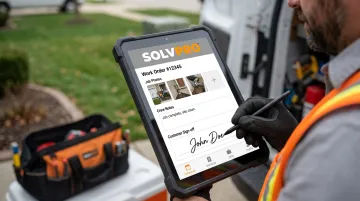
Field crews add photos, notes, and issue flags straight from the job site, capture customer sign-off on-site, and mark work complete, all visible to the office the moment it happens.
For electrical, plumbing, HVAC, landscaping, or commercial cleaning crews, that means inspection data never lives in a separate app from the schedule or the invoice.
| Key Features | Digital work orders and inspection documentation, crew and job time tracking, digital estimates with customer-facing PDF proposals, QuickBooks Online sync |
| Best For | Multi-crew contractors (electrical, plumbing, HVAC, landscaping, cleaning) who want inspections tied directly to scheduling, invoicing, and job profitability |
SafetyCulture
SafetyCulture, formerly known as iAuditor, is likely the most recognized name in this category. It's used across retail, construction, and hospitality, with a large library of pre-built templates covering everything from restaurant health checks to heavy vehicle inspections.
Its strength is breadth: a strong mobile app experience and a template library deep enough that most teams find a starting point without building from scratch. The tradeoff is that trade-specific workflows, like a plumbing pressure test or an electrical panel checklist, often need heavy customization before they fit.
| Key Features | Smart logic-based checklists, large pre-built template library, integrations with Power BI, Tableau, and SAP via marketplace partners |
| Best For | Teams needing general workplace safety checklists without deep integration into invoicing or scheduling |
GoCanvas
GoCanvas is built for teams that want to move paper forms into digital format fast, without a complicated setup process. It's less a full inspection system and more a form-digitization tool that gets a business off paper quickly.
Onboarding is quick, and third-party integrations run through Zapier, giving non-technical teams a path to connect GoCanvas with other apps without custom development.
| Key Features | Customizable form templates, offline data capture, Zapier-based integration library |
| Best For | Small teams wanting simple form digitization rather than a full inspection or field management system |
ProntoForms
ProntoForms, now operating under the TrueContext brand, is a custom mobile forms platform with conditional logic and workflow automation. It's used across utilities, construction, and field services where forms need to branch based on what a technician finds on-site.
Its drag-and-drop form builder is strong, and it offers a documented Salesforce integration for teams already running that CRM.
| Key Features | Conditional logic forms, offline capability, Salesforce integration for CRM-connected workflows |
| Best For | Teams needing advanced custom forms and workflow automation across multiple field data use cases |
Fulcrum
Fulcrum is a GIS-integrated field data collection platform popular with environmental, utility, and civil engineering teams that need to layer inspection data onto maps, not just forms.
Its standout feature is deep integration with Esri ArcGIS, letting geospatial data flow between Fulcrum and existing GIS environments in real time. The form builder is highly customizable, though it leans toward technical teams comfortable with mapping concepts.
| Key Features | GIS/geospatial mapping integration, offline mobile data collection, customizable drag-and-drop forms |
| Best For | Teams needing geospatial tracking and mapping layered onto field inspection data |
GoAudits
GoAudits is a digital checklist and audit app built around ease of use, automated reporting, and pre-built templates spanning multiple industries. Setup is fast, with personalized onboarding support and automated task assignment for corrective actions.
| Key Features | Digital checklists, automated reporting, corrective action and task management, smart dashboards |
| Best For | Teams wanting quick, general-purpose audits across multiple industries without deep field service integration |
What to Look for in Field Inspection Software
The easiest mistake in this category is picking a tool because it's the most recognized name or has the biggest template library. Neither predicts whether your crew will actually use it on a Tuesday morning at a jobsite with one bar of signal.
We weighted five factors:
- Offline reliability - does the app actually capture data with no connection, or just claim to?
- Ease of adoption - can a crew lead figure it out in a day, not a week of training?
- Integration depth - does inspection data flow into invoicing and scheduling, or sit in its own silo?
- Pricing transparency - are there hidden per-seat minimums or add-on fees buried in the fine print?
- Onboarding quality - is there a real person walking new users through setup?
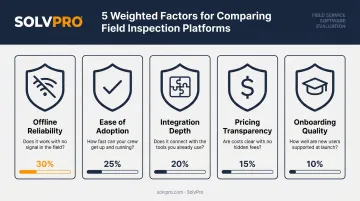
Weighing these five factors consistently favors one type of platform: for growing service businesses, tools that combine inspections with broader job management, like SolvPro, tend to cut more admin time than standalone inspection-only apps. When the same platform schedules the job, documents the work, and sends the invoice, nothing gets re-typed or lost in the handoff between systems.
Conclusion
The right field inspection software matches how your business actually runs jobs, from dispatch to sign-off to invoice. Templates and brand name matter less than fit.
Before committing to a platform, run these three checks:
- Test how it performs offline at a real jobsite
- Watch how fast your crew adopts it without hand-holding
- Calculate the total cost per crew member, not just the advertised entry price
If your crews pass those checks and you're running electrical, plumbing, landscaping, excavation, or cleaning teams that want inspections built into the same system that handles scheduling, invoicing, and payments, SolvPro is worth a look. Setup takes under 10 minutes, there's no long-term contract, and the platform is fully bilingual for office and field teams alike. Book a demo to see how it fits your crew's workflow.
Field service software helps you manage the work. SolvPro helps you make sure the work makes money.
The right tool depends on your trade, crew size, job mix and the systems you already run. Test it on real jobs before you commit, and check that crews will actually enter what the office needs. When you want to see it on your kind of work, Book a Demo.
Run the Job. Protect the Profit.
Frequently Asked Questions
What Are the Four Types of Inspection?
Construction quality control typically breaks inspections into four stages: incoming inspections, initial-phase tests, in-process tests, and final inspection. Each stage catches different issues before they turn into expensive callbacks or disputes.
What Is Field Inspection Software?
It's a mobile tool that replaces paper checklists with digital forms, photo documentation, and automated reporting for on-site quality, safety, and compliance checks. Crews complete inspections on a phone or tablet instead of carrying clipboards.
How Much Does Field Inspection Software Cost?
Pricing across this category ranges from about $10 to $55 per user per month, depending on features and billing terms. All-in-one platforms like SolvPro use flat monthly pricing instead, for teams of up to three users.
Can Field Inspection Software Work Offline?
Yes. Most modern platforms support offline data capture, storing entries locally on the device and syncing automatically once connectivity returns. This matters most on remote jobsites with weak or no cell signal.
What's the Difference Between Field Inspection Software and General Field Service Management Software?
Inspection software focuses narrowly on checklists and documentation. Field service management software like SolvPro combines inspections with scheduling, invoicing, and crew tracking in one connected system.
How Do I Choose the Right Field Inspection Software for My Business?
Evaluate offline reliability, how easily your crew adopts the tool, whether it integrates with your invoicing and scheduling, and total cost per crew before committing to a platform.